Lanyon A Simple Blogger template

Free tutorials, courses, generative tools, and projects built with Javascript, PHP, Python, ML, AI,.Net, C#, Microsoft, Youtube, Github Code Download and more.

July 2022

Archive for July 2022

.NET Framework July 2022 Cumulative Update Preview

We are releasing the July 2022 Cumulative Update Preview Updates for .NET Framework.

Quality and Reliability

This release contains the following quality and reliability improvements.

Networking
  • Addresses an issue when Ssl negotiation can hang indefinitely when client certificates are used when TLS 1.3 is negotiated. Before the change renegotiation (PostHandshakeAuthentiction) would fail and SslStream or HttpWebRequest would observe timeout. Possible workaround is disabling TLS 1.3 either via Switch.System.Net.DontEnableTls13 AppContext or via OS registry.
WPF2
  • Addresses an issue where invoking a synchronization Wait on the UI thread can lead to a render-thread failure, due to unexpected re-entrancy.

1 Windows Presentation Foundation (WPF)

Getting the Update

The Cumulative Update Preview is available via Windows Update, Windows Server Update Services, and Microsoft Update Catalog.

Microsoft Update Catalog

You can get the update via the Microsoft Update Catalog. For Windows 10, NET Framework 4.8 updates are available via Windows Update, Windows Server Update Services, Microsoft Update Catalog. Updates for other versions of .NET Framework are part of the Windows 10 Monthly Cumulative Update.

Note: Customers that rely on Windows Update and Windows Server Update Services will automatically receive the .NET Framework version-specific updates. Advanced system administrators can also take use of the below direct Microsoft Update Catalog download links to .NET Framework-specific updates. Before applying these updates, please ensure that you carefully review the .NET Framework version applicability, to ensure that you only install updates on systems where they apply.

The following table is for Windows 10 and Windows Server 2016+ versions.

Product Version Cumulative Update
Windows 11
.NET Framework 3.5, 4.8 Catalog 5015732
Microsoft server operating systems version 21H2
.NET Framework 3.5, 4.8 Catalog 5015733
Windows 10 21H2
.NET Framework 3.5, 4.8 Catalog 5015730
Windows 10 21H1
.NET Framework 3.5, 4.8 Catalog 5015730
Windows 10, version 20H2 and Windows Server, version 20H2
.NET Framework 3.5, 4.8 Catalog 5015730
Windows 10 1809 (October 2018 Update) and Windows Server 2019 5016188
.NET Framework 3.5, 4.7.2 Catalog 5015736
.NET Framework 3.5, 4.8 Catalog 5015731


Previous Monthly Rollups

The last few .NET Framework Monthly updates are listed below for your convenience:

The post .NET Framework July 2022 Cumulative Update Preview appeared first on .NET Blog.


Announcing .NET Conf – Focus on .NET MAUI, Reactor, and Community Events

Now that .NET MAUI is released, it’s time to get started building your first cross-platform applications! We’ve got a lot of exciting things planned for the next few months to help you get started, including a full day .NET Conf Focus event, worldwide Reactor events, and local community event opportunities.

Join us for .NET Conf: Focus on MAUI on August 9th

.NET Conf: Focus on Windows

.NET Conf: Focus on MAUI is a free, one-day livestream event on August 9 starting at 9 AM Pacific time featuring speakers from the community and Microsoft teams working on and using .NET Multi-platform App UI. Learn how to build native apps for Android, iOS, macOS and Windows with a single codebase using .NET MAUI. Hear from the team building the .NET MAUI framework and tools as well as experts building .NET MAUI apps, libraries, components and controls.

Join us for our tour of virtual and in-person events

We have some great opportunities coming up for you to get involved around the world!

The Microsoft Reactor Bengaluru events are being planned with watch parties and follow-on workshops in 100 communities in India! You can watch them online by registering here or join a local watch party and workshop in-person (more details coming soon!)

Host your own virtual and in-person events

If you’d like to host a .NET MAUI watch party or event at your local user group or Meetup, we’d love to help! We’ll provide technical and creative content from the .NET Conf: Focus on MAUI event, and if you give us your mailing address, we’ll send some fancy new .NET MAUI stickers for your event! Fill out this form to let us know about your event details.

Host a watch party in India

Are you interested in hosting a .NET MAUI watch party in your city in India? We are looking for volunteers. Host a watch party in your city by filling out this form.

We’ve got more being planned, to be announced at .NET Conf: Focus on MAUI.

The post Announcing .NET Conf – Focus on .NET MAUI, Reactor, and Community Events appeared first on .NET Blog.


Customizing Controls in .NET MAUI

Note: This is a Guest Blog Post by Microsoft MVP, Pedro Jesus. Pedro works as a Software Engineer at ArcTouch and is a core maintainer of the .NET MAUI Community Toolkit

Today, I want to talk about and show you the ways that you can completely customize controls in .NET MAUI. Before looking at .NET MAUI let’s move back a couple years, back to the Xamarin.Forms era. Back then, we had a couple of ways to customize controls: We had Behaviors that are used when you don’t need to access the platform-specific APIs in order to customize controls; and we had Effects if you need to access the platform-specific APIs.

Let’s focus a little bit on the Effects API. It was created due to Xamarin’s lack of multi-target architecture. That means we can’t access platform-specific code at the shared level (in the .NET Standard csproj). It worked pretty well and can save you from creating Custom Renderers.

Today, in .NET MAUI, we can leverage the power of the multi-target architecture and access the platform-specific APIs in our shared project. So do we still need Effects? No, because we have access to all code and APIs from all platforms that we target.

So let’s talk about all the possibilities to customize a control in .NET MAUI and some dragons that you may found in the way. For this, we’ll be customizing the Image control adding the ability to tint the image presented.

Note: .NET MAUI still supports Effects if you want to use it, however it is not recommended

Customizing an Existing Control

To add additional features to an existing control, we extend it and add the features that we need.

Let’s create a new control, class ImageTintColor : Image and add a new BindableProperty that we will leverage to change the tint color of the Image.

public class ImageTintColor : Image
{
    public static readonly BindableProperty TintColorProperty =
        BindableProperty.Create(nameof(TintColor), typeof(Color), typeof(TintColorBehavior), propertyChanged: OnTintColorChanged);

    public Color? TintColor
    {
        get => (Color?)GetValue(TintColorProperty);
        set => SetValue(TintColorProperty, value);
    }

    static void OnTintColorChanged(BindableObject bindable, object oldValue, object newValue)
    {
        // ...
    }
}

Folks familiar with Xamarin.Forms will recognize this; it’s pretty much the same code that you will write in a Xamarin.Forms application.

The .NET MAUI platform-specific API work will happen on the OnTintColorChanged delegate. Let’s take a look at it.

public class ImageTintColor : Image
{
    public static readonly BindableProperty TintColorProperty =
        BindableProperty.Create(nameof(TintColor), typeof(Color), typeof(TintColorBehavior), propertyChanged: OnTintColorChanged);

    public Color? TintColor
    {
        get => (Color?)GetValue(TintColorProperty);
        set => SetValue(TintColorProperty, value);
    }

    static void OnTintColorChanged(BindableObject bindable, object oldValue, object newValue)
    {
        var control = (ImageTintColor)bindable;
        var tintColor = control.TintColor;

        if (control.Handler is null || control.Handler.PlatformView is null)
        {
            // Workaround for when this executes the Handler and PlatformView is null
            control.HandlerChanged += OnHandlerChanged;
            return;
        }

        if (tintColor is not null)
        {
#if ANDROID
            // Note the use of Android.Widget.ImageView which is an Android-specific API
            // You can find the Android implementation of `ApplyColor` here: https://github.com/pictos/MFCC/blob/1ef490e507385e050b0cfb6e4f5d68f0cb0b2f60/MFCC/TintColorExtension.android.cs#L9-L12
            ImageExtensions.ApplyColor((Android.Widget.ImageView)control.Handler.PlatformView, tintColor);
#elif IOS
            // Note the use of UIKit.UIImage which is an iOS-specific API
            // You can find the iOS implementation of `ApplyColor` here: https://github.com/pictos/MFCC/blob/1ef490e507385e050b0cfb6e4f5d68f0cb0b2f60/MFCC/TintColorExtension.ios.cs#L7-L11
            ImageExtensions.ApplyColor((UIKit.UIImageView)control.Handler.PlatformView, tintColor);
#endif
        }
        else
        {
#if ANDROID
            // Note the use of Android.Widget.ImageView which is an Android-specific API
            // You can find the Android implementation of `ClearColor` here: https://github.com/pictos/MFCC/blob/1ef490e507385e050b0cfb6e4f5d68f0cb0b2f60/MFCC/TintColorExtension.android.cs#L14-L17
            ImageExtensions.ClearColor((Android.Widget.ImageView)control.Handler.PlatformView);
#elif IOS
            // Note the use of UIKit.UIImage which is an iOS-specific API
            // You can find the iOS implementation of `ClearColor` here: https://github.com/pictos/MFCC/blob/1ef490e507385e050b0cfb6e4f5d68f0cb0b2f60/MFCC/TintColorExtension.ios.cs#L13-L16
            ImageExtensions.ClearColor((UIKit.UIImageView)control.Handler.PlatformView);
#endif
        }

        void OnHandlerChanged(object s, EventArgs e)
        {
            OnTintColorChanged(control, oldValue, newValue);
            control.HandlerChanged -= OnHandlerChanged;
        }
    }
}

Because .NET MAUI uses multi-targeting, we can access the platform specifics and customize the control the way that we want. The ImageExtensions.ApplyColor and ImageExtensions.ClearColor methods are helper methods that will add or remove the tint from the image.

One thing that you maybe noticed is the null check for Handler and PlatformView. This is the first dragon that you may find on your way. When the Image control is created and instantiated and the PropertyChanged delegate of the BindableProperty is called, the Handler can be null. So, without that null check, the code will throw a NullReferenceException. This may sound like a bug, but it’s actually a feature! This allows the .NET MAUI engineering team to keep the same lifecycle that controls have on Xamarin.Forms, avoiding some breaking changes for applications that will migrate from Forms to .NET MAUI.

Now that we have everything set up, we can use our control in our ContentPage. In the snippet below you can see how to use it in XAML:

<ContentPage x:Class="MyMauiApp.ImageControl"
             xmlns="http://schemas.microsoft.com/dotnet/2021/maui"
             xmlns:x="http://schemas.microsoft.com/winfx/2009/xaml"
             xmlns:local="clr-namespace:MyMauiApp"
             Title="ImageControl"
             BackgroundColor="White">

            <local:ImageTintColor x:Name="ImageTintColorControl"
                                  Source="shield.png"
                                  TintColor="Orange" />
</ContentPage>

Using Attached Property and PropertyMapper

Another way to customize a control is using AttachedProperties, it’s a flavor of BindableProperty when you don’t need to have it tied to a specific custom control.

Here’s how we can create an AttachedProperty for TintColor:

public static class TintColorMapper
{
    public static readonly BindableProperty TintColorProperty = BindableProperty.CreateAttached("TintColor", typeof(Color), typeof(Image), null);

    public static Color GetTintColor(BindableObject view) => (Color)view.GetValue(TintColorProperty);

    public static void SetTintColor(BindableObject view, Color? value) => view.SetValue(TintColorProperty, value);

    public static void ApplyTintColor()
    {
        // ...
    }
}

Again we have the boilerplate that we have on Xamarin.Forms for the AttachedProperty, but as you can see we don’t have the PropertyChanged delegate. In order to handle the property change, we will use the Mapper in the ImageHandler. You add the Mapper at any level, since the members are static. I choose to do it inside the TintColorMapper class, as you can see below.

public static class TintColorMapper
{
     public static readonly BindableProperty TintColorProperty = BindableProperty.CreateAttached("TintColor", typeof(Color), typeof(Image), null);

    public static Color GetTintColor(BindableObject view) => (Color)view.GetValue(TintColorProperty);

    public static void SetTintColor(BindableObject view, Color? value) => view.SetValue(TintColorProperty, value);

    public static void ApplyTintColor()
    {
        ImageHandler.Mapper.Add("TintColor", (handler, view) =>
        {
            var tintColor = GetTintColor((Image)handler.VirtualView);

            if (tintColor is not null)
            {
#if ANDROID
                // Note the use of Android.Widget.ImageView which is an Android-specific API
                // You can find the Android implementation of `ApplyColor` here: https://github.com/pictos/MFCC/blob/1ef490e507385e050b0cfb6e4f5d68f0cb0b2f60/MFCC/TintColorExtension.android.cs#L9-L12
                ImageExtensions.ApplyColor((Android.Widget.ImageView)control.Handler.PlatformView, tintColor);
#elif IOS
                // Note the use of UIKit.UIImage which is an iOS-specific API
                // You can find the iOS implementation of `ApplyColor` here: https://github.com/pictos/MFCC/blob/1ef490e507385e050b0cfb6e4f5d68f0cb0b2f60/MFCC/TintColorExtension.ios.cs#L7-L11
                ImageExtensions.ApplyColor((UIKit.UIImageView)handler.PlatformView, tintColor);
#endif
            }
            else
            {
#if ANDROID
                // Note the use of Android.Widget.ImageView which is an Android-specific API
                // You can find the Android implementation of `ClearColor` here: https://github.com/pictos/MFCC/blob/1ef490e507385e050b0cfb6e4f5d68f0cb0b2f60/MFCC/TintColorExtension.android.cs#L14-L17
                ImageExtensions.ClearColor((Android.Widget.ImageView)handler.PlatformView);
#elif IOS
                // Note the use of UIKit.UIImage which is an iOS-specific API
                // You can find the iOS implementation of `ClearColor` here: https://github.com/pictos/MFCC/blob/1ef490e507385e050b0cfb6e4f5d68f0cb0b2f60/MFCC/TintColorExtension.ios.cs#L13-L16
                ImageExtensions.ClearColor((UIKit.UIImageView)handler.PlatformView);
#endif
            }
        });
    }
}

The code is pretty much the same as showed before, just implemented using another API, in this case the AppendToMapping method. If you don’t want this behavior, use the CommandMapper instead, it will be triggered just when a property changed or an action happens.

Be aware that when we handle with Mapper and CommandMapper, we’re adding this behavior for all controls that use that handler in the project. In this case all Image controls will trigger this code. In some cases this isn’t what you want, if you something more specific the next way, using PlatformBehavior will fit perfectly.

So, now that we have everything set up, we can use our control in our page, at the snippet below you can see how to use it in XAML.

<ContentPage x:Class="MyMauiApp.ImageControl"
             xmlns="http://schemas.microsoft.com/dotnet/2021/maui"
             xmlns:x="http://schemas.microsoft.com/winfx/2009/xaml"
             xmlns:local="clr-namespace:MyMauiApp"
             Title="ImageControl"
             BackgroundColor="White">

            <Image x:Name="Image"
                   local:TintColorMapper.TintColor="Fuchsia"
                   Source="shield.png" />
</ContentPage>

Using PlatformBehavior

PlatformBehavior is a new API created on .NET MAUI to make easier the task to customize controls when you need to access the platform-specifics APIs in safe way (safe because it ensures that the Handler and PlatformView aren’t null). It has two methods to override: OnAttachedTo and OnDetachedFrom. This API exists to replace the Effect API from Xamarin.Forms and to take advantage of the multi-target architecture.

In this example, we will use partial class to implement the platform-specific APIs:

//FileName : ImageTintColorBehavior.cs

public partial class ImageTintColorBehavior
{
    public static readonly BindableProperty TintColorProperty =
        BindableProperty.Create(nameof(TintColor), typeof(Color), typeof(TintColorBehavior), propertyChanged: OnTintColorChanged);

    public Color? TintColor
    {
        get => (Color?)GetValue(TintColorProperty);
        set => SetValue(TintColorProperty, value);
    }
}

The above code will be compiled by all platforms that we target.

Now let’s see the code for the Android platform:

//FileName: ImageTintColorBehavior.android.cs

public partial class IconTintColorBehavior : PlatformBehavior<Image, ImageView> // Note the use of ImageView which is an Android-specific API
{
    protected override void OnAttachedTo(Image bindable, ImageView platformView) =>
        ImageExtensions.ApplyColor(bindable, platformView); // You can find the Android implementation of `ApplyColor` here: https://github.com/pictos/MFCC/blob/1ef490e507385e050b0cfb6e4f5d68f0cb0b2f60/MFCC/TintColorExtension.android.cs#L9-L12

    protected override void OnDetachedFrom(Image bindable, ImageView platformView) =>
        ImageExtensions.ClearColor(platformView); // You can find the Android implementation of `ClearColor` here: https://github.com/pictos/MFCC/blob/1ef490e507385e050b0cfb6e4f5d68f0cb0b2f60/MFCC/TintColorExtension.android.cs#L14-L17
}

And here’s the code for the iOS platform:

//FileName: ImageTintColorBehavior.ios.cs

public partial class IconTintColorBehavior : PlatformBehavior<Image, UIImageView> // Note the use of UIImageView which is an iOS-specific API
{
    protected override void OnAttachedTo(Image bindable, UIImageView platformView) => 
        ImageExtensions.ApplyColor(bindable, platformView); // You can find the iOS implementation of `ApplyColor` here: https://github.com/pictos/MFCC/blob/1ef490e507385e050b0cfb6e4f5d68f0cb0b2f60/MFCC/TintColorExtension.ios.cs#L7-L11

    protected override void OnDetachedFrom(Image bindable, UIImageView platformView) => 
        ImageExtensions.ClearColor(platformView); // You can find the iOS implementation of `ClearColor` here: https://github.com/pictos/MFCC/blob/1ef490e507385e050b0cfb6e4f5d68f0cb0b2f60/MFCC/TintColorExtension.ios.cs#L13-L16
}

As you can see, we don’t need to care about if the Handler is null, because that’s handled for us by PlatformBehavior<T, U>.

We can specify the type of platform-specific API that this Behavior covers. If you want to apply the control for more than one type, you don’t need to specify the type of the platform view (e.g. use PlatformBehavior<T>); you probably want to apply your Behavior in more than one control, in that case the platformView will be an PlatformBehavior<View> on Android and an PlatformBehavior<UIView> on iOS.

And the usage is even better, you just need to call the Behavior:

<ContentPage x:Class="MyMauiApp.ImageControl"
             xmlns="http://schemas.microsoft.com/dotnet/2021/maui"
             xmlns:x="http://schemas.microsoft.com/winfx/2009/xaml"
             xmlns:local="clr-namespace:MyMauiApp"
             Title="ImageControl"
             BackgroundColor="White">

            <Image x:Name="Image"
                   Source="shield.png">
                <Image.Behaviors>
                    <local:IconTintColorBehavior TintColor="Fuchsia">
                </Image.Behaviors>
            </Image>
</ContentPage>

Note: The PlatformBehavior will call the OnDetachedFrom when the Handler disconnect from the VirtualView, in other words, when the Unloaded event is fired. The Behavior API doesn’t call the OnDetachedFrom method automatically, you as a developer needs to handle it by yourself.

Conclusion

In this blog post we discussed various ways to customize your controls and interact with the platform-specific APIs. There’s no right or wrong way, all those are valid solutions, you just need to see which will suit better to your case. I would say that for most cases you want to use the PlatformBehavior since it’s designed to work with the multi-target approach and makes sure to clean-up the resources when the control is not used anymore. To learn more, check out the documentation on custom controls.

The post Customizing Controls in .NET MAUI appeared first on .NET Blog.


source https://devblogs.microsoft.com/dotnet/customizing-dotnet-maui-controls/

Announcing Rate Limiting for .NET

We’re excited to announce built-in Rate Limiting support as part of .NET 7. Rate limiting provides a way to protect a resource in order to avoid overwhelming your app and keep traffic at a safe level.

What is rate limiting?

Rate limiting is the concept of limiting how much a resource can be accessed. For example, you know that a database your application accesses can handle 1000 requests per minute safely, but are not confident that it can handle much more than that. You can put a rate limiter in your application that allows 1000 requests every minute and rejects any more requests before they can access the database. Thus, rate limiting your database and allowing your application to handle a safe number of requests without potentially having bad failures from your database.

There are multiple different rate limiting algorithms to control the flow of requests. We’ll go over 4 of them that will be provided in .NET 7.

Concurrency limit

Concurrency limiter limits how many concurrent requests can access a resource. If your limit is 10, then 10 requests can access a resource at once and the 11th request will not be allowed. Once a request completes, the number of allowed requests increases to 1, when a second request completes, the number increases to 2, etc. This is done by disposing a RateLimitLease which we’ll talk about later.

Token bucket limit

Token bucket is an algorithm that derives its name from describing how it works. Imagine there is a bucket filled to the brim with tokens. When a request comes in, it takes a token and keeps it forever. After some consistent period of time, someone adds a pre-determined number of tokens back to the bucket, never adding more than the bucket can hold. If the bucket is empty, when a request comes in, the request is denied access to the resource.

To give a more concrete example, let’s say the bucket can hold 10 tokens and every minute 2 tokens are added to the bucket. When a request comes in it takes a token so we’re left with 9, 3 more requests come in and each take a token leaving us with 6 tokens, after a minute has passed we get 2 new tokens which puts us at 8. 8 requests come in and take the remaining tokens leaving us with 0. If another request comes in it is not allowed to access the resource until we gain more tokens, which happens every minute. After 5 minutes of no requests the bucket will have all 10 tokens again and won’t add any more in the subsequent minutes unless requests take more tokens.

Fixed window limit

The fixed window algorithm uses the concept of a window which will be used in the next algorithm as well. The window is an amount of time that our limit is applied before we move on to the next window. In the fixed window case moving to the next window means resetting the limit back to its starting point. Let’s imagine there is a movie theater with a single room that can seat 100 people, and the movie playing is 2 hours long. When the movie starts we let people start lining up for the next showing which will be in 2 hours, up to 100 people are allowed to line up before we start telling them to come back some other time. Once the 2 hour movie is finished the line of 0 to 100 people can move into the movie theater and we restart the line. This is the same as moving the window in the fixed window algorithm.

Sliding window limit

The sliding window algorithm is similar to the fixed window algorithm but with the addition of segments. A segment is part of a window, if we take the previous 2 hour window and split it into 4 segments, we now have 4 30 minute segments. There is also a current segment index which will always point to the newest segment in a window. Requests during a 30 minute period go into the current segment and every 30 minutes the window slides by one segment. If there were any requests during the segment the window slides past, these are now refreshed and our limit increases by that amount. If there weren’t any requests our limit stays the same.

For example, let’s use the sliding window algorithm with 3 10 minute segments and a 100 request limit. Our initial state is 3 segments all with 0 counts and our current segment index is pointing to the 3rd segment.
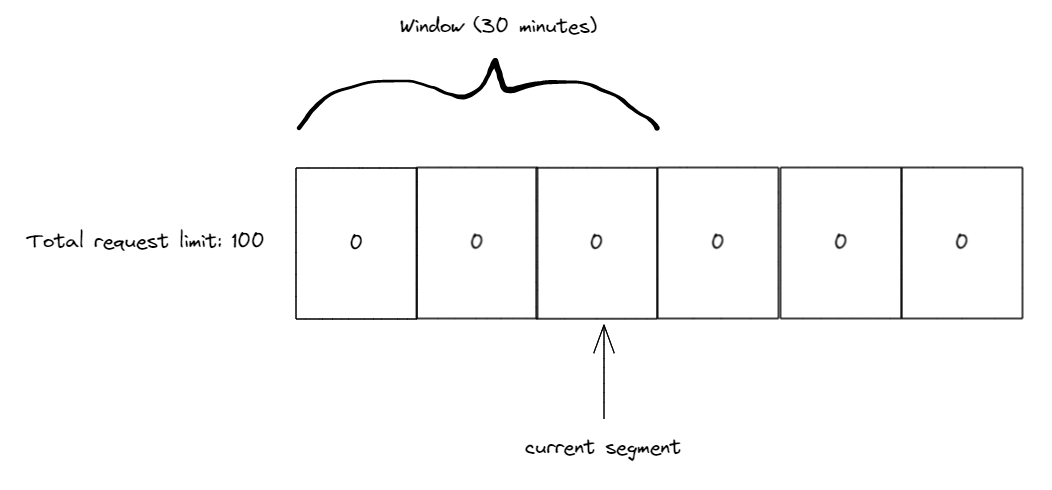
Sliding window, empty segments and current segment pointer at segment 3, window covering segments 1-3

During the first 10 minutes we receive 50 requests all of which are tracked in the 3rd segment (our current segment index). Once the 10 minutes have passed we slide the window by 1 segment also moving our current segment index to the 4th segment. Any used requests in the 1st segment are now added back to our limit. Since there were none our limit is at 50 (as 50 are already used in the 3rd segment).
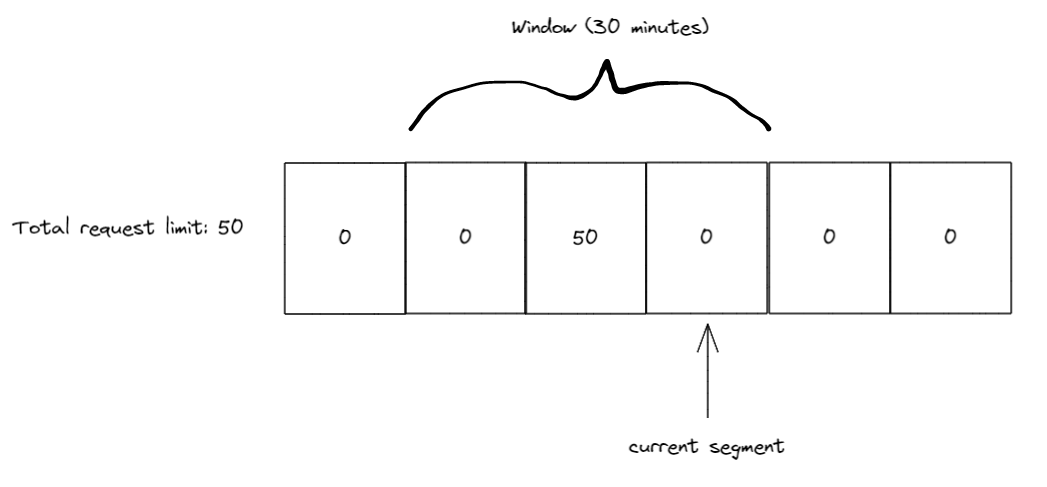
Sliding window, 50 requests in segment 3, current segment pointer at segment 4, window moved to cover segments 2-4

During the next 10 minutes we recieve 20 more requests, so we have 50 in the 3rd segment and 20 in the 4th segment now. Again, we slide the window after 10 minutes passes, so our current segment index is pointing to 5 and we add any requests from segment 2 to our limit.
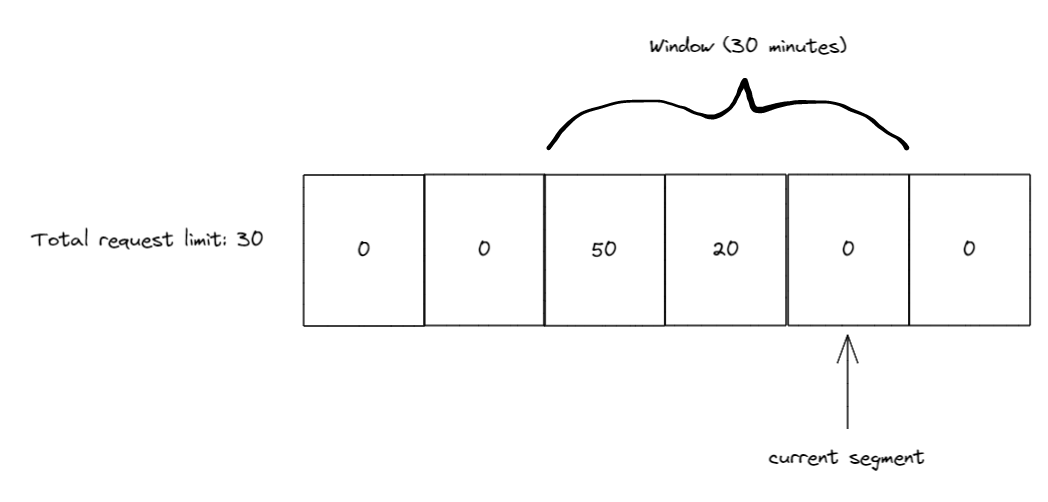
Sliding window, 50 and 20 requests in segment 3 and 4, current segment pointer at segment 5, window covering segments 3-5

10 minutes later we slide the window again, this time when the window slides the current segment index is at 6 and segment 3 (the one with 50 requests) is now outside of the window. So we get the 50 requests back and add them to our limit, which will now be 80, as there are still 20 in use by segment 4.
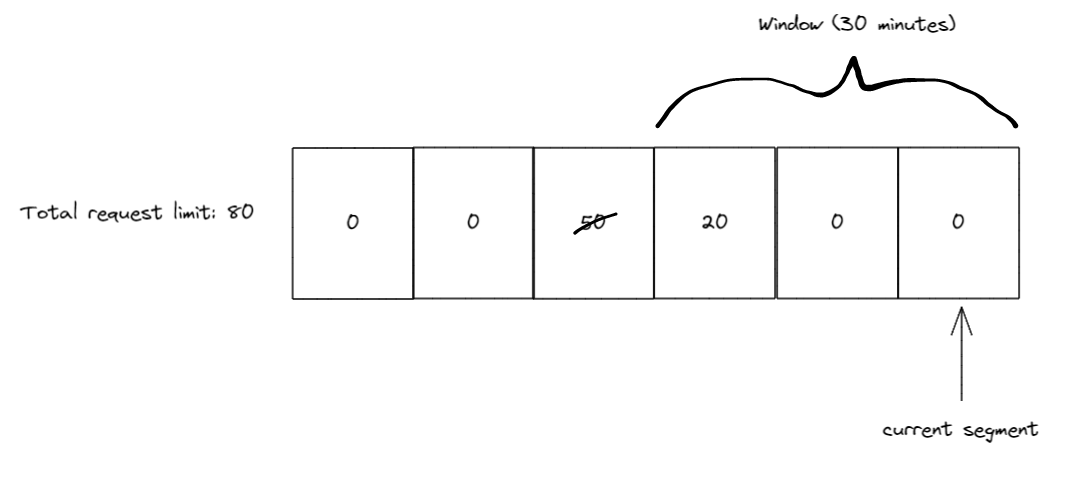
Sliding window, 50 requests crossed out in segment 3, current segment pointer at segment 6, window covering segments 4-6

RateLimiter APIs

Introducing the new, in .NET 7, nuget package System.Threading.RateLimiting!

This package provides the primitives for writing rate limiters as well as providing a few commonly used algorithms built-in. The main type is the abstract base class RateLimiter.

public abstract class RateLimiter : IAsyncDisposable, IDisposable
{
    public abstract int GetAvailablePermits();
    public abstract TimeSpan? IdleDuration { get; }

    public RateLimitLease Acquire(int permitCount = 1);
    public ValueTask<RateLimitLease> WaitAsync(int permitCount = 1, CancellationToken cancellationToken = default);

    public void Dispose();
    public ValueTask DisposeAsync();
}

RateLimiter contains Acquire and WaitAsync as the core methods for trying to gain permits for a resource that is being protected. Depending on the application the protected resource may need to acquire more than 1 permits, so Acquire and WaitAsync both accept an optional permitCount parameter. Acquire is a synchronous method that will check if enough permits are available or not and return a RateLimitLease which contains information about whether you successfully acquired the permits or not. WaitAsync is similar to Acquire except that it can support queuing permit requests which can be de-queued at some point in the future when the permits become available, which is why it’s asynchronous and accepts an optional CancellationToken to allow canceling the queued request.

RateLimitLease has an IsAcquired property which is used to see if the permits were acquired. Additionally, the RateLimitLease may contain metadata such as a suggested retry-after period if the lease failed (will show this in a later example). Finally, the RateLimitLease is disposable and should be disposed when the code is done using the protected resource. The disposal will let the RateLimiter know to update its limits based on how many permits were acquired. Below is an example of using a RateLimiter to try to acquire a resource with 1 permit.

RateLimiter limiter = GetLimiter();
using RateLimitLease lease = limiter.Acquire(permitCount: 1);
if (lease.IsAcquired)
{
    // Do action that is protected by limiter
}
else
{
    // Error handling or add retry logic
}

In the example above we attempt to acquire 1 permit using the synchronous Acquire method. We also use using to make sure we dispose the lease once we are done with the resource. The lease is then checked to see if the permit we requested was acquired, if it was we can then use the protected resource, otherwise we may want to have some logging or error handling to inform the user or app that the resource wasn’t used due to hitting a rate limit.

The other method for trying to acquire permits is WaitAsync. This method allows queuing permits and waiting for the permits to become available if they aren’t. Let’s show another example to explain the queuing concept.

RateLimiter limiter = new ConcurrencyLimiter(
    new ConcurrencyLimiterOptions(permitLimit: 2, queueProcessingOrder: QueueProcessingOrder.OldestFirst, queueLimit: 2));

// thread 1:
using RateLimitLease lease = limiter.Acquire(permitCount: 2);
if (lease.IsAcquired) { }

// thread 2:
using RateLimitLease lease = await limiter.WaitAsync(permitCount: 2);
if (lease.IsAcquired) { }

Here we show our first example of using one of the built-in rate limiting implementations, ConcurrencyLimiter. We create the limiter with a maximum permit limit of 2 and a queue limit of 2. This means that a maximum of 2 permits can be acquired at any time and we allow queuing WaitAsync calls with up to 2 total permit requests.

The queueProcessingOrder parameter determines the order that items in the queue are processed, it can be the value of QueueProcessingOrder.OldestFirst (FIFO) or QueueProcessingOrder.NewestFirst (LIFO). One interesting behavior to note is that using QueueProcessingOrder.NewestFirst when the queue is full will complete the oldest queued WaitAsync calls with a failed RateLimitLease until there is space in the queue for the newest queue item.

In this example there are 2 threads trying to acquire permits. If thread 1 runs first it will acquire the 2 permits successfully and the WaitAsync in thread 2 will be queued waiting for the RateLimitLease in thread 1 to be disposed. Additionally, if another thread tries to acquire permits using either Acquire or WaitAsync it will immediately receive a RateLimitLease with an IsAcquired property equal to false, because the permitLimit and queueLimit are already used up.

If thread 2 runs first it will immediately get a RateLimitLease with IsAcquired equal to true, and when thread 1 runs next (assuming the lease in thread 2 hasn’t been disposed yet) it will synchronously get a RateLimitLease with an IsAcquired property equal to false, because Acquire does not queue and the permitLimit is used up by the WaitAsync call.

So far we’ve seen the ConcurrencyLimiter, there are 3 other limiters we provide in-box. TokenBucketRateLimiter, FixedWindowRateLimiter, and SlidingWindowRateLimiter all of which implement the abstract class ReplenishingRateLimiter which itself implements RateLimiter. ReplenishingRateLimiter introduces the TryReplenish method as well as a couple properties for observing common settings on the limiter. TryReplenish will be explained after showing some examples of these rate limiters.

RateLimiter limiter = new TokenBucketRateLimiter(new TokenBucketRateLimiterOptions(tokenLimit: 5, queueProcessingOrder: QueueProcessingOrder.OldestFirst,
    queueLimit: 1, replenishmentPeriod: TimeSpan.FromSeconds(5), tokensPerPeriod: 1, autoReplenishment: true));

using RateLimitLease lease = await limiter.WaitAsync(5);

// will complete after ~5 seconds
using RateLimitLease lease2 = await limiter.WaitAsync();

Here we show the TokenBucketRateLimiter, it has a few more options than the ConcurrencyLimiter. The replenishmentPeriod is how often new tokens (same concept as permits, just a better name in the context of token bucket) are added back to the limit. In this example tokensPerPeriod is 1 and the replenishmentPeriod is 5 seconds, so every 5 seconds 1 token is added back to the tokenLimit up to the max of 5. And lastly, autoReplenishment is set to true which means the limiter will create a Timer internally to handle the replenishment of tokens every 5 seconds.

If autoReplenishment is set to false then it is up to the developer to call TryReplenish on the limiter. This is useful when managing multiple ReplenishingRateLimiter instances and wanting to lower the overhead by creating a single Timer instance and managing the replenish calls yourself, instead of having each limiter create a Timer.

ReplenishingRateLimiter[] limiters = GetLimiters();
Timer rateLimitTimer = new Timer(static state =>
{
    var replenishingLimiters = (ReplenishingRateLimiter[])state;
    foreach (var limiter in replenishingLimiters)
    {
        limiter.TryReplenish();
    }
}, limiters, TimeSpan.FromSeconds(1), TimeSpan.FromSeconds(1));

FixedWindowRateLimiter has a window option which defines how long it takes for the window to update.

new FixedWindowRateLimiter(new FixedWindowRateLimiterOptions(permitLimit: 2,
    queueProcessingOrder: QueueProcessingOrder.OldestFirst, queueLimit: 1, window: TimeSpan.FromSeconds(10), autoReplenishment: true));

And SlidingWindowRateLimiter has a segmentsPerWindow option in addition to window which specifies how many segments there and how often the window will slide.

new SlidingWindowRateLimiter(new SlidingWindowRateLimiterOptions(permitLimit: 2,
    queueProcessingOrder: QueueProcessingOrder.OldestFirst, queueLimit: 1, window: TimeSpan.FromSeconds(10), segmentsPerWindow: 5, autoReplenishment: true));

Going back to the mention of metadata earlier, let’s show an example of where metadata might be useful.

class RateLimitedHandler : DelegatingHandler
{
    private readonly RateLimiter _rateLimiter;

    public RateLimitedHandler(RateLimiter limiter) : base(new HttpClientHandler())
    {
        _rateLimiter = limiter;
    }

    protected override async Task<HttpResponseMessage> SendAsync(HttpRequestMessage request, CancellationToken cancellationToken)
    {
        using RateLimitLease lease = await _rateLimiter.WaitAsync(1, cancellationToken);
        if (lease.IsAcquired)
        {
            return await base.SendAsync(request, cancellationToken);
        }
        var response = new HttpResponseMessage(System.Net.HttpStatusCode.TooManyRequests);
        if (lease.TryGetMetadata(MetadataName.RetryAfter, out var retryAfter))
        {
            response.Headers.Add(HeaderNames.RetryAfter, ((int)retryAfter.TotalSeconds).ToString(NumberFormatInfo.InvariantInfo));
        }
        return response;
    }
}

RateLimiter limiter = new TokenBucketRateLimiter(new TokenBucketRateLimiterOptions(tokenLimit: 5, queueProcessingOrder: QueueProcessingOrder.OldestFirst,
    queueLimit: 1, replenishmentPeriod: TimeSpan.FromSeconds(5), tokensPerPeriod: 1, autoReplenishment: true));;
HttpClient client = new HttpClient(new RateLimitedHandler(limiter));
await client.GetAsync("https://example.com");

In this example we are making a rate limited HttpClient and if we fail to acquire the requested permit we want to return a failed http request with a 429 status code (Too Many Requests) instead of making an HTTP request to our downstream resource. Additionally, 429 responses can contain a “Retry-After” header that let’s the consumer know when a retry might be successful. We accomplish this by looking for metadata on the RateLimitLease using TryGetMetadata and MetadataName.RetryAfter. We also use the TokenBucketRateLimiter because it is able to calculate an estimate of when the number of requested tokens will be available as it knows how often it replenishes tokens. Whereas the ConcurrencyLimiter would have no way of knowing when permits would become available, so it wouldn’t provide any RetryAfter metadata.

MetadataName is a static class that provides a couple pre-created MetadataName<T> instances, the MetadataName.RetryAfter that we just saw, which is typed as MetadataName<TimeSpan>, and MetadataName.ReasonPhrase, which is typed as MetadataName<string>. There is also a static MetadataName.Create<T>(string name) method for creating your own strongly-typed named metadata keys. RateLimitLease.TryGetMetadata has 2 overloads, one for the strongly-typed MetadataName<T> which has an out T parameter, and the other accepts a string for the metadata name and has an out object parameter.

Let’s now look at another API being introduced to help with more complicated scenarios, the PartitionedRateLimiter!

PartitionedRateLimiter

Also contained in the System.Threading.RateLimiting nuget package is PartitionedRateLimiter<TResource>. This is an abstraction that is very similar to the RateLimiter class except that it accepts a TResource instance as an argument to methods on it. For example Acquire is now: Acquire(TResource resourceID, int permitCount = 1). This is useful for scenarios where you might want to change rate limiting behavior depending on the TResource that is passed in. This can be something such as independent concurrency limits for different TResources or more complicated scenarios like grouping X and Y under the same concurrency limit, but having W and Z under a token bucket limit.

To assist with common usages, we have included a way to construct a PartitionedRateLimiter<TResource> via PartitionedRateLimiter.Create<TResource, TPartitionKey>(...).

enum MyPolicyEnum
{
    One,
    Two,
    Admin,
    Default
}

PartitionedRateLimiter<string> limiter = PartitionedRateLimiter.Create<string, MyPolicyEnum>(resource =>
{
    if (resource == "Policy1")
    {
        return RateLimitPartition.Create(MyPolicyEnum.One, key => new MyCustomLimiter());
    }
    else if (resource == "Policy2")
    {
        return RateLimitPartition.CreateConcurrencyLimiter(MyPolicyEnum.Two, key =>
            new ConcurrencyLimiterOptions(permitLimit: 2, queueProcessingOrder: QueueProcessingOrder.OldestFirst, queueLimit: 2));
    }
    else if (resource == "Admin")
    {
        return RateLimitPartition.CreateNoLimiter(MyPolicyEnum.Admin);
    }
    else
    {
        return RateLimitPartition.CreateTokenBucketLimiter(MyPolicyEnum.Default, key =>
            new TokenBucketRateLimiterOptions(tokenLimit: 5, queueProcessingOrder: QueueProcessingOrder.OldestFirst,
                queueLimit: 1, replenishmentPeriod: TimeSpan.FromSeconds(5), tokensPerPeriod: 1, autoReplenishment: true));
    }
});
RateLimitLease lease = limiter.Acquire(resourceID: "Policy1", permitCount: 1);

// ...

RateLimitLease lease = limiter.Acquire(resourceID: "Policy2", permitCount: 1);

// ...

RateLimitLease lease = limiter.Acquire(resourceID: "Admin", permitCount: 12345678);

// ...

RateLimitLease lease = limiter.Acquire(resourceID: "other value", permitCount: 1);

PartitionedRateLimiter.Create has 2 generic type parameters, the first one represents the resource type which will also be the TResource in the returned PartitionedRateLimiter<TResource>. The second generic type is the partition key type, in the above example we use int as our key type. The key is used to differentiate a group of TResource instances with the same limiter, which is what we are calling a partition. PartitionedRateLimiter.Create accepts a Func<TResource, RateLimitPartition<TPartitionKey>> which we call the partitioner. This function is called every time the PartitionedRateLimiter is interacted with via Acquire or WaitAsync and a RateLimitPartition<TKey> is returned from the function. RateLimitPartition<TKey> contains a Create method which is how the user specifies what identifier the partition will have and what limiter will be associated with that identifier.

In our first block of code above, we are checking the resource for equality with “Policy1”, if they match we create a partition with the key MyPolicyEnum.One and return a factory for creating a custom RateLimiter. The factory is called once and then the rate limiter is cached so future accesses for the key MyPolicyEnum.One will use the same rate limiter instance.

Looking at the first else if condition we similarly create a partition when the resource equals “Policy2”, this time we use the convenience method CreateConcurrencyLimiter to create a ConcurrencyLimiter. We use a new partition key of MyPolicyEnum.Two for this partition and specify the options for the ConcurrencyLimiter that will be generated. Now every Acquire or WaitAsync for “Policy2” will use the same instance of ConcurrencyLimiter.

Our third condition is for our “Admin” resource, we don’t want to limit our admin(s) so we use CreateNoLimiter which will have no limits applied. We also assign the partition key MyPolicyEnum.Admin for this partition.

Finally, we have a fallback for all other resources to use a TokenBucketLimiter instance and we assign the key of MyPolicyEnum.Default to this partition. Any request to a resource not covered by our if conditions will use this TokenBucketLimiter. It’s generally a good practice to have a non-noop fallback limiter in case you didn’t cover all conditions or add new behavior to your application in the future.

In the next example, let’s combine the PartitionedRateLimiter with our customized HttpClient from earlier. We’ll use HttpRequestMessage as our resource type for the PartitionedRateLimiter, which is the type we get in the SendAsync method of DelegatingHandler. And a string for our partition key as we are going to be partitioning based on url paths.

PartitionedRateLimiter<HttpRequestMessage> limiter = PartitionedRateLimiter.Create<HttpRequestMessage, string>(resource =>
{
    if (resource.RequestUri?.IsLoopback)
    {
        return RateLimitPartition.CreateNoLimiter("loopback");
    }

    string[]? segments = resource.RequestUri?.Segments;
    if (segments?.Length >= 2 && segments[1] == "api/")
    {
        // segments will be [] { "/", "api/", "next_path_segment", etc.. }
        return RateLimitPartition.CreateConcurrencyLimiter(segments[2].Trim('/'), key =>
            new ConcurrencyLimiterOptions(permitLimit: 2, queueProcessingOrder: QueueProcessingOrder.OldestFirst, queueLimit: 2));
    }

    return RateLimitPartition.Create("default", key => new MyCustomLimiter());
});

class RateLimitedHandler : DelegatingHandler
{
    private readonly PartitionedRateLimiter<HttpRequestMessage> _rateLimiter;

    public RateLimitedHandler(PartitionedRateLimiter<HttpRequestMessage> limiter) : base(new HttpClientHandler())
    {
        _rateLimiter = limiter;
    }

    protected override async Task<HttpResponseMessage> SendAsync(HttpRequestMessage request, CancellationToken cancellationToken)
    {
        using RateLimitLease lease = await _rateLimiter.WaitAsync(request, 1, cancellationToken);
        if (lease.IsAcquired)
        {
            return await base.SendAsync(request, cancellationToken);
        }
        var response = new HttpResponseMessage(System.Net.HttpStatusCode.TooManyRequests);
        if (lease.TryGetMetadata(MetadataName.RetryAfter, out var retryAfter))
        {
            response.Headers.Add(HeaderNames.RetryAfter, ((int)retryAfter.TotalSeconds).ToString(NumberFormatInfo.InvariantInfo));
        }
        return response;
    }
}

Looking closely at the PartitionedRateLimiter in the above example, our first check is for localhost, we’ve decided that if the user is doing things locally we don’t want to limit them, they won’t be using the upstream resource that we are trying to protect. The next check is more interesting, we are looking at the url path and finding any requests to an /api/<something> endpoint. If the request matches we grab the <something> part of the path and create a partition for that specific path. What this means is that any requests to /api/apple/* will use one instance of our ConcurrencyLimiter while any requests to /api/orange/* will use a different instance of our ConcurrencyLimiter. This is because we use a different partition key for those requests and so our limiter factory generates a new limiter for the different partitions. And finally, we have a fallback limit for any requests that aren’t for localhost or an /api/* endpoint.

Also shown, is the updated RateLimitedHandler which now accepts a PartitionedRateLimiter<HttpRequestMessage> instead of a RateLimiter and passes in request to the WaitAsync call, otherwise the rest of the code remains the same.

There are a few things worth pointing out in this example. We may potentially create many partitions if lots of unique /api/* requests are made, this would result in memory usage growing in our PartitionedRateLimiter. The PartitionedRateLimiter returned from PartitionedRateLimiter.Create does have some logic to remove limiters once they haven’t been used for a while to help mitigate this, but application developers should also be aware of creating unbounded partitions and try to avoid that when possible. Additionally, we have segments[2].Trim('/') for our partition key, the Trim call is to avoid using a different limiter in the cases of /api/apple and /api/apple/ as those produce different segments when using Uri.Segments.

Custom PartitionedRateLimiter<T> implementations can also be written without using the PartitionedRateLimiter.Create method. Below is an example of a custom implementation using a concurrency limit for each int resource. So resource 1 has its own limit, 2 has its own limit, etc. This has the advantage of being more flexible and potentially more efficient at the cost of higher maintenance.

public sealed class PartitionedConcurrencyLimiter : PartitionedRateLimiter<int>
{
    private ConcurrentDictionary<int, int> _keyLimits = new();
    private int _permitLimit;

    private static readonly RateLimitLease FailedLease = new Lease(null, 0, 0);

    public PartitionedConcurrencyLimiter(int permitLimit)
    {
        _permitLimit = permitLimit;
    }

    public override int GetAvailablePermits(int resourceID)
    {
        if (_keyLimits.TryGetValue(resourceID, out int value))
        {
            return value;
        }
        return 0;
    }

    protected override RateLimitLease AcquireCore(int resourceID, int permitCount)
    {
        if (_permitLimit < permitCount)
        {
            return FailedLease;
        }

        bool wasUpdated = false;
        _keyLimits.AddOrUpdate(resourceID, (key) =>
        {
            wasUpdated = true;
            return _permitLimit - permitCount;
        }, (key, currentValue) =>
        {
            if (currentValue >= permitCount)
            {
                wasUpdated = true;
                currentValue -= permitCount;
            }
            return currentValue;
        });

        if (wasUpdated)
        {
            return new Lease(this, resourceID, permitCount);
        }
        return FailedLease;
    }

    protected override ValueTask<RateLimitLease> WaitAsyncCore(int resourceID, int permitCount, CancellationToken cancellationToken)
    {
        return new ValueTask<RateLimitLease>(AcquireCore(resourceID, permitCount));
    }

    private void Release(int resourceID, int permitCount)
    {
        _keyLimits.AddOrUpdate(resourceID, _permitLimit, (key, currentValue) =>
        {
            currentValue += permitCount;
            return currentValue;
        });
    }

    private sealed class Lease : RateLimitLease
    {
        private readonly int _permitCount;
        private readonly int _resourceId;
        private PartitionedConcurrencyLimiter? _limiter;

        public Lease(PartitionedConcurrencyLimiter? limiter, int resourceId, int permitCount)
        {
            _limiter = limiter;
            _resourceId = resourceId;
            _permitCount = permitCount;
        }

        public override bool IsAcquired => _limiter is not null;

        public override IEnumerable<string> MetadataNames => throw new NotImplementedException();

        public override bool TryGetMetadata(string metadataName, out object? metadata)
        {
            throw new NotImplementedException();
        }

        protected override void Dispose(bool disposing)
        {
            if (_limiter is null)
            {
                return;
            }

            _limiter.Release(_resourceId, _permitCount);
            _limiter = null;
        }
    }
}

PartitionedRateLimiter<int> limiter = new PartitionedConcurrencyLimiter(permitLimit: 10);
// both will be successful acquisitions as they use different resource IDs
RateLimitLease lease = limiter.Acquire(resourceID: 1, permitCount: 10);
RateLimitLease lease2 = limiter.Acquire(resourceID: 2, permitCount: 7);

This implementation does have some issues such as never removing entries in the dictionary, not supporting queuing, and throwing when accessing metadata, so please use it as inspiration for implementing a custom PartitionedRateLimiter<T> and don’t copy without modifications into your code.

Now that we’ve gone over the main APIs, let’s take a look at the RateLimiting middleware in ASP.NET Core that makes use of these primitives.

RateLimiting middleware

This middleware is provided via the Microsoft.AspNetCore.RateLimiting NuGet package. The main usage pattern is to configure some rate limiting policies and then attach those policies to your endpoints. A policy is a named Func<HttpContext, RateLimitPartition<TPartitionKey>>, which is the same as what the PartitionedRateLimiter.Create method took, where TResource is now HttpContext and TPartitionKey is still a user defined key. There are also extension methods for the 4 built-in rate limiters when you want to configure a single limiter for a policy without needing different partitions.

var app = WebApplication.Create(args);

app.UseRateLimiter(new RateLimiterOptions()
    .AddConcurrencyLimiter(policyName: "get", new ConcurrencyLimiterOptions(permitLimit: 2, queueProcessingOrder: QueueProcessingOrder.OldestFirst, queueLimit: 2))
    .AddNoLimiter(policyName: "admin")
    .AddPolicy(policyName: "post", partitioner: httpContext =>
    {
        if (!StringValues.IsNullOrEmpty(httpContext.Headers["token"]))
        {
            return RateLimitPartition.CreateTokenBucketLimiter("token", key =>
                new TokenBucketRateLimiterOptions(tokenLimit: 5, queueProcessingOrder: QueueProcessingOrder.OldestFirst,
                    queueLimit: 1, replenishmentPeriod: TimeSpan.FromSeconds(5), tokensPerPeriod: 1, autoReplenishment: true));
        }
        else
        {
            return RateLimitPartition.Create("default", key => new MyCustomLimiter());
        }
    }));

app.MapGet("/get", context => context.Response.WriteAsync("get")).RequireRateLimiting("get");

app.MapGet("/admin", context => context.Response.WriteAsync("admin")).RequireRateLimiting("admin").RequireAuthorization("admin");

app.MapPost("/post", context => context.Response.WriteAsync("post")).RequireRateLimiting("post");

app.Run();

This example shows how to add the middleware, configure some policies, and apply the different policies to different endpoints. Starting at the top, we add the middleware to our middleware pipeline using UseRateLimiter. Next we add some policies to our options using the convenience methods AddConcurrencyLimiter and AddNoLimiter for 2 of the policies, named "get" and "admin" respectively. Then we use the AddPolicy method that allows configuring different partitions based on the resource passed in (HttpContext for the middleware). Finally, we use the RequireRateLimiting method on our various endpoints to let the Rate Limiting middleware know what policy to run on what endpoint. (Note the RequireAuthorization usage on the /admin endpoint doesn’t do anything in this minimal sample, imagine that authentication and authorization are configured)

The AddPolicy method also has 2 more overloads that use IRateLimiterPolicy<TPartitionKey>. This interface exposes an OnRejected callback, the same as RateLimiterOptions which I’ll describe below, and a GetPartition method that takes the HttpContext as an argument and returns a RateLimitPartition<TPartitionKey>. The first overload of AddPolicy takes an instance of IRateLimiterPolicy and the second takes an implementation of IRateLimiterPolicy as a generic argument. The generic argument one will use dependency injection to call the constructor and instantiate the IRateLimiterPolicy for you.

public class CustomRateLimiterPolicy<string> : IRateLimiterPolicy<string>
{
    private readonly ILogger _logger;

    public CustomRateLimiterPolicy(ILogger<CustomRateLimiterPolicy<string>> logger)
    {
        _logger = logger;
    }

    public Func<OnRejectedContext, CancellationToken, ValueTask>? OnRejected
    {
        get => (context, lease) =>
        {
            context.HttpContext.Response.StatusCode = 429;
            _logger.LogDebug("Request rejected");
            return new ValueTask();
        };
    }

    public RateLimitPartition<string> GetPartition(HttpContext context)
    {
        if (!StringValues.IsNullOrEmpty(httpContext.Headers["token"]))
        {
            return RateLimitPartition.CreateTokenBucketLimiter("token", key =>
                new TokenBucketRateLimiterOptions(tokenLimit: 5, queueProcessingOrder: QueueProcessingOrder.OldestFirst,
                    queueLimit: 1, replenishmentPeriod: TimeSpan.FromSeconds(5), tokensPerPeriod: 1, autoReplenishment: true));
        }
        else
        {
            return RateLimitPartition.Create("default", key => new MyCustomLimiter());
        }
    }
}

var app = WebApplication.Create(args);
var logger = app.Services.GetRequiredService<ILogger<CustomRateLimiterPolicy<string>>>();

app.UseRateLimiter(new RateLimitOptions()
    .AddPolicy("a", new CustomRateLimiterPolicy<string>(logger))
    .AddPolicy<CustomRateLimiterPolicy<string>>("b"));

Other configuration on RateLimiterOptions include RejectionStatusCode which is the status code that will be returned if a lease fails to be acquired, by default a 503 is returned. For more advanced usages there is also the OnRejected function which will be called after RejectionStatusCode is used and receives OnRejectedContext as an argument.

new RateLimiterOptions()
{
    OnRejected = (context, cancellationToken) =>
    {
        context.HttpContext.StatusCode = StatusCodes.Status429TooManyRequests;
        return new ValueTask();
    }
};

And last but not least, RateLimiterOptions allows configuring a global PartitionedRateLimiter<HttpContext> via RateLimiterOptions.GlobalLimiter. If a GlobalLimiter is provided it will run before any policy specified on an endpoint. For example, if you wanted to limit your application to handle 1000 concurrent requests no matter what endpoint policies were specified you could configure a PartitionedRateLimiter with those settings and set the GlobalLimiter property.

Summary

Please try Rate Limiting out and let us know what you think! For the RateLimiting APIs in the System.Threading.RateLimiting namespace use the nuget package System.Threading.RateLimiting and provide feedback in the Runtime GitHub repo. For the RateLimiting middleware use the nuget package Microsoft.AspNetCore.RateLimiting and provide feedback in the AspNetCore GitHub repo.

The post Announcing Rate Limiting for .NET appeared first on .NET Blog.


source https://devblogs.microsoft.com/dotnet/announcing-rate-limiting-for-dotnet/

Announcing Entity Framework Core 7 Preview 6: Performance Edition

Entity Framework 7 (EF7) Preview 6 has shipped and is available on nuget.org. Keep reading for links to individual packages. This blog post will focus on optimizations to update performance; for the full list of EF7 Preview 6 enhancements, see this page.

Update performance improvements

In EF7, SaveChanges performance has been significantly improved, with a special focus on removing unneeded network roundtrips to your database. In some scenarios, we’re seeing a 74% reduction in time taken – that’s a four-fold improvement!

Background

Performance is always high on our priorities in EF Core. For EF Core 6.0, we concentrated on improving the performance of non-tracking queries, achieving a very significant speedup and making EF Core comparable to raw SQL queries using Dapper (see this blog post for the details). For EF Core 7.0, we targeted EF Core’s “update pipeline”: that’s the component that implements SaveChanges, and is responsible for applying inserts, updates and deletions to your database.

The query optimizations in EF Core 6.0 were essentially about runtime performance: the goal was to reduce EF Core’s direct overhead, i.e. the time spent within EF Core code when executing a query. The update pipeline improvements in .NET 7.0 are quite different; it turned out that there were opportunities for improvement in the SQL which EF sends to the database, and even more importantly, in the number of network roundtrips which occur under the hood when SaveChanges is invoked. Optimizing network roundtrips is particularly important for modern application performance:

  • Network latency is typically a significant factor (sometimes measured in milliseconds), so eliminating an unneeded roundtrip can be far more impactful than many micro-optimizations in the code itself.
  • Latency also varies based on various factors, so eliminating a roundtrip has an increasing effect the the higher the latency.
  • In traditional on-premises deployment the database server is typically located close to the application servers. In the cloud environment the database server tends to be farther away, increasing latency.

Regardless of the performance optimization described below, I highly recommend keeping roundtrips in mind when interacting with a database, and reading the EF performance docs for some tips (for example, prefer loading rows eagerly whenever possible)

Transactions and roundtrips

Let’s examine a very trivial EF program that inserts a single row into the database:

var blog = new Blog { Name = "MyBlog" };
ctx.Blogs.Add(blog);
await ctx.SaveChangesAsync();

Running this with EF Core 6.0 shows the following log messages (filtered to highlight the important stuff):

dbug: 2022-07-10 17:10:48.450 RelationalEventId.TransactionStarted[20200] (Microsoft.EntityFrameworkCore.Database.Transaction)
      Began transaction with isolation level 'ReadCommitted'.
info: 2022-07-10 17:10:48.521 RelationalEventId.CommandExecuted[20101] (Microsoft.EntityFrameworkCore.Database.Command)
      Executed DbCommand (30ms) [Parameters=[@p0='Foo' (Size = 4000)], CommandType='Text', CommandTimeout='30']
      SET NOCOUNT ON;
      INSERT INTO [Blogs] ([Name])
      VALUES (@p0);
      SELECT [Id]
      FROM [Blogs]
      WHERE @@ROWCOUNT = 1 AND [Id] = scope_identity();
dbug: 2022-07-10 17:10:48.549 RelationalEventId.TransactionCommitted[20202] (Microsoft.EntityFrameworkCore.Database.Transaction)
      Committed transaction.

The main command – which took 30 milliseconds – contains two SQL statements (ignoring the NOCOUNT which isn’t relevant): the expected INSERT statement, followed by a SELECT to fetch the ID for the new row we just inserted. In EF Core, when your entity’s key is an int, EF will usually set it up to be database-generated by default; for SQL Server, this means an IDENTITY column. Since you may want to continue doing further operations after inserting that row, EF must fetch back the ID value and populate it in your blog instance.

So far, so good; but there’s more going on here: a transaction is started before the command is executed, and committed afterwards. Looking at this through my performance analysis spectacles, that transaction costs us two additional database roundtrips – one to start it, and another to commit. Now, the transaction is there for a reason: SaveChanges may need to apply multiple update operations, and we want those updates to be wrapped in transaction, so that if there’s a failure, everything is rolled back and the database is left in a consistent state. But what happens if there’s only one operation, like in the above case?

Well, it turns out that database guarantee transactionality for (most) single SQL statements; if any error occurs, you don’t need to worry about the statement only partially completed. That’s great – that means that we can entirely remove the transaction when a single statement is involved. And sure enough, here’s what the same code produces with EF Core 7.0:

info: 2022-07-10 17:24:28.740 RelationalEventId.CommandExecuted[20101] (Microsoft.EntityFrameworkCore.Database.Command)
      Executed DbCommand (52ms) [Parameters=[@p0='Foo' (Size = 4000)], CommandType='Text', CommandTimeout='30']
      SET IMPLICIT_TRANSACTIONS OFF;
      SET NOCOUNT ON;
      INSERT INTO [Blogs] ([Name])
      OUTPUT INSERTED.[Id]
      VALUES (@p0);

Much shorter – the transaction is gone! Let’s see what this optimization is worth by benchmarking it with BenchmarkDotNet (you’re not still hand rolling your own benchmarks with Stopwatch, are you?).

Method EF Version Server Mean Error StdDev
Insert_one_row 6.0 Localhost 522.9 us 5.76 us 5.10 us
Insert_one_row 7.0 Localhost 390.0 us 6.78 us 8.82 us

Nice, that’s a 133 microsecond improvement, or 25%! But since we’re discussing roundtrips, you have to ask: where’s the database, and what’s the latency to it? The figures above are for running against a SQL Server instance running on my local machine. That’s something you should generally never do when benchmarking: having the application and the database on the same machine can cause interference and skew your results; after all, you wouldn’t do that in production would you? But more importantly for us, the latency when contacting localhost is, well, very low – we’re looking at the lower bound for the possible improvement.

Let’s do another run against a remote machine. In this benchmark, I’ll be connecting from my laptop to my desktop, over a wifi connection. That’s also not quite realistic: wifi isn’t the best medium for this kind of thing, and just like you’re probably not running the database on the same machine in production, you’re probably not connecting to it over wifi, are you? We won’t discuss how closely this approximates a real-world connection to e.g. a cloud database – you can easily benchmark this yourself in your environment and find out. Here are the results:

Method EF Version Server Mean Error StdDev
Insert_one_row 6.0 Remote 8.418 ms 0.1668 ms 0.4216 ms
Insert_one_row 7.0 Remote 4.593 ms 0.0913 ms 0.2531 ms

That’s quite a different ballpark: we’ve saved 3.8 milliseconds, or 45%. 3.8ms is already considered a significant amount of time in a responsive web application or API, so that’s a significant win.

Before we move on, you may have noticed other SQL changes above, besides the transaction elimination:

  • A new SET IMPLICIT_TRANSACTIONS OFF has appeared. SQL Server has an opt-in “implicit transactions” mode, where executing a statement outside of a transaction won’t auto-commit, but instead implicitly start a new transaction. We want to disable this to make sure that changes are actually saved. The overhead for this is negligible.
  • Instead of inserting and then selecting the database-generated ID, the new SQL uses an “OUTPUT clause” to tell SQL Server to send the value directly from the INSERT. Aside from being tighter SQL, this is needed to get the transactionality guarantees without needing the explicit transaction, as we discussed above. It so happens that the EF Core 6’s two statements are safe, since the last inserted identity value (scope_identity) is local to the connection, and the ID doesn’t change in EF, but there are various other cases where that wouldn’t hold true (e.g. if there were other database-generated values besides the ID).

Inserting multiple rows

Let’s see what happens if we insert multiple rows:

for (var i = 0; i < 4; i++)
{
    var blog = new Blog { Name = "Foo" + i };
    ctx.Blogs.Add(blog);
}
await ctx.SaveChangesAsync();

Running this with EF Core 6.0 shows the following in the logs:

dbug: 2022-07-10 18:46:39.583 RelationalEventId.TransactionStarted[20200] (Microsoft.EntityFrameworkCore.Database.Transaction)
      Began transaction with isolation level 'ReadCommitted'.
info: 2022-07-10 18:46:39.677 RelationalEventId.CommandExecuted[20101] (Microsoft.EntityFrameworkCore.Database.Command)
      Executed DbCommand (52ms) [Parameters=[@p0='Foo0' (Size = 4000), @p1='Foo1' (Size = 4000), @p2='Foo2' (Size = 4000), @p3='Foo3' (Size = 4000)], CommandType='Text', CommandTimeout
='30']
      SET NOCOUNT ON;
      DECLARE @inserted0 TABLE ([Id] int, [_Position] [int]);
      MERGE [Blogs] USING (
      VALUES (@p0, 0),
      (@p1, 1),
      (@p2, 2),
      (@p3, 3)) AS i ([Name], _Position) ON 1=0
      WHEN NOT MATCHED THEN
      INSERT ([Name])
      VALUES (i.[Name])
      OUTPUT INSERTED.[Id], i._Position
      INTO @inserted0;

      SELECT [i].[Id] FROM @inserted0 i
      ORDER BY [i].[_Position];
dbug: 2022-07-10 18:46:39.705 RelationalEventId.TransactionCommitted[20202] (Microsoft.EntityFrameworkCore.Database.Transaction)
      Committed transaction.

That’s a bit… unexpected (and not easy to understand). SQL Server has a MERGE statement, which was originally intended for merging together two tables, but can be used for other purposes. It turns out that using MERGE to insert four rows is significantly faster than 4 separate INSERT statements – even when batched. So the above does the following:

  1. Create a temporary table (that’s the DECLARE @inserted0 bit).
  2. Use MERGE to insert into four rows – based on parameters we send – into the table. An OUTPUT clause (remember that?) outputs the database-generated ID into the temporary table.
  3. SELECT to retrieve the IDs from the temporary table.

As a side note, this kind of advanced, SQL Server-specific technique is a good example of how an ORM like EF Core can help you be more efficient than writing SQL yourself. Of course, you can use the above technique yourself without EF Core, but in reality, few users go this deep into optimization investigations; with EF Core you don’t even need to be aware of it.

Let’s compare that with the EF Core 7.0 output:

info: 2022-07-10 18:46:56.530 RelationalEventId.CommandExecuted[20101] (Microsoft.EntityFrameworkCore.Database.Command)
      Executed DbCommand (25ms) [Parameters=[@p0='Foo0' (Size = 4000), @p1='Foo1' (Size = 4000), @p2='Foo2' (Size = 4000), @p3='Foo3' (Size = 4000)], CommandType='Text', CommandTimeout
='30']
      SET IMPLICIT_TRANSACTIONS OFF;
      SET NOCOUNT ON;
      MERGE [Blogs] USING (
      VALUES (@p0, 0),
      (@p1, 1),
      (@p2, 2),
      (@p3, 3)) AS i ([Name], _Position) ON 1=0
      WHEN NOT MATCHED THEN
      INSERT ([Name])
      VALUES (i.[Name])
      OUTPUT INSERTED.[Id], i._Position;

The transaction is gone, as above – MERGE is also a single statement that’s protected by an implicit transaction. Note that if we used 4 INSERT statements instead, we would not be able to omit the explicit transaction (with its extra roundtrips); so that’s another advantage of using MERGE, compounded on the basic better performance it delivers here.

But other things have changed as well: the temporary table is gone, and the OUTPUT clause now sends the generated IDs directly back to the client. Let’s benchmark how these two variations perform:

Method EF Version Server Mean Error StdDev
Insert_four_rows 6.0 Remote 12.93 ms 0.258 ms 0.651 ms
Insert_four_rows 7.0 Remote 4.985 ms 0.0981 ms 0.1981 ms
Insert_four_rows 6.0 Local 1.679 ms 0.0331 ms 0.0368 ms
Insert_four_rows 7.0 Local 435.8 us 7.85 us 6.96 us

The remote scenario runs almost 8 milliseconds faster, or a 61% improvement. The local scenario is even more impressive: the 1.243 millisecond improvement amounts to a 74% improvement; the operation is running four times as fast on EF Core 7.0!

Note that these results include two separate optimizations: the removal of the transaction discussed above, and the optimization of MERGE to not use a temporary table.

Interlude: SQL Server and the OUTPUT clause

At this point you may be wondering why it is that EF Core didn’t use a simple OUTPUT clause – without a temporary table – up to now. After all, the new SQL is both simpler and faster.

Unfortunately, SQL Server has some limitations which disallow the OUTPUT clause in certain scenarios. Most importantly, using the OUTPUT clause on a table that has a trigger defined is unsupported and raises an error (see the SQL Server docs); OUTPUT with INTO (as used above with MERGE by EF Core 6.0) is supported. Now, when we were first designing EF Core, the goal we had was for things to work across all scenarios, in order to make the user experience as seamless as possible; we were also unaware just how much overhead the temporary table actually added. Revisiting this for EF Core 7.0, we had the following options:

  1. Retain the current slow behavior by default, and allow users to opt into the newer, more efficient technique.
  2. Switch to the more efficient technique, and provide an opt out for people using triggers to switch to the slower behavior.

This isn’t an easy decision to make – we try hard to never break users if we can help it. However, given the extreme performance difference and the fact that users wouldn’t even be aware of the situation, we ended up going with option 2. Users with triggers who upgrade to EF Core 7.0 will get an informative exception that points them to the opt-out, and everyone else gets significantly improved performance without needing to know anything.

Even less roundtrips: principals and dependents

Let’s look at one more scenario. In this one, we’re going to insert a principal (Blog) and a dependent (Post):

ctx.Blogs.Add(new Blog
{
    Name = "MyBlog",
    Posts = new()
    {
        new Post { Title = "My first post" }
    }
});
await ctx.SaveChangesAsync();

This generates the following:

dbug: 2022-07-10 19:39:32.826 RelationalEventId.TransactionStarted[20200] (Microsoft.EntityFrameworkCore.Database.Transaction)
      Began transaction with isolation level 'ReadCommitted'.
info: 2022-07-10 19:39:32.890 RelationalEventId.CommandExecuted[20101] (Microsoft.EntityFrameworkCore.Database.Command)
      Executed DbCommand (22ms) [Parameters=[@p0='MyBlog' (Size = 4000)], CommandType='Text', CommandTimeout='30']
      SET NOCOUNT ON;
      INSERT INTO [Blogs] ([Name])
      VALUES (@p0);
      SELECT [Id]
      FROM [Blogs]
      WHERE @@ROWCOUNT = 1 AND [Id] = scope_identity();
info: 2022-07-10 19:39:32.929 RelationalEventId.CommandExecuted[20101] (Microsoft.EntityFrameworkCore.Database.Command)
      Executed DbCommand (3ms) [Parameters=[@p1='1', @p2='My first post' (Size = 4000)], CommandType='Text', CommandTimeout='30']
      SET NOCOUNT ON;
      INSERT INTO [Post] ([BlogId], [Title])
      VALUES (@p1, @p2);
      SELECT [Id]
      FROM [Post]
      WHERE @@ROWCOUNT = 1 AND [Id] = scope_identity();
dbug: 2022-07-10 19:39:32.932 RelationalEventId.TransactionCommitted[20202] (Microsoft.EntityFrameworkCore.Database.Transaction)
      Committed transaction.

We have four roundtrips: two for the transaction management, one for the Blog insertion, and one for the Post insertion (note that each DbCommand execution represents a roundtrip). Now, EF Core does generally do batching in SaveChanges, meaning that multiple changes are sent in a single command, for better efficiency. However, in this case that’s not possible: since the Blog’s key is a database-generated IDENTITY column, we must get the generated value back before we can send the Post insertion, which must contain it. This is a normal state of affairs, and there isn’t much we can do about it.

Let’s change our Blog and Post to use GUID keys instead of integers. By default, EF Core performs client generation on GUID keys, meaning that it generates a new GUID itself instead of having the database do it, as is the case with IDENTITY columns. With EF Core 6.0, we get the following:

dbug: 2022-07-10 19:47:51.176 RelationalEventId.TransactionStarted[20200] (Microsoft.EntityFrameworkCore.Database.Transaction)
      Began transaction with isolation level 'ReadCommitted'.
info: 2022-07-10 19:47:51.273 RelationalEventId.CommandExecuted[20101] (Microsoft.EntityFrameworkCore.Database.Command)
      Executed DbCommand (36ms) [Parameters=[@p0='7c63f6ac-a69a-4365-d1c5-08da629c4f43', @p1='MyBlog' (Size = 4000)], CommandType='Text', CommandTimeout='30']
      SET NOCOUNT ON;
      INSERT INTO [Blogs] ([Id], [Name])
      VALUES (@p0, @p1);
info: 2022-07-10 19:47:51.284 RelationalEventId.CommandExecuted[20101] (Microsoft.EntityFrameworkCore.Database.Command)
      Executed DbCommand (2ms) [Parameters=[@p2='d0e30140-0f33-4435-e165-08da629c4f4d', @p3='0', @p4='7c63f6ac-a69a-4365-d1c5-08da629c4f43' (Nullable = true), @p5='My first post' (Size
 = 4000)], CommandType='Text', CommandTimeout='30']
      SET NOCOUNT ON;
      INSERT INTO [Post] ([Id], [BlogId], [BlogId1], [Title])
      VALUES (@p2, @p3, @p4, @p5);
dbug: 2022-07-10 19:47:51.296 RelationalEventId.TransactionCommitted[20202] (Microsoft.EntityFrameworkCore.Database.Transaction)
      Committed transaction.

Unfortunately, the Blog and Post are still being inserted via different commands. EF Core 7.0 does away with this and does the following:

dbug: 2022-07-10 19:40:30.259 RelationalEventId.TransactionStarted[20200] (Microsoft.EntityFrameworkCore.Database.Transaction)
      Began transaction with isolation level 'ReadCommitted'.
info: 2022-07-10 19:40:30.293 RelationalEventId.CommandExecuted[20101] (Microsoft.EntityFrameworkCore.Database.Command)
      Executed DbCommand (26ms) [Parameters=[@p0='ce67f663-221a-4a86-3d5b-08da629b4875', @p1='MyBlog' (Size = 4000), @p2='127329d1-5c31-4001-c6a6-08da629b487b', @p3='0', @p4='ce67f663-
221a-4a86-3d5b-08da629b4875' (Nullable = true), @p5='My first post' (Size = 4000)], CommandType='Text', CommandTimeout='30']
      SET NOCOUNT ON;
      INSERT INTO [Blogs] ([Id], [Name])
      VALUES (@p0, @p1);
      INSERT INTO [Post] ([Id], [BlogId], [BlogId1], [Title])
      VALUES (@p2, @p3, @p4, @p5);
dbug: 2022-07-10 19:40:30.302 RelationalEventId.TransactionCommitted[20202] (Microsoft.EntityFrameworkCore.Database.Transaction)
      Committed transaction.

Since the Blog’s key is client-generated, it’s no longer necessary to wait for any database-generated values, and the two INSERTs are combined into a single command, reducing a roundtrip.

I know what you’re thinking – you’re now considering switching from auto-incrementing integer IDs to GUIDs, to take advantage of this optimizations. Before you run off and do that, you should know that EF Core also has a feature called HiLo, which provides similar results with an integer key. When HiLo is configured, EF sets up a database sequence, and fetches a range of values from it (10 by default); these pre-fetched values are cached internally by EF Core, and used whenever a new row needs to be inserted. The effect is similar to the GUID scenario above: as long as we have remaining values from the sequence, we no longer need to fetch a database-generated ID when inserting. Once EF exhausts those values, it will do a single roundtrip to fetch the next range of values, and so on.

HiLo can be enabled on a property basis as follows:

protected override void OnModelCreating(ModelBuilder modelBuilder)
{
    modelBuilder.Entity<Blog>().Property(b => b.Id).UseHiLo();
}

Once that’s done, our SaveChanges output is efficient, and resembles the GUID scenario:

dbug: 2022-07-10 19:54:25.862 RelationalEventId.TransactionStarted[20200] (Microsoft.EntityFrameworkCore.Database.Transaction)
      Began transaction with isolation level 'ReadCommitted'.
info: 2022-07-10 19:54:25.890 RelationalEventId.CommandExecuted[20101] (Microsoft.EntityFrameworkCore.Database.Command)
      Executed DbCommand (20ms) [Parameters=[@p0='1', @p1='MyBlog' (Size = 4000), @p2='1', @p3='My first post' (Size = 4000)], CommandType='Text', CommandTimeout='30']
      SET NOCOUNT ON;
      INSERT INTO [Blogs] ([Id], [Name])
      VALUES (@p0, @p1);
      INSERT INTO [Post] ([BlogId], [Title])
      OUTPUT INSERTED.[Id]
      VALUES (@p2, @p3);
dbug: 2022-07-10 19:54:25.909 RelationalEventId.TransactionCommitted[20202] (Microsoft.EntityFrameworkCore.Database.Transaction)
      Committed transaction.

Note that this roundtrip-removing optimization speeds up some other scenarios as well, including the table-per-type (TPT) inheritance mapping strategy, cases where rows are deleted and inserted into the same table in a single SaveChanges call.

Closing words

In this blog post, we’ve gone over three optimizations in the EF Core 7.0 update pipeline:

  1. Omit the transaction when only one statement is being executed via SaveChanges (reduction of two roundtrips).
  2. Optimize SQL Server’s multiple row insertion technique to stop using a temporary variable.
  3. Remove unneeded roundtrips related to insertion of a principal and dependent in the same SaveChanges call, and some other scenarios.

We believe these are impactful improvements, and hope that they’ll benefit your application. Please share your experience, good or bad!

Prerequisites

  • EF7 currently targets .NET 6.
  • EF7 will not run on .NET Framework.

EF7 is the successor to EF Core 6.0, not to be confused with EF6. If you are considering upgrading from EF6, please read our guide to port from EF6 to EF Core.

How to get EF7 previews

EF7 is distributed exclusively as a set of NuGet packages. For example, to add the SQL Server provider to your project, you can use the following command using the dotnet tool:

dotnet add package Microsoft.EntityFrameworkCore.SqlServer --version 7.0.0-preview.6.22329.4

This following table links to the preview 6 versions of the EF Core packages and describes what they are used for.

Package Purpose
Microsoft.EntityFrameworkCore The main EF Core package that is independent of specific database providers
Microsoft.EntityFrameworkCore.SqlServer Database provider for Microsoft SQL Server and SQL Azure
Microsoft.EntityFrameworkCore.SqlServer.NetTopologySuite SQL Server support for spatial types
Microsoft.EntityFrameworkCore.Sqlite Database provider for SQLite that includes the native binary for the database engine
Microsoft.EntityFrameworkCore.Sqlite.Core Database provider for SQLite without a packaged native binary
Microsoft.EntityFrameworkCore.Sqlite.NetTopologySuite SQLite support for spatial types
Microsoft.EntityFrameworkCore.Cosmos Database provider for Azure Cosmos DB
Microsoft.EntityFrameworkCore.InMemory The in-memory database provider
Microsoft.EntityFrameworkCore.Tools EF Core PowerShell commands for the Visual Studio Package Manager Console; use this to integrate tools like scaffolding and migrations with Visual Studio
Microsoft.EntityFrameworkCore.Design Shared design-time components for EF Core tools
Microsoft.EntityFrameworkCore.Proxies Lazy-loading and change-tracking proxies
Microsoft.EntityFrameworkCore.Abstractions Decoupled EF Core abstractions; use this for features like extended data annotations defined by EF Core
Microsoft.EntityFrameworkCore.Relational Shared EF Core components for relational database providers
Microsoft.EntityFrameworkCore.Analyzers C# analyzers for EF Core

We also published the 7.0 preview 6 release of the Microsoft.Data.Sqlite.Core provider for ADO.NET.

Installing the EF7 Command Line Interface (CLI)

Before you can execute EF7 Core migration or scaffolding commands, you’ll have to install the CLI package as either a global or local tool.

To install the preview tool globally, install with:

dotnet tool install --global dotnet-ef --version 7.0.0-preview.6.22329.4 

If you already have the tool installed, you can upgrade it with the following command:

dotnet tool update --global dotnet-ef --version 7.0.0-preview.6.22329.4 

It’s possible to use this new version of the EF7 CLI with projects that use older versions of the EF Core runtime.

Daily builds

EF7 previews are aligned with .NET 7 previews. These previews tend to lag behind the latest work on EF7. Consider using the daily builds instead to get the most up-to-date EF7 features and bug fixes.

As with the previews, the daily builds require .NET 6.

The .NET Data Community Standup

The .NET data team is now live streaming every other Wednesday at 10am Pacific Time, 1pm Eastern Time, or 17:00 UTC. Join the stream to ask questions about the data-related topic of your choice, including the latest preview release.

Documentation and Feedback

The starting point for all EF Core documentation is docs.microsoft.com/ef/.

Please file issues found and any other feedback on the dotnet/efcore GitHub repo.

The following links are provided for easy reference and access.

Thank you from the team

A big thank you from the EF team to everyone who has used and contributed to EF over the years!

Welcome to EF7.

The post Announcing Entity Framework Core 7 Preview 6: Performance Edition appeared first on .NET Blog.


Share this post

Search This Blog

What's New

The "AI is going to replace devs" hype is over – 22-year dev veteran Jason Lengstorf [Podcast #201]

Image
Curriculum for the course The "AI is going to replace devs" hype is over – 22-year dev veteran Jason Lengstorf [Podcast #201] Today Quincy Larson interviews Jason Lengstorf. He's a college dropout who taught himself programming while building websites for his emo band. 22 years later he's worked as a developer at IBM, Netlify, run his own dev consultancy, and he now runs CodeTV making reality TV shows for developers. We talk about: - How many CEOs over-estimated the impact of AI coding tools and laid off too many devs, whom they're now trying to rehire - Why the developer job market has already rebounded a bit, but will never be the same - Tips for how to land roles in the post-LLM résumé spam job search era - How devs are working to rebuild the fabric of the community through in-person community events Support for this podcast is provided by a grant from AlgoMonster. AlgoMonster is a platform that teaches data structure and algorithm patterns in a structure...

Labels

Programming Video Tutorials Coursera Video Tutorials Plurasight Programming Tutorials Udemy Tutorial C# Microsoft .Net Dot Net Udemy Tutorial, Plurasight Programming Tutorials, Coursera Video Tutorials, Programming Video Tutorials Asp.Net Core Asp.Net Programming AWS Azure GCP How To WordPress Migration C sharp AWS Project Git Commands FREE AWS Tutorial OldNewThings Git Tutorial Azure vs AWS vs GCP New in .Net javascript AI Google I/O 2025 Wordpress jquery Generative Video Git Git Squash Google Flow AI PHP SQL Veo 3 squash commit CSS Cloud Services React Tutorial With Live Project Source Code git rebase CPR Nummer Dropdown Reset Javascript Figma Figma Beginner Tutorial Geolocation Non-Programmer Content Python Free Course Think Simply Awesome Tutorial UI UX Live Project UI/UX Full Course Wireframing dotnet core runtime error html API Gateway AWS EKS vs Azure AKS All in one WP stuck C++ C++ Coroutines CPR Denmark ChatGPT Cloud Database Cloud DevOps Cloud Security Cloud Storage Contact Form 7 Dropdown Unselect Javascript E commerce Free AWS Terraform Project Training Git Commit Google Drive Files Google Drive Tips Http Error 500.30 Http Error 500.31 Interview Questions Learn Courutines C++ Microservices for Live Streaming PII Denmark Pub Sub SQL Server SSIS Terraform Course Free Terraform Tutorial Free USA E commerce strategies UpdraftPlus UpdraftPlus Manual Restore Website Optimization Strategies dropdown javascript select drop down javascript smarttube apk error 403 smarttube next 403 Error 413 Error 503 504 524 AI & ML AI Assistants AI Course CS50 AI in daily life AWS API Gateway AWS EBS AWS EC2 vs Azure VMs vs GCP Compute Engine AWS EFS AWS IAM AWS Lamda AWS RDS vs Azure SQL AWS Redshift AWS S3 AZ-104 AZ-104 Free Course AZ-104 Full Course AZ-104 Pass the exam Abstract Class C# Abstract Method Ajax Calender Control Ajax Control Toolkit All In One Extension Compatibility All In One WP Freeze All In One WP Migration All in one WP All-in-One WP Migration Android 15 Android TV Applying Theme html Asp.net core runtime Error Audio Auto Complete Azure AD Azure APIM Azure Administrator Certification Azure Blob Storage Azure Data Lake Azure Files Azure Function Azure Managed Disk Azure Synapse Base Class Child Class Best Grocery Price Big Data BigBasket vs Grofers Bing Homepage Quiz Blogger Import Blogger Post Import Blogger XML Import Bluetooth Connectivity Browser Detail Building Real-Time Web Applications Bulk Insert CI/CD CPR Address Update CPR Generator CPR Generator Denmark CS50 AI Course CS50 AI Python Course CS50 Artificial Intelligence Full Course CVR Centrale Virksomhedsregister Change Workspace TFS ChatGPT Essay Guide ChatGPT Usage ChatGPT vs Humans Cloud API Management Cloud CDN Cloud Computing Cloud Data Warehouse Cloud Event Streaming Cloud IAM Cloud Messaging Queue Cloud Monitoring and Logging Cloud Networking CloudFront Cloudflare Cloudwatch Compute Services Connect a Bluetooth Device to my PC site:microsoft.com Containers ControlService FAILED 1062 Corona Lockdown MP CosmosDB Covid19 Covid19 Bhopal Covid19 Home Delivery MP Covid19 Indore Covid19 Susner Covid19 Ujjain Cypress Javascript Cypress Javascript framework Cypress Javascript testing Cypress Javascript tutorial Cypress Javascript vs typescript DNS Danish CVR Data Analytics Data Analytics Course Free Data Engineering Data Structure Full Course Data Visualization Database Database Diagram Visualizer Davek Na Dodano Vrednost Dbdiagram export seeder Deep Learning Course Denmark Numbers Det Centrale Personregister Det Centrale Virksomhedsregister DevOps Device Compatibility Dictionary Dictionary in C# Digital Economy Disaster Recovery for Web Applications Disaster-Proof Infrastructure Dmart Frenchise Dmart Home Delibery Dmart Mumbai Address Dmart Pickup Points Doodle Jump Drive Images On Blog Drive Images On Website Driver Problems DropDown Dropbox Dropdown jquery DynamoDB ETL ETL Package Ecommerce Store using AWS & React Embed Drive Images Escape Sequences in c#.Net Event Hub Explicit Join Extract Facebook App Fake CVR Denmark Fake DDV Slovenia Fake VAT Number Fake Virk Number Faker Feature Toggle Find CPR Information Find a Word on Website Firestore Flappy Bird Game Form Selectors using jQuery Free React Portfolio Template FreeCodeCamp Frontend Best Practices for Millions of Users Full Text Index View G Drive Hosting GAN certification course GCP Cloud Data Lake GCP Filestore GCP Functions GCP IAM GCP Persistent Disk Gemini Git Checkout Google Adsense Setting Google Beam Google BigQuery Google Conversion Tracking Google Docs Advanced Tutorial Google Drive Clone Google Drive Clone Bot Google Drive Clone HTML CSS Google Drive Clone PHP Google Drive Clone React Google Drive Clone Tutorial Google Drive Clone VueJS Google Drive File Sharing Google Drive Images Google Drive Sharing Permissions Grocery Price Compare Online Grocery in Corona Grocery in Covid19 Grofers vs DMart vs Big basket HAXM installation HTML Storage HTML to PDF Javascript HTML2Canvas HTML5 HTML5 Append Data HTML5 Audio HTML5 Data Storage HTML5 Storage HTML5 Video Harvard University AI Course Header Sent Height Jquery High Availability in Live Streaming Platforms High-Concurrency Frontend Design High-Concurrency Web Applications How to Search for a Word on Mac Html2Canvas Black Background issue Http Error 413 Http Error 500.35 IIS INNER Join Image Gallery Blogger Image Gallery Blogger Picasa Image Gallery Blogger Template Image Gallery Blogger Template Free Implicit Join Indexing in SQL Instagram Clone React Instagram Clone Script Install NodeJS Ubuntu Internet Infrastructure Interview IoT IoT Core IoT Hub JS Game Tutorial Java Feature Toggle Javascript game tutorial JioCinema Case Study Keep Me Login Key Management Kinesis Learn Scrappy with a live project List Live Streaming Data Delivery Live Streaming Performance Optimization Load Load Balancer Looping Dictionary MTech First Semester Syllabus MTech Syllabus MVC Mac Mac Finder Shortcut Media Controller Media Group Attribute Microservices Architecture for Scalability Missing MySQL Extension Mobile Optimization Multiple Audio Sync Multiple Video Sync Mumbai Dmart List MySQL MySQL ERD Generator Next.js Beginner Tutorial Ngnix NodeJS NodeJS Ubuntu Commands Numpy OOPS Concepts OOPS in C# Object Oriented Programming Object Storage Outer Join PHP Installation Error PHP WordPress Installation Error Pandas Personligt identifikations nummer Pipedrive Pipedrive Quickbooks Integration Portfolio Website using React Project Astra PyTorch Quickbooks Quote Generator RGPV Syllabus Download Random SSN Generator ReCaptcha Dumbass React Feature Toggle Real-Time Video Processing Architecture Real-Time Video Processing Backend RegExp Regular Expression Reinstall Bluetooth Drivers Remember Me Remove NodeJS Ubuntu Renew DHCP Lease Reset IP Address Linux Reset IP Address Mac Reset IP Address Windows Reset Remote Connection Reset Remote Connection Failure Resize Textarea Restore Errors Restore Failed UpdraftPlus Route 53 SOS Phone SQL Indexed Tables SQL Joins SQL Seed generator SQS SSIS Package SSIS Tutorial SSN Generator for Paypal SSN Number SSN Number Generator SSN Validator Safari 8 Safari Video Delay SageMaker Scalable Backend for High Concurrency Scalable Cloud Infrastructure for Live Streaming Scalable Frontend Architectures Scalable Live Streaming Architecture Scrapy course for beginners Search A word Search for a Word in Google Docs Secret Management Serverless Service Bus Slovenian VAT Generator SmartTube Software Architect Interview Questions Software Architect Mock Interview Sparse Checkout Spotlight Mac Shortcut Stored Procedure Subtree Merge T-Mobile IMEI Check TFS TMobile IMEI check unlock Team Foundation Server Terraform Associate Certification Training Free Text Search Text color Textarea Resize Jquery Theme Top WordPress Plugins Transform Trim javascript Troubleshooting TypeScript Beginner Tutorial Ubuntu Unleash Feature Toggle Update Computer Name UpdraftPlus 500 UpdraftPlus Backup Restore UpdraftPlus Error 500 UpdraftPlus Error 504 UpdraftPlus Error 524 UpdraftPlus HTTP Error UpdraftPlus New Domain UpdraftPlus Restore Not Working UpdraftPlus Troubleshooting Upstream Reset Error Use Google Drive Images VAT Number Generator Verizon imei check Verizon imei check paid off Verizon imei check unlock Verizon imei check\ Version Control Vertex AI Video View Indexing SQL Views in SQL Virksomhedsregister Virtual friends Visual Studio 2013 WHERE Clause WHPX expo Web Security Web scraping full course with project Web3 What is Feature Toggle WordPress Backup Troubleshooting WordPress Backup UpdraftPlus WordPress Database Backup WordPress Error 503 WordPress Installation Error WordPress Migration UpdraftPlus Wordpress Restore Workspaces Commands Your ip has been banned Zero Click angle between two points bing homepage quiz answers bing homepage quiz answers today bing homepage quiz not working bing homepage quiz reddit bing homepage quiz today byod Verizon imei check chatgpt essay example chatgpt essay writer chatgpt essay writing check tmobile imei contact form 7 captcha contact form 7 captcha plugin contact form 7 recaptcha v3 cpr-nummer engelsk cpr-nummer liste cpr-nummer register cpr-nummer tjek dbdiagram dom load in javascript dotnet core hosting bundle dotnet failed to load dotnet runtime error get url in php how to search for a word on a page how to search for a word on a page windows ipconfig release is cypress javascript istio transport failure jQuery AutoComplete jQuery Input Selector jQuery Menu jQuery Options joins in mySql jquery selector jquery selectors jsPDF jsPDF images missing key key-value keypress event in jQuery kubernetes upstream error localStorage metro by t-mobile imei check nemid cpr-nummer react native expo setup react native on Windows react native setup recaptcha v3 contact form 7 recaptcha wordpress contact form 7 reset connection failure resize control jQuery response code 403 smarttube round number in javascript select sessionStorage smarttube 403 エラー smarttube apk smarttube beta smarttube download smarttube reddit smarttube unknown source error 403 smartube sos iphone top right sos on iphone 13 sos only iphone substr substr in javascript tmobile imei tmobile imei check paid off tmobile imei number total by Verizon imei check trim trim jquery turn off sos iphone turn off sos on iphone 11 unknown source error 403 unknown source error response code 403 smarttube upstream connect error url in php view hidden files mac finder zuegQmMdy8M ошибка 403 smarttube
  • ()
  • ()
Show more
an "open and free" initiative. Powered by Blogger.