Lanyon A Simple Blogger template

Free tutorials, courses, generative tools, and projects built with Javascript, PHP, Python, ML, AI,.Net, C#, Microsoft, Youtube, Github Code Download and more.

January 2021

Archive for January 2021

Using C# Source Generators to create an external DSL

This post looks at how to use C# Source Generators to build an external DSL to represent mathematical expressions.

The code for this post is on the roslyn-sdk repository.

A recap of C# Source Generators

There are two other articles describing C# Source Generators on this blog, Introducing C# Source Generators and New C# Source Generator Samples. If you’re new to generators, you might want to read them first.

Let’s just remind ourselves of what they are. You can think of a Source Generator as a function that runs at compile time. It takes some inputs and produces C# code.

Program Parse Tree -> Additional Files -> File Specific Options -> C# Code

This conceptual view is implemented in the ISourceGenerator interface.

    public interface ISourceGenerator {
        void Execute(GeneratorExecutionContext context);
        void Initialize(GeneratorInitializationContext context);
}

You implement the Execute method and get the inputs through the context object. The Initialize function is more rarely used.

The context parameter to Execute contains the inputs.

  • context.Compilation is the parse tree for the program and everything else needed by the compiler (settings, references, etc.).
  • context.AdditionalFiles gives you the additional files in the project.
  • context.AnalyzerConfigOptions.GetOptions provides the options for each additional file.

The additional files are added to the project file using this syntax. Also, notice the file specific options that you can retrieve in your generator code.

<AdditionalFiles Include="Cars.csv" CsvLoadType="OnDemand" CacheObjects="true" />

You are not limited to these inputs. A C# generator is just a bit of code that runs at compile time. The code can do whatever it pleases. For example, it could download information from a website (not a good idea). But the three inputs above are the most logical ones as they are part of the project. It is the recommended way to do it.

As a side note, a different source generators’ metaphor is the anthropomorphization of the compiler. Mrs. Compiler goes about her business of generating the parse tree and then she stops and asks you: “Do you have anything to add to what I have done so far?”

The scenario

You work for an engineering company that employes many mathematicians. The formulas that underpin the business are spread out through the large C# codebase. The company would like to centralize them and make them easy to write and understand for their mathematicians.

They would like the calculations to be written in pure math, but have the same performance as C# code. For example, they would like the code to end up being inlined at the point of usage. Here is an example of what they would like to write:

AreaSquare(l)       = pow(l, 2)
AreaRectangle(w, h) = w * h
AreaCircle(r)       = pi * r * r
Quadratic(a, b, c)  = {-b + sqrt(pow(b,2) - 4 * a * c)} / (2 * a)

GoldenRatio         = 1.61803
GoldHarm(n)         = GoldenRatio + 1 * ∑(i, 1, n, 1 / i)

D(x', x'', y', y'') = sqrt(pow([x'-x''],2) + pow([y'-y''], 2))

You notice several things that differentiate this language from C#:

  1. No type-annotations.
  2. Different kinds of parenthesis.
  3. Invalid C# characters in identifiers.
  4. Special syntax for the summation symbol ().

Despite the differences, the language structure is similar to C# methods and properties. You think you should be able to translate each line of the language to a snippet of valid C# code.

You decide to use Source Generators for this task because they plug directly into the normal compiler workflow and because in the future the code might need to access the parse tree for the enclosing program.

One could use Regex substitutions to go from this language to C#, but that approach is problematic for two reasons.

  1. The language structure is not completely identical to C# (i.e., you need to generate special code for )
  2. More importantly, you expose yourself to code injection attack. A disgruntled mathematician could write code to mint bitcoins inside your language. By properly parsing the language you can whitelist the available functions.

Hooking up the inputs

Here is the implementation of the Execute method for the ISourceGenerator interface.

        public void Execute(GeneratorExecutionContext context)
        {

            foreach (AdditionalText file in context.AdditionalFiles)
            {
                if (Path.GetExtension(file.Path).Equals(".math", StringComparison.OrdinalIgnoreCase))
                {
                    if(!libraryIsAdded)
                    {
                        context.AddSource("___MathLibrary___.cs", SourceText.From(libraryCode, Encoding.UTF8));
                        libraryIsAdded = true;
                    }
                    // Load formulas from .math files
                    var mathText = file.GetText();
                    var mathString = "";

                    if(mathText != null)
                    {
                        mathString = mathText.ToString();
                    } else
                    {
                        throw new Exception($"Cannot load file {file.Path}");
                    }

                    // Get name of generated namespace from file name
                    string fileName = Path.GetFileNameWithoutExtension(file.Path);

                    // Parse and gen the formulas functions
                    var tokens = Lexer.Tokenize(mathString);
                    var code = Parser.Parse(tokens);

                    var codeFileName = $@"{fileName}.cs";

                    context.AddSource(codeFileName, SourceText.From(code, Encoding.UTF8));
                }
            }
        }

The code scans the additional files from the project file and operates on the ones with the extension .math.

Firstly, it adds to the project a C# library file containing some utility functions. Then it gets the text for the Math file (aka the formulas), parses the language, and generates C# code for it.

This snippet is the minimum code to hook up a new language into your C# project. You can do more here. You can inspect the parse tree or gather more options to influence the way the language is parsed and generated, but this is not necessary in this case.

Writing the parser

This section is standard compiler fare. If you are familiar with lexing, parsing, and generating code, you can jump directly to the next section. If you are curious, read on.

We are implementing the following two lines from the code above.

var tokens = Lexer.Tokenize(mathString);
var code = Parser.Parse(tokens);

The goal of these lines is to take the Math language and generate the following valid C# code. You can then call any of the generated functions from your existing code.

using static System.Math;
using static ___MathLibrary___.Formulas; // For the __MySum__ function

namespace Maths {

    public static partial class Formulas {

        public static double  AreaSquare (double  l ) => Pow ( l , 2 ) ;
        public static double  AreaRectangle (double  w ,double  h ) => w * h ;
        public static double  AreaCircle (double  r ) => PI * r * r ;
        public static double  Quadratic (double  a ,double  b ,double  c ) => ( - b + Sqrt ( Pow ( b , 2 ) - 4 * a * c ) ) / ( 2 * a ) ;

        public static double  GoldenRatio => 1.61803 ;
        public static double  GoldHarm (double  n ) => GoldenRatio + 1 * ___MySum___ ((int) 1 ,(int) n ,i =>  1 / i ) ;

        public static double  D (double  xPrime ,double  xSecond ,double  yPrime ,double  ySecond ) => Sqrt ( Pow ( ( xPrime - xSecond ) , 2 ) + Pow ( ( yPrime - ySecond ) , 2 ) ) ;

    }
}

I just touch on the most important points of the implementation, the full code is here.

This is not production code. For the sake of simplicity, I had to fit it in one sample file without external dependencies. It is probably wiser to use a parser generator to future-proof the implementation and avoid errors.

With such caveats out of the way, the lexer is Regex based. It uses the following Token definition and Regexps.

    public enum TokenType {
        Number,
        Identifier,
        Operation,
        OpenParens,
        CloseParens,
        Equal,
        EOL,
        EOF,
        Spaces,
        Comma,
        Sum,
        None
    }

    public struct Token {
        public TokenType Type;
        public string Value;
        public int Line;
        public int Column;
    }

/// ... More code not shown

        static (TokenType, string)[] tokenStrings = {
            (TokenType.EOL,         @"(rn|r|n)"),
            (TokenType.Spaces,      @"s+"),
            (TokenType.Number,      @"[+-]?((d+.?d*)|(.d+))"),
            (TokenType.Identifier,  @"[_a-zA-Z][`'""_a-zA-Z0-9]*"),
            (TokenType.Operation,   @"[+-/*]"),
            (TokenType.OpenParens,  @"[([{]"),
            (TokenType.CloseParens, @"[)]}]"),
            (TokenType.Equal,       @"="),
            (TokenType.Comma,       @","),
            (TokenType.Sum,         @"∑")
        };

The Tokenize function just goes from the source text to a list of tokens.


        using Tokens = System.Collections.Generic.IEnumerable<MathsGenerator.Token>;

        static public Tokens Tokenize(string source) {

It is too long to show here. Follow the link above for the gory details.

The parser’s grammar is described below.

    /* EBNF for the language
        lines   = {line} EOF
        line    = {EOL} identifier [lround args rround] equal expr EOL {EOL}
        args    = identifier {comma identifier}
        expr    = [plus|minus] term { (plus|minus) term }
        term    = factor { (times|divide) factor };
        factor  = number | var | func | sum | matrix | lround expr rround;
        var     = identifier;
        func    = identifier lround expr {comma expr} rround;
        sum     = ∑ lround identifier comma expr comma expr comma expr rround;
    */

It is implemented as a recursive descendent parser.

The Parse function is below and illustrates a few of the design decisions.

        public static string Parse(Tokens tokens) {
            var globalSymbolTable   = new SymTable();
            var symbolTable         = new SymTable();
            var buffer              = new StringBuilder();

            var en = tokens.GetEnumerator();
            en.MoveNext();

            buffer = Lines(new Context {
                tokens = en,
                globalSymbolTable = globalSymbolTable,
                symbolTable = symbolTable,
                buffer = buffer
                });
            return buffer.ToString();

        }

  • globalSymbolTable is used to store the symbols that are whitelisted and the global symbols that are generated during the parsing of the language.
  • symbolTable is for the parameters to a function and gets cleared at the start of each new line.
  • buffer contains the C# code that is generated while parsing.
  • Lines is the first mutually recursive function and maps to the first line of the grammar.

A typical example of one of such recursive functions is below.

        private static void Line(Context ctx) {
            // line    = {EOL} identifier [lround args rround] equal expr EOL {EOL}

            ctx.symbolTable.Clear();

            while(Peek(ctx, TokenType.EOL))
                Consume(ctx, TokenType.EOL);

            ctx.buffer.Append("tpublic static double ");

            AddGlobalSymbol(ctx);
            Consume(ctx, TokenType.Identifier);

            if(Peek(ctx, TokenType.OpenParens, "(")) {
                Consume(ctx, TokenType.OpenParens, "("); // Just round parens
                Args(ctx);
                Consume(ctx, TokenType.CloseParens, ")");
            }

            Consume(ctx, TokenType.Equal);
            Expr(ctx);
            ctx.buffer.Append(" ;");

            Consume(ctx, TokenType.EOL);

            while(Peek(ctx, TokenType.EOL))
                Consume(ctx, TokenType.EOL);
        }

This shows the manipulation of both symbol tables, the utility functions to advance the tokens stream, the call to the other recursive functions, and emitting the C# code.

Not very elegant, but it gets the job done.

We whitelist all the functions in the Math class.

        static HashSet<string> validFunctions =
            new HashSet<string>(typeof(System.Math).GetMethods().Select(m => m.Name.ToLower()));

For most Tokens, there is a straightforward translation to C#.

        private static StringBuilder Emit(Context ctx, Token token) => token.Type switch
        {
            TokenType.EOL           => ctx.buffer.Append("n"),
            TokenType.CloseParens   => ctx.buffer.Append(')'), // All parens become rounded
            TokenType.OpenParens    => ctx.buffer.Append('('),
            TokenType.Equal         => ctx.buffer.Append("=>"),
            TokenType.Comma         => ctx.buffer.Append(token.Value),

            // Identifiers are normalized and checked for injection attacks
            TokenType.Identifier    => EmitIdentifier(ctx, token),
            TokenType.Number        => ctx.buffer.Append(token.Value),
            TokenType.Operation     => ctx.buffer.Append(token.Value),
            TokenType.Sum           => ctx.buffer.Append("MySum"),
            _                       => Error(token, TokenType.None)
        };

But identifiers need special treatment to check the whitelisted symbols and replace invalid C# characters with valid strings.

        private static StringBuilder EmitIdentifier(Context ctx, Token token) {
            var val = token.Value;

            if(val == "pi") {
                ctx.buffer.Append("PI"); // Doesn't follow pattern
                return ctx.buffer;
            }

            if(validFunctions.Contains(val)) {
                ctx.buffer.Append(char.ToUpper(val[0]) + val.Substring(1));
                return ctx.buffer;
            }

            string id = token.Value;
            if(ctx.globalSymbolTable.Contains(token.Value) ||
                          ctx.symbolTable.Contains(token.Value)) {
                foreach (var r in replacementStrings) {
                    id = id.Replace(r.Key, r.Value);
                }
                return ctx.buffer.Append(id);
            } else {
                throw new Exception($"{token.Value} not a known identifier or function.");
            }
        }

There is a lot more that could be said about the parser. In the end, the implementation is not important. This one is far from perfect.

Practical advice

As you build your own Source Generators, there are a few things that make the process smoother.

  • Write most code in a standard Console project. When you are happy with the result, copy and paste it to your source generator. This gives you a good developer experience (i.e., step line by line) for most of your work.
  • Once you have copied your code to the source generator, and if you still have problems, use Debug.Launch to launch the debugger at the start of the Execute function.
  • Visual Studio currently has no ability to unload a source generator once loaded. Modifications to the generator itself will only take effect after you closed and reopened your solution.

These are teething problems that hopefully will be fixed in new releases of Visual Studio. For now, you can use the above workarounds.

Conclusion

Source generators allow you to embed external DSLs into your C# project. This post shows how to do this for a simple mathematical language.

The post Using C# Source Generators to create an external DSL appeared first on .NET Blog.


source https://devblogs.microsoft.com/dotnet/using-c-source-generators-to-create-an-external-dsl/

Data Structures - Full Course Using C and C++


Data Structures - Full Course Using C and C++

Learn about data structures in this comprehensive course. We will be implementing these data structures in C or C++. You should have a good understanding of pointers in C. If you need to learn about pointers, watch this course: https://www.youtube.com/watch?v=zuegQmMdy8M 

Data Structures - Full Course Course Contents:

  1. ⌨️ (0:00:00) Introduction to data structures
  2. ⌨️ (0:06:33) Data Structures: List as abstract data type
  3. ⌨️ (0:19:40) Introduction to linked list
  4. ⌨️ (0:36:50) Arrays vs Linked Lists
  5. ⌨️ (0:49:05) Linked List - Implementation in C/C++
  6. ⌨️ (1:03:02) Linked List in C/C++ - Inserting a node at beginning
  7. ⌨️ (1:15:50) Linked List in C/C++ - Insert a node at nth position
  8. ⌨️ (1:31:04) Linked List in C/C++ - Delete a node at nth position
  9. ⌨️ (1:43:32) Reverse a linked list - Iterative method
  10. ⌨️ (1:57:21) Print elements of a linked list in forward and reverse order using recursion
  11. ⌨️ (2:11:43) Reverse a linked list using recursion
  12. ⌨️ (2:20:38) Introduction to Doubly Linked List
  13. ⌨️ (2:27:50) Doubly Linked List - Implementation in C/C++
  14. ⌨️ (2:43:09) Introduction to stack
  15. ⌨️ (2:51:34) Array implementation of stacks
  16. ⌨️ (3:04:42) Linked List implementation of stacks
  17. ⌨️ (3:15:39) Reverse a string or linked list using stack.
  18. ⌨️ (3:32:03) Check for balanced parentheses using stack
  19. ⌨️ (3:46:14) Infix, Prefix and Postfix
  20. ⌨️ (3:59:14) Evaluation of Prefix and Postfix expressions using stack
  21. ⌨️ (4:14:00) Infix to Postfix using stack
  22. ⌨️ (4:32:17) Introduction to Queues
  23. ⌨️ (4:41:35) Array implementation of Queue
  24. ⌨️ (4:56:33) Linked List implementation of Queue
  25. ⌨️ (5:10:48) Introduction to Trees
  26. ⌨️ (5:26:37) Binary Tree
  27. ⌨️ (5:42:51) Binary Search Tree
  28. ⌨️ (6:02:17) Binary search tree - Implementation in C/C++
  29. ⌨️ (6:20:52) BST implementation - memory allocation in stack and heap
  30. ⌨️ (6:33:55) Find min and max element in a binary search tree
  31. ⌨️ (6:39:41) Find height of a binary tree
  32. ⌨️ (6:46:50) Binary tree traversal - breadth-first and depth-first strategies
  33. ⌨️ (6:58:43) Binary tree: Level Order Traversal
  34. ⌨️ (7:10:05) Binary tree traversal: Preorder, Inorder, Postorder
  35. ⌨️ (7:24:33) Check if a binary tree is binary search tree or not
  36. ⌨️ (7:41:01) Delete a node from Binary Search Tree
  37. ⌨️ (7:59:27) Inorder Successor in a binary search tree
  38. ⌨️ (8:17:23) Introduction to graphs
  39. ⌨️ (8:34:05) Properties of Graphs
  40. ⌨️ (8:49:19) Graph Representation part 01 - Edge List
  41. ⌨️ (9:03:03) Graph Representation part 02 - Adjacency Matrix
  42. ⌨️ (9:17:46) Graph Representation part 03 - Adjacency List

Data Structures - Full Course Using C and C++


Click Here to watch on Youtube: Data Structures - Full Course Using C and C++


✏️ Course developed by Harsha and Animesh from MyCodeSchool.

  • 🔗 Read all about their amazing story here: https://www.freecodecamp.org/news/mycodeschool-youtube-channel-history/ 
  • 🔗 Check out the MyCodeSchool channel: https://www.youtube.com/user/mycodeschool 
  • 🔗 Check out the MyCodeSchool website: http://mycodeschool.com/ 

 Learn to code for free and get a developer job visit this blog for all the free courses from several channels and authors like Udemy, Youtube, Plurasight, Linkedin, Coursera and torrent.

This video is first published on youtube via freecodecamp. If Video does not appear here, you can watch this on Youtube always.

Data Structures - Full Course Free Download

Udemy Data Structures - Full Course Using C and C++ courses free download, Plurasight Data Structures - Full Course Using C and C++ courses free download, Linda Data Structures - Full Course Using C and C++ courses free download, Coursera Data Structures - Full Course Using C and C++ course download free, Brad Hussey udemy course free, free programming full course download, full course with project files, Download full project free, College major project download, CS major project idea, EC major project idea, clone projects download free

Improvements to the new Razor editor in Visual Studio

It’s been six months since we announced the first preview of a new experimental Razor editor for Visual Studio based on a common Razor language server and it’s time to give an update on our progress. The team has been hard at work bringing the new Razor editor up to parity with the old one, fixing bugs, and adding lots of great new functionality. We think the new editor is close to being ready for normal daily development, so now is the time to give it a try with the latest Visual Studio preview. We hope you’ll give the new Razor editor a try and share feedback with us on your experience!

Get started

To get started wtih the new Razor editor:

  1. Install the latest Visual Studio preview (16.9 Preview 3).

    • Note: Visual Studio previews can be safely installed side-by-side with your stable Visual Studio installation.
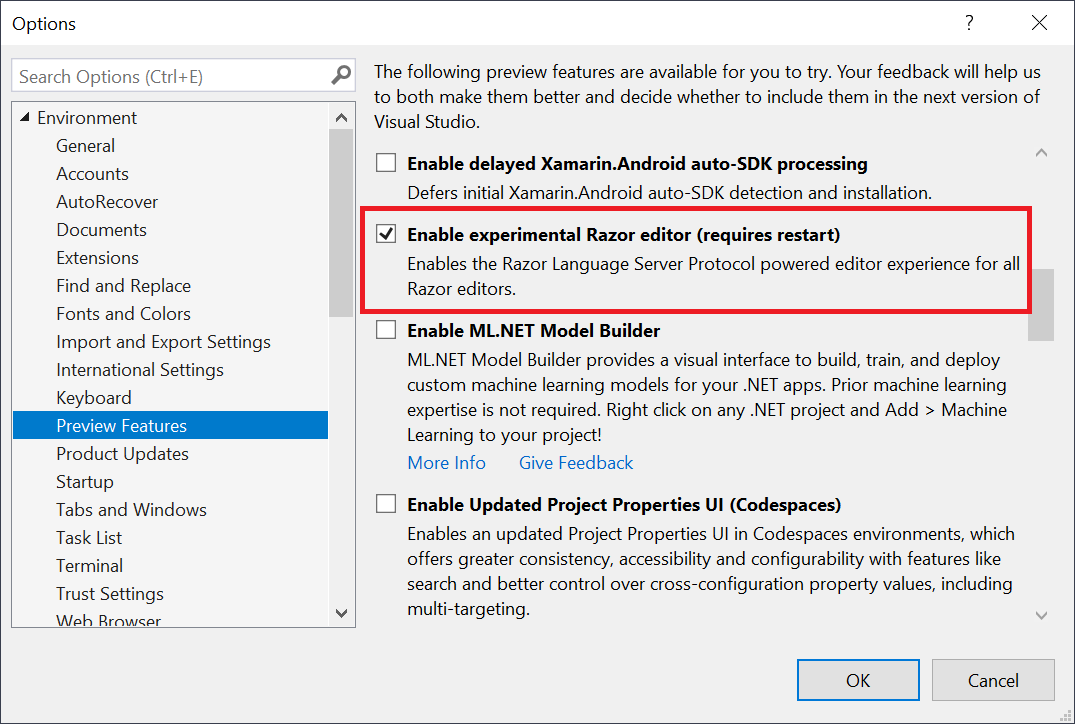
  2. Go to Tools > Options > Environment > Preview Features and select the Enable experimental Razor editor option:

    Enable new experimental Razor editor

When you go to turn on the new Razor editor you may find that it’s already on. Starting with Visual Studio 16.9 Preview 3 we are slowly rolling out the new Razor editor to different groups of users. If you tried out the new editor previously and then turned it off, you won’t be part of the automatic rollout. You’ll need to manually reenable it to see all the progress that we’ve made. Many of the known issues with the new editor have now been fixed, so it’s worth giving it another shot if you hit blocking issues with earlier builds.

What’s new?

In addition to working on the basics of the Razor editor experience (completions, diagnostics, tooltips, syntax coloring, etc.) the team has added a bunch of new features to the new Razor editor. Many of these features were made possible or simpler to implement by the new Language Server Protocol (LSP) based architecture.

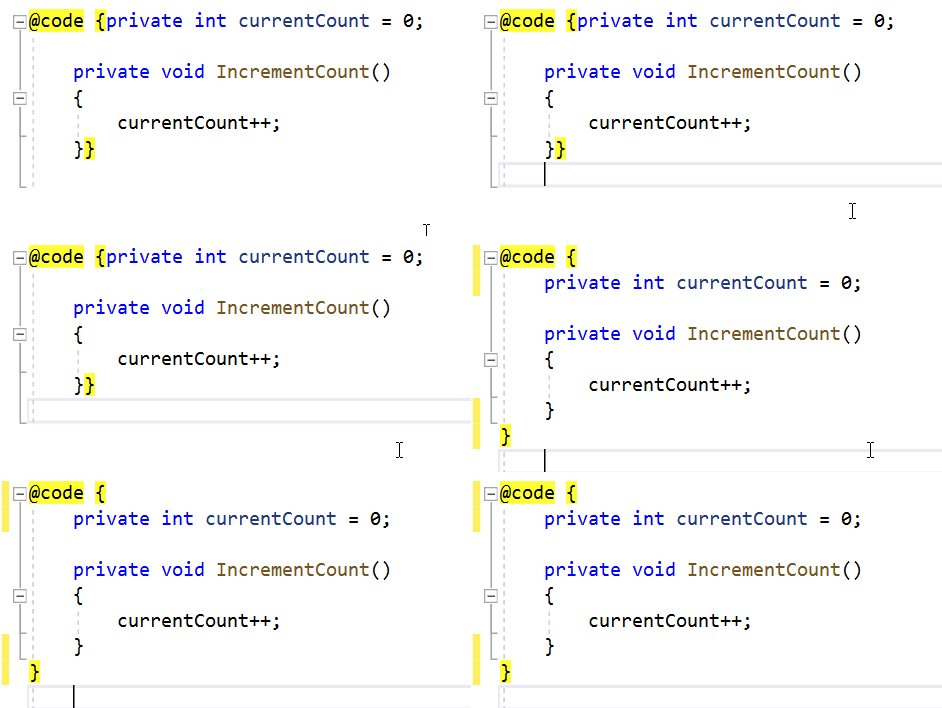
Improved formatting

The new Razor editor has an improved formatting engine that is more conservative than the old one (first, do no harm!), and is also much smarter about how it handles your code.

Formatting Counter

We’re committed to fixing Razor formatting so that it makes you smile with the new editor, so let us know if you hit formatting issues and we’ll be sure to get them addressed.

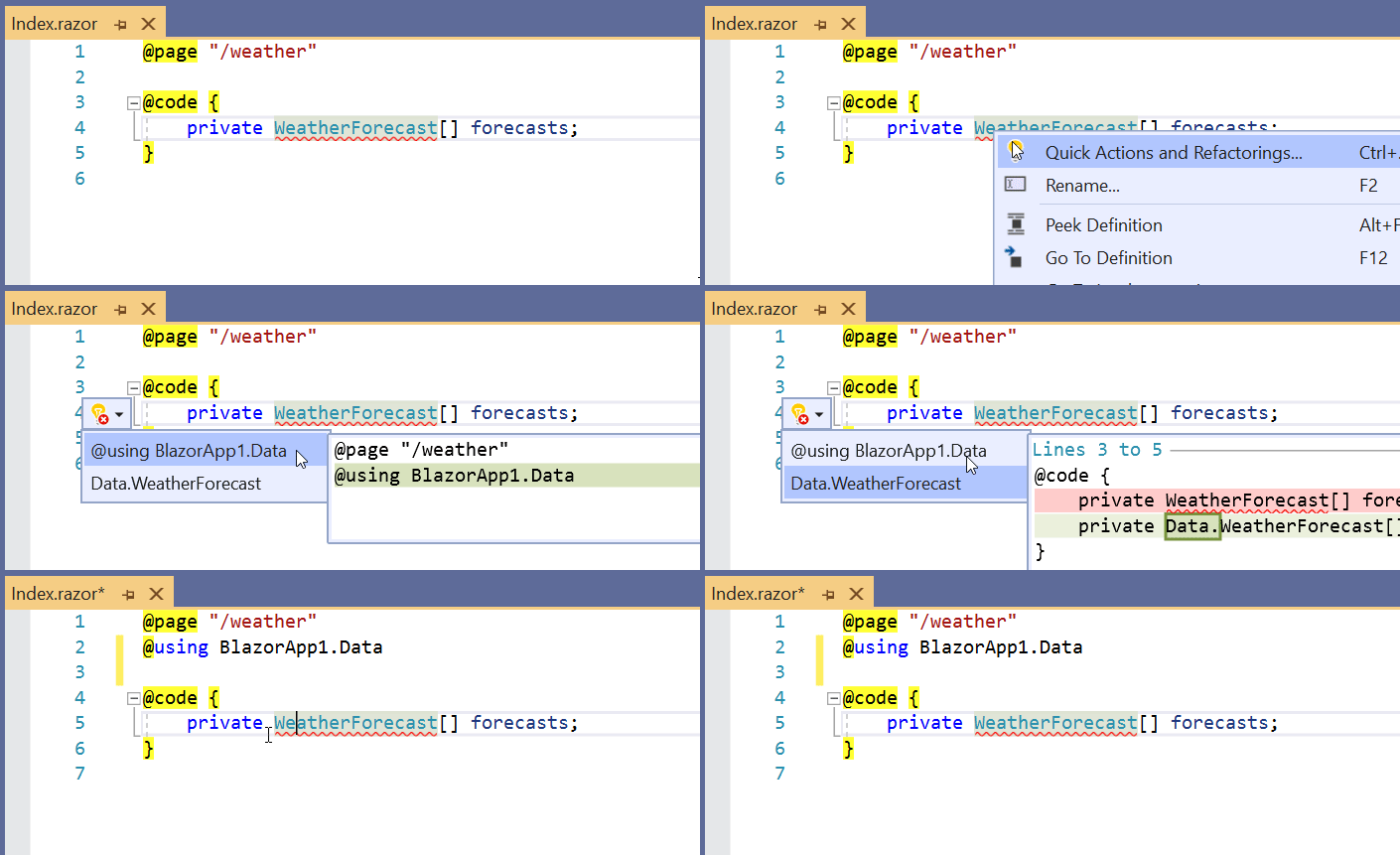
C# code actions

Some C# code actions are now available in Razor files:

  • Add @using directives or fully qualified type names.

    Add @using from C#

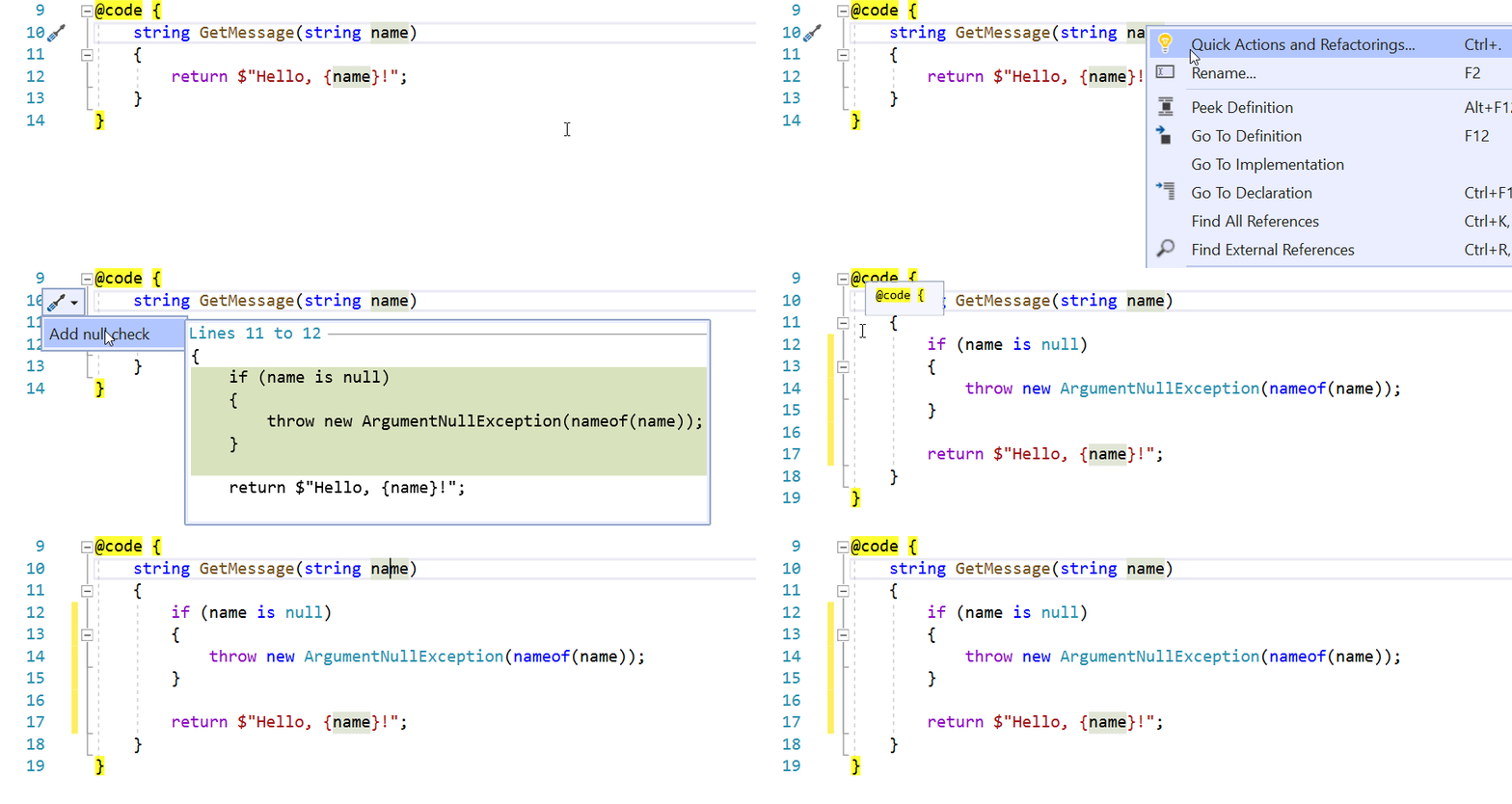
  • Add null checks.

    Add null checks

The design of the new Razor editor makes it much easier to enable C# code actions, and we expect to enable many more in future releases.

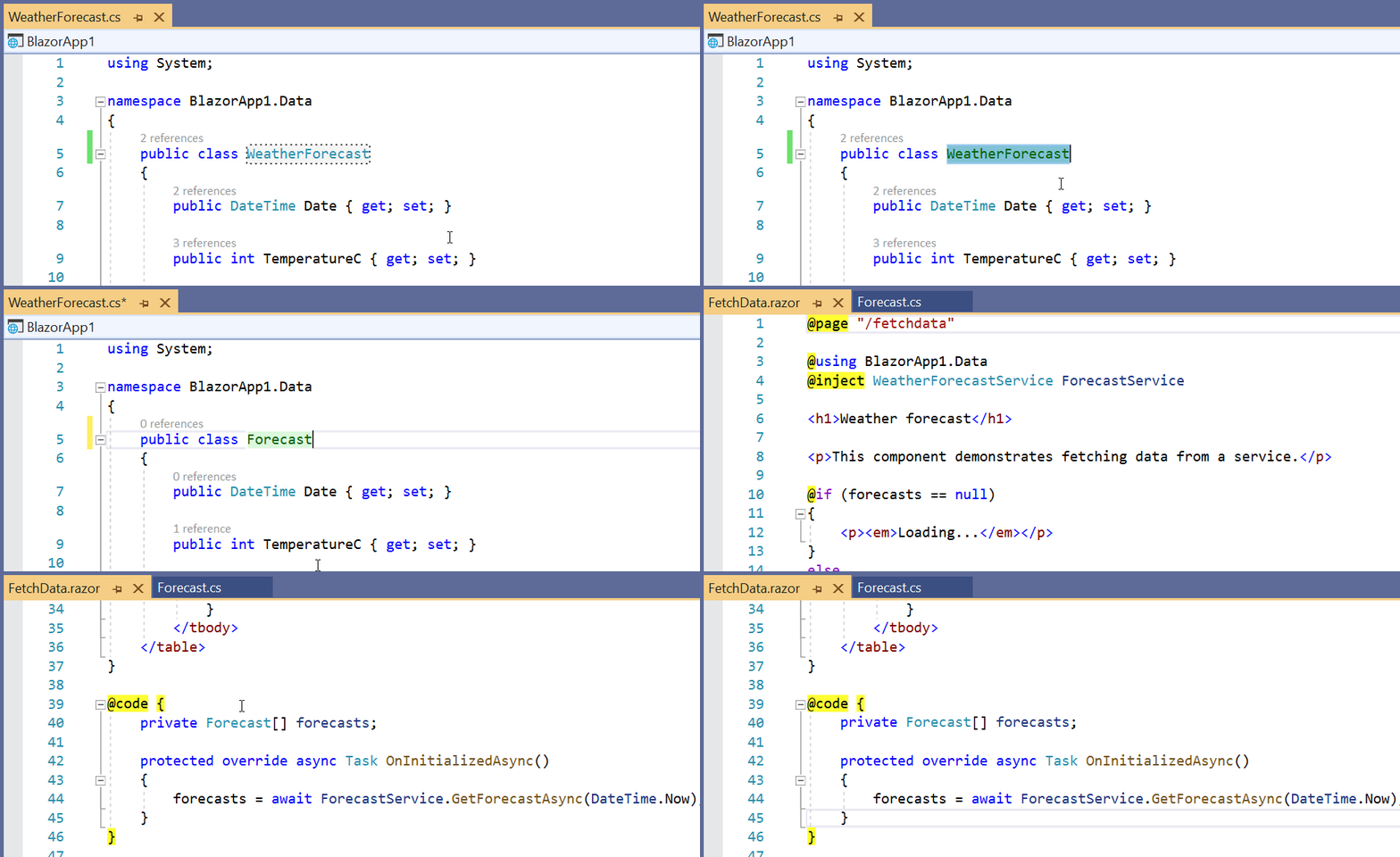
Rename across closed files

Renaming is no longer limited to open Razor files. Names in closed Razor files will get updated as well.

Rename across closed Razor files

Rename Blazor components

You can now rename a Blazor component from it’s tag. The component Razor file will get renamed automatically.

Rename component

Component code actions

Several component specific code actions are also now available:

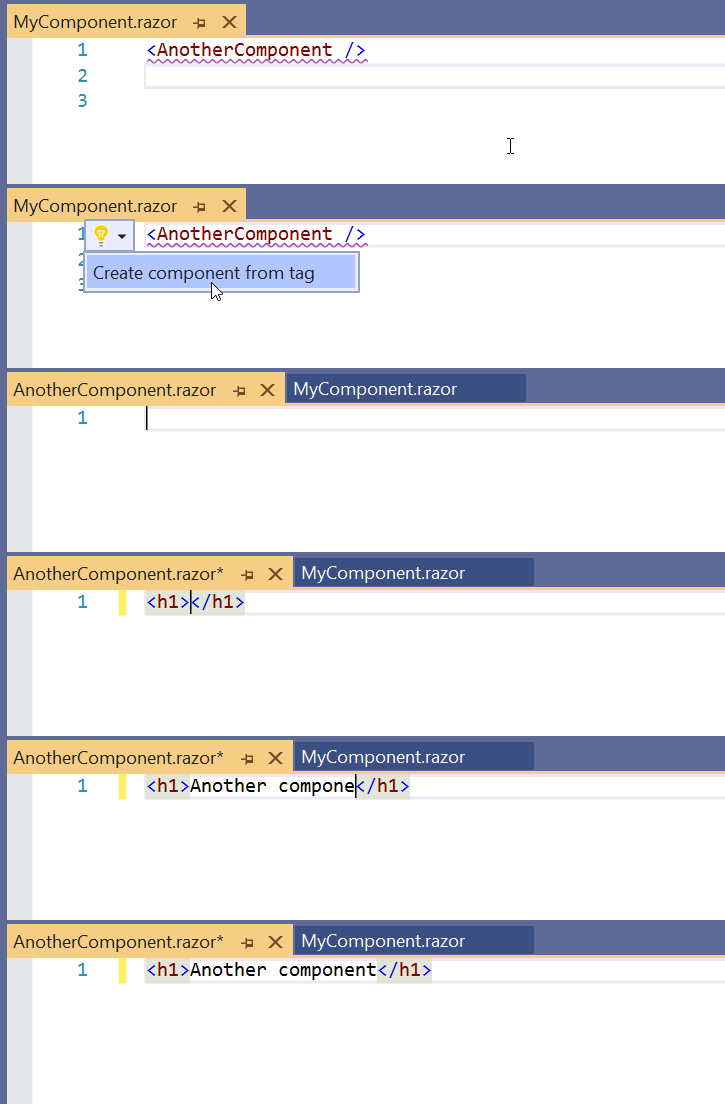
  • Create component from unknown tag.

    Create component from unknown tag

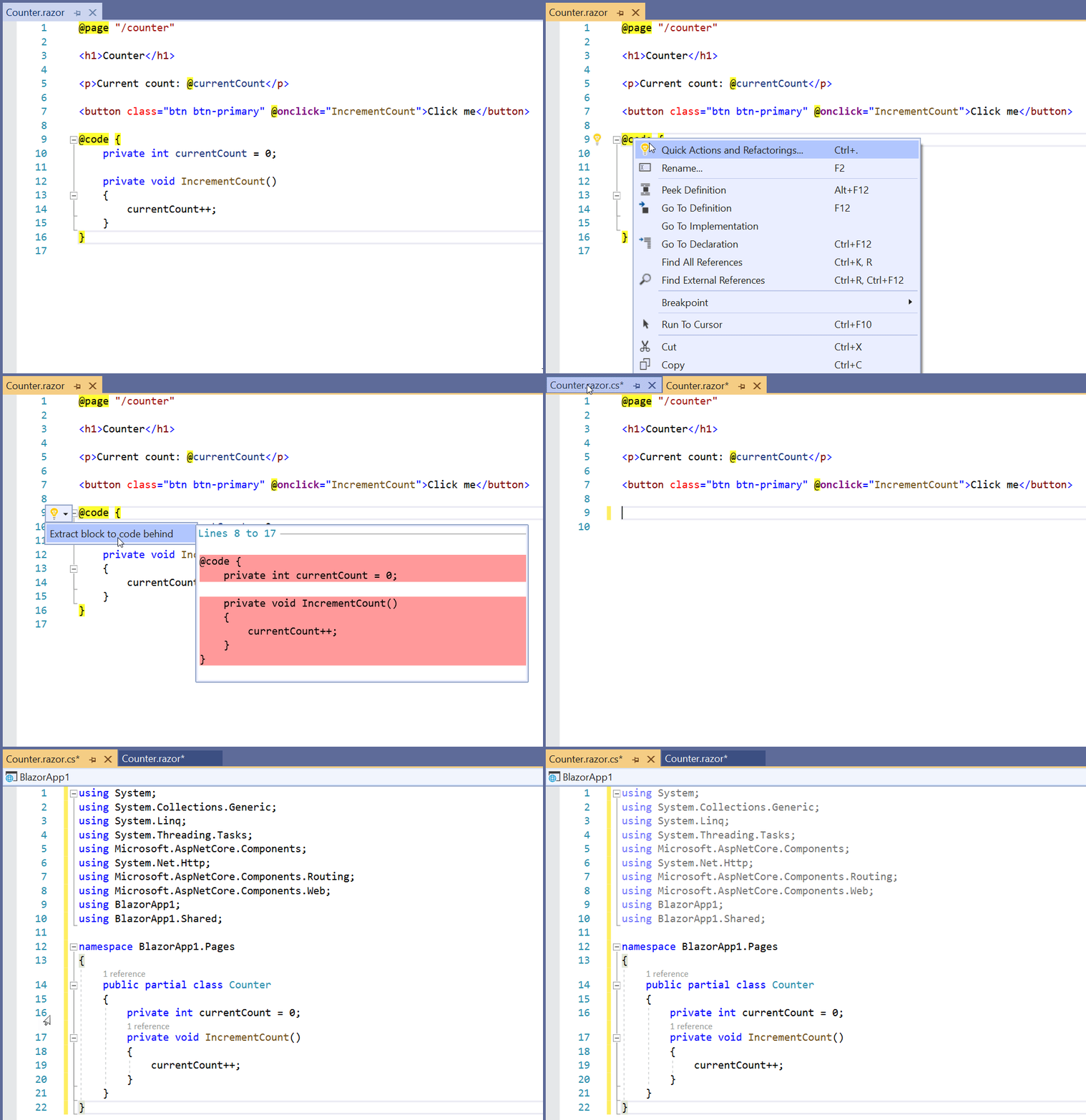
  • Extract @code to code-behind.

    Extract @code to code-behind

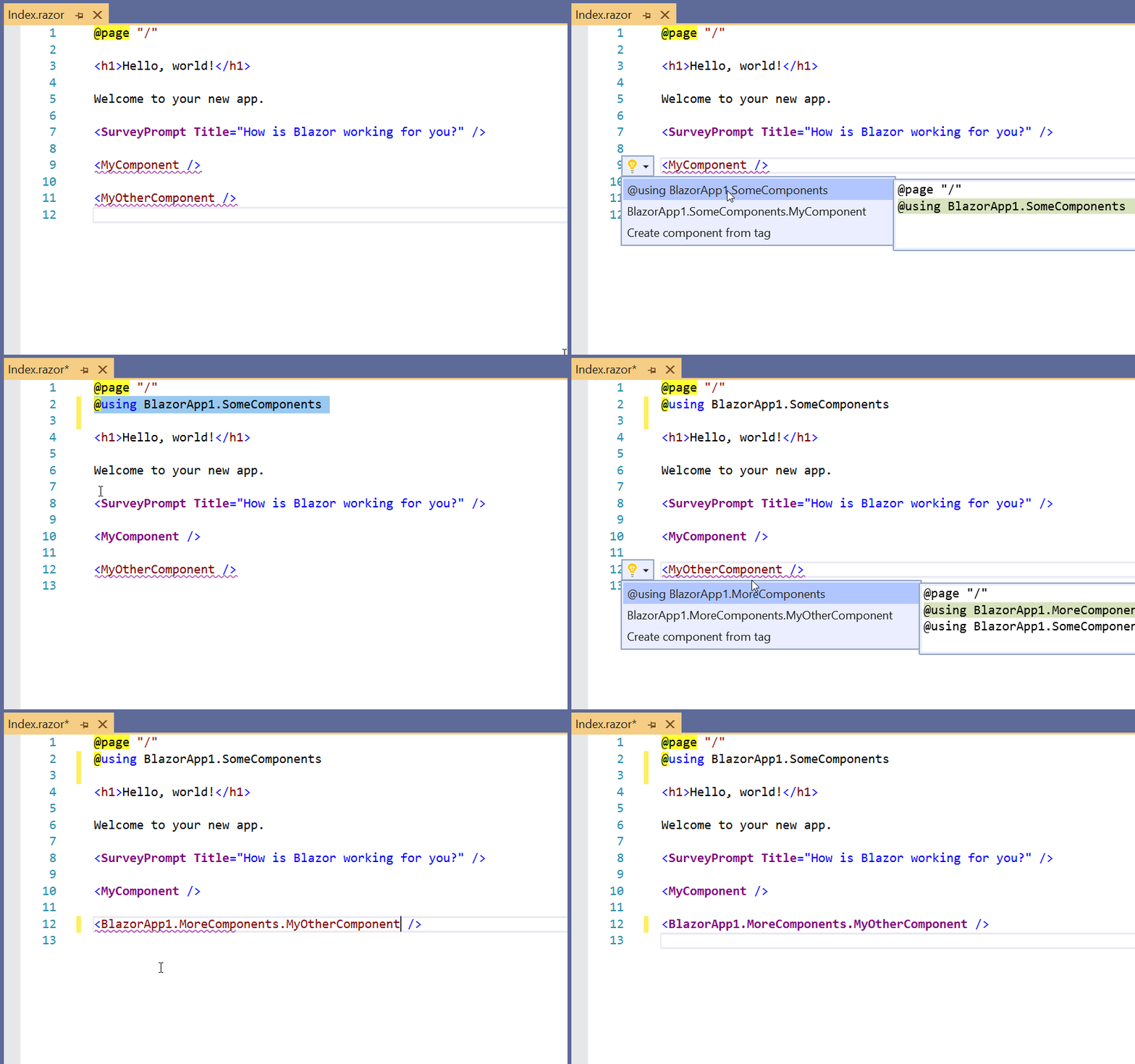
  • Add @using for components or fully qualified component tag.

    Add using for component

Go to component definition

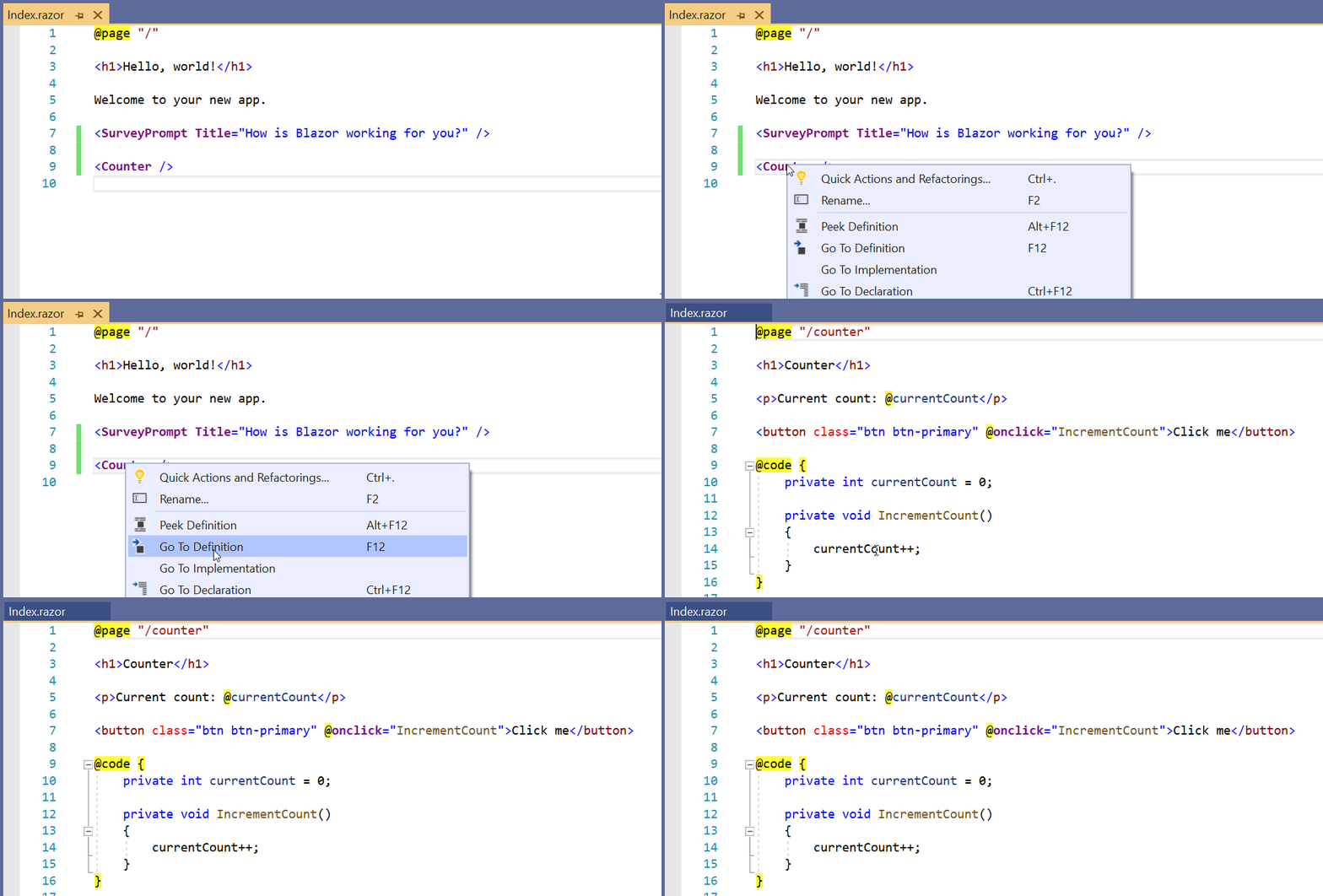
Need to see the code for that component fast? Just hit F12 on the tag and you’re there!

Go to component definition

Edit Razor with LiveShare

The new Razor editor also works with LiveShare, so you’ll get all of the new Razor editing goodness even when working with Razor over a remote session.

Use the new Razor editor with Visual Studio Code

Because the new Razor editor is based on a reusable Razor language server, the new Razor editor and its new features are also available from Visual Studio Code with the C# extension installed.

What about Visual Studio for Mac? Visual Studio for Mac doesn’t have LSP support just yet, but once it does we’ll bring the new Razor editor to Visual Studio for Mac as well.

Razor syntax coloring improvements

We’re also working on some improvements to Razor syntax coloring in the new editor that we’d love to get your feedback on. Please take a moment to share with us your opinions by taking the following surveys if you haven’t already:

Known issues

There are still some known issues with this release of the new Razor editor:

  • Razor syntax coloring imperfections. Razor syntax coloring may sometimes require an edit to trigger, or in some cases may use incorrect colors.
  • No snippet completions. Snippet completions (like prop) aren’t yet supported with the new editor.
  • Limited override completion. Method override completions will only generate the method name, and not the full method signature.

These issues are all being worked on and will be addressed in future releases.

Giving feedback

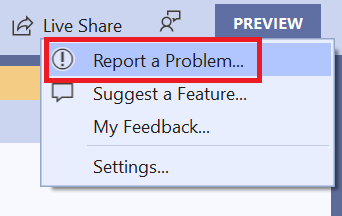
If you hit an issue with the new editor, the best way to let us know is using the Send Feedback > Report a Problem feature in Visual Studio.

Report a problem

In addition to the information you provide, the submitted issue will automatically include all of the relevant logs needed for us to diagnose and address the issue.

We hope you enjoy trying out the new Razor editor. Thanks for giving the new Razor editor and for sharing your feedback with us!

The post Improvements to the new Razor editor in Visual Studio appeared first on ASP.NET Blog.


Android Studio Tutorial - Build a GPS App


Curriculum for the course Android Studio Tutorial - Build a GPS App

Learn how to create a GPS Android App. You will learn how to use FusedLocationProviderClient, Google Play services, Location Provider, and other parts of a GPS-aware application. 💻 Starting XML file: https://github.com/shadsluiter/gpsDemoStarting/blob/master/activity_main.xml ✏️ Course developed by Shad Sluiter. Check out his channel: https://www.youtube.com/user/shadsluiter -- Learn to code for free and get a developer job: https://www.freecodecamp.org Read hundreds of articles on programming: https://freecodecamp.org/news And subscribe for new videos on technology every day: https://youtube.com/subscription_center?add_user=freecodecamp

Watch Online Full Course: Android Studio Tutorial - Build a GPS App


Click Here to watch on Youtube: Android Studio Tutorial - Build a GPS App


This video is first published on youtube via freecodecamp. If Video does not appear here, you can watch this on Youtube always.


Udemy Android Studio Tutorial - Build a GPS App courses free download, Plurasight Android Studio Tutorial - Build a GPS App courses free download, Linda Android Studio Tutorial - Build a GPS App courses free download, Coursera Android Studio Tutorial - Build a GPS App course download free, Brad Hussey udemy course free, free programming full course download, full course with project files, Download full project free, College major project download, CS major project idea, EC major project idea, clone projects download free

Build a Shopping Cart with React and TypeScript - Tutorial


Curriculum for the course Build a Shopping Cart with React and TypeScript - Tutorial

Learn the fundamentals and how to build a ReactJS shopping cart with Typescript, Material UI, Styled Components and React-Query. This tutorial uses a free open API for dummy data to the items in the shop. React-Query hooks is used for fetching the data from the API. Styled Components is used in combination with Material UI to customize the styles. 💻 Code: https://github.com/weibenfalk/react-shopping-cart ✏️ Course created by Thomas Weibenfalk. Check out his channel: https://www.youtube.com/channel/UCnnnWy4UTYN258FfVGeXBbg -- Learn to code for free and get a developer job: https://www.freecodecamp.org Read hundreds of articles on programming: https://freecodecamp.org/news And subscribe for new videos on technology every day: https://youtube.com/subscription_center?add_user=freecodecamp

Watch Online Full Course: Build a Shopping Cart with React and TypeScript - Tutorial


Click Here to watch on Youtube: Build a Shopping Cart with React and TypeScript - Tutorial


This video is first published on youtube via freecodecamp. If Video does not appear here, you can watch this on Youtube always.


Udemy Build a Shopping Cart with React and TypeScript - Tutorial courses free download, Plurasight Build a Shopping Cart with React and TypeScript - Tutorial courses free download, Linda Build a Shopping Cart with React and TypeScript - Tutorial courses free download, Coursera Build a Shopping Cart with React and TypeScript - Tutorial course download free, Brad Hussey udemy course free, free programming full course download, full course with project files, Download full project free, College major project download, CS major project idea, EC major project idea, clone projects download free

Basics of SQL Injection - Penetration Testing for Ethical Hackers


Curriculum for the course Basics of SQL Injection - Penetration Testing for Ethical Hackers

SQL injection is common hacking technique used retrieve or destroy data from a database without permission. It is considered one of the top web application security risks. In this course, you will learn how SQL injection works so you are able to defended against this hacker attack in your own web applications. ✏️ This course was developed by Sagar Bansal. Check out his channel: https://www.youtube.com/channel/UCdsl8fYtJM2Mw-HueDy2G4Q ⭐️ Course Contents ⭐️ ⌨️ (0:00:00) Introduction ⌨️ (0:02:33) What is SQL Injection ⌨️ (0:06:56) Lab Setup ⌨️ (0:11:04) Basics of SQL ⌨️ (0:16:33) Classic Injection Bypass ⌨️ (0:26:01) Types of SQL Injection ⌨️ (0:30:21) Union Based SQL Injection ⌨️ (0:41:08) Error Based SQL Injection ⌨️ (0:53:27) Boolean Based SQL Injection ⌨️ (1:03:04) Time-Based SQL Injection ⌨️ (1:11:39) Semi-Automated SQL Injection ⌨️ (1:24:02) Fully Automated SQL Injection ⌨️ (1:37:11) Defending Against SQL Injections -- Learn to code for free and get a developer job: https://www.freecodecamp.org Read hundreds of articles on programming: https://freecodecamp.org/news And subscribe for new videos on technology every day: https://youtube.com/subscription_center?add_user=freecodecamp

Watch Online Full Course: Basics of SQL Injection - Penetration Testing for Ethical Hackers


Click Here to watch on Youtube: Basics of SQL Injection - Penetration Testing for Ethical Hackers


This video is first published on youtube via freecodecamp. If Video does not appear here, you can watch this on Youtube always.


Udemy Basics of SQL Injection - Penetration Testing for Ethical Hackers courses free download, Plurasight Basics of SQL Injection - Penetration Testing for Ethical Hackers courses free download, Linda Basics of SQL Injection - Penetration Testing for Ethical Hackers courses free download, Coursera Basics of SQL Injection - Penetration Testing for Ethical Hackers course download free, Brad Hussey udemy course free, free programming full course download, full course with project files, Download full project free, College major project download, CS major project idea, EC major project idea, clone projects download free

The Plan for Entity Framework Core 6.0

Today we are excited to share with you the plan for Entity Framework Core 6.0.

EF Core 6.0

This plan brings together input from many stakeholders and outlines where and how we intend to invest for the Entity Framework (EF Core) 6.0 release. This plan is not set-in-stone and will evolve as we work on the release based on what we learn. This learning includes feedback from people like you, so please let us know what you think!

IMPORTANT This plan is not a commitment. It is a starting point that will evolve as we learn more. Some things not currently planned for 6.0 may get pulled in. Some things currently planned for 6.0 may get punted out.

General information

EF Core 6.0 is the next release after EF Core 5.0 and is currently scheduled for November 2021 at the same time as .NET 6. EF Core 6.0 will align with .NET 6 as a long-term support (LTS) release.

EF Core 6.0 will likely target .NET 6 when released. It is unlikely to support any .NET Standard version. It will not run on .NET Framework. See the future of .NET Standard for more information.

Themes

Highly requested features

As always, a major input into the planning process comes from the voting (👍) for features on GitHub. For EF Core 6.0 we plan to work on the following highly requested features:

  • SQL Server temporal tables
    • Allow temporal tables to be created via Migrations, as well as allowing access to historical data through LINQ queries.
  • JSON columns
    • Introduce common patterns for JSON support that can be implemented by any database provider.
    • JSON column support will be implemented for SQL Server and SQLite. (Note that the PostgreSQL and MySQL providers already support JSON columns.)
  • ColumnAttribute.Order
    • Allow arbitrary ordering of columns when creating a table with Migrations or EnsureCreated.

Performance

While EF Core is generally faster than EF6, there are still areas where significant improvements in performance are possible. We plan to tackle several of these areas in EF Core 6.0, while also improving our perf infrastructure and testing.

  • Performance infrastructure and new tests
    • Improve the infrastructure for performance tests as well as adding new tests and fixing low-hanging fruit.
  • Compiled models
    • Compiled models will improve startup performance, as well as having generally better performance when accessing the model.
  • TechEmpower Fortunes
    • We plan to match Dapper performance on the TechEmpower Fortunes benchmark. (This is a significant challenge which will likely not be fully achieved. Nevertheless, we will get as close as we can.)
  • Linker/AOT
    • We will continue investigating in making EF Core work better with linkers and AOT. We do not expect to fully close the gap in the 6.0 timeframe, but we hope to make significant progress.

Migrations and deployment

Following on from the investigations done for EF Core 5.0, we plan to introduce improved support for managing migrations and deploying databases. This includes two major areas:

  • Migrations bundles
    • Migrations bundles will provide a simple, robust mechanism for deploying EF Core migrations.
  • Managing migrations
    • Wwe plan to improve the tools and project/assembly management for EF Core migrations.

Improve existing features and fix bugs

  • EF6 query parity
    • We plan to close the query gap to EF6 and make supported EF Core queries a true superset of supported EF6 queries.
  • Value objects
    • We plan to introduce a better experience focused on the needs of value objects in domain-driven design.
    • This approach will be based on value converters rather than owned entities which have proved not to be a good fit.
  • Cosmos database provider
    • We are actively gathering feedback on which improvements to make to the Cosmos provider in EF Core 6.0; please make sure to vote (👍) for the Cosmos features that you need.
  • Expose model building conventions to applications
    • Model building conventions are currently controlled by the database provider. In EF Core 6.0, we intend to allow applications to hook into and change these conventions.
  • Zero bug balance (ZBB)
    • We plan to fix all outstanding non-blocked bugs during the EF Core 6.0 timeframe.
  • Miscellaneous smaller features
    • Split query for non-navigation collections
    • Detect simple join tables in reverse engineering and create many-to-many relationships
    • Complete full/free-text search on SQLite and SQL Server
    • SQL Server Spatial Indexes
    • Mechanism/API to specify a default conversion for any property of a given type in the model
    • Use the new batching API from ADO.NET

.NET integration

The EF Core team also works on several related but independent .NET Data technologies. In particular, we plan to work on:

  • Enhancements to System.Data
    • Implementation of the new batching API
    • Continued work with other .NET teams and the community to understand and evolve ADO.NET
    • Standardize on DiagnosticSource for tracing in System.Data components
  • Enhancements to Microsoft.Data.Sqlite
    • Connection pooling
    • Prepared statements
  • Nullable reference types

Experiments and investigations

The EF team is planning to invest time during the EF Core 6.0 timeframe experimenting and investigating in two areas. This is a learning process and as such no concrete deliverables are planned for the 6.0 release.

  • SqlServer.Core
    • An experiment in collaboration with the community to determine what potential there is modern .NET features in a highly performant SQL Server driver.
  • GraphQL
    • We plan to investigate the space and collaborate with the community to find ways to improve the experience of using GraphQL with .NET.

Find out more

This post is a brief summary of the full EF Core 6.0 Plan. Please see the full plan for more information.

Suggestions

Your feedback on planning is important. The best way to indicate the importance of an issue is to vote (👍) for that issue on GitHub. This data will then feed into the planning process for the next release.

In addition, please comment on this post if you believe we are missing something that is critical for EF Core 6.0, or are focusing on the wrong areas.

The post The Plan for Entity Framework Core 6.0 appeared first on .NET Blog.


source https://devblogs.microsoft.com/dotnet/the-plan-for-entity-framework-core-6-0/

Azure Active Directory’s gateway is on .NET Core 3.1!

Azure Active Directory’s gateway service is a reverse proxy that fronts hundreds of services that make up Azure Active Directory (Azure AD). If you’ve used services such as office.com, outlook.com, or xbox.live.com, then you’ve used Azure AD’s gateway. The gateway provides features such as TLS termination, automatic failovers/retries, geo-proximity routing, throttling, and tarpitting to services in Azure AD. The gateway is present in more than 53 Azure datacenters worldwide and serves ~115 Billion requests each day. Up until recently, Azure AD’s gateway was running on .NET Framework 4.6.2. As of September 2020, it’s running on .NET Core 3.1.

Motivation for porting to .NET Core

The gateway’s scale of execution results in significant consumption of compute resources, which in turn costs money. Finding ways to reduce the cost of executing the service has been a key goal for the team behind it. The buzz around .NET Core’s focus on performance caught our attention, especially since TechEmpower listed ASP.NET Core as one of the fastest web frameworks on the planet. We ran our own benchmarks on gateway prototypes on .NET Core and the results made the decision very easy: we must port our service to .NET Core.

Does .NET Core performance translate to real-life cost savings?

It absolutely does. In Azure AD gateway’s case, we were able to cut our CPU costs by 50%.

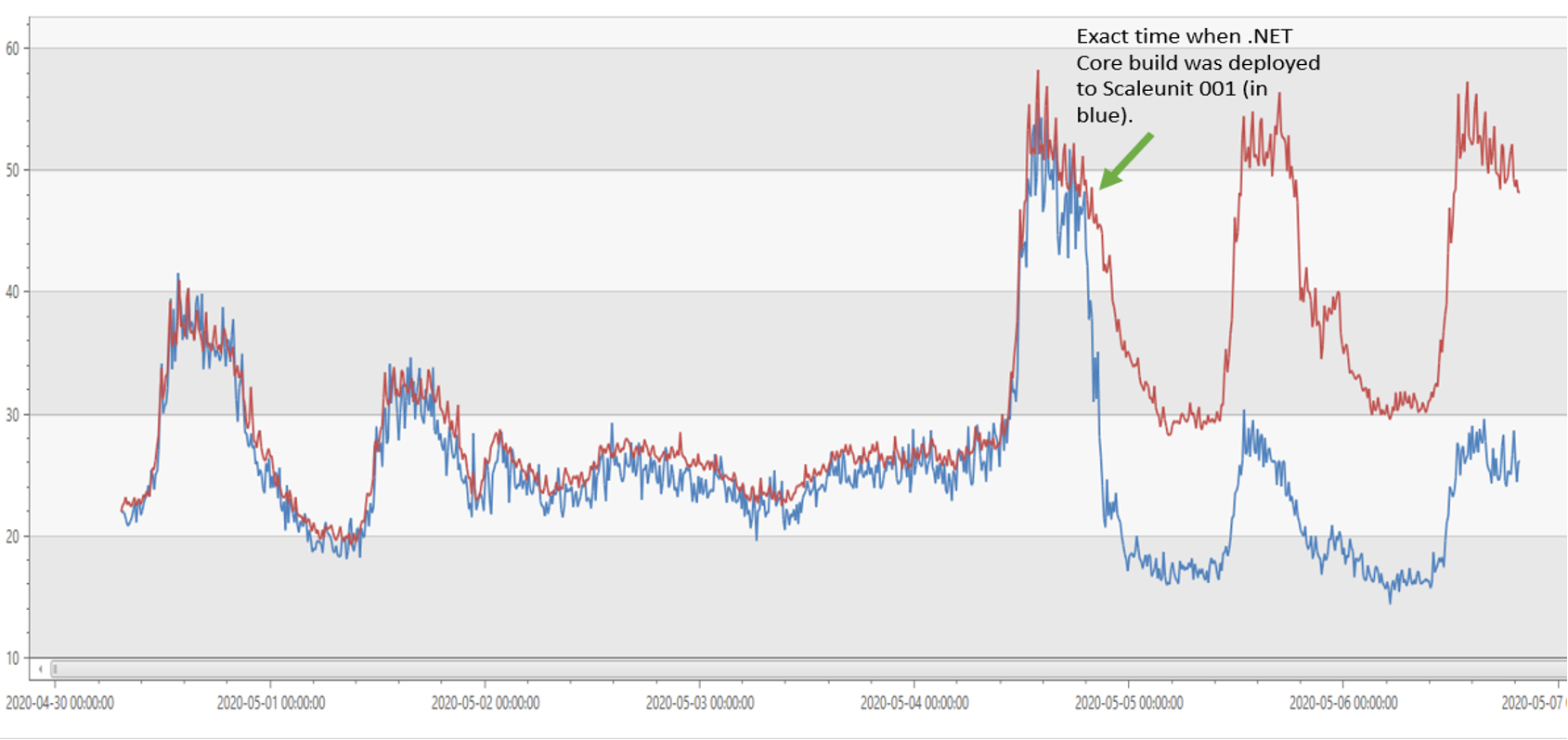
The gateway used to run on IIS with .NET Framework 4.6.2. Today, it runs on IIS with .NET Core 3.1. The image below shows that our CPU usage was reduced by half on .NET Core 3.1 compared to .NET Framework 4.6.2 (effectively doubling our throughput).

Azure Active Directory’s gateway service is on .NET Core

As a result of the gains in throughput, we were able to reduce our fleet size from ~40k cores to ~20k cores (50% reduction).

Image CoresReduction 2

How was the port to .NET Core achieved?

The porting was done in 3 phases.

Phase 1: Choosing an edge webserver.

When we started the porting effort, the first question we had to ask ourselves was which of the 3 webservers in .NET Core do we pick?

We ran our production scenarios on all 3 webservers, and we realized it all came down to TLS support. Given the gateway is a reverse proxy, support for a wide range of TLS scenarios is critical.

Kestrel:

  • When we started our migration (November 2019), Kestrel did not support client certificate negotiation nor revocation on a per-hostname basis. In .NET 5.0, support for these features was added.
  • As for .NET 5.0, Kestrel (via its reliance on SslStream) does not support CTL stores on a per hostname basis. Support is expected in .NET 6.0.

HTTP.sys:

  • HTTP.sys server had a disconnect between the TLS configuration at Http.Sys layer and the .NET implementation: Even when a binding is configured to not negotiate client certificates, accessing the Client certificate property in .NET Core triggers an unwanted TLS renegotiation.

  • For example, performing a simple null check in C# renegotiates the TLS handshake:

    if (HttpContext.Connection.ClientCertificate != null)
    

    This has been addressed in: https://github.com/dotnet/aspnetcore/issues/14806 in ASP.NET Core 3.1. At the time, when we started the port in November 2019, we were on ASP.NET Core 2.2 and therefore did not pick this server.

IIS:

  • IIS met all our requirements for TLS, so that’s the webserver we chose.

Phase 2: Migrating the application and dependencies.

As with many large services and applications, Azure AD’s gateway has many dependencies. Some were written specifically for the service, and some written by others inside and outside of Microsoft. In certain cases, those libraries were already targeting .NET Standard 2.0. For others, we updated them to support .NET Standard 2.0 or found alternative implementations, e.g. removing our legacy Dependency Injection library and instead using .NET Core’s built-in support for dependency injection. The .NET Portability Analyzer was of great help in this step.

For the application itself:

  • Azure AD’s gateway used to have a dependency on IHttpModule and IHttpHandler from classic ASP.NET, which don’t exist in ASP.NET Core. So, we re-wrote the application using the middleware constructs in ASP.NET Core.
  • One of the things that really helped throughout the migration is Azure Profiler (a service that collects performance traces at runtime on Azure VMs). We deployed our nightly builds to test beds, used wrk2 as a load agent to test the scenarios under stress and collected Azure Profiler traces. These traces would then inform us of the next tweak necessary to extract peak performance from our application.

Phase 3: Rolling out gradually.

The philosophy we adopted during rollout was to discover as many issues as possible with little or no production impact.

  • We deployed our initial builds to test, integration and DogFood environments. This led to early discovery of bugs and helped in fixing them before hitting production.
  • After code complete, we deployed the .NET Core build to a single production machine in a scale unit. A scale unit is a load balanced pool of machines.
    • The scale unit had ~100 machines, where 99 machines were still running our existing .NET Framework build and only 1 machine was running the new .NET Core build.
    • All ~100 machines in this scale unit receive the exact type and amount of traffic. Then, we compared status codes, error rates, functional scenarios and performance of the single machine to the remaining 99 machines to detect anomalies.
    • We wanted this single machine to behave functionally the same as the remaining 99 machines, but have much better performance/throughput and that’s what we observed.
  • We also “forked” traffic from live production scale units (running .NET Framework build) to .NET Core scale units to compare and contrast as indicated above.
  • Once we reached functional equivalence, we started expanding the number of Scale units running .NET Core and gradually expanded to an entire datacenter.
  • Once an entire datacenter was migrated, the last step was to gradually expand worldwide to all the Azure datacenters where Azure AD’s gateway service has a presence. Migration done!

Learnings

  • ASP.NET Core is strict about RFCs. This is a very good thing as it drives good practices across the board. However, classic ASP.NET and .NET Framework were quite a bit more lenient and that causes some backwards compatibility issues:
  • There was a performance bottleneck in FileBufferingReadStream‘s CopyToAsync() method due to multiple 1 byte copies of a n byte stream. This has been addressed in .NET 5.0 by picking a default buffer size of 4K: https://github.com/dotnet/aspnetcore/issues/24032
  • Be aware of classic ASP.NET quirks:
    • Trailing whitespace is auto-trimmed in the path:
      • foo.com/oauth   ?client=abc is trimmed to foo.com/oauth?client=abc on classic ASP.NET.
      • Over the years, customers/downstream services have taken a dependency on this path being trimmed and ASP.NET Core does not auto-trim the path. So, we had to trim trailing whitespace to mimic classic ASP.NET behavior.
    • Content-Type header is auto-generated if missing:
      • When the response is larger than zero bytes, but Content-Type header is missing, classic ASP.NET generates a default Content-Type:text/html header. ASP.NET Core does not force generate a default Content-Type header and clients who assume Content-Type header is always sent in the response start having issues. We mimicked the classic ASP.NET behavior by adding a default Content-Type when it is missing from downstream services.

Future

Porting to .NET Core resulted in doubling the throughput for our service and it was a great decision to move. Our .NET Core journey will not stop after porting. For the future, we are looking at:

The post Azure Active Directory’s gateway is on .NET Core 3.1! appeared first on .NET Blog.


source https://devblogs.microsoft.com/dotnet/azure-active-directorys-gateway-service-is-on-net-core-3-1/

Diagnostics improvements in .NET 5

Building upon the diagnostics improvements we introduced in .NET Core 3.0, we’ve been hard at work further improving this space. I’m excited to introduce the next wave of diagnostics improvements.

Diagnostics tool are available without the .NET SDK

Until recently, the .NET diagnostics suite of tools was available only as .NET SDK global tools. While this provided a convenient way to acquire and update the tools, this meant it was difficult to acquire them in environments where the full SDK was not present. We now provide a single-file distribution mechanism that only requires a runtime (3.1+) to be available on the target machine.

The latest version of the tools is always available at a link that follows the following schema:

https://aka.ms/<tool-name>/<platform-runtime-identifier>

For example, if you’re running .NET Core on x64 Ubuntu, you can acquire the dotnet-trace from https://aka.ms/dotnet-trace/linux-x64.

The list of supported platforms and their download links can be found on the documentation for each of the tools, e.g., dotnet-counters documentation. The list of all available tools and supported platform runtime identifiers can be found in the diagnostics repo.

Analyze Linux memory dumps on Windows

Debugging managed code requires special knowledge of managed objects and constructs. The Data Access Component (DAC) is a subset of the runtime execution engine that has knowledge of these constructs and can access these managed objects without a runtime. In .NET Core 3.1.8+ and in .NET 5+, we’ve started to compile the Linux DAC against Windows. .NET Core process dumps collected on Linux can now be analyzed on Windows using WinDBG, dotnet dump analyze, and Visual Studio 2019 16.8.

More information on both how to collect .NET memory dumps and how to analyze them can be found on the Visual Studio blog.

Startup tracing

The .NET diagnostics suite of tools work by connecting to the diagnostics port created by the runtime and then requesting the runtime to egress information using the Diagnostics IPC Protocol over that channel. In .NET Core 3.1, it wasn’t possible to perform startup tracing (via EventPipe; ETW was still possible) since events emitted before the tools could connect to the runtime would be lost. In .NET 5, it is now possible to configure the runtime to suspend itself during startup until a tool has connected (or have the runtime connect to the tool).

The 5.0 versions of dotnet-counters and dotnet-trace can now launch dotnet processes and collect diagnostics information from the process start. For example, the following command will start mydotnetapp.exe and begin monitoring counters.

dotnet counters monitor -- mydotnetapp.exe

More information on startup tracing can be found on documentation pages for dotnet-counters and dotnet-trace.

Assembly load diagnostics

in .NET 5, the runtime now emits events for assembly binds via EventPipe. This information can help you diagnose why the runtime cannot locate an assembly at runtime. This is the replacement for the Fusion Log Viewer (fuslogvw.exe) present in the .NET Framework.

You can use the following command to collect assembly load diagnostics:

dotnet-trace collect --providers Microsoft-Windows-DotNETRuntime:4:4 --process-id [process ID]

The resulting .nettrace file can be analyzed using PerfView.

Closing

Thanks for trying out the updated diagnostics tools in .NET 5. Please continue to give us feedback, either in the comments or on GitHub. We are listening carefully and will continue to make changes based on your feedback. We have more upcoming changes to improve the diagnostics tools in .NET 5 that will be covered in a follow-up blog post.

The post Diagnostics improvements in .NET 5 appeared first on .NET Blog.


source https://devblogs.microsoft.com/dotnet/diagnostics-improvements-in-net-5/

How to Make a Landing Page using HTML, SCSS, and JavaScript - Full Course


Curriculum for the course How to Make a Landing Page using HTML, SCSS, and JavaScript - Full Course

Learn how to build a responsive website from scratch with HTML, CSS, and JavaScript. ✏️ This course was created by Jessica Chan. 🔗 Jessica's YouTube Channel: https://www.youtube.com/thecodercoder 🔗 Jessica's Twitter: https://twitter.com/thecodercoder 💻 Starter files from Fontend Mentor: https://www.frontendmentor.io/challenges/easybank-landing-page-WaUhkoDN 💻 Source code on GitHub: https://github.com/thecodercoder/fem-easybank 🔗 Responsive Design for Beginners course: https://coder-coder.com/responsive/ ⭐️ Course Contents ⭐️ ⌨️ (0:00) Introduction ⌨️ (0:30) Part 1: Setup and Navigation Bar ⌨️ (49:52) Part 2: Animated Hamburger Menu ⌨️ (1:21:28) Part 3: Animated Mobile Menu ⌨️ (1:43:56) Part 4: Responsive Hero ⌨️ (2:39:24) Part 5: 4-Column Features (flexbox) ⌨️ (3:16:58) Part 6: 4-Column Articles (CSS grid) ⌨️ (4:04:56) Part 7: Footer -- Learn to code for free and get a developer job: https://www.freecodecamp.org Read hundreds of articles on programming: https://freecodecamp.org/news And subscribe for new videos on technology every day: https://youtube.com/subscription_center?add_user=freecodecamp

Watch Online Full Course: How to Make a Landing Page using HTML, SCSS, and JavaScript - Full Course


Click Here to watch on Youtube: How to Make a Landing Page using HTML, SCSS, and JavaScript - Full Course


This video is first published on youtube via freecodecamp. If Video does not appear here, you can watch this on Youtube always.


Udemy How to Make a Landing Page using HTML, SCSS, and JavaScript - Full Course courses free download, Plurasight How to Make a Landing Page using HTML, SCSS, and JavaScript - Full Course courses free download, Linda How to Make a Landing Page using HTML, SCSS, and JavaScript - Full Course courses free download, Coursera How to Make a Landing Page using HTML, SCSS, and JavaScript - Full Course course download free, Brad Hussey udemy course free, free programming full course download, full course with project files, Download full project free, College major project download, CS major project idea, EC major project idea, clone projects download free

.NET January 2021 Updates – 5.0.2, 3.1.11, 2.1.24

Today, we are releasing the .NET January 2021 Updates. These updates contains reliability and security improvements. See the individual release notes for details on updated packages.

You can download 5.0.2 , 3.1.11, 2.1.24 versions for Windows, macOS, and Linux, for x86, x64, Arm32, and Arm64.

Security

Microsoft is releasing this security advisory to provide information about a vulnerability in ASP.NET Core and ASP.NET 5. This advisory also provides guidance on what developers can do to update their applications to remove this vulnerability.
A denial-of-service vulnerability exists in the way Kestrel parses HTTP/2 requests. The security update addresses the vulnerability by fixing the way the Kestrel parses HTTP/2 requests.


Improvements

Visual Studio

See release notes for Visual Studio compatibility for .NET Core 2.1 and .NET Core 3.1 and .NET 5.0.

.NET Core 2.1 End of life

.NET Core 2.1 will reach end of life on August 21, 2021, as described in .NET Releases and per .NET Release Policies. After that time, .NET Core 2.1 patch updates will no longer be provided. We recommend that you move any .NET Core 2.1 applications and environments to .NET Core 3.1 in first half of 2021. It’ll be an easy upgrade in most cases.

This update of .NET Core 2.1 is the last update for .NET Core 2.1.6xx SDK since Visual Studio 16.0 is out of support as of January 2021. We will continue to update versions 2.1.5xx and 2.1.8xx until .NET Core 2.1 reaches end of life.

The .NET Releases page is the best place to look for release lifecycle information. Knowing key dates helps you make informed decisions about when to upgrade or make other changes to your software and computing environment.


OS Lifecycle update

RHEL 6 has reached end of life as of November 2020. The operating system support pages for .NET Core 2.1 and .NET Core 3.1 have been updated to reflect that RHEL 6 is no longer supported.

The post .NET January 2021 Updates – 5.0.2, 3.1.11, 2.1.24 appeared first on .NET Blog.


source https://devblogs.microsoft.com/dotnet/net-january-2021/

.NET Framework January Security and Quality Rollup Update

Today, we are releasing the January 2021 Security and Quality Rollup Updates for .NET Framework.

Security

The January Security and Quality Rollup Update does not contain any new security fixes. See October 2020 Security and Quality Rollup for the latest security updates.

Quality and Reliability

This release contains the following quality and reliability improvements.

CLR1
  • Improved the clean-up process for X509Certificate2 certificates
WPF2
  • Addressed an issue with a FailFast crash arising in apps with two threads that both load application resources.

1 Common Language Runtime (CLR) 2 Windows Presentation Foundation (WPF)

Getting the Update

The Security and Quality Rollup is available via Windows Update, Windows Server Update Services, and Microsoft Update Catalog.

Microsoft Update Catalog

You can get the update via the Microsoft Update Catalog. For Windows 10, NET Framework 4.8 updates are available via Windows Update, Windows Server Update Services, Microsoft Update Catalog. Updates for other versions of .NET Framework are part of the Windows 10 Monthly Cumulative Update.

**Note**: Customers that rely on Windows Update and Windows Server Update Services will automatically receive the .NET Framework version-specific updates. Advanced system administrators can also take use of the below direct Microsoft Update Catalog download links to .NET Framework-specific updates. Before applying these updates, please ensure that you carefully review the .NET Framework version applicability, to ensure that you only install updates on systems where they apply.

The following table is for Windows 10 and Windows Server 2016+ versions.

Product Version Cumulative Update
Windows 10, version 20H2 and Windows Server, version 20H2
.NET Framework 3.5, 4.8 Catalog 4586876
Windows 10 2004 and Windows Server, version 2004
.NET Framework 3.5, 4.8 Catalog 4586876
Windows 10 1909 and Windows Server, version 1909
.NET Framework 3.5, 4.8 Catalog 4586878
Windows 10 1903 and Windows Server, version 1903
.NET Framework 3.5, 4.8 Catalog 4586878
Windows 10 1809 (October 2018 Update) and Windows Server 2019 4598499
.NET Framework 3.5, 4.7.2 Catalog 4586875
.NET Framework 3.5, 4.8 Catalog 4586877
Windows 10 1803 (April 2018 Update)
.NET Framework 3.5, 4.7.2 Catalog 4598245
.NET Framework 4.8 Catalog 4597249
Windows 10 1709 (Fall Creators Update)
.NET Framework 3.5, 4.7.1, 4.7.2 Catalog 4598234
.NET Framework 4.8 Catalog 4597248
Windows 10 1607 (Anniversary Update) and Windows Server 2016
.NET Framework 3.5, 4.6.2, 4.7, 4.7.1, 4.7.2 Catalog 4598243
.NET Framework 4.8 Catalog 4597247
Windows 10 1507
.NET Framework 3.5, 4.6, 4.6.1, 4.6.2 Catalog 4598231
Azure Stack HCI, version 20H2
.NET Framework 4.7.2 Catalog 4586874

The following table is for earlier Windows and Windows Server versions.

Product Version Security and Quality Rollup
Windows 8.1, Windows RT 8.1 and Windows Server 2012 R2 4598502
.NET Framework 4.5.2 Catalog 4578956
.NET Framework 4.6, 4.6.1, 4.6.2, 4.7, 4.7.1, 4.7.2 Catalog 4597238
.NET Framework 4.8 Catalog 4597253
.NET Framework 4.8 Catalog 4486105
Windows Server 2012 4598501
.NET Framework 4.5.2 Catalog 4578954
.NET Framework 4.6, 4.6.1, 4.6.2, 4.7, 4.7.1, 4.7.2 Catalog 4597237
.NET Framework 4.8 Catalog 4597252
.NET Framework 4.8 Catalog 4486081
Windows 7 SP1 and Windows Server 2008 R2 SP1 4598500
.NET Framework 4.5.2 Catalog 4578955
.NET Framework 4.6, 4.6.1, 4.6.2, 4.7, 4.7.1, 4.7.2 Catalog 4597239
.NET Framework 4.8 Catalog 4597254
.NET Framework 4.8 Catalog
Windows Server 2008 4598503
.NET Framework 4.5.2 Catalog 4578955
.NET Framework 4.6 Catalog 4597239


Previous Monthly Rollups

The last few .NET Framework Monthly updates are listed below for your convenience:

The post .NET Framework January Security and Quality Rollup Update appeared first on .NET Blog.


source https://devblogs.microsoft.com/dotnet/net-framework-january-security-and-quality-rollup-update/

Migrating RealProxy Usage to DispatchProxy

As I’ve helped customers port .NET Framework apps to .NET Core 3.1 and .NET 5, one question that has come up several times is the question of what to do about System.Runtime.Remoting.Proxies.RealProxy usage. Customers using the API are concerned because they know that remoting is not supported on .NET Core. Fortunately, the new DispatchProxy API works as an easy replacement in many cases. In this blog post, I’m going to briefly discuss how to use DispatchProxy (or Castle.Core’s DynamicProxy) in place of RealProxy for aspect-oriented programming scenarios and what differences exist between the three proxy APIs.

Despite being in the System.Runtime.Remoting namespace, in many cases, users aren’t actually doing any cross-process remoting with RealProxy. Instead, many developers use it as an easy way to implement an aspect-oriented programming (AOP) paradigm as explained in Aspect-Oriented Programming : Aspect-Oriented Programming with the RealProxy Class. The idea is that cross-cutting concerns (like logging or caching) can be handled in a proxy class that wraps other types so that those concerns can be handled centrally without having to modify the original classes.

Although RealProxy isn’t available in .NET Core or .NET 5, a dedicated API was added for exactly this scenario. If you are trying to implement cross-cutting concerns via proxy wrappers (and don’t care about cross-process remoting), System.Reflection.DispatchProxy will probably fit the bill. And if DispatchProxy doesn’t meet your needs for some reason, the third-party Castle.DynamicProxy APIs from Castle.Core offer another .NET Standard-compatible alternative. The sample code in this post is available on GitHub in the mjrousos/ProxyExploration repository.

RealProxy example

To start, let’s take a look at how RealProxy may have been used in a .NET Framework project to add logging.

RealProxy is an abstract class. To use it, you need to derive from it and implement the abstract Invoke method. The proxy is able to generate objects that appear to be of a given type but, when the generated objects’ APIs are used, the proxy’s Invoke method will be called (instead of using the proxied type’s members). Invoke should take whatever action is desired (possibly invoking the indicated member on a wrapped instance of the proxied type) and return a ReturnMessage with the result of the operation.

Here is a simple example of a RealProxy-based proxy for adding Serilog logging around all method calls. The comments in the code explain the role the different methods play in making the proxy work.

// Simple sample RealProxy-based logging proxy
// Note that the proxied type must derive from MarshalByRefObject
public class RealProxyLoggingDecorator<T> : RealProxy where T: MarshalByRefObject
{
    // A field to store an inner 'real' instance of the proxied type.
    // All API calls will go to this wrapped instance (after the proxy has 
    // done its logging).
    private readonly T _target;

    // The Serilog logger to be used for logging.
    private readonly Logger _logger;

    // When creating a new instance of this proxy type, invoke RealProxy's
    // constructor with the type to be wrapped and, optionally, allow
    // the caller to provide a 'target' object to be wrapped.
    private RealProxyLoggingDecorator(T target = null) : base(typeof(T))
    {
        // If no target object is supplied, created a new one.
        if (target == null)
        {
            target = Activator.CreateInstance<T>();
        }

        _target = target;

        // Setup the Serilog logger
        _logger = new LoggerConfiguration()
            .WriteTo.Console().CreateLogger();
        _logger.Information("New logging decorator created for object of type {TypeName}", typeof(T).FullName);
    }

    // This convenience method creates an instance of RealProxyLoggingDecorator
    // and calls RealProxy's GetTransparentProxy method to retrieve the proxy
    // object (which looks like an instance of T but calls our Invoke method
    // whenever an API is used).
    public static T Decorate(T target = null) =>
        new RealProxyLoggingDecorator<T>(target).GetTransparentProxy() as T;

    // The invoke method is the heart of a RealProxy implementation. Here, we
    // define what should happen when a member on the proxy object is used.
    public override IMessage Invoke(IMessage msg)
    {
        // The IMessage argument should be an IMethodCallMessage indicating
        // which method is being invoked. Interestingly, RealProxy even translates 
        // field access into method calls so those will show up here, too.
        if (msg is IMethodCallMessage methodCallMsg)
        {
            try
            {
                // Perform the logging that this proxy is meant to provide
                _logger.Information("Calling method {TypeName}.{MethodName} with arguments {Arguments}",
                    methodCallMsg.MethodBase.DeclaringType.Name, methodCallMsg.MethodName, methodCallMsg.Args);

                // Cache the method's arguments locally so that out and ref args can be updated at invoke time.
                // (methodCallMsg.Args can't be updated directly since they are returned by a property getter
                // and don't refer to a consistent object[])
                var args = methodCallMsg.Args;

                // For this proxy implementation, we still want to call the original API 
                // (after logging has happened), so use reflection to invoke the desired
                // API on our wrapped target object.
                var result = methodCallMsg.MethodBase.Invoke(_target, args);

                // A little more logging.
                _logger.Information("Method {TypeName}.{MethodName} returned {ReturnValue}", 
                    methodCallMsg.MethodBase.DeclaringType.Name, methodCallMsg.MethodName, result);

                // Finally, Invoke should return a ReturnMessage object indicating the result of the operation
                return new ReturnMessage(result, args, args.Length, methodCallMsg.LogicalCallContext, methodCallMsg);
            }
            catch (TargetInvocationException exc)
            {
                // If the MethodBase.Invoke call fails, log a warning and then return
                // a ReturnMessage containing the exception.
                _logger.Warning(exc.InnerException, "Method {TypeName}.{MethodName} threw exception: {Exception}",
                    methodCallMsg.TypeName, methodCallMsg.MethodName, exc.InnerException);

                return new ReturnMessage(exc.InnerException, methodCallMsg);
            }
        }
        else
        {
            throw new ArgumentException("Invalid message; expected IMethodCallMessage", nameof(msg));
        }
    }
}

To use the proxy type, a caller just needs to use the Decorate helper method to create an instance of the proxy. The returned object will look and act just like the type being proxied except that the proxy’s Invoke method will be used whenever a member of the object is used.

// Creates an object that acts like an instance of Widget
var widget = RealProxyLoggingDecorator<Widget>.Decorate(new Widget("Widget name", 9.99));

Pros and cons of RealProxy

  • Pros
    • Has been part of the .NET Framework since 1.0 and Mono since 2.0, so it’s available to any .NET Framework app and may be more familiar to .NET developers.
    • Intercepts all member access – even setting or getting field values.
    • Proxies by wrapping the target object, so a proxy can be created around an already existing object.
  • Cons
    • Can only proxy types derived from MarshalByRefObject, so types to be proxied often need to be derived from that type specifically for proxying purposes.
    • Proxies calls to underlying objects by wrapping the target object. Therefore, if the object being wrapped makes subsequent calls to its own APIs as part of executing a method, those member accesses will not be proxied. For example, if Widget.Buy() uses Widget.Price internally, calling Buy() on a proxy object using the sample RealProxy implementation above would log the call to Buy but not the subsequent call to Price.
    • Unavailable in .NET Standard, .NET Core, or .NET 5.

DispatchProxy as an alternative

System.Reflection.DispatchProxy was created as a .NET Standard alternative to RealProxy. It is a very similar API – it is used by deriving from DispatchProxy and implementing an Invoke method that is called when a method or property on the proxied type is called. But it also has a few important differences from RealProxy. Whereas RealProxy only worked with MarshalByRefObject types, DispatchProxy works based on interfaces. So, target types don’t need to derive from MarshalByRefObject, but they do need to implement an interface and that interface is what will be exposed by the proxy type created by DispatchProxy.

A simple implementation of a logging proxy using DispatchProxy might look like this:

// Simple sample DispatchProxy-based logging proxy
public class DispatchProxyLoggingDecorator<T> : DispatchProxy 
    where T: interface // T must be an interface
{
    // The Serilog logger to be used for logging.
    private readonly Logger _logger;

    // Expose the target object as a read-only property so that users can access
    // fields or other implementation-specific details not available through the interface
    public T Target { get; private set; }

    // DispatchProxy's parameterless ctor is called when a 
    // new proxy instance is Created
    public DispatchProxyLoggingDecorator() : base()
    {
        // Setup the Serilog logger
        _logger = new LoggerConfiguration()
            .WriteTo.Console().CreateLogger();
        _logger.Information("New logging decorator created for object of type {TypeName}", typeof(T).FullName);
    }

    // This convenience method creates an instance of DispatchProxyLoggingDecorator,
    // sets the target object, and calls DispatchProxy's Create method to retrieve the 
    // proxy implementation of the target interface (which looks like an instance of T 
    // but calls its Invoke method whenever an API is used).
    public static T Decorate(T target = null)
    {
        // DispatchProxy.Create creates proxy objects
        var proxy = Create<T, DispatchProxyLoggingDecorator<T>>()
            as DispatchProxyLoggingDecorator<T>;

        // If the proxy wraps an underlying object, it must be supplied after creating
        // the proxy.
        proxy.Target = target ?? Activator.CreateInstance<T>();

        return proxy as T;
    }

    // The invoke method is the heart of a DispatchProxy implementation. Here, we
    // define what should happen when a method on the proxied object is used. The
    // signature is a little simpler than RealProxy's since a MethodInfo and args
    // are passed in directly.
    protected override object Invoke(MethodInfo targetMethod, object[] args)
    {
        try
        {
            // Perform the logging that this proxy is meant to provide
            _logger.Information("Calling method {TypeName}.{MethodName} with arguments {Arguments}", targetMethod.DeclaringType.Name, targetMethod.Name, args);

            // For this proxy implementation, we still want to call the original API 
            // (after logging has happened), so use reflection to invoke the desired
            // API on our wrapped target object.
            var result = targetMethod.Invoke(Target, args);

            // A little more logging.
            _logger.Information("Method {TypeName}.{MethodName} returned {ReturnValue}", targetMethod.DeclaringType.Name, targetMethod.Name, result);

            return result;
        }
        catch (TargetInvocationException exc)
        {
            // If the MethodInvoke.Invoke call fails, log a warning and then rethrow the exception
            _logger.Warning(exc.InnerException, "Method {TypeName}.{MethodName} threw exception: {Exception}", targetMethod.DeclaringType.Name, targetMethod.Name, exc.InnerException);

            throw exc.InnerException;
        }
    }
}

Using a proxy object generated by DispatchProxy.Create is very similar to using one generated from RealProxy except that the type of the object is actually the type of the proxy (not the underlying object), which implements the proxied interface. One of the challenges with this is that fields on the proxied type won’t be available (since they won’t be present on the interface). To work around this, the proxy can expose the target object or helper methods could be added to the proxy type that allow accessing fields on the target object via reflection, but workarounds like this are a bit messy.

var undecoratedWidget = new Widget("Widgetty", 9.99);

// Note that the proxy is of type IWidget rather than Widget.
// The returned object is actually of type DispatchProxyLoggingDecorator
// (so any helper methods on that type can be used in addition to IWidget APIs)
var widget = DispatchProxyLoggingDecorator<IWidget>.Decorate(undecoratedWidget);

Pros and cons of DispatchProxy

  • Pros
    • Works with .NET Standard 1.3+ (so it works with both .NET Framework 4.6+ and .NET Core/.NET 5).
    • Does not require proxied types to derive from MarshalByRefObject.
    • Proxies by wrapping the target object, so a proxy can be created around an already existing object.
  • Cons
    • Proxies interfaces, not classes, so proxied types must implement an interface and access to any members not in the interface (like fields) is complicated.
    • Proxies calls to underlying objects by wrapping the target object. Therefore, if the object being wrapped makes subsequent calls to its own APIs as part of executing a method, those member accesses will not be proxied. For example, if Widget.Buy() uses Widget.Price internally, calling Buy() on an object proxied using the sample RealProxy implementation earlier would log the call to Buy but not the subsequent call to Price.

DynamicProxy as an alternative

In most cases, AOP patterns can be implemented either by DispatchProxy or RealProxy (if targeting .NET Framework). If those don’t meet your needs, though, there are a variety of third party options available. One popular third-party alternative is Castle.Core’s DynamicProxy. Unlike DispatchProxy, DynamicProxy works on .NET Framework 3.5 and 4.0 (in addition to .NET Standard 1.3), so it can be used on older .NET Framework versions.

DynamicProxy is also unique in that it provides a couple different proxying models, so you can choose the one that fits your scenario best. It can proxy by wrapping a target type (this is called composition-based proxying) just like DispatchProxy. In this model, the proxy type implements an interface and can, optionally, route proxied calls to an internal target object – just like DispatchProxy. Alternatively, DynamicProxy supports inheritance-based proxying, meaning that the proxy object actually derives from the target type and ‘intercepts’ API calls by just overriding them. This approach means that subsequent internal calls made by the target object will still be proxied (since the methods are overridden) but it comes with a variety of downsides, as well. First, inheritance-based proxying means that only virtual methods can be proxied and, secondly, because the proxy and the target object are one in the same, it’s not possible to create a proxy wrapper around an object that already exists. For a more in-depth look at DynamicProxy, check out this tutorial.

When using DynamicProxy, you create IInterceptor types that are responsible for handling calls to the proxy object. A simple logging interceptor might look like this:

// Simple sample logging interceptor for DynamicProxy
class DynamicProxyLoggingInterceptor : IInterceptor
{
    // The Serilog logger to be used for logging.
    private readonly Logger _logger;

    // Constructor that initializes the Logger the interceptor will use
    public DynamicProxyLoggingInterceptor(string typeName = null) 
    {
        // Setup the Serilog logger
        _logger = new LoggerConfiguration()
            .WriteTo.Console().CreateLogger();
        _logger.Information($"New logging decorator created{(string.IsNullOrWhiteSpace(typeName) ? string.Empty : " for object of type {TypeName}")}", typeName);
    }

    // The Intercept method is where the interceptor decides how to handle calls to the proxy object
    public void Intercept(IInvocation invocation)
    {
        try
        {
            // Perform the logging that this proxy is meant to provide
            _logger.Information("Calling method {TypeName}.{MethodName} with arguments {Arguments}", invocation.Method.DeclaringType.Name, invocation.Method.Name, invocation.Arguments);

            // Invocation.Proceeds goes on to the next interceptor or, if there are no more interceptors, invokes the method.
            // The details of how the method are invoked will depend on the proxying model used. The interceptor does not need
            // to know those details.
            invocation.Proceed();

            // A little more logging.
            _logger.Information("Finished calling method {TypeName}.{MethodName}", invocation.Method.DeclaringType.Name, invocation.Method.Name);
        }
        catch (TargetInvocationException exc)
        {
            // If the subsequent invocation fails, log a warning and then rethrow the exception
            _logger.Warning(exc.InnerException, "Method {TypeName}.{MethodName} threw exception: {Exception}", invocation.Method.DeclaringType.Name, invocation.Method.Name, exc.InnerException);

            throw exc.InnerException;
        }
    }
}

The proxy object itself is created by calling methods on the ProxyGenerator type. Different APIs are used depending on the proxying model being used. Helper methods for creating an inheritance-based proxy and composition-based proxy might look like this:

public class DynamicProxyLoggingDecorator
{
    // ProxyGenerator is used to create DynamicProxy proxy objects
    private static readonly ProxyGenerator _generator = new ProxyGenerator();

    // CreateClassWithProxy uses inheritance-based proxying to create a new object that actually
    // derives from the provided class and applies interceptors to all APIs before
    // invoking the base class's implementation. In this model, the proxy
    // object and target object are the same.
    public static T DecorateViaInheritance<T>() where T: class =>
        _generator.CreateClassProxy<T>(new DynamicProxyLoggingInterceptor(typeof(T).Name));

    // CreateInterfaceProxyWithTarget uses composition-based proxying to wrap a target object with
    // a proxy object implementing the desired interface. Calls are passed to the target object
    // after running interceptors. This model is similar to DispatchProxy.
    public static T DecorateViaComposition<T>(T target = null) where T: class
    {
        var proxy = target != null ?
            _generator.CreateInterfaceProxyWithTarget(target, new DynamicProxyLoggingInterceptor(typeof(T).Name)) :

            // There is also a CreateInterfaceProxyWithoutTarget method but that API assumes there is no wrapped object at all,
            // and only the interceptors are called. That model can be useful but doesn't match the logging scenario used in this sample.
            _generator.CreateInterfaceProxyWithTarget<T>(Activator.CreateInstance(typeof(T)) as T, new DynamicProxyLoggingInterceptor(typeof(T).Name));

        return proxy;
    }
}

Pros and cons of DynamicProxy

  • Pros
    • Works on both .NET Core/.NET 5 and .NET Framework 3.5+
    • Support for multiple proxying patterns adds flexibility
    • The inheritance-based proxy option enables methods called from within a proxy object to also be proxied (though this has its own drawbacks)
    • Does not require MarshalByRefObjects; can work with interfaces or classes with virtual members
    • The IInterceptor model makes it easy to combine multiple proxy behaviors
  • Cons
    • Proxies are based on interfaces or virtual members on classes, so proxied types must implement interesting APIs according to one of those patterns
    • Unlike RealProxy, cannot proxy field access, though inheritance-based proxying at least allows access to fields more easily than DispatchProxy (interceptors are not invoked)
    • More complicated than other options (multiple proxy creation methods, IInterceptor, etc.)

Summary and Wrap-up

The different proxy APIs discussed above all have their own pros and cons. None will be right for all scenarios, but hopefully this post helps explain how AOP patterns can still be used in .NET 5 without needing System.Runtime.Remoting.Proxies.RealProxy. In most cases, DispatchProxy can be dropped in as a straight-forward replacement. And if an inheritance-based proxying pattern would be more useful, or you need the flexibility of the IInterceptor model or the ability to proxy virtual methods not from an interface, Castle.Core’s DynamicProxy is a great option.

As mentioned earlier, the code snippets from this blog post are available (in the context of a sample project exercising the different proxy APIs) on GitHub.

The post Migrating RealProxy Usage to DispatchProxy appeared first on .NET Blog.


source https://devblogs.microsoft.com/dotnet/migrating-realproxy-usage-to-dispatchproxy/

Share this post

Search This Blog

What's New

The "AI is going to replace devs" hype is over – 22-year dev veteran Jason Lengstorf [Podcast #201]

Image
Curriculum for the course The "AI is going to replace devs" hype is over – 22-year dev veteran Jason Lengstorf [Podcast #201] Today Quincy Larson interviews Jason Lengstorf. He's a college dropout who taught himself programming while building websites for his emo band. 22 years later he's worked as a developer at IBM, Netlify, run his own dev consultancy, and he now runs CodeTV making reality TV shows for developers. We talk about: - How many CEOs over-estimated the impact of AI coding tools and laid off too many devs, whom they're now trying to rehire - Why the developer job market has already rebounded a bit, but will never be the same - Tips for how to land roles in the post-LLM résumé spam job search era - How devs are working to rebuild the fabric of the community through in-person community events Support for this podcast is provided by a grant from AlgoMonster. AlgoMonster is a platform that teaches data structure and algorithm patterns in a structure...

Labels

Programming Video Tutorials Coursera Video Tutorials Plurasight Programming Tutorials Udemy Tutorial C# Microsoft .Net Dot Net Udemy Tutorial, Plurasight Programming Tutorials, Coursera Video Tutorials, Programming Video Tutorials Asp.Net Core Asp.Net Programming AWS Azure GCP How To WordPress Migration C sharp AWS Project Git Commands FREE AWS Tutorial OldNewThings Git Tutorial Azure vs AWS vs GCP New in .Net javascript AI Google I/O 2025 Wordpress jquery Generative Video Git Git Squash Google Flow AI PHP SQL Veo 3 squash commit CSS Cloud Services React Tutorial With Live Project Source Code git rebase CPR Nummer Dropdown Reset Javascript Figma Figma Beginner Tutorial Geolocation Non-Programmer Content Python Free Course Think Simply Awesome Tutorial UI UX Live Project UI/UX Full Course Wireframing dotnet core runtime error html API Gateway AWS EKS vs Azure AKS All in one WP stuck C++ C++ Coroutines CPR Denmark ChatGPT Cloud Database Cloud DevOps Cloud Security Cloud Storage Contact Form 7 Dropdown Unselect Javascript E commerce Free AWS Terraform Project Training Git Commit Google Drive Files Google Drive Tips Http Error 500.30 Http Error 500.31 Interview Questions Learn Courutines C++ Microservices for Live Streaming PII Denmark Pub Sub SQL Server SSIS Terraform Course Free Terraform Tutorial Free USA E commerce strategies UpdraftPlus UpdraftPlus Manual Restore Website Optimization Strategies dropdown javascript select drop down javascript smarttube apk error 403 smarttube next 403 Error 413 Error 503 504 524 AI & ML AI Assistants AI Course CS50 AI in daily life AWS API Gateway AWS EBS AWS EC2 vs Azure VMs vs GCP Compute Engine AWS EFS AWS IAM AWS Lamda AWS RDS vs Azure SQL AWS Redshift AWS S3 AZ-104 AZ-104 Free Course AZ-104 Full Course AZ-104 Pass the exam Abstract Class C# Abstract Method Ajax Calender Control Ajax Control Toolkit All In One Extension Compatibility All In One WP Freeze All In One WP Migration All in one WP All-in-One WP Migration Android 15 Android TV Applying Theme html Asp.net core runtime Error Audio Auto Complete Azure AD Azure APIM Azure Administrator Certification Azure Blob Storage Azure Data Lake Azure Files Azure Function Azure Managed Disk Azure Synapse Base Class Child Class Best Grocery Price Big Data BigBasket vs Grofers Bing Homepage Quiz Blogger Import Blogger Post Import Blogger XML Import Bluetooth Connectivity Browser Detail Building Real-Time Web Applications Bulk Insert CI/CD CPR Address Update CPR Generator CPR Generator Denmark CS50 AI Course CS50 AI Python Course CS50 Artificial Intelligence Full Course CVR Centrale Virksomhedsregister Change Workspace TFS ChatGPT Essay Guide ChatGPT Usage ChatGPT vs Humans Cloud API Management Cloud CDN Cloud Computing Cloud Data Warehouse Cloud Event Streaming Cloud IAM Cloud Messaging Queue Cloud Monitoring and Logging Cloud Networking CloudFront Cloudflare Cloudwatch Compute Services Connect a Bluetooth Device to my PC site:microsoft.com Containers ControlService FAILED 1062 Corona Lockdown MP CosmosDB Covid19 Covid19 Bhopal Covid19 Home Delivery MP Covid19 Indore Covid19 Susner Covid19 Ujjain Cypress Javascript Cypress Javascript framework Cypress Javascript testing Cypress Javascript tutorial Cypress Javascript vs typescript DNS Danish CVR Data Analytics Data Analytics Course Free Data Engineering Data Structure Full Course Data Visualization Database Database Diagram Visualizer Davek Na Dodano Vrednost Dbdiagram export seeder Deep Learning Course Denmark Numbers Det Centrale Personregister Det Centrale Virksomhedsregister DevOps Device Compatibility Dictionary Dictionary in C# Digital Economy Disaster Recovery for Web Applications Disaster-Proof Infrastructure Dmart Frenchise Dmart Home Delibery Dmart Mumbai Address Dmart Pickup Points Doodle Jump Drive Images On Blog Drive Images On Website Driver Problems DropDown Dropbox Dropdown jquery DynamoDB ETL ETL Package Ecommerce Store using AWS & React Embed Drive Images Escape Sequences in c#.Net Event Hub Explicit Join Extract Facebook App Fake CVR Denmark Fake DDV Slovenia Fake VAT Number Fake Virk Number Faker Feature Toggle Find CPR Information Find a Word on Website Firestore Flappy Bird Game Form Selectors using jQuery Free React Portfolio Template FreeCodeCamp Frontend Best Practices for Millions of Users Full Text Index View G Drive Hosting GAN certification course GCP Cloud Data Lake GCP Filestore GCP Functions GCP IAM GCP Persistent Disk Gemini Git Checkout Google Adsense Setting Google Beam Google BigQuery Google Conversion Tracking Google Docs Advanced Tutorial Google Drive Clone Google Drive Clone Bot Google Drive Clone HTML CSS Google Drive Clone PHP Google Drive Clone React Google Drive Clone Tutorial Google Drive Clone VueJS Google Drive File Sharing Google Drive Images Google Drive Sharing Permissions Grocery Price Compare Online Grocery in Corona Grocery in Covid19 Grofers vs DMart vs Big basket HAXM installation HTML Storage HTML to PDF Javascript HTML2Canvas HTML5 HTML5 Append Data HTML5 Audio HTML5 Data Storage HTML5 Storage HTML5 Video Harvard University AI Course Header Sent Height Jquery High Availability in Live Streaming Platforms High-Concurrency Frontend Design High-Concurrency Web Applications How to Search for a Word on Mac Html2Canvas Black Background issue Http Error 413 Http Error 500.35 IIS INNER Join Image Gallery Blogger Image Gallery Blogger Picasa Image Gallery Blogger Template Image Gallery Blogger Template Free Implicit Join Indexing in SQL Instagram Clone React Instagram Clone Script Install NodeJS Ubuntu Internet Infrastructure Interview IoT IoT Core IoT Hub JS Game Tutorial Java Feature Toggle Javascript game tutorial JioCinema Case Study Keep Me Login Key Management Kinesis Learn Scrappy with a live project List Live Streaming Data Delivery Live Streaming Performance Optimization Load Load Balancer Looping Dictionary MTech First Semester Syllabus MTech Syllabus MVC Mac Mac Finder Shortcut Media Controller Media Group Attribute Microservices Architecture for Scalability Missing MySQL Extension Mobile Optimization Multiple Audio Sync Multiple Video Sync Mumbai Dmart List MySQL MySQL ERD Generator Next.js Beginner Tutorial Ngnix NodeJS NodeJS Ubuntu Commands Numpy OOPS Concepts OOPS in C# Object Oriented Programming Object Storage Outer Join PHP Installation Error PHP WordPress Installation Error Pandas Personligt identifikations nummer Pipedrive Pipedrive Quickbooks Integration Portfolio Website using React Project Astra PyTorch Quickbooks Quote Generator RGPV Syllabus Download Random SSN Generator ReCaptcha Dumbass React Feature Toggle Real-Time Video Processing Architecture Real-Time Video Processing Backend RegExp Regular Expression Reinstall Bluetooth Drivers Remember Me Remove NodeJS Ubuntu Renew DHCP Lease Reset IP Address Linux Reset IP Address Mac Reset IP Address Windows Reset Remote Connection Reset Remote Connection Failure Resize Textarea Restore Errors Restore Failed UpdraftPlus Route 53 SOS Phone SQL Indexed Tables SQL Joins SQL Seed generator SQS SSIS Package SSIS Tutorial SSN Generator for Paypal SSN Number SSN Number Generator SSN Validator Safari 8 Safari Video Delay SageMaker Scalable Backend for High Concurrency Scalable Cloud Infrastructure for Live Streaming Scalable Frontend Architectures Scalable Live Streaming Architecture Scrapy course for beginners Search A word Search for a Word in Google Docs Secret Management Serverless Service Bus Slovenian VAT Generator SmartTube Software Architect Interview Questions Software Architect Mock Interview Sparse Checkout Spotlight Mac Shortcut Stored Procedure Subtree Merge T-Mobile IMEI Check TFS TMobile IMEI check unlock Team Foundation Server Terraform Associate Certification Training Free Text Search Text color Textarea Resize Jquery Theme Top WordPress Plugins Transform Trim javascript Troubleshooting TypeScript Beginner Tutorial Ubuntu Unleash Feature Toggle Update Computer Name UpdraftPlus 500 UpdraftPlus Backup Restore UpdraftPlus Error 500 UpdraftPlus Error 504 UpdraftPlus Error 524 UpdraftPlus HTTP Error UpdraftPlus New Domain UpdraftPlus Restore Not Working UpdraftPlus Troubleshooting Upstream Reset Error Use Google Drive Images VAT Number Generator Verizon imei check Verizon imei check paid off Verizon imei check unlock Verizon imei check\ Version Control Vertex AI Video View Indexing SQL Views in SQL Virksomhedsregister Virtual friends Visual Studio 2013 WHERE Clause WHPX expo Web Security Web scraping full course with project Web3 What is Feature Toggle WordPress Backup Troubleshooting WordPress Backup UpdraftPlus WordPress Database Backup WordPress Error 503 WordPress Installation Error WordPress Migration UpdraftPlus Wordpress Restore Workspaces Commands Your ip has been banned Zero Click angle between two points bing homepage quiz answers bing homepage quiz answers today bing homepage quiz not working bing homepage quiz reddit bing homepage quiz today byod Verizon imei check chatgpt essay example chatgpt essay writer chatgpt essay writing check tmobile imei contact form 7 captcha contact form 7 captcha plugin contact form 7 recaptcha v3 cpr-nummer engelsk cpr-nummer liste cpr-nummer register cpr-nummer tjek dbdiagram dom load in javascript dotnet core hosting bundle dotnet failed to load dotnet runtime error get url in php how to search for a word on a page how to search for a word on a page windows ipconfig release is cypress javascript istio transport failure jQuery AutoComplete jQuery Input Selector jQuery Menu jQuery Options joins in mySql jquery selector jquery selectors jsPDF jsPDF images missing key key-value keypress event in jQuery kubernetes upstream error localStorage metro by t-mobile imei check nemid cpr-nummer react native expo setup react native on Windows react native setup recaptcha v3 contact form 7 recaptcha wordpress contact form 7 reset connection failure resize control jQuery response code 403 smarttube round number in javascript select sessionStorage smarttube 403 エラー smarttube apk smarttube beta smarttube download smarttube reddit smarttube unknown source error 403 smartube sos iphone top right sos on iphone 13 sos only iphone substr substr in javascript tmobile imei tmobile imei check paid off tmobile imei number total by Verizon imei check trim trim jquery turn off sos iphone turn off sos on iphone 11 unknown source error 403 unknown source error response code 403 smarttube upstream connect error url in php view hidden files mac finder zuegQmMdy8M ошибка 403 smarttube
  • ()
  • ()
Show more
an "open and free" initiative. Powered by Blogger.