Lanyon A Simple Blogger template

Free tutorials, courses, generative tools, and projects built with Javascript, PHP, Python, ML, AI,.Net, C#, Microsoft, Youtube, Github Code Download and more.

June 2023

Archive for June 2023

3D RPG Action Game Dev Tutorial in Godot


Curriculum for the course 3D RPG Action Game Dev Tutorial in Godot

In this Godot game development course, you will learn how to build a 3D action RPG. If you've been wanting to learn how to create 3D games, this is the course for you. Some of the key topics you will learn about include 3D world creation, character creation with a complex animation tree, inventory systems with dictionaries, and simple AI monster system. ✏️ Course created by @CodingQuests ⭐️ Assets ⭐️ Environment: https://devassets.com/assets/adventure-starter-pack/ https://kaylousberg.itch.io/kaykit-dungeon-remastered https://fertile-soil-productions.itch.io/modular-terrain-pack https://fertile-soil-productions.itch.io/modular-village-pack Player: https://www.mixamo.com/#/ https://kaylousberg.itch.io/kaykit-skeletons https://kaylousberg.itch.io/kaykit-animations Inv: https://admurin.itch.io/mega-admurins-freebies https://opengameart.org/content/golden-ui-bigger-than-ever-edition ⭐️ Contents ⭐️ ⌨️ (0:00:00) Intro ⌨️ (0:02:13) Downloading Assets ⌨️ (0:16:19) Importing Assets ⌨️ (0:32:29) Camera ⌨️ (0:46:17) AnimationTree ⌨️ (0:57:35) States Setup ⌨️ (1:00:55) Walking Idle State ⌨️ (1:14:18) AnimationTree With States ⌨️ (1:33:38) GridMap ⌨️ (1:39:49) Fire Torch /W Particles ⌨️ (1:54:01) Ai ⌨️ (2:18:21) Inventory Scripts ⌨️ (2:30:07) Inv User InterFace ⌨️ (2:41:00) Inv Interaction ⌨️ (2:56:15) Inv Information Interacting ⌨️ (3:23:02) Inv ItemInfo Screen ⌨️ (3:37:43) Equipment Visuals ⌨️ (3:54:20) Equipment from Inventory ⌨️ (4:07:41) Equipment slot already filled ⌨️ (4:21:05) Shop Interaction ⌨️ (4:26:12) Shop UI ⌨️ (4:39:17) Shop Scripts & Buying ⌨️ (4:43:08) Saving & Loading Inventory ⌨️ (4:53:32) Cleaning up the UI ⌨️ (5:16:37) Outro 🎉 Thanks to our Champion and Sponsor supporters: 👾 davthecoder 👾 jedi-or-sith 👾 南宮千影 👾 Agustín Kussrow 👾 Nattira Maneerat 👾 Heather Wcislo 👾 Serhiy Kalinets 👾 Justin Hual 👾 Otis Morgan -- Learn to code for free and get a developer job: https://www.freecodecamp.org Read hundreds of articles on programming: https://freecodecamp.org/news

Watch Online Full Course: 3D RPG Action Game Dev Tutorial in Godot


Click Here to watch on Youtube: 3D RPG Action Game Dev Tutorial in Godot


This video is first published on youtube via freecodecamp. If Video does not appear here, you can watch this on Youtube always.


Udemy 3D RPG Action Game Dev Tutorial in Godot courses free download, Plurasight 3D RPG Action Game Dev Tutorial in Godot courses free download, Linda 3D RPG Action Game Dev Tutorial in Godot courses free download, Coursera 3D RPG Action Game Dev Tutorial in Godot course download free, Brad Hussey udemy course free, free programming full course download, full course with project files, Download full project free, College major project download, CS major project idea, EC major project idea, clone projects download free

Advanced C# Programming Course


Curriculum for the course Advanced C# Programming Course

Learn advanced C# programming concepts. This course is designed to elevate your programming proficiency, delving into intricate aspects like delegates, events, generics, async/await tasks, and LINQ, plus you'll learn about .NET. With detailed code examples and best practice guidelines, you'll explore design patterns, user actions, queries, operators, C# attributes, and more. ✏️ Course created by @GavinLon 🎥 C# for Beginners Playlist: https://www.youtube.com/watch?v=2pquQMSYk6c&list=PL4LFuHwItvKbneXxSutjeyz6i1w32K6di ⭐️ Code ⭐️ Part 1 https://github.com/GavinLonDigital/SchoolHRAdministration Part 3 https://github.com/GavinLonDigital/DelegateBasicExample Part 4 https://github.com/GavinLonDigital/ClubMembershipApplication Part 5 https://github.com/GavinLonDigital/CovarianceAndContravarianceDelegateExample Part 6 https://github.com/GavinLonDigital/FuncActionPredicateExamples Part 7 https://docs.microsoft.com/en-us/dotnet/standard/asynchronous-programming-patterns/using-an-asynccallback-delegate-to-end-an-asynchronous-operation?view=netframework-4.8 Part 8 https://docs.microsoft.com/en-us/dotnet/standard/events/how-to-raise-and-consume-events Part 9 https://github.com/GavinLonDigital/ThermostatEventsApp Part 10 https://github.com/GavinLonDigital/EmployeeUWPApp Part 11 https://github.com/GavinLonDigital/BuildingSurveillanceSystemApplication Part 12 https://github.com/GavinLonDigital/GenericsBasics Part 13 https://github.com/GavinLonDigital/GenericBubbleSortApplication Part 14 https://github.com/GavinLonDigital/HardwareWarehouseManagementSystem Part 15 https://github.com/GavinLonDigital/DigitalProductInventoryApplication Part 16 -UWP Project -------------------- https://github.com/GavinLonDigital/TestClientAsyncUWP Web API Project -------------------------- https://github.com/GavinLonDigital/TestTimeConsumingOperationWebAPI Part 17 https://github.com/GavinLonDigital/FinancialTradingPlatformApplication Part 18 https://github.com/GavinLonDigital/FinancialTradingPlatformUWP Part 19 https://docs.microsoft.com/en-us/dotnet/csharp/programming-guide/concepts/async/cancel-an-async-task-or-a-list-of-tasks Part 20 https://github.com/GavinLonDigital/ThePretendCompanyApplication Part 21 https://github.com/GavinLonDigital/LINQExamples_1 Part 22 https://github.com/GavinLonDigital/LINQExamples_1 Part 23 https://github.com/GavinLonDigital/LINQExamples_2 Part 24 https://github.com/GavinLonDigital/AttributesExamples Part 25 https://github.com/GavinLonDigital/TestHarness ⭐️ Contents ⭐️ ⌨️ (0:00:00) Part 1 - Introduction ⌨️ (0:01:07) Part 2 - Overview of the Advanced C# Course ⌨️ (0:20:46) Part 3 - The Significants of the Release of .NET 5 ⌨️ (0:33:17) Part 4 - Delegates - Introduction ⌨️ (0:47:47) Part 5 - Delegates - Create a Code Example ⌨️ (1:51:45) Part 6 - Delegates - Understanding Covariance and Contravariance ⌨️ (2:04:19) Part 7 - Delegates - Fund, Action and Predicate ⌨️ (2:24:26) Part 8 - Delegates - Asynchronous Method Calls ⌨️ (2:39:24) Part 9 - Events - Introduction ⌨️ (2:55:50) Part 10 - Events - Add/Remove Accessors ⌨️ (2:22:44) Part 11 - Events - User Actions & UWP ⌨️ (3:52:23) Part 12 - Events - The Observer Design Pattern ⌨️ (5:12:33) Part 13 - Generics - Introduction ⌨️ (5:27:30) Part 14 - Generics - Understanding Constraints ⌨️ (5:53:42) Part 15 - Generics - Generic Delegates and Events ⌨️ (6:34:56) Part 16 - Generics - The Factory Design Pattern ⌨️ (6:56:23) Part 17 - Async / Await Task - Introduction ⌨️ (7:35:36) Part 18 - Async / Await Task - Task.Run() ⌨️ (8:04:34) Part 19 - Async / Await Task - Best Practices ⌨️ (8:45:23) Part 20 - Async / Await Task - Cancelling Asynchronous Operations ⌨️ (9:13:47) Part 21 - LINQ - Introduction ⌨️ (9:50:14) Part 22 - LINQ - Queries ⌨️ (10:29:57) Part 23 - LINQ - Operators ⌨️ (11:16:51) Part 24 - LINQ - More Operators and Summary ⌨️ (12:18:46) Part 25 - C# Attributes ⌨️ (13:33:13) Part 26 - C# Reflection ⌨️ (14:34:53) Part 27 - .NET Framework and .NET Core ⌨️ (14:39:06) Part 28 - .NET 6 ⌨️ (14:50:52) Part 29 - .NET 7 🎉 Thanks to our Champion and Sponsor supporters: 👾 davthecoder 👾 jedi-or-sith 👾 南宮千影 👾 Agustín Kussrow 👾 Nattira Maneerat 👾 Heather Wcislo 👾 Serhiy Kalinets 👾 Justin Hual 👾 Otis Morgan -- Learn to code for free and get a developer job: https://www.freecodecamp.org Read hundreds of articles on programming: https://freecodecamp.org/news

Watch Online Full Course: Advanced C# Programming Course


Click Here to watch on Youtube: Advanced C# Programming Course


This video is first published on youtube via freecodecamp. If Video does not appear here, you can watch this on Youtube always.


Udemy Advanced C# Programming Course courses free download, Plurasight Advanced C# Programming Course courses free download, Linda Advanced C# Programming Course courses free download, Coursera Advanced C# Programming Course course download free, Brad Hussey udemy course free, free programming full course download, full course with project files, Download full project free, College major project download, CS major project idea, EC major project idea, clone projects download free

Get ready for fsharpConf 2023!

Note: This is a guest blog post by Tomas Petricek, a member of the fsharpConf team, and Petr Semkin, who works on the F# Compiler & Tooling team.

Join the F# Community online Monday, June 26th for the live streaming of the fourth year of fsharpConf, a free virtual event featuring world-class F# experts across the globe supported by the F# Software Foundation and the.NET team at Microsoft.

F# boasts a dynamic open-source community that contributes to an expansive range of libraries, tools, and applications. These span areas from web development frameworks and domain-driven development tools to data analytics and scientific computing. The aim of fsharpConf is to unite this community, facilitating a platform to explore both foundational principles and innovative ideas in the world of F#.

What to anticipate at fsharpConf 2023?

This year’s conference will highlight discussions on diverse topics, including:

  • Moving from R to F#, harnessing F# for scientific computing, and using F# for city analysis.
  • Domain modeling, employing F# tools for domain-driven development, and web programming with Fable.
  • Insights into the current activities of the F# team at Microsoft, updates on the dotnet/fsharp repository, and the community’s initiatives to advocate and sustain F#.
  • Developing an F# version of Wolfenstein and using F# to construct a “deployless” programming language, DarkLang.
Time Speaker Topic
08:55 EDT

05:55 PST

14:55 CEST

fsharpConf organizers

Welcome to fsharpConf!
09:00 EDT

06:00 PST

15:00 CEST

Kathleen Dollard

.NET Languages PM and Friends Talk About F#
09:30 EDT

06:30 PST

15:30 CEST

John Azariah

Scientific Computing with F#
10:00 EDT

07:00 PST

16:00 CEST

Mark Seemann with Tomas Petricek

Discussion: Are Free Monads Really Free?
10:30 EDT

07:30 PST

16:30 CEST

James Randall

A Whirlwind Tour of Creating an F# Version of the Classic Wolfenstein 3D
11:00 EDT

08:00 PST

17:00 CEST

Edgar Gonzalez, David Schaefer, Jimmy Byrd & Florian Verdonck

Amplifying F#
11:30 EDT

08:30 PST

17:30 CEST

Maxime Mangel

Fable.Form: Unlock your Forms Super Powers
12:00 EDT

09:00 PST

18:00 CEST

Lars Furu Kjelsaas

Handling a Complex Domain with Readable Code
12:30 EDT

09:30 PST

18:30 CEST

Christopher Simon

Ubiquitous F# in Contextive, the Ubiquitous Language Tool
13:00 EDT

10:00 PST

19:00 CEST

Quick Coffee or Tea Break!

fsharpConf organizers

13:15 EDT

10:15 PST

19:15 CEST

Don Syme

A Brief Appearance of a Mystery Guest (TBA)
13:30 EDT

10:30 PST

19:30 CEST

Georg Haaser

FSharp.­Data.­Adaptive – Taming Mutation/td>
14:00 EDT

11:00 PST

20:00 CEST

Beth Milhollin

My Leap from R to F#
14:30 EDT

11:30 PST

20:30 CEST

Paul Biggar

Building Darklang in F#
15:00 EDT

12:00 PST

21:00 CEST

Paweł Stadnicki

City as a Function
15:30 EDT

12:30 PST

21:30 CEST

F# Team – MSFT Prague

News From the dotnet/fsharp Repository

Can’t wait until June 26?

If anticipation is too much, delve into our archives. Recordings from fsharpConf 2016, fsharpConf 2018, and fsharpConf 2020 offer a wealth of past talks on topics including the SAFE stack, F# type providers, using F# for Ham Radio, probabilistic programming languages, distributed computing, and even quantum computing.

The post Get ready for fsharpConf 2023! appeared first on .NET Blog.


source https://devblogs.microsoft.com/dotnet/tune-in-for-fsharpconf-2023/

Pandas for Data Analysis by Example – Full Course for Beginners


Curriculum for the course Pandas for Data Analysis by Example – Full Course for Beginners

Learn how to use Pandas and Python for Data Analysis, to Data Cleaning and Data Wrangling. You will learn by creating real life projects interactively to help you take the next step in your Data Science Career. Learn more about the projects at https://www.datawars.io/freecodecamp ⚠️ Important! We encourage you to try to resolve the projects by yourself first! And watch the solution afterwards ⚠️ 💻 Course created by Santiago Basulto from DataWars. 🔗 Find more interactive Data Science projects solve at: https://www.datawars.io ⭐️ Projects Covered ⭐️ ⌨️ Introduction - (00:00) ⌨️ DataFrames practice: working with English Words [🟢 Easy] - (0:02:22) This project focuses on the basics of pandas DataFrames, including understanding its structures and modifying them. The data we're using is a big dictionary of english words. 🔗 Solve the project by yourself: https://www.datawars.io/fcc-english-words ⌨️ Filtering and sorting with Pokemon data [🟢 Easy] - (0:33:26) This project focuses on the main tasks of Data Analysis: filtering and sorting and question/answering. The dataset includes information of pokemons from all generations (to make it more fun!) 🔗 Solve the project by yourself: https://www.datawars.io/fcc-filtering-pokemon ⌨️ The Birthday Paradox in the NBA [🟡 Intermediate] - (1:24:30) The Birthday Paradox answers the question: how many people do you need in the same room in order to have a probability of at least 50% that two people share a birthday. The answer is astonishing! You'll use your findings to find which teams in the NBA share player's birthdays. 🔗 Solve the project by yourself: https://www.datawars.io/fcc-birthday-nba ⌨️ Matching Strings by Similarity using Levenshtein distance [🟡 Intermediate] - (1:55:28) One of the most challenging tasks of Data Cleaning is dealing with Strings. This project is all about string handling and advanced techniques, as using the Combinatorics and the Levenshtein distance to find irregularities in company names. 🔗 Solve the project by yourself: https://www.datawars.io/fcc-string-similarity ⌨️ Data Cleaning with Google Playstore dataset [🟡 Intermediate] - (2:24:15) An all-encompassing project that covers all the aspects of Data Cleaning, including: finding and fixing null values, duplicate values, outliers and more. The data was scraped from the Google Playstore which means that is full of irregularities. The project finishes with some Data Analysis tasks! 🔗 Solve the project by yourself: https://www.datawars.io/fcc-data-cleaning-playstore ⌨️ Premier League Match Analysis [🔴 Advanced] - (3:18:34) This project increases the complexity of your Data Analysis skills, as it combines Data Cleaning, with some analysis based on grouping operations. The dataset comes from the Premier League, the top-division Football/Soccer league in England. 🔗 Solve the project by yourself: https://www.datawars.io/fcc-premier-league ⌨️ NBA 2017 season analysis: joining and groupby practice [🔴 Advanced] - (3:53:46) This project puts your Data Wrangling skills to a test, by asking you to merge different dataframes, clean them, and finish doing some analysis and question/answering. The dataset contains the full information of 2017 NBA statistics. 🔗 Solve the project by yourself: https://www.datawars.io/fcc-nba-analysis 🎉 Thanks to our Champion and Sponsor supporters: 👾 davthecoder 👾 jedi-or-sith 👾 南宮千影 👾 Agustín Kussrow 👾 Nattira Maneerat 👾 Heather Wcislo 👾 Serhiy Kalinets 👾 Justin Hual 👾 Otis Morgan -- Learn to code for free and get a developer job: https://www.freecodecamp.org Read hundreds of articles on programming: https://freecodecamp.org/news

Watch Online Full Course: Pandas for Data Analysis by Example – Full Course for Beginners


Click Here to watch on Youtube: Pandas for Data Analysis by Example – Full Course for Beginners


This video is first published on youtube via freecodecamp. If Video does not appear here, you can watch this on Youtube always.


Udemy Pandas for Data Analysis by Example – Full Course for Beginners courses free download, Plurasight Pandas for Data Analysis by Example – Full Course for Beginners courses free download, Linda Pandas for Data Analysis by Example – Full Course for Beginners courses free download, Coursera Pandas for Data Analysis by Example – Full Course for Beginners course download free, Brad Hussey udemy course free, free programming full course download, full course with project files, Download full project free, College major project download, CS major project idea, EC major project idea, clone projects download free

Introducing the New T4 Command-Line Tool for .NET

We’re happy to announce that Visual Studio 2022 v17.6 now includes an updated Text Template Transformation Toolkit (T4) command-line tool built with .NET 6.

For those unfamiliar, T4 is a powerful framework that allows you to automate the creation of text files. It’s perfect for automating the creation of HTML, XAML, or even code models from REST APIs. These template files can contain invokable .NET code and string literals, so it’s critical that our users are able to utilize the latest .NET 6+ features and libraries.

Try It

Using the new TextTransformCore.exe utility is simple: all arguments are the same as TextTransform.exe. The location of the new utility is also the same and can be found under {VS_INSTALL_PATH}\Common7\IDE\TextTransformCore.exe.

Feedback

We want to hear from you! Please file feedback or issues in our Developer Community.

Additionally, there are a few questions we have about how best to support our T4 users who wish to use .NET (Core) libraries, so we’ve prepared a short survey.

Limitations

We currently do not yet support in-IDE or MSBuild task file generators for .NET 6+. However, if your template does not rely on invoking in-IDE services you can work around this by using the new TextTransformCore.exe with the Exec command.

Here’s an example, as a PreBuild step:

<Target Name="PreBuild" BeforeTargets="PreBuildEvent">
    <Exec Command="'$(DevEnvDir)TextTransformCore.exe' '$(ProjectDir)MyFile.tt'" />
</Target>

Known issues

There’s currently a known issue where transforms will fail when setting the attribute hostSpecific to true. If you do not use this.Host we recommend that you set the attribute hostSpecific="false". This issue only applies to TextTransformCore.exe.

Thanks for your patience — we’re excited to see how you utilize these new T4 capabilities.

The post Introducing the New T4 Command-Line Tool for .NET appeared first on .NET Blog.


Microsoft Forms Services Journey to .NET 6

Microsoft Forms is a product for creating surveys and quizzes. It’s widely used in Microsoft365 Business subscribers. Many Microsoft365 Education subscribers use quizzes to do class tests and homework.

The Forms backend service has several microservices, which handle various workloads (e.g. serving static & dynamic web content, providing REST APIs for Forms web client & integration parties to consume, etc.). These micro services are built up on .NET (predominantly, ASP.NET WebForm/WebAPI on .NET Framework 4.7.2).

In 2022, we migrated the frontend REST API service to .NET 6, gained near 200% increase in CPU efficiency, and more importantly, refreshed team members’ skillset (e.g. SDK style project file & multi-targeting, ASP.NET Core app development, especially middleware & filters pipeline). Earlier this year, we completed the .NET 6 migration of the backend service, which handles CRUD REST APIs to access data in SQL Azure databases.

Our approach

We prepared for the migration over a couple years in two stages. We started with targeting netstandard2.0 or multi-targeting both net472 & net6.

  • First stage: most references to HttpContext (and System.Web namespace) were removed.
  • Second stage: most dependencies were upgraded or replaced to allow .NET Core app to consume, and most projects targeted netstandard2.0 or multi-targeted net472 & net6.

When we finally started migrating the web apps, we found that because of the work spent in stage 1 and 2, little effort was required to remove incompatibilities.

We did, however, need to spend time on the configuration code in the web apps. Previously, configuration data was accessed in an ad-hoc way. Wherever a piece of configuration info was needed, code was written to retrieve it in some way. We took .NET 6 migration as a chance to apply the options pattern. Now all code structs access configuration data with injected IOptions<> or IOptionsMonitor<>. We found that in this way code readability & maintainability are improved, and it became quite obvious which configuration data a component consumes.

As time went by, we found that it became more and more problematic to target netstandard2.0 or to multi-target.

  • More and more dependencies removed net472, even .NET Framework build, so we had to stick to old versions or add Condition attributes here and there, in project files.
    • And Condition attribute only works for multi-targeting, so we needed to turn more and more netstandard2.0 to multi-targeting.
    • Sticking to old version doesn’t always work, since old version starts to have bugs that only show up in .NET Core workload. And newer versions even start to be incompatible (at compile time) to old ones.
  • Targeting netstandard2.0 means many .NET Core-only dependencies can’t be used, typically those with better performance & cost.
  • Even for multi-targeting projects, conditional compilation is more and more needed here and there, for different perf/cost characteristics of the 2 runtimes. For example, using interpolated string as log content is a bad pattern for net472, since that creates a string unconditionally, but for .NET Core, as long as the log method has an overload which accepts interpolated string handler, using interpolated string as log content is the most efficient and expressive way.
  • Multi-targeting increases compile time. As we still need net472 build to run legacy apps, the .NET team suggested to avoid targeting netstandard2.0 and do multi-targeting more often.
  • The progressive migration also brought us another problem – incompatibility in Authentication. To keep existing ASP.NET apps untouched, we chose to migrate quite a lot of OWIN and ASP.NET code to build a compatible authentication stack.

The results

We migrated several ASP.NET apps to ASP.NET Core, and we found that CPU efficiency (we use RPS/CPU, i.e. RPS per CPU percentage as indicator) improved the most post-migration. We think most improvement was due to updating the hosting model from IIS to Kestrel. We think that’s why the simpler the app, the more CPU efficiency improved. For example, the migration of 2 pretty simple web apps both gave over 400% improvement in CPU efficiency, while the relatively complex backend app, which accesses DB got 100+% improvement (still very prominent, of course).

Another prominent change was the number of threads. We set the minimum worker thread count to 400 for both processes. Previously, the ASP.NET web app pushed it to 400+ in several hours (even quicker sometimes) after startup. Now, the ASP.NET Core app uses 60-80 threads during the entire lifetime.

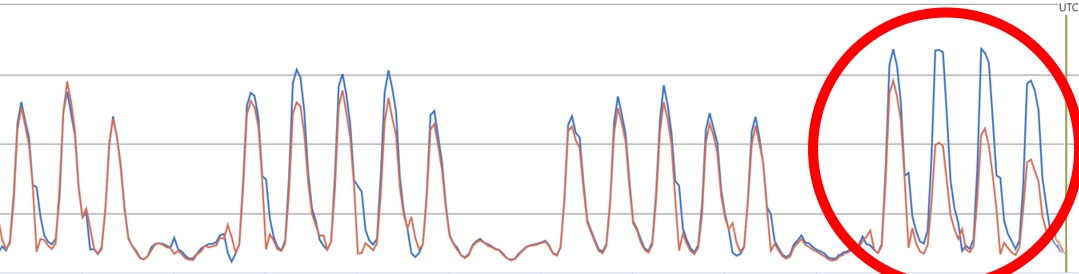
Frontend service CPU usage

The improvements to CPU usage have been significant. In the following chart, the red line represents a service that was upgraded to .NET 6. The blue line represents a service that has remained on .NET Framework. You can see the point where the .NET 6 upgrade occurred and the improvement we delivered.

Frontend CPU chart

Frontend service P75 latency of a key API

Frontend GetRuntimeForm P75 latency

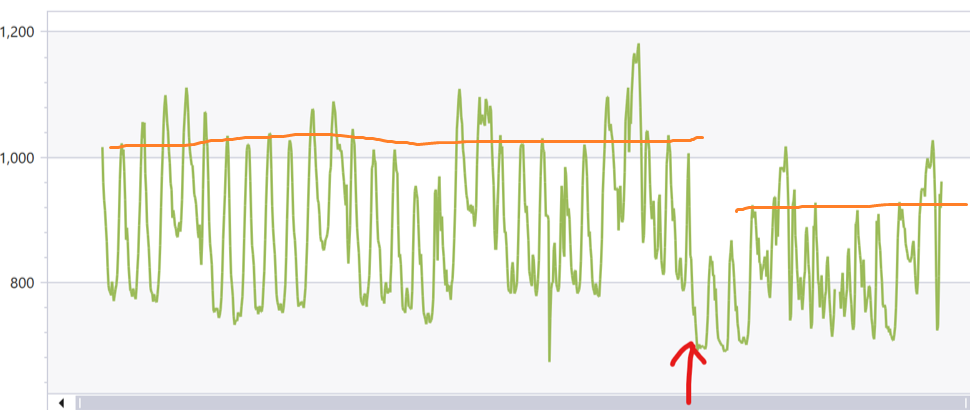
Backend net472/net6 service CPU efficiency comparison

Here, you can clearly see the significant CPU efficiency improvements that result from switching from IIS+ASP.NET (light blue line for RPS, green line for process CPU) to the .NET 6 process (blue line for RPS, orange line for process CPU). Backend CPU efficiency chart

In conclusion, you can see prominent CPU efficiency improvement in both frontend and backend, request latency and working set improvements are not as prominent, but also exciting. With these improvements, we have cut down 30+% of our cloud service computation cost.

Most importantly, the team has built new skills upon the modern .NET technology stack. Every team member is happy and excited about that and eagerly pursuing opportunities to take advantage of the new platform, to write more efficient code, and to design and build more attractive features. And now, we’re starting to consider .NET 8!

The post Microsoft Forms Service’s Journey to .NET 6 appeared first on .NET Blog.


source https://devblogs.microsoft.com/dotnet/microsoft-forms-services-journey-to-dotnet-6/

Learn Supabase (Firebase Alternative) – Full Tutorial for Beginners


Curriculum for the course Learn Supabase (Firebase Alternative) – Full Tutorial for Beginners

Learn how to use Supabase in this full course for beginners. Supabase is an open source Firebase alternative for building secure and performant Postgres backends with minimal configuration. 💻 Code: https://github.com/guillaumeduhan/supabase-vue3 ✏️ Course developed by @codewithguillaume ⭐️ Contents ⭐️ ⌨️ (0:00:00) Introduction ⌨️ (0:04:13) Create a project ⌨️ (0:15:58) Tables ⌨️ (0:30:37) RLS (Row Level Security) ⌨️ (0:44:52) Authentication ⌨️ (0:53:49) User management ⌨️ (0:59:16) Recover password ⌨️ (1:04:37) E-mails templates ⌨️ (1:11:28) URL Configuration ⌨️ (1:13:54) Read, insert or delete ⌨️ (1:32:09) Subscriptions ⌨️ (1:40:16) Relations ⌨️ (1:45:15) Functions ⌨️ (1:52:00) Triggers ⌨️ (2:00:37) Schemas ⌨️ (2:05:02) Storage ⌨️ (2:12:49) Logs ⌨️ (2:19:11) Extensions ⌨️ (2:24:43) Realtime ⌨️ (2:30:04) Edge-functions ⌨️ (2:44:14) Webhooks ⌨️ (2:49:53) Self-host or Local dev 🎉 Thanks to our Champion and Sponsor supporters: 👾 davthecoder 👾 jedi-or-sith 👾 南宮千影 👾 Agustín Kussrow 👾 Nattira Maneerat 👾 Heather Wcislo 👾 Serhiy Kalinets 👾 Justin Hual 👾 Otis Morgan -- Learn to code for free and get a developer job: https://www.freecodecamp.org Read hundreds of articles on programming: https://freecodecamp.org/news

Watch Online Full Course: Learn Supabase (Firebase Alternative) – Full Tutorial for Beginners


Click Here to watch on Youtube: Learn Supabase (Firebase Alternative) – Full Tutorial for Beginners


This video is first published on youtube via freecodecamp. If Video does not appear here, you can watch this on Youtube always.


Udemy Learn Supabase (Firebase Alternative) – Full Tutorial for Beginners courses free download, Plurasight Learn Supabase (Firebase Alternative) – Full Tutorial for Beginners courses free download, Linda Learn Supabase (Firebase Alternative) – Full Tutorial for Beginners courses free download, Coursera Learn Supabase (Firebase Alternative) – Full Tutorial for Beginners course download free, Brad Hussey udemy course free, free programming full course download, full course with project files, Download full project free, College major project download, CS major project idea, EC major project idea, clone projects download free

Pointers in C for Absolute Beginners – Full Course


Curriculum for the course Pointers in C for Absolute Beginners – Full Course

Finally understand pointers in C in this course for absolute beginners. Pointers are variables that store the memory address of another variable. They "point" to the location of data in memory. With a bunch of examples, this course demystifies pointers and their various uses, covering topics such as passing by reference vs. value, void pointers, arrays, and more. ✏️ Course created by @suspectedoceano2016 ⭐️ Contents ⭐️ (0:00:00) Introduction (0:00:39) What is a computer eli5 CPU, RAM, bytes (0:08:04) Data Types (0:13:31) Intro to processes (0:16:44) process memory layout (0:19:17) Variables in memory (0:23:01) Naive change_value program (0:28:05) Change_value with pointers (0:33:03) The classic swap (0:34:05) Why declaration and dereference have the same syntax for pointers? (0:38:39) Advantages of passing by reference va passing by value (0:45:26) Why do pointers to different data types have the same size? (0:47:49) Given that pointers have all the same size, why do we need a pointer type? (0:58:16) void pointers are confusing (1:00:14) why malloc is handy and more on void* (1:09:09) Are arrays just pointers? (1:25:00) Array Decay into a pointer (1:32:59) why array decay is useful? (1:37:49) arr[5] == 5[arr] (1:39:04) pointers to pointers: **argv (1:47:11) *argv[] or **argv? (1:52:41) pointer to functions (1:59:02) use case with pointers to functions 🎉 Thanks to our Champion and Sponsor supporters: 👾 davthecoder 👾 jedi-or-sith 👾 南宮千影 👾 Agustín Kussrow 👾 Nattira Maneerat 👾 Heather Wcislo 👾 Serhiy Kalinets 👾 Justin Hual 👾 Otis Morgan -- Learn to code for free and get a developer job: https://www.freecodecamp.org Read hundreds of articles on programming: https://freecodecamp.org/news

Watch Online Full Course: Pointers in C for Absolute Beginners – Full Course


Click Here to watch on Youtube: Pointers in C for Absolute Beginners – Full Course


This video is first published on youtube via freecodecamp. If Video does not appear here, you can watch this on Youtube always.


Udemy Pointers in C for Absolute Beginners – Full Course courses free download, Plurasight Pointers in C for Absolute Beginners – Full Course courses free download, Linda Pointers in C for Absolute Beginners – Full Course courses free download, Coursera Pointers in C for Absolute Beginners – Full Course course download free, Brad Hussey udemy course free, free programming full course download, full course with project files, Download full project free, College major project download, CS major project idea, EC major project idea, clone projects download free

.NET Framework June 2023 Security and Quality Rollup

Today, we are releasing the June 2023 Security and Quality Rollup for .NET Framework.

Security

CVE-2023-24897 – .NET Framework Remote Code Execution Vulnerability

This security update addresses a vulnerability in the MSDIA SDK where corrupted PDBs can cause heap overflow, leading to a crash or remove code execution.

CVE-2023-29326 – .NET Framework Remote Code Execution Vulnerability

This security update addresses a vulnerability in WPF where the BAML offers other ways to instantiate types that leads to an elevation of privilege.

CVE-2023-24895 – .NET Framework Remote Code Execution Vulnerability

This security update addresses a vulnerability in the WPF XAML parser where an unsandboxed parser can lead to remote code execution.

CVE-2023-24936 – .NET Framework Elevation of Privilege Vulnerability

This security update addresses a vulnerability in bypass restrictions when deserializing a DataSet or DataTable from XML, leading to an elevation of privilege.

CVE-2023-29331 – .NET Framework Denial of Service Vulnerability

This security update addresses a vulnerability where the AIA fetching process for client certificates can lead to denial of service.

CVE-2023-29330 – .NET Framework Denial of Service Vulnerability

This security update addresses a vulnerability where X509Certificate2 file handling can lead to denial of service.

Quality and Reliability

This release contains the following quality and reliability improvements.

WPF1
  • Addresses an issue where using IsReadOnly property of TextBox and RichTextBox in ControlTemplate.Triggers throws an exception.
  • Addresses Null Reference Exception reloading XPS document after adjusting column width for Datagrid and Gridview controls.
  • Addresses Null Reference Exception when ToolTip is visible property is overridden to be always be false.
  • Addresses an issue to avoid ArgumentOutOfRangeException when ControlTemplate has two or more ItemsPresenter sharing a single ItemsCollection.
  • Addresses ArgumentNullException that can arise in apps, or libraries, that directly set the IsOpen property on ToolTips or their Popups.
SQL Connectivity
  • Addresses an issue where SQL connection created is not terminated by the library when this error is thrown or is leaked in the client application.

1 Windows Presentation Foundation (WPF)

Getting the Update

The Security and Quality Rollup is available via Windows Update, Windows Server Update Services, and Microsoft Update Catalog. The Security Only Update is available via Windows Server Update Services and Microsoft Update Catalog.

Note: Customers that rely on Windows Update and Windows Server Update Services will automatically receive the .NET Framework version-specific updates. Advanced system administrators can also take use of the below direct Microsoft Update Catalog download links to .NET Framework-specific updates. Before applying these updates, please ensure that you carefully review the .NET Framework version applicability, to ensure that you only install updates on systems where they apply.

The following table is for Windows 10, version 1507 and Windows Server 2016 versions and newer operating systems.

Product Version Cumulative Update
Windows 11, version 22H2
.NET Framework 3.5, 4.8.1 Catalog 5027119
Windows 11, version 21H2 5027539
.NET Framework 3.5, 4.8 Catalog 5027125
.NET Framework 3.5, 4.8.1 Catalog 5027118
Microsoft server operating system, version 22H2 5027535
.NET Framework 3.5, 4.8 Catalog 5027127
Microsoft server operating system version 21H2 5027544
.NET Framework 3.5, 4.8 Catalog 5027127
.NET Framework 3.5, 4.8.1 Catalog 5027121
Windows 10, version 22H2 5027538
.NET Framework 3.5, 4.8 Catalog 5027122
.NET Framework 3.5, 4.8.1 Catalog 5027117
Windows 10, version 21H2 5027537
.NET Framework 3.5, 4.8 Catalog 5027122
.NET Framework 3.5, 4.8.1 Catalog 5027117
Windows 10 1809 (October 2018 Update) and Windows Server 2019 5027536
.NET Framework 3.5, 4.7.2 Catalog 5027131
.NET Framework 3.5, 4.8 Catalog 5027124
Windows 10 1607 (Anniversary Update) and Windows Server 2016
.NET Framework 3.5, 4.6.2, 4.7, 4.7.1, 4.7.2 Catalog 5027219
.NET Framework 4.8 Catalog 5027123
Windows 10 1507
.NET Framework 3.5, 4.6, 4.6.2 Catalog 5027230

The following table is for earlier Windows and Windows Server versions.

Product Version Security and Quality Rollup Security Only Update
Windows Embedded 8.1 and Windows Server 2012 R2 5027542 5027533
.NET Framework 3.5 Catalog 5027141 Catalog 5027116
.NET Framework 4.6.2, 4.7, 4.7.1, 4.7.2 Catalog 5027133 Catalog 5027112
.NET Framework 4.8 Catalog 5027128 Catalog 5027109
Windows Embedded 8 and Windows Server 2012 5027541 5027532
.NET Framework 3.5 Catalog 5027138 Catalog 5027107
.NET Framework 4.6.2, 4.7, 4.7.1, 4.7.2 Catalog 5027132 Catalog 5027111
.NET Framework 4.8 Catalog 5027126 Catalog 5027108
Windows Embedded 7 and Windows Server 2008 R2 SP1 5027540 5027531
.NET Framework 3.5.1 Catalog 5027140 Catalog 5027115
.NET Framework 4.6.2, 4.7, 4.7.1, 4.7.2 Catalog 5027134 Catalog 5027113
.NET Framework 4.8 Catalog 5027129 Catalog 5027110
Windows Server 2008 5027543 5027534
.NET Framework 2.0, 3.0 Catalog 5027139 Catalog 5027114
.NET Framework 4.6.2 Catalog 5027134 Catalog 5027113


Previous Monthly Rollups

The last few .NET Framework Monthly updates are listed below for your convenience:

The post .NET Framework June 2023 Security and Quality Rollup appeared first on .NET Blog.


source https://devblogs.microsoft.com/dotnet/dotnet-framework-june-2023-security-and-quality-rollup/

.NET June 2023 Updates – .NET 7.0.7, .NET 6.0.18

Today, we are releasing the .NET June 2023 Updates. These updates contain security and non-security improvements. Your app may be vulnerable if you have not deployed a recent .NET update.

You can download 7.0.7 and 6.0.18 versions for Windows, macOS, and Linux, for x86, x64, Arm32, and Arm64.

Windows Package Manager CLI (winget)

You can now install .NET updates using the Windows Package Manager CLI (winget):

  • To install the .NET 7 runtime: winget install dotnet-runtime-7
  • To install the .NET 7 SDK: winget install dotnet-sdk-7
  • To update an existing installation: winget upgrade

See Install with Windows Package Manager (winget) for more information.

Improvements

Security

CVE-2023-24895 – .NET Remote Code Execution Vulnerability

Microsoft is releasing this security advisory to provide information about a vulnerability in .NET 7.0 and .NET 6.0. This advisory also provides guidance on what developers can do to update their applications to remove this vulnerability.

A vulnerability exists in how WPF for .NET handles certain XAML Frame elements which may result in remote code execution.

CVE-2023-24897 – .NET Remote Code Execution Vulnerability

Microsoft is releasing this security advisory to provide information about a vulnerability in .NET 7.0 and .NET 6.0. This advisory also provides guidance on what developers can do to update their applications to remove this vulnerability.

A vulnerability exists in how .NET reads debugging symbols, where reading a malicious symbols file may result in remote code execution.

CVE-2023-24936 – .NET Elevation of Privilege Vulnerability

Microsoft is releasing this security advisory to provide information about a vulnerability in .NET 7.0 and .NET 6.0. This advisory also provides guidance on what developers can do to update their applications to remove this vulnerability.

A vulnerability exists in .NET when deserializing a DataSet or DataTable from XML which may result in elevation of privileges.

CVE-2023-29331 – .NET Denial of Service Vulnerability

Microsoft is releasing this security advisory to provide information about a vulnerability in .NET 7.0 and .NET 6.0. This advisory also provides guidance on what developers can do to update their applications to remove this vulnerability.

A vulnerability exists in .NET when processing X.509 certificates that may result in Denial of Service.

CVE-2023-29337 – NuGet Client Remote Code Execution Vulnerability

Microsoft is releasing this security advisory to provide information about a vulnerability in .NET and NuGet on Linux. This advisory also provides guidance on what developers can do to update their applications to remove this vulnerability.

A vulnerability exists in nuget where a potential race condition that can lead to a symlink attack

CVE-2023-32032 – .NET Denial of Service Vulnerability

Microsoft is releasing this security advisory to provide information about a vulnerability in .NET 7.0 and .NET 6.0. This advisory also provides guidance on what developers can do to update their applications to remove this vulnerability.

A vulnerability exists in .NET using extracting the contents of a Tar file which may result in elevation of privileges.

CVE-2023-33126 – .NET Denial of Service Vulnerability

Microsoft is releasing this security advisory to provide information about a vulnerability in .NET 7.0 and .NET 6.0. This advisory also provides guidance on what developers can do to update their applications to remove this vulnerability.

A vulnerability exists in .NET during crash and stack trace scenarios that could lead to loading arbitrary binaries.

CVE-2023-33128 – .NET Denial of Service Vulnerability

Microsoft is releasing this security advisory to provide information about a vulnerability in .NET 7.0 and .NET 6.0. This advisory also provides guidance on what developers can do to update their applications to remove this vulnerability.

A vulnerability exists in .NET source generator for P/Invokes that can lead to generated code freeing uninitialized memory and crashing.

CVE-2023-33135 – .NET Denial of Service Vulnerability

Microsoft is releasing this security advisory to provide information about a vulnerability in .NET 7.0 and .NET 6.0. This advisory also provides guidance on what developers can do to update their applications to remove this vulnerability.

A vulnerability exists in the .NET SDK during tool restore which can lead to an elevation of privilege.

Visual Studio

See release notes for Visual Studio compatibility for .NET 7.0 and .NET 6.0.

The post .NET June 2023 Updates – .NET 7.0.7, .NET 6.0.18 appeared first on .NET Blog.


Announcing .NET MAUI in .NET 8 Preview 5

Hello everyone! I’m thrilled to announce that .NET MAUI in .NET 8 Preview 5 is now available with lots of bug fixes and performance improvements for cross-platform app development. In this post, I’ll summarize some of the most important changes in this release and show you how to update your .NET MAUI project to use this release.

What’s fixed and improved in .NET MAUI

Preview 5 is another quality-focused update that fixes many issues and enhances the performance of the framework, including:

  • iOS Keyboard Scrolling: ContentInsets were added to improve the scrolling behavior of the iOS keyboard. #14371
  • Test Improvements: Various improvements and fixes were made to the tests, including the removal of the skip attribute from a test related to SearchBarHandler. #14852
  • Performance Enhancements: Performance improvements were made to the {Binding} mechanism and the layout performance of labels on Android. #14830, #14933, #14980
  • Bug Fixes: Several bug fixes were implemented, addressing issues such as gestures in Label Spans, Entry issues with the keyboard, Label truncation on iOS, CollectionView issues, ContentView RTL, and more. #14410, #14382, #14453, #14391, #11763, #15114, #12909

These are just some of the highlights of this release. For a complete list of changes, please check out the release notes.

How to update

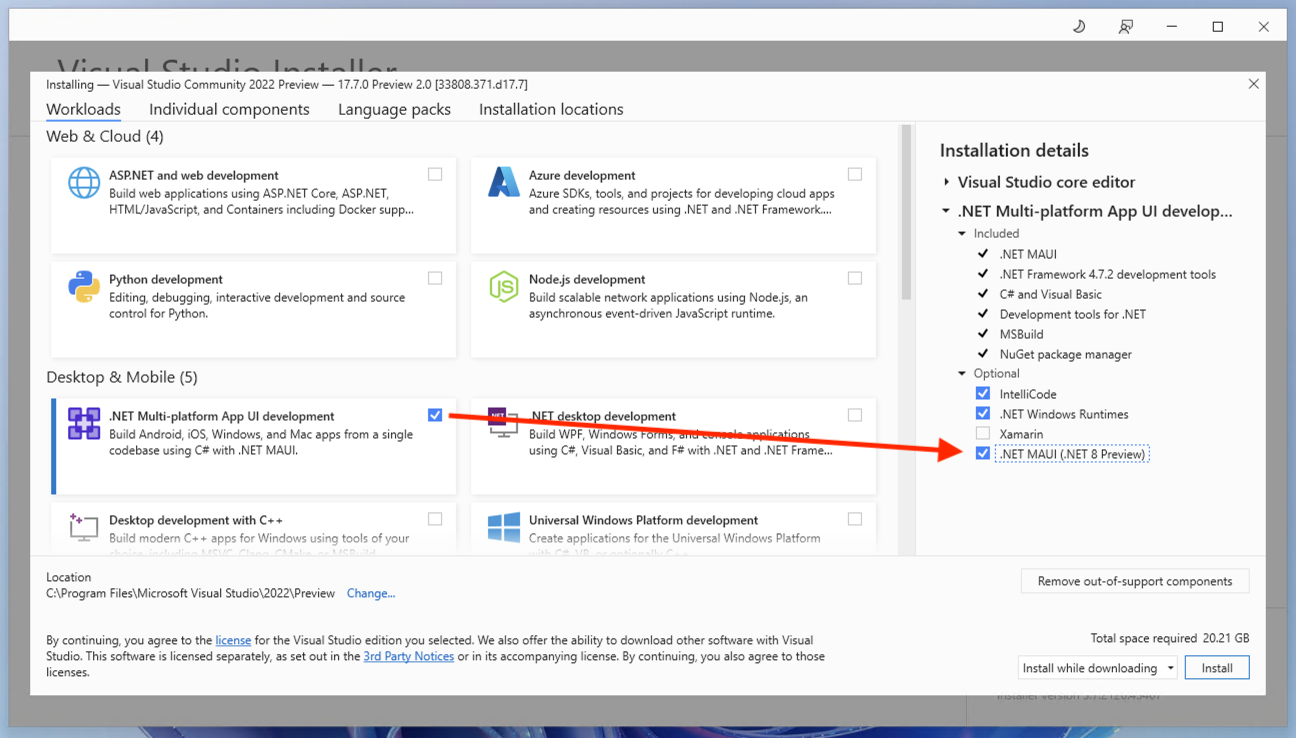
Visual Studio 2022 on Windows now includes .NET 8 previews and the .NET MAUI preview workload. Download the latest preview version 17.7 Preview 2, select the .NET Multi-platform App UI workload, and then check the optional component “.NET MAUI (.NET 8 Preview)”.

Visual Studio installer checkbox for .NET MAUI and .NET 8 previews

If you are on macOS, you may download the .NET 8 preview 5 installer, and then install .NET MAUI from the command line:

dotnet workload install maui

To verify that everything is installed correctly, you can run the following command:

dotnet --list-sdks

You should see something like this:

8.0.100-preview.5.23303.2 [C:\Program Files\dotnet\sdk]

And to verify you have the correct .NET MAUI workload, run the command:

dotnet workload list

You should see something like this:

Installed Workload Id      Manifest Version                            Installation Source
-----------------------------------------------------------------------------------------------------------
maui-windows               8.0.0-preview.5.8529/8.0.100-preview.5      VS 17.5.33627.172, VS 17.7.33808.371
maui-maccatalyst           8.0.0-preview.5.8529/8.0.100-preview.5      VS 17.5.33627.172, VS 17.7.33808.371
maccatalyst                16.4.8525-net8-p5/8.0.100-preview.5         VS 17.5.33627.172, VS 17.7.33808.371
maui-ios                   8.0.0-preview.5.8529/8.0.100-preview.5      VS 17.5.33627.172, VS 17.7.33808.371
ios                        16.4.8525-net8-p5/8.0.100-preview.5         VS 17.5.33627.172, VS 17.7.33808.371
maui-android               8.0.0-preview.5.8529/8.0.100-preview.5      VS 17.5.33627.172, VS 17.7.33808.371
android                    34.0.0-preview.5.312/8.0.100-preview.5      VS 17.5.33627.172, VS 17.7.33808.371

Updating existing projects

To update your .NET MAUI project to use 8.0.0-preview.5.8506, you first need to install the .NET 8 Preview 5 SDK and then update the .NET MAUI NuGet packages in your project. You can use Visual Studio or Visual Studio for Mac to manage your NuGet packages or edit your project file manually.

To use Visual Studio or Visual Studio for Mac, right-click on your project and select “Manage NuGet Packages…” then select the “Include prerelease” option and search for Microsoft.Maui. packages. Update all the packages to version 8.0.0-preview.5.8506. To edit your project file manually, open it in a text editor and find the ItemGroup element that contains the PackageReference elements for Microsoft.Maui. packages. Update all the Version attributes to 8.0.0-preview.5.8506.

Your project file should have an ItemGroup that looks something like this:

<ItemGroup>
    <PackageReference Include="Microsoft.Maui.Controls" Version="$(MauiVersion)" />
    <PackageReference Include="Microsoft.Maui.Controls.Compatibility" Version="$(MauiVersion)" />
    <PackageReference Include="Microsoft.Extensions.Logging.Debug" Version="8.0.0-preview.5.23280.8" />
</ItemGroup>

Now you can build and run your project using Visual Studio or Visual Studio for Mac or use the dotnet build command with the -t:Run target:

dotnet build -t:Run -f net8-android MyMauiApp.csproj

This will build and launch your app on an Android emulator or device.

Feedback Welcome

We appreciate your feedback and contributions to .NET MAUI. You can report issues, suggest features, or submit pull requests on our GitHub repository. You can also join our Discord server or follow us on Twitter to stay in touch with the latest news and updates.

Thank you for your support and happy coding!

The post Announcing .NET MAUI in .NET 8 Preview 5 appeared first on .NET Blog.


source https://devblogs.microsoft.com/dotnet/announcing-dotnet-maui-in-dotnet-8-preview-5/

ASP.NET Core updates in .NET 8 Preview 5

.NET 8 Preview 5 is now available and includes many great new improvements to ASP.NET Core.

Here’s a summary of what’s new in this preview release:

  • Improved ASP.NET Core debugging experience
  • Servers & middleware
    • IHttpSysRequestTimingFeature
    • SNI hostname in ITlsHandshakeFeature
    • IExceptionHandler
  • Blazor
    • New Blazor Web App project template
    • Blazor router integration with endpoint routing
    • Enable interactivity for individual components with Blazor Server
    • Improved packaging of Webcil files
    • Blazor Content Security Policy (CSP) compatibility
  • API authoring
    • Support for generic attributes
  • SignalR
    • SignalR seamless reconnect
  • Native AOT
    • Support for AsParameters and automatic metadata generation in compile-timed generated minimal APIs
  • Authentication and authorization
    • Authentication updates in ASP.NET Core SPA templates
    • New analyzer for recommended AuthorizationBuilder usage

For more details on the ASP.NET Core work planned for .NET 8 see the full ASP.NET Core roadmap for .NET 8 on GitHub.

Get started

To get started with ASP.NET Core in .NET 8 Preview 5, install the .NET 8 SDK.

If you’re on Windows using Visual Studio, we recommend installing the latest Visual Studio 2022 preview. If you’re using Visual Studio Code, you can try out the new C# Dev Kit. Visual Studio for Mac support for .NET 8 previews isn’t available at this time.

Upgrade an existing project

To upgrade an existing ASP.NET Core app from .NET 8 Preview 4 to .NET 8 Preview 5:

  • Update the target framework of your app to net8.0.
  • Update all Microsoft.AspNetCore.* package references to 8.0.0-preview.5.*.
  • Update all Microsoft.Extensions.* package references to 8.0.0-preview.5.*.

See also the full list of breaking changes in ASP.NET Core for .NET 8.

Improved ASP.NET Core debugging experience

.NET 8 preview 5 introduces significant improvements to ASP.NET Core debugging. We’ve added debug customization attributes to make finding important information on types like HttpContext, HttpRequest, HttpResponse and ClaimsPrincipal easier in your IDE’s debugger.

.NET 7

ASP.NET Core debugging before

.NET 8

ASP.NET Core debugging after

We want to keep improving ASP.NET Core debugging. If you have suggestions about other commonly used or hard-to-debug types, let us know in the comments or on the aspnetcore GitHub repo.


Servers & middleware

IHttpSysRequestTimingFeature

The new IHttpSysRequestTimingFeature interface exposes detailed timestamp data related to request processing when using the HTTP.sys server.

Previously, HTTP.sys request information was provided via the IHttpSysRequestInfoFeature. With the addition of IHttpSysRequestTimingFeature, we’re moving towards more well-defined APIs that provide better access to request timing data.

namespace Microsoft.AspNetCore.Server.HttpSys
{
    public interface IHttpSysRequestTimingFeature
    {
        ReadOnlySpan<long> Timestamps { get; }
        bool TryGetTimestamp(HttpSysRequestTimingType timestampType, out long timestamp);
        bool TryGetElapsedTime(HttpSysRequestTimingType startingTimestampType, HttpSysRequestTimingType endingTimestampType, out TimeSpan elapsed);
    }
}

The Timestamps property gives access to all HTTP.sys timing timestamps. The timestamps are obtained using the QueryPerformanceCounter and the timestamp frequency can be determined via QueryPerformanceFrequency.

The TryGetTimestamp method retrieves the timestamp for the provided timing type, while TryGetElapsedTime method gives the elapsed time between two specified timings.

This enhancement provides developers with:

  • More granular insight into the various stages of request processing.
  • Precise performance diagnostics capabilities.
  • Improved access to and control over HTTP.sys request timing data.

We’re eager to see how this advanced access to HTTP.sys timing information helps optimize your applications and refine your diagnostics experience.

SNI hostname in ITlsHandshakeFeature

The Server Name Indication (SNI) hostname is now exposed in the ITlsHandshakeFeature interface.

/// <summary>
/// Gets the host name from the "server_name" (SNI) extension of the client hello if present.
/// See <see href="https://www.rfc-editor.org/rfc/rfc6066#section-3">RFC 6066</see>.
/// </summary>
string? HostName => null;

SNI is part of the TLS handshake process and allows clients to specify the hostname they’re attempting to connect to. This enables servers that host multiple virtual hosts or domains to present the correct security certificate during the handshake process. Normally SNI is only handled within the TLS stack and used to select the matching certificate, but by exposing it, other components in the application can use that information for diagnostics, rate limiting, routing, billing, etc.

Exposing the hostname is particularly useful for large-scale services managing thousands of SNI bindings. With this feature, you gain valuable insights into the chosen SNI during the TLS handshake, thereby significantly improving your debugging capabilities during customer escalations. This increased transparency allows for faster problem resolution and enhanced service reliability.

Thanks to karimsalem1 for contributing this feature!

IExceptionHandler

The exception handler middleware is an existing component used to catch un-expected request processing exceptions and return a user-friendly error page without leaking implementation details. IExceptionHandler is a new interface for services that can be resolved and invoked by the exception handler middleware. It gives the developer a callback that allows handling known exceptions in a central location.

IExceptionHandler‘s are registered by calling IServiceCollection.AddExceptionHandler<T>. Multiple can be added, and they’ll be called in the order registered. If an exception handler handles a request, it can return true to stop processing. If an exception isn’t handled by any exception handler, then control falls back to the old behavior and options from the middleware. Different metrics and logs will be emitted for handled versus unhandled exceptions.

public interface IExceptionHandler
{
    ValueTask<bool> TryHandleAsync(HttpContext httpContext, Exception exception, CancellationToken cancellationToken);
}


SignalR

SignalR seamless reconnect

This preview includes early support for “seamless reconnects” in SignalR. This feature aims to reduce the perceived downtime of clients that have a temporary hiccup in their network connection, due to switching network connections, driving through a tunnel, etc. It achieves this by temporarily buffering data on the server and client and ack-ing messages sent by both sides, as well as recognizing when a connection is returning and replaying messages that may have been sent while the connection was down.

Because the feature is still being designed, there isn’t any configuration yet and support is limited to .NET clients using WebSockets.

To opt-in to the feature, update your .NET client code to enable the option:

var hubConnection = new HubConnectionBuilder()
    .WithUrl("<hub url>",
             options =>
             {
                options.UseAcks = true;
             })
    .Build();

In future previews there will likely be options to disable the feature from the server-side, configuration for how much buffering will occur, and timeout limits. Additionally, support will be added for other transports and clients.

Please provide feedback and follow along with the progress of the feature at https://github.com/dotnet/aspnetcore/issues/46691.


Blazor

New Blazor Web App project template

In this preview we’re introducing a new Blazor project template: the Blazor Web App template. This new template provides a single starting point for using Blazor components to build any style of web UI, both server-side rendered and client-side rendered. It combines the strengths of the existing Blazor Server and Blazor WebAssembly hosting models with the new Blazor capabilities we’re adding in .NET 8: server-side rendering, streaming rendering, enhanced navigation & form handling, and the ability to add interactivity using either Blazor Server or Blazor WebAssembly on a per component basis. Not all of these features are enabled yet in this preview, but the new Blazor Web App template provides a convenient way to try out these new features as they become available.

You can create a new Blazor Web App from the command line by running:

dotnet new blazor -o BlazorWebApp

The new Blazor Web App project template is also available in Visual Studio:

Blazor Web App project template

The Blazor Web App template is set up for server-side rendering of Razor components by default. In Program.cs the call to AddRazorComponents() adds the related services and then MapRazorComponents<App>() discovers the available components and specifies the root component for the app.

Program.cs

using BlazorWebApp;

var builder = WebApplication.CreateBuilder(args);

// Add services to the container.
builder.Services.AddRazorComponents();

var app = builder.Build();

// ...

app.MapRazorComponents<App>();

app.Run();

The root App component in the Blazor Web App template defines the root HTML content, sets up the Blazor router, and adds the blazor.web.js script. The previously required IRazorComponentApplication interface is no longer needed.

App.razor

<!DOCTYPE html>
<html lang="en">

<head>
    <meta charset="utf-8" />
    <meta name="viewport" content="width=device-width, initial-scale=1.0, maximum-scale=1.0, user-scalable=no" />
    <title>BlazorWebApp1</title>
    <base href="/" />
    <link href="css/bootstrap/bootstrap.min.css" rel="stylesheet" />
    <link href="css/app.css" rel="stylesheet" />
    <link rel="icon" type="image/png" href="favicon.png" />
    <link href="BlazorWebApp1.styles.css" rel="stylesheet" />
    <HeadOutlet />
</head>

<body>

    <Router AppAssembly="@typeof(App).Assembly">
        <Found Context="routeData">
            <RouteView RouteData="@routeData" DefaultLayout="@typeof(MainLayout)" />
            <FocusOnNavigate RouteData="@routeData" Selector="h1" />
        </Found>
        <NotFound>
            <PageTitle>Not found</PageTitle>
            <LayoutView Layout="@typeof(MainLayout)">
                <p role="alert">Sorry, there's nothing at this address.</p>
            </LayoutView>
        </NotFound>
    </Router>


</body>
</html>

Blazor router integration with endpoint routing

The Blazor Router component now integrates with endpoint routing to handle both server and client-side routing. This means routing to components with server-side rendering works just like it does with client-side rendering. It also means you can now use the Router to specify a default layout.

The new Blazor Web App template includes a couple of sample pages with routes. Index.razor defines the home page for the app and contains just some basic markup. ShowData.razor uses streaming rendering to display some weather forecast data. The Router component integrates with endpoint routing to route requests to these pages.

Note that each page navigation currently requires a full page load. By default the app isn’t set up for client routing, and we haven’t added support for enhanced page navigation yet. Enhanced navigation is coming soon in a future .NET 8 preview.

Enable interactivity for individual components with Blazor Server

In .NET 8 Preview 5 we can now enable interactivity for individual components using the Blazor Server rendering mode. You can enable interactivity with Blazor Server using the AddServerComponents extension method, and then enable interactivity for specific components using the new [RenderModeServer] attribute.

The new Blazor Web App template isn’t set up by default for any type of interactivity, Blazor Server or Blazor WebAssembly, so there’s no Counter component. But we can add a Counter component and set it up for interactivity ourselves.

To add a page with a Counter component:

  1. Create a counter page by adding a Pages/Counter.razor file with the following content:
    @page "/counter"
    
    <PageTitle>Counter</PageTitle>
    
    <h1>Counter</h1>
    
    <p role="status">Current count: @currentCount</p>
    
    <button class="btn btn-primary" @onclick="IncrementCount">Click me</button>
    
    @code {
        private int currentCount = 0;
    
        private void IncrementCount()
        {
            currentCount++;
        }
    }
  2. Update Shared/NavMenu.razor to add a link for the counter page:
    <div class="nav-item px-3">
        <NavLink class="nav-link" href="counter">
            <span class="oi oi-plus" aria-hidden="true"></span> Counter
        </NavLink>
    </div>

You can now browse to the counter page, but the counter button doesn’t work yet because the page is only being server-side rendered.

To setup interactivity for the Counter component using Blazor Server:

  1. In Program.cs add the services for Blazor Server interactivity:
    builder.Services.AddRazorComponents()
        .AddServerComponents();
  2. In Pages/Counter.razor add the [RenderModeServer] attribute:
    @attribute [RenderModeServer]

Now when you browse to the counter page it should be interactive. A Blazor Server connection is established when you browse to the page. When you click the Counter button the onclick event is fired, which increments the count.

If you want to create a Blazor Web App that is already set up with an interactive Counter you can do that from the command line by passing the --use-server option:

dotnet new blazor --use-server -o BlazorWebApp

The --use-server option is not yet available when creating a Blazor Web App from Visual Studio, but we expect to add it there soon.

In this preview release, once the Blazor Server connection and circuit is established it sticks around even when you leave the counter page. We expect to improve how the lifetime of circuits are managed in a future update. Also, while some of the APIs for the Blazor WebAssembly render mode have been added in this preview (like the [RenderModeWebAssembly] attribute), support for running interactively on WebAssembly isn’t fully implemented yet. That will come in a future update too.

Improved packaging of Webcil files

Webcil is new web-friendly packaging format for .NET assemblies that is designed to enable using Blazor WebAssembly in restrictive network environments. In .NET 8 Preview 5 we’ve improved the Webcil format by adding a standard WebAssembly wrapper. This means that Webcil files are now just WebAssembly files that have the standard .wasm extension.

Webcil is now the default packaging format when you publish a Blazor WebAssembly app. If you wish to disable the use of Webcil, you may do so by setting <WasmEnableWebcil>false</WasmEnableWebcil> in your project file.

Blazor Content Security Policy (CSP) compatibility

Blazor WebAssembly no longer requires enabling the unsafe-eval script source when specifying a Content Security Policy (CSP).


API authoring

Support for generic attributes

Attributes that previously required a System.Type parameter are now available in cleaner generic variants. This is made possible by support for generic attributes in C# 11. For example, the syntax for annotating the response type of an action can be modified as follows:

[ApiController]
[Route("api/[controller]")]
public class TodosController : Controller
{
  [HttpGet("/")]
  // Before: [ProducesResponseType(typeof(Todo), StatusCodes.Status200OK)]
  [ProducesResponseType<Todo>(StatusCodes.Status200OK)]
  public Todo Get() => new Todo(1, "Write a sample", DateTime.Now, false);
}

Generic variants are supported for the following attributes:

  • [ProducesResponseType<T>]
  • [Produces<T>]
  • [MiddlewareFilter<T>]
  • [ModelBinder<T>]
  • [ModelMetadataType<T>]
  • [ServiceFilter<T>]
  • [TypeFilter<T>]


Native AOT

Support for AsParameters and automatic metadata generation in compile-timed generated minimal APIs

In .NET 8 Preview 3 we introduced compile-time code generation for minimal APIs to support Native AOT scenarios. In this preview, minimal APIs generated at compile-time now include support for parameters decorated with the AsParameters attribute and support automatic metadata inference for request and response types.

For example, in the sample below, the generated code will:

  • Bind a projectId parameter from the query
  • Bind a Todo parameter from the JSON body
  • Annotate the endpoint metadata to indicate that it accepts a JSON payload
  • Annotate the endpoint metadata to indicate that it returns a Todo as a JSON payload
var app = WebApplication.Create();

app.MapPost("/todos", ([AsParameters] CreateTodoArgs payload) => 
{
    if (payload.TodoToCreate is not null)
    {
        return payload.TodoToCreate;
    }
    return new Todo(0, "New todo", DateTime.Now, false);
});

app.Run();

record CreateTodoArgs(int ProjectId, Todo? TodoToCreate);
record Todo(int Id, string Name, DateTime CreatedAt, bool IsCompleted);

This behavior matches that of the run-time code generation for minimal APIs.


Authentication and authorization

Authentication updates in ASP.NET Core SPA templates

The ASP.NET Core React and Angular project templates no longer have a dependency on the Duende IdentityServer. Instead, these templates now handle authentication for individual user accounts using the default ASP.NET Core Identity UI and cookie authentication. This makes it possible to create secure single page app (SPA) projects without the complexity of configuring and managing a full-featured OpenID Connect (OIDC) server. For projects that still require full OIDC support, you can use the Duende project templates for setting up Duende IdentityServer with ASP.NET Core Identity.

In .NET 7 we introduced support for an AddAuthorizationBuilder API that allowed users to register authorization services and configure authorization policies with a much terser invocation pattern. In this preview, we introduce a new Roslyn analyzer to support updating to the terser syntax with the new AddAuthorizationBuilder API when applicable.
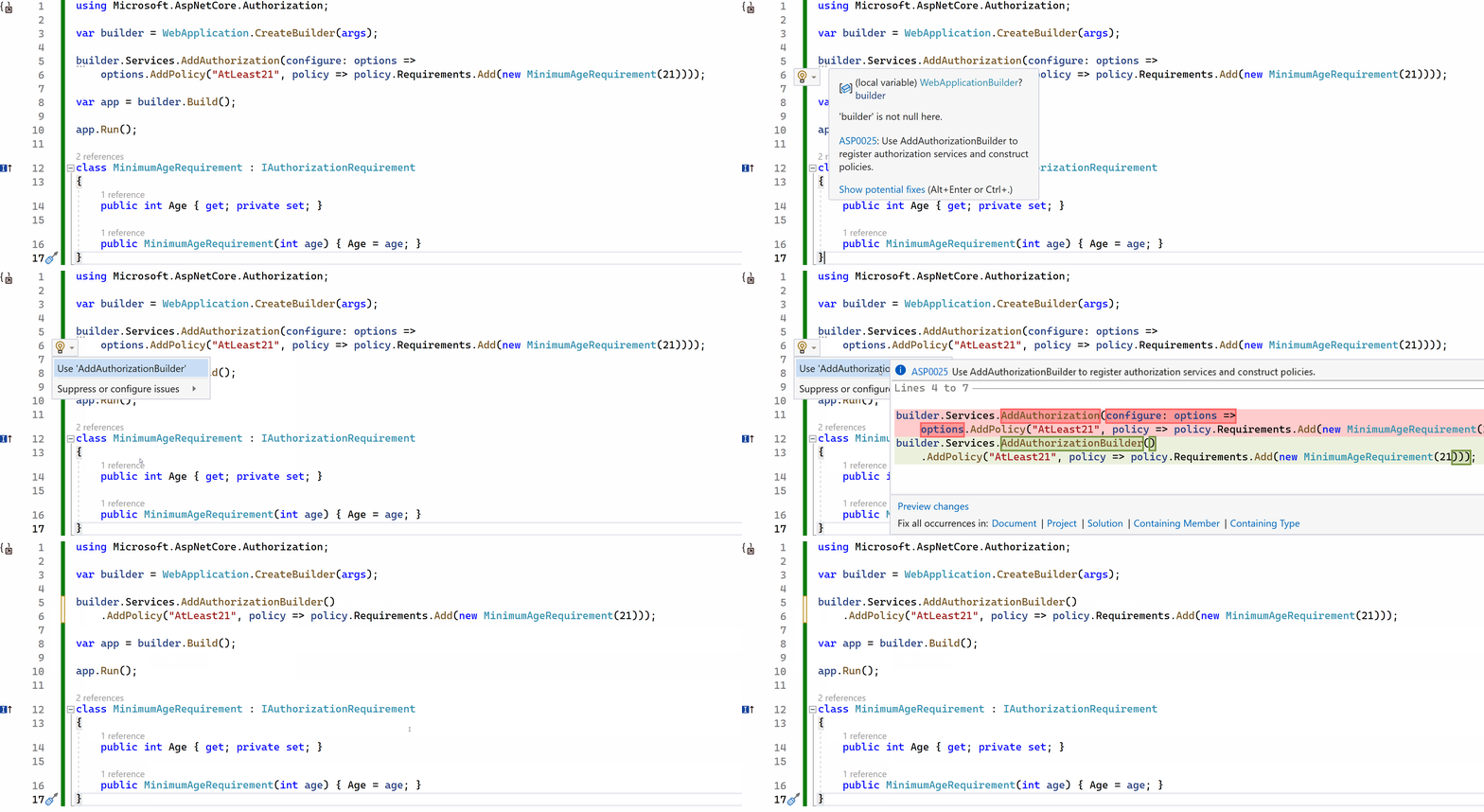
Demo of AddAuthorizationBuilder analyzer

Thanks to community member, David Acker, for contributing this new analyzer!

Give feedback

We hope you enjoy this preview release of ASP.NET Core in .NET 8. Let us know what you think about these new improvements by filing issues on GitHub.

Thanks for trying out ASP.NET Core!

The post ASP.NET Core updates in .NET 8 Preview 5 appeared first on .NET Blog.


source https://devblogs.microsoft.com/dotnet/asp-net-core-updates-in-dotnet-8-preview-5/

Announcing .NET 8 Preview 5

We’re excited to share all the new features and improvements in .NET 8 Preview 5! This release is a follow-up to the Preview 4 release. You’ll continue to see many more features show up with these monthly releases. .NET 6 and 7 users will want to follow this release closely since we have focused on making it a straightforward upgrade path.

You can download .NET 8 Preview 5 for Linux, macOS, and Windows.

Check out what’s new in ASP.NET Core in the Preview 5 release. Stay current with what’s new and coming in What’s New in .NET 8. It will be kept updated throughout the release.

Microsoft Build 2023 was a huge success in big part to .NET developers like you! The .NET team saw huge turnout for our sessions, where we talked about some of the most exciting features in .NET 8 and answered questions from attendees. Join the .NET Team at Microsoft Build 2023!

Now, let’s take a look at some new .NET 8 features.

Download .NET 8 Preview 5

SDK: Enhancements to Metrics APIs

Preview 5 brings a number of improvements and updates to metrics APIs that covers additional use cases.

Dependency Injection (DI) Friendly metrics APIs

The team is excited to introduce the IMeterFactory interface, which can be registered in DI containers and used to create Meter objects in an isolated manner.

            // service is the DI IServiceCollection 
            // Register the IMeterFactory to the DI container using the default meter factory implementation. 
            services.AddMetrics();

Consumers can now use the code below to create a meter factory and use it to easily create a new Meter object.

            IMeterFactory meterFactory = serviceProvider.GetRequiredService<IMeterFactory>();

            MeterOptions options = new MeterOptions("MeterName")
            {
                 Version = "version",
            };

            Meter meter = meterFactory.Create(options);

Enabling the creation of Meters and Instruments with Tags

Meters and Instruments [can also be created]((https://github.com/dotnet/runtime/pull/86740) with attached key-value pair tags. This feature allows aggregators of published metric measurements to differentiate the aggregated values based on these tags.

            MeterOptions options = new MeterOptions("name")
            {
                Version = "version",

                // Attach these tags to the created meter
                Tags = new TagList() { { "MeterKey1", "MeterValue1" }, { "MeterKey2", "MeterValue2" } }
            };

            Meter meter = meterFactory.Create(options);

            Instrument instrument = meter.CreateCounter<int>("counter", null, null, new TagList() { { "counterKey1", "counterValue1" } });
            instrument. Add(1);

The .NET SDK now includes Source Link to power-up the IDE experience when inspecting Sourcelinked NuGet Packages. The goal is that by bundling Source Link into the SDK instead of requiring a separate PackageReference, more packages will include this information by default. We believe this will create better IDE experiences for developers all-up!

Source Link is a language- and source-control agnostic system for providing first-class source debugging experiences for binaries. The goal of the project is to let anyone build NuGet libraries to provide source debugging for their users with little to no extra effort. Source Link is supported by Microsoft and is enabled by libraries such as .NET Core and Roslyn.

Visual Studio and many other editors support reading Source Link information from symbols while debugging. Editors can download and display the appropriate commit-specific source for users, such as from raw.githubusercontent, which enables breakpoints and all other sources debugging experience on arbitrary NuGet dependencies.

The shipped implementation of Source Link includes providers for git, GitHub, GitLab, Azure Repositories, and BitBucket, but there are even more providers available on NuGet.

You can find more information about Source Link at the Learn docs, and read more about the available settings the repo documentation.

SDK: New .NET Libraries analyzers

Analyzers are like coding partners built into SDK and the Interactive Development Environment (IDE) that recognize issues and suggest corrections as you write code. Starting from .NET 8 Preview 1, our team has added several analyzers and code fixers that help developers verify correct and/or more performant usage of .NET Library APIs. We are thrilled to mention that most of these analyzers have been implemented by our community members. We would like to extend a big thank you to all our contributors for their hard work and dedication.

Analyzer proposal and the contributor Description Category Severity Help Link
Pass constants to parameters marked as [ConstantExpected] by @wzchua CA1856 fires when the ConstantExpected attribute isn’t applied correctly on the parameter. CA1857 fires when a parameter is annotated with the ConstantExpected attribute, but the argument provided isn’t a constant. A constant should be used for optimal performance. Performance CA1856: Error CA1857: Warning CA1856, CA1857
Using StartsWith instead of IndexOf == 0 by @Youssef1313 It’s more efficient and clearer to call String.StartsWith than to call String.IndexOf and compare the result with zero to determine whether a string starts with a given prefix. Performance Info CA1858
Recommend use of concrete types to maximize devirtualization potential by @geeknoid This rule recommends upgrading the type of specific local variables, fields, properties, method parameters, and method return types from interface or abstract types to concrete types when possible. Using concrete types leads to higher quality generated code by minimizing virtual or interface dispatch overhead and enabling inlining. Performance Info CA1859
Prefer .Length/Count/IsEmpty over Any() by @CollinAlpert It’s more efficient and clearer to use Length, Count, or IsEmpty than to call Enumerable.Any extension method to determine whether a collection type has any elements Performance Info CA1860
Extract array of const to static readonly field @steveberdy Constant arrays passed as arguments aren’t reused when called repeatedly, which implies a new array is created each time. If the passed array isn’t mutated within the called method, consider extracting it to a static readonly field to improve performance. Performance Info CA1861
Do not use OfType() with impossible types by @fowl2 Enumerable.Cast<T> and Enumerable.OfType<T> require compatible types to function expectedly. Enumerable.Cast<T> will throw InvalidCastException at runtime for elements of incompatible types. Enumerable.OfType<T> will never succeed with elements of incompatible types, resulting in an empty sequence. Widening and user defined conversions aren’t supported with generic types. Reliability Warning CA2021
Convert argument null checks to ArgumentNullException.ThrowIfNull by @stephentoub Throw helpers are simpler and more efficient than an if block constructing a new exception instance. With this analyzer four analyzers added for: ArgumentNullException, ArgumentException, ArgumentOutOfRangeException and ObjectDisposedException throw helpers Maintainability Info CA1510, CA1511, CA1512, CA1513

We plan to continue adding more analyzers to .NET 8 to help developers write better code and we are hoping for even more community contributions. This is a great opportunity for the community to add a new complete feature to .NET 8 SDK.

If you are interested in contributing, please check out our list of analyzers that are ready for development and marked up for grabs.

SDK: Linux self-contained

The Linux distribution-built (source-build) SDK can now build self-contained applications that utilizes source-build runtime packages. Distribution specific runtime package will be bundled with the source-build SDK. During self-contained deployment, this bundled runtime package will be referenced and thereby enabling the feature for the user. Please note that there are no changes for the MS-built SDK.

Thanks to our Red Hat partners, especially @tmds, for their valuable contributions towards this feature.

SDK: Self-contained no longer default

Since .NET 6, specifying a runtime during publish has resulted in the following warning:

> warning NETSDK1179: One of '--self-contained' or '--no-self-contained' options are required when '--runtime' is used.

For .NET 8, this will finally go away. Going forward, -r/--runtime will no longer imply --self-contained for apps targeting net8.0 and higher Target Frameworks. If you intend that behavior, you’ll either need to

  • add the CLI option explicitly, or
  • add the <SelfContained>true</SelfContained> property to your project files

Apps targeting net7.0 or lower remain unaffected. You can read more about this change in the breaking change notice we’ve posted.

We’re making this change because we believe that targeting specific platforms is an independent decision from bundling the runtime for that platform. Defaulting more apps to framework-dependent deployments means that the runtime the app runs on can be safely updated without requiring a rebuild or redeployment. It also results in smaller app sizes than self-contained deployments.

Alpine ASP.NET Docker Composite Images

We are now offering a new ASP.NET Docker image that uses a newer variant of ready-to-run (R2R) compilation called “composite”. Composite R2R images are built by compiling multiple MSIL assemblies into a single R2R output binary. Composite images can have a combination of benefits: reduction of JIT time, reduced startup performance, and reduction of R2R image size.

Composite images have have tighter version coupling. This means the final app run cannot use different versions of framework (such as System.Reflection.Metadata and/or ASP.NET binaries than are embedded into the composite one. This limitation is why we are producing a new image flavor. It is possible that your apps won’t work with composite, as currently constructed.

This new container image is new. We decided to start with a new Alpine-based variant. Alpine images are often chosen due to smaller size, which aligns with the goal of this project. We may expand support to other images types, such as our distroless images, in future

Where can we get the composite images?

As of now, the composite images are available as preview in under the mcr.microsoft.com/dotnet/nightly/aspnet repo. The tags are listed with the -composite suffix in the official nightly Dotnet Docker page.

Runtime host determines RID-specific assets without RID graph by default

When running an application with Runtime (RID)-specific assets, the host determines which assets are relevant for the platform on which it’s running. This applies to both the application itself and the resolution logic used by AssemblyDependencyResolver. By default in .NET 8, this determination will no longer use the RID graph, but will rely on a known list of RIDs based on how the runtime itself was built.

The RID graph has proven to be costly to maintain, difficult to understand, and generally fragile. This change is part of a longer-term goal to simplify our RID model.

You can read more about this change in the breaking change notice.

Codegen

Dynamic Profile Guided Optimization (PGO) is now enabled by default, which means that special configuration settings are no longer needed. We anticipate performance for a broad class of applications will improve by anywhere from 5% to 500% (with 15% as a reasonable expectation), depending on the nature of the application bottlenecks. In our local benchmark suite of approximately 4600 tests, 23% improved by 20% or more.

Customer experience with PGO in past releases has been uniformly positive. If you are new to Dynamic PGO, however, we look forward to hearing about your experiences as well (good or bad).

If necessary, you can opt out of Dynamic PGO via

<TieredPGO>false</TieredPGO>

in your .csproj or via similar settings in the runtime config or environment.

NativeAOT: Optimized ThreadStatic field access for GC-type

Field accesses that are marked as ThreadStaticLocal are now optimized for primitive types. Reference type fields have been optimized as well. These changes have led some really good improvements in a number of benchmarks: (133 on windows/arm64, 23 on windows/x64, 16, 13, 11 improvements).

Arm64

Preview 5 also brings a number of few peephole optimizations:

  • With PR#85032, we enabled peephole optimization to replace str pair with stp.
  • With PR#85657, we enabled peephole optimization of replacing pair of ldr/str with ldp/stp inside prolog.

General optimizations

Our team has released a number of general optimizations that include:

  • x64 instructions such as movzx, movsx and movsxd have been optimized in PR#85780, which slightly improved code-gen by eliminating more redundant mov instructions.
  • PR#86318 improved constant folding for some frozen objects (non-GC objects). It reduced the size of the generated code by almost 10 times (e.g., 424 bytes to 41 byte).

AVX-512

  • PR#85389 enabled AVX-512 for block unrollings, which increases ranges where it previously used to fallback to memcpy/memset and reduced the execution time by half.
  • Various integer intrinsics are enabled for AVX512F, AVX512BW and AVX512CD, PR#85833.

Community PRs (Many thanks to JIT community contributors!)

  • @SingleAccretion contributed 18 PRs in Preview 5. Much of this work was focused on internal JIT cleanup with the eventual goal of greatly simplifying the internal representation (IR), in particular around the representation of assignments/stores.
    • PR#85180 marked the start of this work and in a future preview it will result in the JIT being several percent faster when compiling user functions.
  • @yesmey enabled unrolling StringBuilder.Append for const string that unblocks more AVX-512 usages. It improved the execution time of System.Tests.Perf_Enum benchmarks up to 8 % and StringBuilder up to 16%, PR#85894.
  • @MichalPetryka submitted PR#85398 that improved the JIT’s ability to reason about single-defined variables early-on, and PR#85349 that improved the JIT’s codegen for calls to function pointers without arguments.

Improve your productivity in VS Code with the C# Dev Kit extension!

The C# Dev Kit extension in VS Code is now available for public preview in VS Code! We’d appreciate your feedback using C# Dev Kit with .NET 8.

It is designed to improve your C# productivity in VS Code, C# Dev Kit helps you manage your code with a solution explorer, write code faster with AI-assisted suggestions and completions, and gives you new capabilities to run and debug tests in the Test Explorer. Using a Roslyn-powered language service, C# Dev Kit also greatly improves performance of C# language features such as code navigation, refactoring, IntelliSense, and more.

To get started with C# Dev Kit, check out our recent announcement blog post.

Community spotlight

DoctorKrolic

I am a .NET back-end developer with a strong passion for code analysis applications. Love building both robust back-end services and C# productivity tools! In my free time, I enjoy contributing to open-source projects and keeping up with the latest industry trends to continuously improve my skills and knowledge.

DoctorKrolic

Do you know somebody who is contributing to .NET that we should feature in future posts? Nominate them at https://aka.ms/net8contributor.

Summary

.NET 8 Preview 5 contains exciting new features and improvements that were made possible with the hard work and dedication of a diverse team of engineers at Microsoft as well as a passionate open-source community. We want to extend our sincere thanks to everyone who has contributed to .NET 8 so far, whether it was through code contributions, bug reports, or providing feedback.

Your contributions have been instrumental in the making .NET 8 Previews, and we look forward to continuing to work together to build a brighter future for .NET and the entire technology community.

Curious about what is coming? Go see for yourself what’s next in .NET!

The post Announcing .NET 8 Preview 5 appeared first on .NET Blog.


source https://devblogs.microsoft.com/dotnet/announcing-dotnet-8-preview-5/
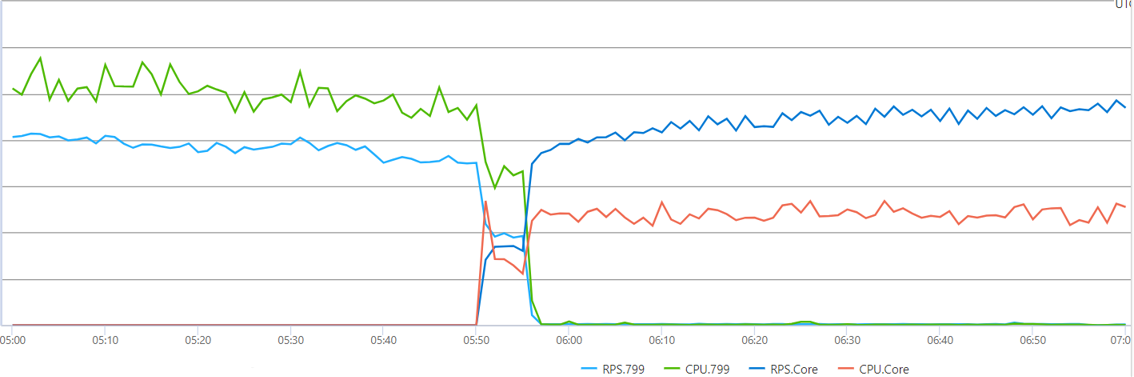
Share this post

Search This Blog

What's New

The "AI is going to replace devs" hype is over – 22-year dev veteran Jason Lengstorf [Podcast #201]

Image
Curriculum for the course The "AI is going to replace devs" hype is over – 22-year dev veteran Jason Lengstorf [Podcast #201] Today Quincy Larson interviews Jason Lengstorf. He's a college dropout who taught himself programming while building websites for his emo band. 22 years later he's worked as a developer at IBM, Netlify, run his own dev consultancy, and he now runs CodeTV making reality TV shows for developers. We talk about: - How many CEOs over-estimated the impact of AI coding tools and laid off too many devs, whom they're now trying to rehire - Why the developer job market has already rebounded a bit, but will never be the same - Tips for how to land roles in the post-LLM résumé spam job search era - How devs are working to rebuild the fabric of the community through in-person community events Support for this podcast is provided by a grant from AlgoMonster. AlgoMonster is a platform that teaches data structure and algorithm patterns in a structure...

Labels

Programming Video Tutorials Coursera Video Tutorials Plurasight Programming Tutorials Udemy Tutorial C# Microsoft .Net Dot Net Udemy Tutorial, Plurasight Programming Tutorials, Coursera Video Tutorials, Programming Video Tutorials Asp.Net Core Asp.Net Programming AWS Azure GCP How To WordPress Migration C sharp AWS Project Git Commands FREE AWS Tutorial OldNewThings Git Tutorial Azure vs AWS vs GCP New in .Net javascript AI Google I/O 2025 Wordpress jquery Generative Video Git Git Squash Google Flow AI PHP SQL Veo 3 squash commit CSS Cloud Services React Tutorial With Live Project Source Code git rebase CPR Nummer Dropdown Reset Javascript Figma Figma Beginner Tutorial Geolocation Non-Programmer Content Python Free Course Think Simply Awesome Tutorial UI UX Live Project UI/UX Full Course Wireframing dotnet core runtime error html API Gateway AWS EKS vs Azure AKS All in one WP stuck C++ C++ Coroutines CPR Denmark ChatGPT Cloud Database Cloud DevOps Cloud Security Cloud Storage Contact Form 7 Dropdown Unselect Javascript E commerce Free AWS Terraform Project Training Git Commit Google Drive Files Google Drive Tips Http Error 500.30 Http Error 500.31 Interview Questions Learn Courutines C++ Microservices for Live Streaming PII Denmark Pub Sub SQL Server SSIS Terraform Course Free Terraform Tutorial Free USA E commerce strategies UpdraftPlus UpdraftPlus Manual Restore Website Optimization Strategies dropdown javascript select drop down javascript smarttube apk error 403 smarttube next 403 Error 413 Error 503 504 524 AI & ML AI Assistants AI Course CS50 AI in daily life AWS API Gateway AWS EBS AWS EC2 vs Azure VMs vs GCP Compute Engine AWS EFS AWS IAM AWS Lamda AWS RDS vs Azure SQL AWS Redshift AWS S3 AZ-104 AZ-104 Free Course AZ-104 Full Course AZ-104 Pass the exam Abstract Class C# Abstract Method Ajax Calender Control Ajax Control Toolkit All In One Extension Compatibility All In One WP Freeze All In One WP Migration All in one WP All-in-One WP Migration Android 15 Android TV Applying Theme html Asp.net core runtime Error Audio Auto Complete Azure AD Azure APIM Azure Administrator Certification Azure Blob Storage Azure Data Lake Azure Files Azure Function Azure Managed Disk Azure Synapse Base Class Child Class Best Grocery Price Big Data BigBasket vs Grofers Bing Homepage Quiz Blogger Import Blogger Post Import Blogger XML Import Bluetooth Connectivity Browser Detail Building Real-Time Web Applications Bulk Insert CI/CD CPR Address Update CPR Generator CPR Generator Denmark CS50 AI Course CS50 AI Python Course CS50 Artificial Intelligence Full Course CVR Centrale Virksomhedsregister Change Workspace TFS ChatGPT Essay Guide ChatGPT Usage ChatGPT vs Humans Cloud API Management Cloud CDN Cloud Computing Cloud Data Warehouse Cloud Event Streaming Cloud IAM Cloud Messaging Queue Cloud Monitoring and Logging Cloud Networking CloudFront Cloudflare Cloudwatch Compute Services Connect a Bluetooth Device to my PC site:microsoft.com Containers ControlService FAILED 1062 Corona Lockdown MP CosmosDB Covid19 Covid19 Bhopal Covid19 Home Delivery MP Covid19 Indore Covid19 Susner Covid19 Ujjain Cypress Javascript Cypress Javascript framework Cypress Javascript testing Cypress Javascript tutorial Cypress Javascript vs typescript DNS Danish CVR Data Analytics Data Analytics Course Free Data Engineering Data Structure Full Course Data Visualization Database Database Diagram Visualizer Davek Na Dodano Vrednost Dbdiagram export seeder Deep Learning Course Denmark Numbers Det Centrale Personregister Det Centrale Virksomhedsregister DevOps Device Compatibility Dictionary Dictionary in C# Digital Economy Disaster Recovery for Web Applications Disaster-Proof Infrastructure Dmart Frenchise Dmart Home Delibery Dmart Mumbai Address Dmart Pickup Points Doodle Jump Drive Images On Blog Drive Images On Website Driver Problems DropDown Dropbox Dropdown jquery DynamoDB ETL ETL Package Ecommerce Store using AWS & React Embed Drive Images Escape Sequences in c#.Net Event Hub Explicit Join Extract Facebook App Fake CVR Denmark Fake DDV Slovenia Fake VAT Number Fake Virk Number Faker Feature Toggle Find CPR Information Find a Word on Website Firestore Flappy Bird Game Form Selectors using jQuery Free React Portfolio Template FreeCodeCamp Frontend Best Practices for Millions of Users Full Text Index View G Drive Hosting GAN certification course GCP Cloud Data Lake GCP Filestore GCP Functions GCP IAM GCP Persistent Disk Gemini Git Checkout Google Adsense Setting Google Beam Google BigQuery Google Conversion Tracking Google Docs Advanced Tutorial Google Drive Clone Google Drive Clone Bot Google Drive Clone HTML CSS Google Drive Clone PHP Google Drive Clone React Google Drive Clone Tutorial Google Drive Clone VueJS Google Drive File Sharing Google Drive Images Google Drive Sharing Permissions Grocery Price Compare Online Grocery in Corona Grocery in Covid19 Grofers vs DMart vs Big basket HAXM installation HTML Storage HTML to PDF Javascript HTML2Canvas HTML5 HTML5 Append Data HTML5 Audio HTML5 Data Storage HTML5 Storage HTML5 Video Harvard University AI Course Header Sent Height Jquery High Availability in Live Streaming Platforms High-Concurrency Frontend Design High-Concurrency Web Applications How to Search for a Word on Mac Html2Canvas Black Background issue Http Error 413 Http Error 500.35 IIS INNER Join Image Gallery Blogger Image Gallery Blogger Picasa Image Gallery Blogger Template Image Gallery Blogger Template Free Implicit Join Indexing in SQL Instagram Clone React Instagram Clone Script Install NodeJS Ubuntu Internet Infrastructure Interview IoT IoT Core IoT Hub JS Game Tutorial Java Feature Toggle Javascript game tutorial JioCinema Case Study Keep Me Login Key Management Kinesis Learn Scrappy with a live project List Live Streaming Data Delivery Live Streaming Performance Optimization Load Load Balancer Looping Dictionary MTech First Semester Syllabus MTech Syllabus MVC Mac Mac Finder Shortcut Media Controller Media Group Attribute Microservices Architecture for Scalability Missing MySQL Extension Mobile Optimization Multiple Audio Sync Multiple Video Sync Mumbai Dmart List MySQL MySQL ERD Generator Next.js Beginner Tutorial Ngnix NodeJS NodeJS Ubuntu Commands Numpy OOPS Concepts OOPS in C# Object Oriented Programming Object Storage Outer Join PHP Installation Error PHP WordPress Installation Error Pandas Personligt identifikations nummer Pipedrive Pipedrive Quickbooks Integration Portfolio Website using React Project Astra PyTorch Quickbooks Quote Generator RGPV Syllabus Download Random SSN Generator ReCaptcha Dumbass React Feature Toggle Real-Time Video Processing Architecture Real-Time Video Processing Backend RegExp Regular Expression Reinstall Bluetooth Drivers Remember Me Remove NodeJS Ubuntu Renew DHCP Lease Reset IP Address Linux Reset IP Address Mac Reset IP Address Windows Reset Remote Connection Reset Remote Connection Failure Resize Textarea Restore Errors Restore Failed UpdraftPlus Route 53 SOS Phone SQL Indexed Tables SQL Joins SQL Seed generator SQS SSIS Package SSIS Tutorial SSN Generator for Paypal SSN Number SSN Number Generator SSN Validator Safari 8 Safari Video Delay SageMaker Scalable Backend for High Concurrency Scalable Cloud Infrastructure for Live Streaming Scalable Frontend Architectures Scalable Live Streaming Architecture Scrapy course for beginners Search A word Search for a Word in Google Docs Secret Management Serverless Service Bus Slovenian VAT Generator SmartTube Software Architect Interview Questions Software Architect Mock Interview Sparse Checkout Spotlight Mac Shortcut Stored Procedure Subtree Merge T-Mobile IMEI Check TFS TMobile IMEI check unlock Team Foundation Server Terraform Associate Certification Training Free Text Search Text color Textarea Resize Jquery Theme Top WordPress Plugins Transform Trim javascript Troubleshooting TypeScript Beginner Tutorial Ubuntu Unleash Feature Toggle Update Computer Name UpdraftPlus 500 UpdraftPlus Backup Restore UpdraftPlus Error 500 UpdraftPlus Error 504 UpdraftPlus Error 524 UpdraftPlus HTTP Error UpdraftPlus New Domain UpdraftPlus Restore Not Working UpdraftPlus Troubleshooting Upstream Reset Error Use Google Drive Images VAT Number Generator Verizon imei check Verizon imei check paid off Verizon imei check unlock Verizon imei check\ Version Control Vertex AI Video View Indexing SQL Views in SQL Virksomhedsregister Virtual friends Visual Studio 2013 WHERE Clause WHPX expo Web Security Web scraping full course with project Web3 What is Feature Toggle WordPress Backup Troubleshooting WordPress Backup UpdraftPlus WordPress Database Backup WordPress Error 503 WordPress Installation Error WordPress Migration UpdraftPlus Wordpress Restore Workspaces Commands Your ip has been banned Zero Click angle between two points bing homepage quiz answers bing homepage quiz answers today bing homepage quiz not working bing homepage quiz reddit bing homepage quiz today byod Verizon imei check chatgpt essay example chatgpt essay writer chatgpt essay writing check tmobile imei contact form 7 captcha contact form 7 captcha plugin contact form 7 recaptcha v3 cpr-nummer engelsk cpr-nummer liste cpr-nummer register cpr-nummer tjek dbdiagram dom load in javascript dotnet core hosting bundle dotnet failed to load dotnet runtime error get url in php how to search for a word on a page how to search for a word on a page windows ipconfig release is cypress javascript istio transport failure jQuery AutoComplete jQuery Input Selector jQuery Menu jQuery Options joins in mySql jquery selector jquery selectors jsPDF jsPDF images missing key key-value keypress event in jQuery kubernetes upstream error localStorage metro by t-mobile imei check nemid cpr-nummer react native expo setup react native on Windows react native setup recaptcha v3 contact form 7 recaptcha wordpress contact form 7 reset connection failure resize control jQuery response code 403 smarttube round number in javascript select sessionStorage smarttube 403 エラー smarttube apk smarttube beta smarttube download smarttube reddit smarttube unknown source error 403 smartube sos iphone top right sos on iphone 13 sos only iphone substr substr in javascript tmobile imei tmobile imei check paid off tmobile imei number total by Verizon imei check trim trim jquery turn off sos iphone turn off sos on iphone 11 unknown source error 403 unknown source error response code 403 smarttube upstream connect error url in php view hidden files mac finder zuegQmMdy8M ошибка 403 smarttube
  • ()
  • ()
Show more
an "open and free" initiative. Powered by Blogger.