Lanyon A Simple Blogger template

Free tutorials, courses, generative tools, and projects built with Javascript, PHP, Python, ML, AI,.Net, C#, Microsoft, Youtube, Github Code Download and more.

December 2022

Archive for December 2022

Top .NET Videos & Live Streams of 2022

This year was packed full of amazing releases, conferences, and .NET developer content. The .NET YouTube reached new heights by adding nearly 60K new subscribers bringing the total over 200K! Thank you all so much for being subscribers, joining in on discussions, and jamming that like button on all of that great content that the team and community puts out. We have seen over 7 million videos views which amounts to over 650K hours consumed! That is over 27,000 days or 3,870 weeks, or 74 years of watch time! With some fun stats out of the way, let’s get into the top videos of 2022.

Top .NET videos of 2022

Let’s start things off with the top new on-demand videos that were released this year. This list does include sessions from .NET Conf, but not the live streams themselves.

Clean Architecture with ASP.NET Core 7

Steve Smith’s presentations on Clean Architecture continue to take the top spot on views each year form .NET COnf. This year Steve looks at clean architecture (aka Onion, Hexagonal, Ports-and-Adapters) to help organize your code in a way that limits its dependencies on infrastructure concerns in ASP.NET Core.

.NET Conf 2022 Keynote: Welcome to .NET 7

The most watched live stream event is also one of the most watched on-demand videos of the year and it includes the launch of .NET 7! Take a look at what is new for .NET developers across all workloads including cloud, mobile, desktop, web, AI, IoT, and so much more.

If I’m a beginner at .NET, what resources are available to me?

Looking to get started with .NET? Jayme has you covered with all of the resources in you need and covers it all in 60 seconds!

Introducing the .NET Community Toolkit

The .NET Community Toolkit is one of my personal favorite libraries of the year, and Sergio joins me to discuss how it can help developers build apps faster with support for MVVM source generators, performance APIs, and advanced diagnostics.

ASP.NET Core in .NET 7 Preview 1 – What you need to know

The excitement for .NET 7 was high even from the very first preview as shown by the popularity of Dan’s video of what is new in ASP.NET Core in .NET 7 Preview 1! He breaks it all down and then at .NET Conf 2022 gave a full State of ASP.NET Core session that you for sure need to checkout!

Beginner’s Series

In addition to these videos, there were several top Beginner’s series that filled several of the top spots including Entity Framework Core and .NET MAUI.

Top .NET Live Streams of 2022

Some of the most popular content on the .NET YouTube are live streams from the .NET teams where they engage directly with you! You can always find the latest upcoming streams on the .NET website’s [https://live.dot.net](.NET Live TV) page.

.NET Conf

.NET Conf Day 1 and Day 2 took top spots as you may have guessed, but .NET Conf: Focus on .NET MAUI and the .NET Conf 2022 – Student Zone were not that far behind.

Learn C# with CSharpFritz

Each monday, Jeff Fritz live codes, answer questions, and builds fun .NET projects. This year he had tons of top live streams, but Get Started with ASP.NET Core MVC took the top spot! Be sure to watch it back and binge on his back catalog.

.NET 20th Anniversary

Not only did .NET 7 launch this year, but it was also the celebration of 20 years of .NET! The .NET 20th Anniversary was a celebration of all things .NET with team members and stories from the community.

Let’s Learn .NET – .NET MAUI

When .NET MAUI launched earlier this year, developers were ready to start learning how to build fantastic multi-platform apps for iOS, Android, Mac, and Windows from a singled code base. The Let’s Learn .NET series introduces developers to different .NET topics and .NET MAUI took the top spot.

.NET Community Standups

Each week .NET team members give you a behind the scenes look into the development of .NET. No matter what type off .NET developer you are and what you are building there is surely something you will find super interesting at one of these standups. Some of the top standups this year were:

That’s a wrap!

Thanks to everyone that create, enjoyed, comments, smashed that like button in 2022! We have tons of great new content coming your way in 2023 so make sure you go and subscribe to the .NET YouTube if you haven’t yet to stay up to date.

What were your favorite videos and live streams of 2022? What are you looking forward to in 2023? Let us know in the comments below.

The post Top .NET Videos & Live Streams of 2022 appeared first on .NET Blog.


Top .NET Blog Posts of 2022

It’s been an exciting year for .NET and the .NET blog! We published over 150 blog posts, totaling almost 370K words! Just in case you missed a few, here’s a quick summary of some of the top posts of 2022.

Performance Improvements in .NET 7

Deep dive in over 255 pages (when printed to PDF) of performance improvements for developers in .NET 7. The yearly entry by Stephen Toub is not only the most viewed post of the year, but also the most commented on as well! If you want to learn even more about performance improvements in .NET 7, Stephen also had a session on performance at .NET Conf 2022!

In addition to this amazing blog post on overall performance improvements, each team also did entries for the different frameworks & platforms:

Introducing .NET MAUI – One Codebase, Many Platforms

It was a huge year for mobile & desktop .NET developers with the launch of .NET MAUI, the Multi-platform App UI enabling developers to build cross-platform apps for iOS, Android, Mac, and Windows from a single shared codebase. David Ortinau highlights everything developers need to know to start their journey building native apps with .NET MAUI and hybrid apps by integrated Blazor into .NET MAUI! All of this while having full access to the native APIs all in C#. Be sure to also dive into the .NET MAUI update for .NET 7 and the .NET Conf – State of .NET MAUI session.

dotnet MAUI sample gallery of controls

.NET 7 is Available Today

.NET 7 is here and brings your apps increased performance and new features for C# 11/F# 7, .NET MAUI, ASP.NET Core/Blazor, Web APIs, WinForms, WPF and more. With .NET 7, you can also easily containerize your .NET 7 projects, set up CI/CD workflows in GitHub actions, and achieve cloud-native observability. Jon, Jeremy, and Angelos dive into everything you need to know about .NET 7!

![dotnet Bot flying a drone](dotnet7.png)

Announcing .NET Framework 4.8.1

Native Arm64 support comes to .NET Framework in version 4.8.1! Tara Overfield covers everything developers need to know about this release beyond Arm64 support including all sorts of accessibility improvements for Windows Forms and WPF.

Speaking of Arm64, did you know that Visual Studio 2022 17.4 delivers a fully native Arm64 experience for developers?

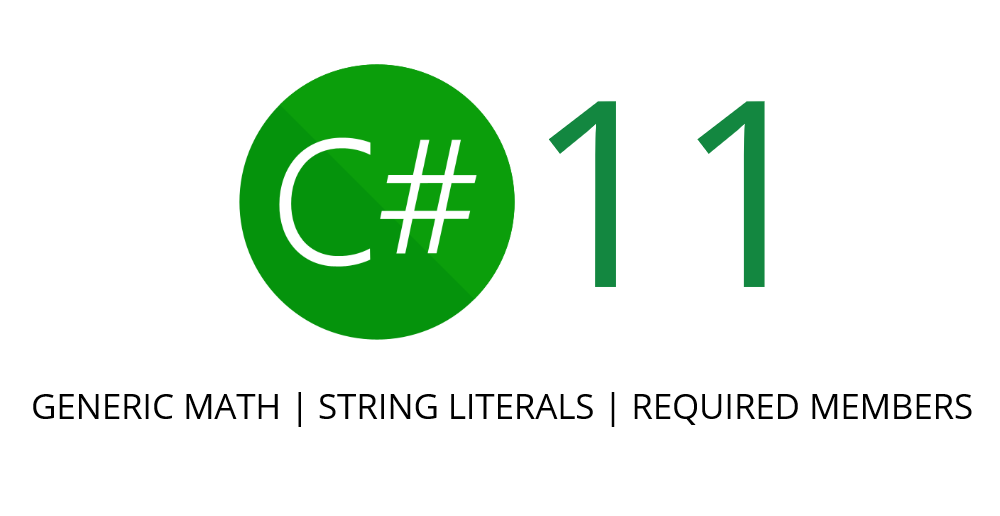
Early peek at C# 11 features

There is so much to love in C# 11 and Kathleen Dollard gave everyone an early peek into highly anticipated features including list patterns, raw string literals, required members, and so much more.

c sharp logo with words of features

With the launch of .NET 7, C# 11 was also released and Mads Torgersen did a full blog on the final features, so be sure to give that a look and watch the .NET Conf session on What’s New in C# 11.

Honorable Mentions

Throughout the year the .NET team continued to keep everyone up to date on the progress of .NET 7 and these blog posts continued to get great traction. Beyond the “update” posts the team also did plenty of feature deep dives and product announcements, here are some of the top posts in these categories:

There you have it, the top .NET blog posts of 2022! What were your favorites? What do you want to see more of in 2023? Let us know in the comments below!

The post Top .NET Blog Posts of 2022 appeared first on .NET Blog.


source https://devblogs.microsoft.com/dotnet/top-dotnet-blog-posts-of-2022/

Accelerate ML.NET training with Intel oneDAL

ML.NET is an open-source, cross-platform machine learning framework for .NET developers that enables integration of custom machine learning models into .NET apps.

Just over a month ago, we released ML.NET 2.0. Thank you for trying it out and giving us feedback.

We’re not stopping there though and are excited to introduce the first preview release of ML.NET 3.0. This release brings several hardware acceleration improvements that allow you to make the most out of your compute resources during training.

Install the latest ML.NET 3.0 and Intel oneDaL preview packages to try out the latest improvements powered by Intel oneDAL and give us feedback.

What is Intel oneAPI Data Analytics Library (oneDAL)

Intel oneAPI Data Analytics Library is a library that helps speed up data analysis by providing highly optimized algorithmic building blocks for all stages of the data analytics and machine learning process.

oneDAL makes use of the SIMD extensions in 64-bit architectures, which are featured in Intel and AMD CPUs

oneDAL components in ML.NET

oneDAL integrates into ML.NET by accelerating existing trainers during training. Currently, the following ML.NET trainers provide oneDAL support.

Trainer Machine Learning Task
Ordinary Least Squares Regression
L-BGFS Classification
FastTree Regression & Classification
FastForest Regression & Classification

Get started with oneDAL in ML.NET

  1. Install the latest Microsoft.ML 3.0 preview version.
    dotnet add package Microsoft.ML --prerelease

    If you’re using OLS or FastTree, you’ll have to install additional packages

    # Ordinary Least Squares (OLS)
    dotnet add package Microsoft.ML.Mkl.Components --prerelease
    
    # FastTree
    dotnet add package Microsoft.ML.FastTree --prerelease
  2. Install the Microsoft.ML.OneDal NuGet package.
    dotnet add package Microsoft.ML.OneDal --prerelease
    
  3. Set the MLNET_BACKEND environment variable to ONEDAL. If you’re using one of the trainers supported by oneDAL, there are no code changes required.
  4. Create a pipeline using one of the oneDAL-supported ML.NET trainers. In this sample, it’s using LbfgsLogisticRegression to train a binary classification model to predict oneDAL support.
    // Initialize MLContext
    var ctx = new MLContext();
    
    // Define data
    var trainingData = new [] 
    {
        new {Arch="ARM", Trainer="LightGBM", oneDALSupport=false},
        new {Arch="x86", Trainer="FastTree", oneDALSupport=true},
        new {Arch="x86", Trainer="LbfgsLogisticRegression", oneDALSupport=true},
        new {Arch="ARM", Trainer="FastTree", oneDALSupport=false}
    };
    
    // Load data into IDataView
    var trainingDv = ctx.Data.LoadFromEnumerable(trainingData);
    
    // Define data processing pipeline & trainer
    var pipeline = 
        ctx.Transforms.Categorical.OneHotEncoding(new [] {
                new InputOutputColumnPair("ArchEncoded", "Arch"),
                new InputOutputColumnPair("TrainerEncoded", "Trainer")})
            .Append(ctx.Transforms.Concatenate("Features", "ArchEncoded", "TrainerEncoded"))
            .Append(ctx.BinaryClassification.Trainers.LbfgsLogisticRegression(labelColumnName:"oneDALSupport"));
    
    // Train model
    var model = pipeline.Fit(trainingDv)
  5. Train your model.

For a more complete example, see this sample.

Known issues

On Windows, you may see a library loading error. To unblock yourself, add the “runtimes\win-x64\native” directory in your application “bin” directory to the PATH environment variable.

What’s next?

We’re just getting started with ML.NET 3.0 development and are excited about the improvements and new capabilities we’re looking to enable. For more details, see the ML.NET roadmap.

Thank you

We are extremely grateful to our Intel partners as none of these improvements would be possible without them.

Get started and resources

Learn more about ML.NET, Model Builder, and the ML.NET CLI in Microsoft Docs.

If you run into any issues, feature requests, or feedback, please file an issue in the ML.NET repo.

Join the ML.NET Community Discord or #machine-learning channel on the .NET Development Discord.

Tune in to the Machine Learning .NET Community Standup every other Wednesday at 10am Pacific Time.

The post Accelerate ML.NET training with Intel oneDAL appeared first on .NET Blog.


Build Your Own SaaS - PagerDuty! Postgres + Stripe API + Twilio + SMTP


Curriculum for the course Build Your Own SaaS - PagerDuty! Postgres + Stripe API + Twilio + SMTP

Learn how to build your own SaaS app! You will create PagerDuty clone using Postgres, Stripe, Twilio, SMTP, and Retool. You will build a dashboard that lets you know if your app goes down and then notifies you through email and SMS. ✏️ Ania Kubów developed this course. Check out her channel: https://www.youtube.com/aniakubow 🏗 Retool provided a grant to make this course possible. Learn more about Retool: https://retool.com ⭐️ Contents ⭐️ 00:00 Introduction 02:51 Tutorial Starts 03:41 Working with pre-made UI Components 16:26 Setting up our Postgres database 18:58 Creating Tables in Postgres 29:00 Feeding in Data to our Dashboard 39:09 Adding new Incidents 48:53 Deleting Incidents 50:49 The Team members page 1:04:42 Hooking up the Twilio and SMPT API 🎉 Thanks to our Champion and Sponsor supporters: 👾 Nattira Maneerat 👾 Heather Wcislo 👾 Serhiy Kalinets 👾 Erdeniz Unvan 👾 Justin Hual 👾 Agustín Kussrow 👾 Otis Morgan Learn to code for free and get a developer job: https://www.freecodecamp.org Read hundreds of articles on programming: https://freecodecamp.org/news

Watch Online Full Course: Build Your Own SaaS - PagerDuty! Postgres + Stripe API + Twilio + SMTP


Click Here to watch on Youtube: Build Your Own SaaS - PagerDuty! Postgres + Stripe API + Twilio + SMTP


This video is first published on youtube via freecodecamp. If Video does not appear here, you can watch this on Youtube always.


Udemy Build Your Own SaaS - PagerDuty! Postgres + Stripe API + Twilio + SMTP courses free download, Plurasight Build Your Own SaaS - PagerDuty! Postgres + Stripe API + Twilio + SMTP courses free download, Linda Build Your Own SaaS - PagerDuty! Postgres + Stripe API + Twilio + SMTP courses free download, Coursera Build Your Own SaaS - PagerDuty! Postgres + Stripe API + Twilio + SMTP course download free, Brad Hussey udemy course free, free programming full course download, full course with project files, Download full project free, College major project download, CS major project idea, EC major project idea, clone projects download free

Build Your Own Podcast App with .NET 7, Blazor, and .NET MAUI

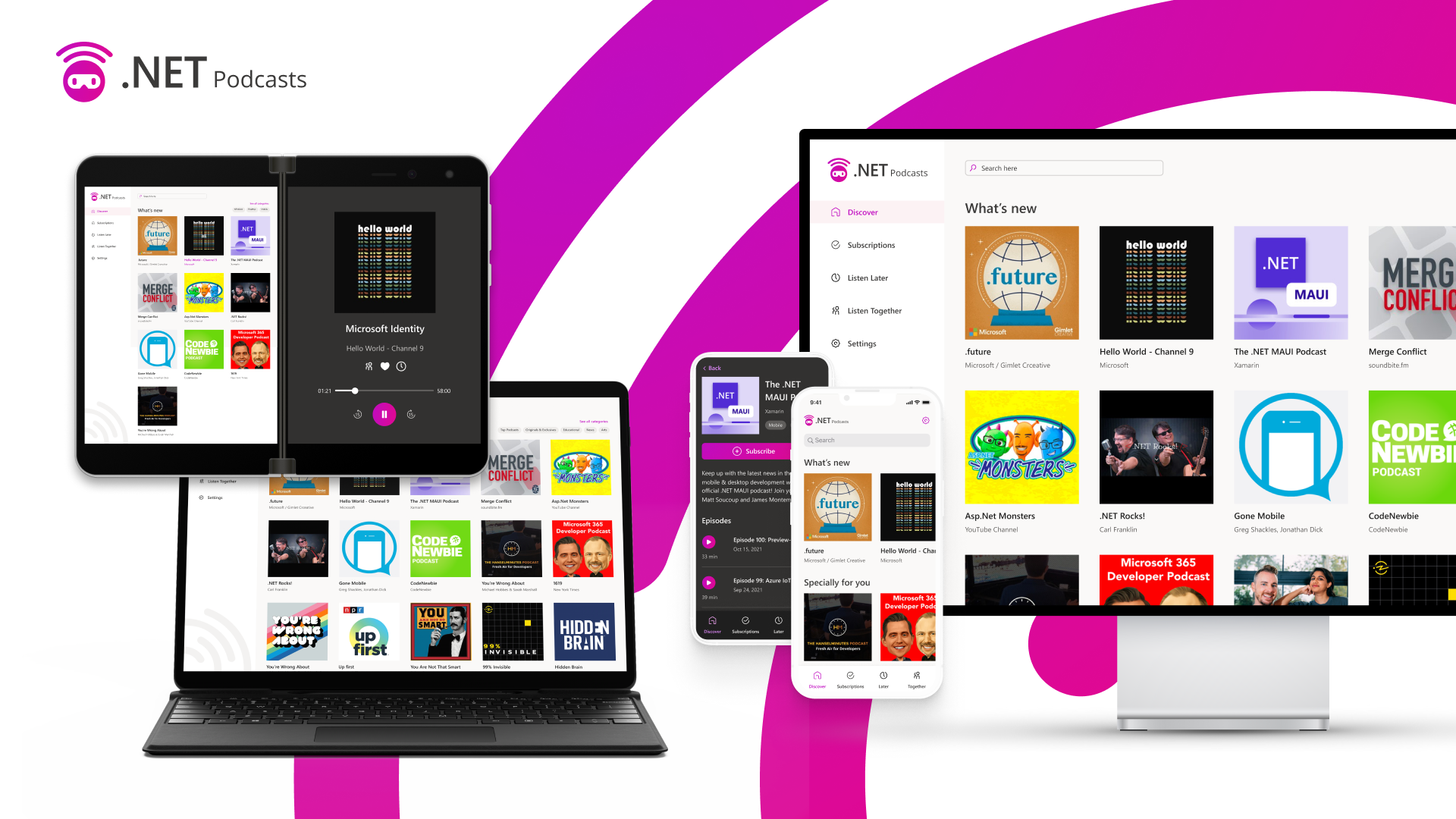
The .NET Podcast app was first introduced at .NET Conf 2021 and recently updated to highlight new features in .NET 7 at the .NET Conf 2022 keynote. The podcast app is ready to use sample application that showcases .NET, ASP.NET Core, Blazor, .NET MAUI, Azure Container Apps, Orleans, Power Platform, Playwright, and more. In this post, I’ll explain all the new features and show how we upgraded the .NET Podcast app to take advantage of them.

.NET Podcast application running on phones, browser, and desktop

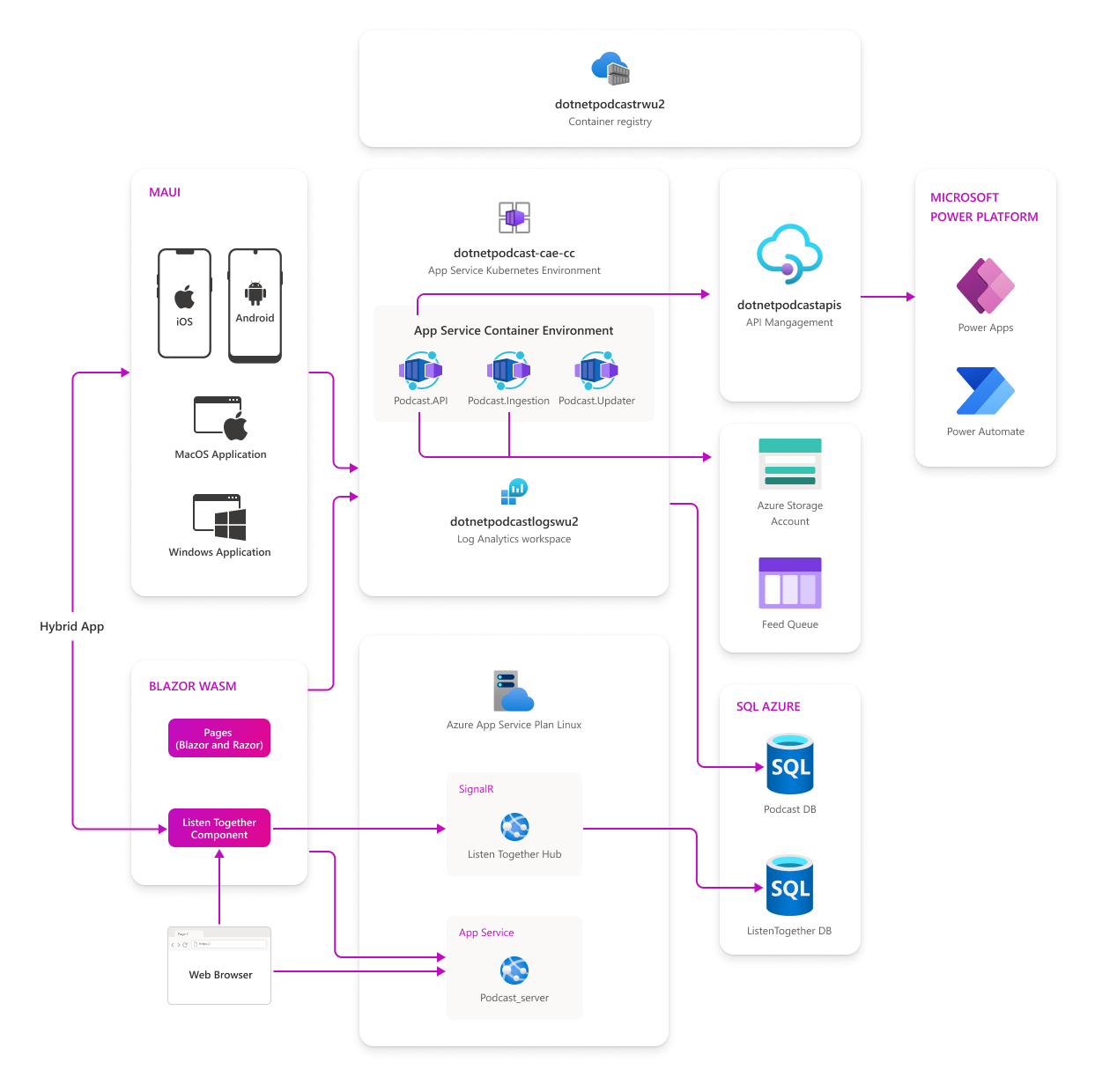
Architecture

As mentioned, the .NET Podcast app uses a cloud-native architecture to power the mobile, desktop, and web apps. Microservices were used for the worker services that add and update the podcasts feeds and the APIs that serve up data to the apps. These are all powered by Azure Container Apps to dynamically scale the microservices based on the different characteristics of each service.

Architecture diagram for the dotnet podcast app

There is a lot more to the .NET Podcast app including integration into Azure SQL Server for our database, Azure Storage to save images and queuing submissions, and Azure API Management to leverage the APIs in Power Apps and Power Automate.

API Updates

The .NET Podcast APIs have been updated to use the latest features in ASP.NET Core including Output Cache, Rate Limiting, API Versioning, and new Route Groups for Minimal APIs. Additionally, it integrates the latest enhancements with authentication and authorization that great simplifies these features for developers.

// Authentication and authorization-related services

builder.Services.AddMicrosoftIdentityWebApiAuthentication(builder.Configuration);

builder.Services.AddAuthorizationBuilder().AddPolicy("modify_feeds", policy => policy.RequireScope("API.Access"));

// OpenAPI and versioning-related services
builder.Services.AddSwaggerGen();
builder.Services.Configure<SwaggerGeneratorOptions>(opts =>
{
    opts.InferSecuritySchemes = true;
});
builder.Services.AddEndpointsApiExplorer();
builder.Services.AddApiVersioning(options =>
{
    options.DefaultApiVersion = new ApiVersion(2, 0);
    options.ReportApiVersions = true;
    options.AssumeDefaultVersionWhenUnspecified = true;
    options.ApiVersionReader = new HeaderApiVersionReader("api-version");
});

// Enable Output Cache
builder.Services.AddOutputCache();

// Rate-limiting and output caching-related services
builder.Services.AddRateLimiter(options => options.AddFixedWindowLimiter("feeds", options =>
{
    options.PermitLimit = 5;
    options.QueueProcessingOrder = QueueProcessingOrder.OldestFirst;
    options.QueueLimit = 0;
    options.Window = TimeSpan.FromSeconds(2);
    options.AutoReplenishment = false;
}));

// Create version set
var versionSet = app.NewApiVersionSet()
                    .HasApiVersion(1.0)
                    .HasApiVersion(2.0)
                    .ReportApiVersions()
                    .Build();

// create new mapping for apis
var shows = app.MapGroup("/shows");

shows
    .MapShowsApi()
    .WithApiVersionSet(versionSet)
    .MapToApiVersion(1.0)
    .MapToApiVersion(2.0);

Looking for more updates with APIs in .NET 7? Checkout the Making the Most of Minimal APIs in .NET 7 from .NET Conf.

Observability & Monitoring

Once you have built and deployed your services, you need to observe and monitor them. During the keynote we showed how to integrate Open Telemetry, Azure Monitor, and more in just a few lines of code to completely instrument your services.

builder.Services.AddOpenTelemetryTracing(tracing =>
        tracing.SetResourceBuilder(serviceResource)
        .AddAzureMonitorTraceExporter(o =>
        {
            o.ConnectionString = azureMonitorConnectionString;
        })
        .AddJaegerExporter()
        .AddHttpClientInstrumentation()
        .AddAspNetCoreInstrumentation()
        .AddEntityFrameworkCoreInstrumentation()
    );

builder.Services.AddOpenTelemetryMetrics(metrics =>
{
    metrics
    .SetResourceBuilder(serviceResource)
    .AddPrometheusExporter()
    .AddAzureMonitorMetricExporter(o =>
    {
        o.ConnectionString = azureMonitorConnectionString;
    })
    .AddAspNetCoreInstrumentation()
    .AddHttpClientInstrumentation()
    .AddRuntimeInstrumentation()
    .AddProcessInstrumentation()
    .AddHttpClientInstrumentation()
    .AddEventCountersInstrumentation(ec =>
    {
        ec.AddEventSources("Microsoft.AspNetCore.Hosting");
    });
});

builder.Logging.AddOpenTelemetry(logging =>
{
    logging
    .SetResourceBuilder(serviceResource)
    .AddAzureMonitorLogExporter(o =>
    {
        o.ConnectionString = azureMonitorConnectionString;
    })
    .AttachLogsToActivityEvent();
});

.NET SDK Containers

The .NET Podcast application is powered by microservices and containers. The .NET SDK can now containerize your app with just a few configuration changes. This feature is now integrated into the services that power the .NET Podcast app and the CI/CD pipeline as well.

<PropertyGroup>
    <ContainerImageName>podcastapi</ContainerImageName>
</PropertyGroup>

<ItemGroup>
    <PackageReference Include="Microsoft.NET.Build.Containers" Version="0.2.7" />
</ItemGroup>
dotnet publish -c Release -r linux-x64 -p PublishProfile=DefaultContainer src/Services/Podcasts/Podcast.API/Podcast.API.csproj

If you are interested in containers and microservices be sure to watch some of these sessions from .NET Conf:

Playwright Tests

Playwright is an open source testing framework from Microsfot that enables reliable end-to-end testing for modern web apps. As the team was working on backend and frontend updates, they wanted to ensure that the core scenarios of the podcast app didn’t break. They setup several Playwright tests and integrated it into their CI pipeline so they ran with every pull request.

Playwright run results from GitHub Actions

Checkout the session from .NET Conf from Max and Debbie from the Playwright team on testing Blazor apps with Playwright:

Power App Integration

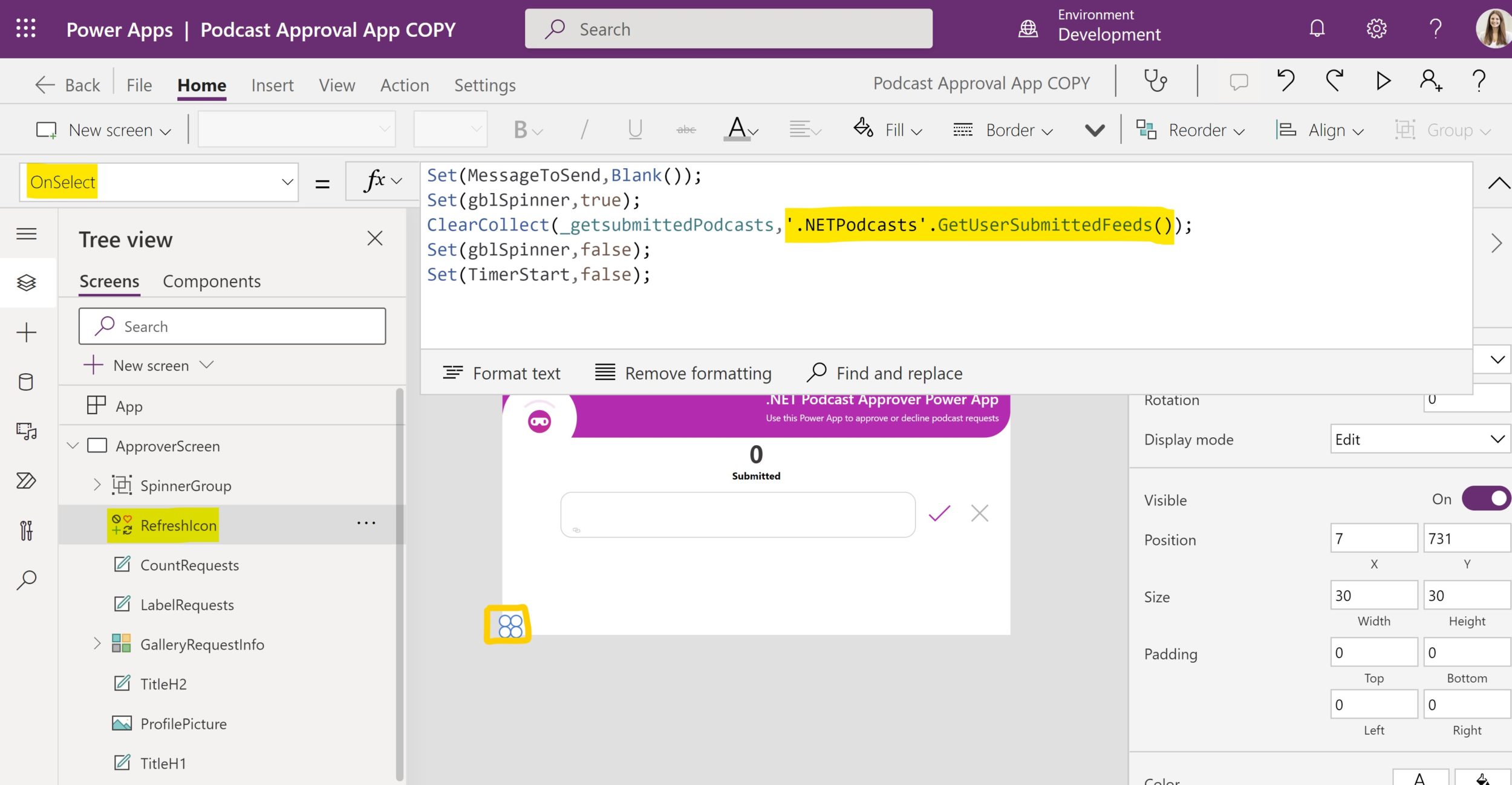
With Azure API Management(APIM) you can easily take your .NET APIs to power more services and apps including the Power Platform. During .NET Conf 2022, we showcased a Power App that would triage approving and denying new podcast submissions with .NET APIs that were surfaced through APIM. Now included in the repo is the full Power App the you can deploy yourself.

Power Platform designer showing podcast app and API

Be sure to watch the APIM and Power Apps session from .NET Conf:

Give it a try today

The GitHub repository has step-by-step directions on how to easily get the entire application running locally for development with just one simple command. Additionally, you can set a full continuous integration and deployment pipeline with GitHub Actions that deploys the entire solution to Azure by settings up a few GitHub secrets in your cloned repo.

In addition to just running the apps, you can also step-by-step demo directions for any of the demos at .NET Conf.

We will be continuing to add new features to the app and are also interested in what you are interested in seeing or what you are building with this sample architecture. Head over to the GitHub discussions to let us know.

The post Build Your Own Podcast App with .NET 7, Blazor, and .NET MAUI appeared first on .NET Blog.


source https://devblogs.microsoft.com/dotnet/build-your-own-podcast-app-with-dotnet-blazor-and-dotnet-maui/

JavaScript Tutorial - Create a Card Game 🃏


Curriculum for the course JavaScript Tutorial - Create a Card Game 🃏

Improve your JavaScript skills by creating a basic card game with HTML and CSS. ♣️♥️♠️♦️ This tutorial not only covers creating a basic card game using JavaScript but also: - how to create dynamic user interactive code using vanilla JavaScript - Creating some animation effects - Responsive layout design using CSS grid, CSS FlexBox and media queries - How to dynamically change the positions of grid cells, so as to randomize the positions of the cards contained in a css grid using JavaScript, - localStorage functionality - And much More… 💻 Code: https://github.com/GavinLonDigital/HuntTheAceJSGame ✏️ Gavin Lon created this tutorial. Check out his channel: https://www.youtube.com/@GavinLon ⭐️ Contents ⭐️ ⌨️ (0:00:00) Introduction ⌨️ (0:05:26) Getting Started ⌨️ (0:07:00) Live Server Extension ⌨️ (0:09:50) Create Cards - HTML ⌨️ (0:14:44) Create the Game Play Grid ⌨️ (0:19:55) Create Cards Dynamically - JS Code ⌨️ (0:28:46) Initialise Card Positions ⌨️ (0:34:39) Load Game and Start Game ⌨️ (0:38:43) Stack Cards ⌨️ (0:41:53) Flip Cards ⌨️ (0:45:14) Shuffle Cards ⌨️ (0:49:28) Deal Cards ⌨️ (0:54:37) Choose Card ⌨️ (1:16:56) Styling and Layout ⌨️ (1:24:28) Animation ⌨️ (1:32:39) Responsive Layout ⌨️ (1:36:43) Local Storage 🎉 Thanks to our Champion and Sponsor supporters: 👾 Nattira Maneerat 👾 Heather Wcislo 👾 Serhiy Kalinets 👾 Erdeniz Unvan 👾 Justin Hual 👾 Agustín Kussrow 👾 Otis Morgan -- Learn to code for free and get a developer job: https://www.freecodecamp.org Read hundreds of articles on programming: https://freecodecamp.org/news

Watch Online Full Course: JavaScript Tutorial - Create a Card Game 🃏


Click Here to watch on Youtube: JavaScript Tutorial - Create a Card Game 🃏


This video is first published on youtube via freecodecamp. If Video does not appear here, you can watch this on Youtube always.


Udemy JavaScript Tutorial - Create a Card Game 🃏 courses free download, Plurasight JavaScript Tutorial - Create a Card Game 🃏 courses free download, Linda JavaScript Tutorial - Create a Card Game 🃏 courses free download, Coursera JavaScript Tutorial - Create a Card Game 🃏 course download free, Brad Hussey udemy course free, free programming full course download, full course with project files, Download full project free, College major project download, CS major project idea, EC major project idea, clone projects download free

.NET December 2022 Updates – .NET 7.0.1, .NET 6.0.12, .NET Core 3.1.32

Today, we are releasing the .NET December 2022 Updates. These updates contain security and non-security improvements. Your app may be vulnerable if you have not deployed a recent .NET update.

You can download 7.0.1, 6.0.12, and 3.1.32 versions for Windows, macOS, and Linux, for x86, x64, Arm32, and Arm64.

Improvements

Security

CVE-2022-41089 – .NET Remote Code Execution Vulnerability

Microsoft is releasing this security advisory to provide information about a vulnerability in .NET Core 3.1, .NET 6.0., and .NET 7.0. This advisory also provides guidance on what developers can do to update their applications to remove this vulnerability.

A remote code execution vulnerability exists in .NET Core 3.1, .NET 6.0, and .NET 7.0, where a malicious actor could cause a user to run arbitrary code as a result of parsing maliciously crafted xps files.

Visual Studio

See release notes for Visual Studio compatibility for .NET 7.0, .NET 6.0 and .NET Core 3.1.

.NET Core 3.1 End of life

.NET Core 3.1 will reach end of life on December 13, 2022, as described in .NET Releases and per .NET Release Policies. After that time, .NET Core 3.1 patch updates will no longer be provided. We recommend that you move any .NET Core 3.1 applications and environments to .NET 6.0. It’ll be an easy upgrade in most cases. The .NET Releases page is the best place to look for release lifecycle information. Knowing key dates helps you make informed decisions about when to upgrade or make other changes to your software and computing environment.

The post .NET December 2022 Updates – .NET 7.0.1, .NET 6.0.12, .NET Core 3.1.32 appeared first on .NET Blog.


Polyglot Notebooks – December 2022 Release

We are pleased to announce the December 2022 improvements to Polyglot Notebooks for Visual Studio Code. Make sure to install the Polyglot Notebooks extension from the VS Code Marketplace, or install it directly from the extension gallery in Visual Studio Code. If you haven’t read about our latest announcement regarding the difference between .NET Interactive and Polyglot Notebooks, we recommend you read this first.

Upgrade to .NET 7

Polyglot Notebooks has recently upgraded to depend on .NET 7. The extension now requires the .NET 7 SDK to work so update today! To learn more about .NET 7, read our announcement!

Support for C# 11 and F# 7

As part of the upgrade to .NET 7, Polyglot Notebooks now has support for C# 11 and F# 7. To see all the exciting new features you can use in Polyglot Notebooks, review the following resources:

Improvements to SQL and KQL with the new dynamic kernel picker

When establishing a connection with a Microsoft SQL Server or Kusto Cluster, you need to alias the connection using the –kernel-name parameter in the #!connect command. In order to then declare which database connection you want to query against, you previously would have had to add a magic command using the alias at the beginning of each cell.

Before the dynamic kernel picker:

image

With the dynamic kernel picker, you can now declare which database connection you are querying in the bottom right of the cell instead of using a magic command. Simply add a new code cell after establishing your connection, click on the dynamic kernel picker, and select the alias you created for your connection. Then write your native SQL or Kusto code!

With the dynamic kernel picker:

image

Summary

Be sure to download the Polyglot Notebooks extension for Visual Studio Code now to try out the above improvements. If you run into any problems or have suggestions, please file an issue on the .NET Interactive GitHub page.

The post Polyglot Notebooks – December 2022 Release appeared first on .NET Blog.


.NET 7 Networking Improvements

With the recent release of .NET 7, we’d like to introduce some interesting changes and additions done in the networking space. This blog post talks about .NET 7 changes in HTTP space, new QUIC APIs, networking security and WebSockets.

HTTP

Improved handling of connection attempt failures

In versions prior to .NET 6, in case there is no connection immediately available in the connection pool, a new HTTP request will always spin up a new connection attempt and wait for it (if the settings on the handler permit it, e.g. MaxConnectionsPerServer for HTTP/1.1, or EnableMultipleHttp2Connections for HTTP/2). The downside to this is, if it takes a while to establish that connection and another connection becomes available in the meantime, that request would continue waiting for the connection it spawned, hurting latency. In .NET 6.0 we changed this to process requests on whichever connection that becomes available first, whether that’s a newly established one or one that became ready to handle the request in the meantime. A new connection is still created (subject to limits), and if it wasn’t used by the initiating request, it is then pooled for subsequent requests to possibly use.

Unfortunately, the .NET 6.0 implementation turned out to be problematic for some users: a failing connection attempt also fails the request on the top of the request queue, which may lead to unexpected request failures in certain scenarios. Moreover, if there is a pending connection in the pool that will never become usable, e.g. because of a misbehaving server or a network issue, new incoming requests associated with it will also stall and may time out.

In .NET 7.0 we implemented the following changes to address these issues:

  • A failing connection attempt can only fail it’s initiating request, and never an unrelated one. If the original request has been handled by the time a connection fails, the connection failure is ignored (dotnet/runtime#62935).
  • If a request initiates a new connection, but then becomes handled by another connection from the pool, the new pending connection attempt will time out silently after a short period, regardless of ConnectTimeout. With this change, stalled connections will not stall unrelated requests (dotnet/runtime#71785). Note that the failures of such “disowned” pending connection attempts will happen in the background and never surface to the user, the only way to observe them is to enable telemetry.

HttpHeaders read thread safety

The HttpHeaders collections were never thread-safe. Accessing a header may force lazy parsing of its value, resulting in modifications to the underlying data structures.

Before .NET 6, reading from the collection concurrently happened to be thread-safe in most cases.

Starting with .NET 6, less locking was performed around header parsing as it was no longer needed internally. Due to this change, multiple examples of users erroneously accessing the headers concurrently surfaced, for example, in gRPC (dotnet/runtime#55898), NewRelic (newrelic/newrelic-dotnet-agent#803), or even HttpClient itself (dotnet/runtime#65379). Violating thread safety in .NET 6 may result in the header values being duplicated/malformed or various exceptions being thrown during enumeration/header accesses.

.NET 7 makes the header behavior more intuitive. The HttpHeaders collection now matches the thread-safety guarantees of a Dictionary:

The collection can support multiple readers concurrently, as long as it is not modified. In the rare case where an enumeration contends with write accesses, the collection must be locked during the entire enumeration. To allow the collection to be accessed by multiple threads for reading and writing, you must implement your own synchronization.

This was achieved by the following changes:

Detect HTTP/2 and HTTP/3 protocol errors

The HTTP/2 and HTTP/3 protocols define protocol-level error codes in RFC 7540 Section 7 and RFC 9114 Section 8.1, for example, REFUSED_STREAM (0x7) in HTTP/2 or H3_EXCESSIVE_LOAD (0x0107) in HTTP/3. Unlike HTTP-status codes, this is low-level error information that is unimportant for most HttpClient users, but it helps in advanced HTTP/2 or HTTP/3 scenarios, notably grpc-dotnet, where distinguishing protocol errors is vital to implement client retries.

We defined a new exception HttpProtocolException to hold the protocol-level error code in it’s ErrorCode property.

When calling HttpClient directly, HttpRequestException can be an inner exception of HttpRequestException:

try
{
    using var response = await httpClient.GetStringAsync(url);
}
catch (HttpRequestException ex) when (ex.InnerException is HttpProtocolException pex)
{
    Console.WriteLine("HTTP error code: " + pex.ErrorCode)
}

When working with HttpContent‘s response stream, it is being thrown directly:

using var response = await httpClient.GetAsync(url, HttpCompletionOption.ResponseHeadersRead);
using var responseStream = await response.Content.ReadAsStreamAsync();
try
{
    await responseStream.ReadAsync(buffer);
}
catch (HttpProtocolException pex)
{
    Console.WriteLine("HTTP error code: " + pex.ErrorCode)
}

HTTP/3

HTTP/3 support in HttpClient was already feature complete in the previous .NET release, so we mostly concentrated our efforts in this space on the underlying System.Net.Quic. Despite that, we did introduce few fixes and changes in .NET 7.

The most important change is that HTTP/3 is now enabled by default (dotnet/runtime#73153). It doesn’t mean that all HTTP requests will prefer HTTP/3 from now on, but in certain cases they might upgrade to it. For it to happen, the request must opt into version upgrade via HttpRequestMessage.VersionPolicy set to RequestVersionOrHigher. Then, if the server announces HTTP/3 authority in Alt-Svc header, HttpClient will use it for further requests, see RFC 9114 Section 3.1.1.

To name a few other interesting changes:

QUIC

QUIC is a new, transport layer protocol. It has been recently standardized in RFC 9000. It uses UDP as an underlying protocol and it’s inherently secure as it mandates TLS 1.3 usage, see RFC 9001. Another interesting difference from well-known transport protocols such as TCP and UDP is that it has stream multiplexing built-in on the transport layer. This allows having multiple, concurrent, independent data streams that do not affect each other.

QUIC itself doesn’t define any semantics for the exchanged data as it’s a transport protocol. It’s rather used in application layer protocols, for example in HTTP/3 or in SMB over QUIC. It can also be used for any custom defined protocol.

The protocol offers many advantages over TCP with TLS. For instance, faster connection establishment as it doesn’t require as many round trips as TCP with TLS on top. Or avoidance of head-of-line blocking problem where one lost packet doesn’t block data of all the other streams. On the other hand, there are disadvantages that come with using QUIC. As it is a new protocol, its adoption is still growing and is limited. Apart from that, QUIC traffic might be even blocked by some networking components.

QUIC in .NET

We introduced QUIC implementation in .NET 5 in System.Net.Quic library. However, up until now the library was strictly internal and served only for own implementation of HTTP/3. With the release of .NET 7, we’re making the library public and we’re exposing its APIs. Since we had only HttpClient and Kestrel as consumers of the APIs for this release, we decided to keep them as preview feature. It gives us ability to tweak the API in the next release before we settle on the final shape.

From the implementation perspective, System.Net.Quic depends on MsQuic, native implementation of QUIC protocol. As a result, System.Net.Quic platform support and dependencies are inherited from MsQuic and documented in HTTP/3 Platform dependencies. In short, MsQuic library is shipped as part of .NET for Windows. For Linux, libmsquic must be manually installed via an appropriate package manager. For the other platforms, it is still possible to build MsQuic manually, whether against SChannel or OpenSSL, and use it with System.Net.Quic.

API overview

System.Net.Quic brings three major classes that enable usage of QUIC protocol:

  • QuicListener – server side class for accepting incoming connections.
  • QuicConnection – QUIC connection, corresponding to RFC 9000 Section 5.
  • QuicStream – QUIC stream, corresponding to RFC 9000 Section 2.

But before any usage of these classes, user code should check whether QUIC is currently supported, as libmsquic might be missing, or TLS 1.3 might not be supported. For that, both QuicListener and QuicConnection expose a static property IsSupported:

if (QuicListener.IsSupported)
{
    // Use QuicListener
}
else
{
    // Fallback/Error
}

if (QuicConnection.IsSupported)
{
    // Use QuicConnection
}
else
{
    // Fallback/Error
}

Note that, at the moment both these properties are in sync and will report the same value, but that might change in the future. So we recommend to check QuicListener.IsSupported for server-scenarios and QuicConnection.IsSupported for the client ones.

QuicListener

QuicListener represents a server side class that accepts incoming connections from the clients. The listener is constructed and started with a static method QuicListener.ListenAsync. The method accepts an instance of QuicListenerOptions class with all the settings necessary to start the listener and accept incoming connections. After that, listener is ready to hand out connections via AcceptConnectionAsync. Connections returned by this method are always fully connected, meaning that the TLS handshake is finished and the connection is ready to be used. Finally, to stop listening and release all resources, DisposeAsync must be called.

The sample usage of QuicListener:

using System.Net.Quic;

// First, check if QUIC is supported.
if (!QuicListener.IsSupported)
{
    Console.WriteLine("QUIC is not supported, check for presence of libmsquic and support of TLS 1.3.");
    return;
}

// We want the same configuration for each incoming connection, so we prepare the connection options upfront and reuse them.
// This represents the minimal configuration necessary.
var serverConnectionOptions = new QuicServerConnectionOptions()
{
    // Used to abort stream if it's not properly closed by the user.
    // See https://www.rfc-editor.org/rfc/rfc9000#section-20.2
    DefaultStreamErrorCode = 0x0A, // Protocol-dependent error code.

    // Used to close the connection if it's not done by the user.
    // See https://www.rfc-editor.org/rfc/rfc9000#section-20.2
    DefaultCloseErrorCode = 0x0B, // Protocol-dependent error code.

    // Same options as for server side SslStream.
    ServerAuthenticationOptions = new SslServerAuthenticationOptions
    {
        // List of supported application protocols, must be the same or subset of QuicListenerOptions.ApplicationProtocols.
        ApplicationProtocols = new List<SslApplicationProtocol>() { "protocol-name" },
        // Server certificate, it can also be provided via ServerCertificateContext or ServerCertificateSelectionCallback.
        ServerCertificate = serverCertificate
    }
};

// Initialize, configure the listener and start listening.
var listener = await QuicListener.ListenAsync(new QuicListenerOptions()
{
    // Listening endpoint, port 0 means any port.
    ListenEndPoint = new IPEndPoint(IPAddress.Loopback, 0),
    // List of all supported application protocols by this listener.
    ApplicationProtocols = new List<SslApplicationProtocol>() { "protocol-name" },
    // Callback to provide options for the incoming connections, it gets called once per each connection.
    ConnectionOptionsCallback = (_, _, _) => ValueTask.FromResult(serverConnectionOptions)
});

// Accept and process the connections.
while (isRunning)
{
    // Accept will propagate any exceptions that occurred during the connection establishment,
    // including exceptions thrown from ConnectionOptionsCallback, caused by invalid QuicServerConnectionOptions or TLS handshake failures.
    var connection = await listener.AcceptConnectionAsync();

    // Process the connection...
}

// When finished, dispose the listener.
await listener.DisposeAsync();

More details about how this class was designed can be found in the QuicListener API Proposal (dotnet/runtime#67560).

QuicConnection

QuicConnection is a class used for both server and client side QUIC connections. Server side connections are created internally by the listener and handed out via QuicListener.AcceptConnectionAsync. Client side connections must be opened and connected to the server. As with the listener, there’s a static method QuicConnection.ConnectAsync that instantiates and connects the connection. It accepts an instance of QuicClientConnectionOptions, an analogous class to QuicServerConnectionOptions. After that, the work with the connection doesn’t differ between client and server. It can open outgoing streams and accept incoming ones. It also provides properties with information about the connection, like LocalEndPoint, RemoteEndPoint, or RemoteCertificate.

When the work with the connection is done, it needs to be closed and disposed. QUIC protocol mandates using an application layer code for immediate closure, see RFC 9000 Section 10.2. For that, CloseAsync with application layer code can be called or if not, DisposeAsync will use the code provided in QuicConnectionOptions.DefaultCloseErrorCode. Either way, DisposeAsync must be called at the end of the work with the connection to fully release all the associated resources.

The sample usage of QuicConnection:

using System.Net.Quic;

// First, check if QUIC is supported.
if (!QuicConnection.IsSupported)
{
    Console.WriteLine("QUIC is not supported, check for presence of libmsquic and support of TLS 1.3.");
    return;
}

// This represents the minimal configuration necessary to open a connection.
var clientConnectionOptions = new QuicClientConnectionOptions()
{
    // End point of the server to connect to.
    RemoteEndPoint = listener.LocalEndPoint,

    // Used to abort stream if it's not properly closed by the user.
    // See https://www.rfc-editor.org/rfc/rfc9000#section-20.2
    DefaultStreamErrorCode = 0x0A, // Protocol-dependent error code.

    // Used to close the connection if it's not done by the user.
    // See https://www.rfc-editor.org/rfc/rfc9000#section-20.2
    DefaultCloseErrorCode = 0x0B, // Protocol-dependent error code.

    // Optionally set limits for inbound streams.
    MaxInboundUnidirectionalStreams = 10,
    MaxInboundBidirectionalStreams = 100,

    // Same options as for client side SslStream.
    ClientAuthenticationOptions = new SslClientAuthenticationOptions()
    {
        // List of supported application protocols.
        ApplicationProtocols = new List<SslApplicationProtocol>() { "protocol-name" }
    }
};

// Initialize, configure and connect to the server.
var connection = await QuicConnection.ConnectAsync(clientConnectionOptions);

Console.WriteLine($"Connected {connection.LocalEndPoint} --> {connection.RemoteEndPoint}");

// Open a bidirectional (can both read and write) outbound stream.
var outgoingStream = await connection.OpenOutboundStreamAsync(QuicStreamType.Bidirectional);

// Work with the outgoing stream ...

// To accept any stream on a client connection, at least one of MaxInboundBidirectionalStreams or MaxInboundUnidirectionalStreams of QuicConnectionOptions must be set.
while (isRunning)
{
    // Accept an inbound stream.
    var incomingStream = await connection.AcceptInboundStreamAsync();

    // Work with the incoming stream ...
}

// Close the connection with the custom code.
await connection.CloseAsync(0x0C);

// Dispose the connection.
await connection.DisposeAsync();

More details about how this class was designed can be found in the QuicConnection API Proposal (dotnet/runtime#68902).

QuicStream

QuicStream is the actual type that is used to send and receive data in QUIC protocol. It derives from ordinary Stream and can be used as such, but it also offers several features that are specific to QUIC protocol. Firstly, a QUIC stream can either be unidirectional or bidirectional, see RFC 9000 Section 2.1. A bidirectional stream is able to send and receive data on both sides, whereas unidirectional stream can only write from the initiating side and read on the accepting one. Each peer can limit how many concurrent stream of each type is willing to accept, see QuicConnectionOptions.MaxInboundBidirectionalStreams and QuicConnectionOptions.MaxInboundUnidirectionalStreams.

Another particularity of QUIC stream is ability to explicitly close the writing side in the middle of work with the stream, see CompleteWrites or WriteAsync-system-boolean-system-threading-cancellationtoken)) overload with completeWrites argument. Closing of the writing side lets the peer know that no more data will arrive, yet the peer still can continue sending (in case of a bidirectional stream). This is useful in scenarios like HTTP request/response exchange when the client sends the request and closes the writing side to let the server know that this is the end of the request content. Server is still able to send the response after that, but knows that no more data will arrive from the client. And for erroneous cases, either writing or reading side of the stream can be aborted, see Abort. The behavior of the individual methods for each stream type is summarized in the following table (note that both client and server can open and accept streams):

Peer opening stream Peer accepting stream
CanRead bidirectional: true
unidirectional: false
true
CanWrite true bidirectional: true
unidirectional: false
ReadAsync bidirectional: reads data
unidirectional: InvalidOperationException
reads data
WriteAsync sends data => peer read returns the data bidirectional: sends data => peer read returns the data
unidirectional: InvalidOperationException
CompleteWrites closes writing side => peer read returns 0 bidirectional: closes writing side => peer read returns 0
unidirectional: no-op
Abort(QuicAbortDirection.Read) bidirectional: STOP_SENDING => peer write throws QuicException(QuicError.OperationAborted)
unidirectional: no-op
STOP_SENDING => peer write throws QuicException(QuicError.OperationAborted)
Abort(QuicAbortDirection.Write) RESET_STREAM => peer read throws QuicException(QuicError.OperationAborted) bidirectional: RESET_STREAM => peer read throws QuicException(QuicError.OperationAborted)
unidirectional: no-op

On top of these methods, QuicStream offers two specialized properties to get notified whenever either reading or writing side of the stream has been closed: ReadsClosed and WritesClosed. Both return a Task that completes with its corresponding side getting closed, whether it be success or abort, in which case the Task will contain appropriate exception. These properties are useful when the user code needs to know about stream side getting closed without issuing call to ReadAsync or WriteAsync.

Finally, when the work with the stream is done, it needs to be disposed with DisposeAsync. The dispose will make sure that both reading and/or writing side – depending on the stream type – is closed. If stream hasn’t been properly read till the end, dispose will issue an equivalent of Abort(QuicAbortDirection.Read). However, if stream writing side hasn’t been closed, it will be gracefully closed as it would be with CompleteWrites. The reason for this difference is to make sure that scenarios working with an ordinary Stream behave as expected and lead to a successful path. Consider the following example:

// Work done with all different types of streams.
async Task WorkWithStream(Stream stream)
{
    // This will dispose the stream at the end of the scope.
    await using (stream)
    {
        // Simple echo, read data and send them back.
        byte[] buffer = new byte[1024];
        int count = 0;
        // The loop stops when read returns 0 bytes as is common for all streams.
        while ((count = await stream.ReadAsync(buffer)) > 0)
        {
            await stream.WriteAsync(buffer.AsMemory(0, count));
        }
    }
}

// Open a QuicStream and pass to the common method.
var quicStream = await connection.OpenOutboundStreamAsync(QuicStreamType.Bidirectional);
await WorkWithStream(quicStream);

The sample usage of QuicStream in client scenario:

// Consider connection from the connection example, open a bidirectional stream.
await using var stream = await connection.OpenStreamAsync(QuicStreamType.Bidirectional, cancellationToken);

// Send some data.
await stream.WriteAsync(data, cancellationToken);

// End the writing-side together with the last data.
await stream.WriteAsync(data, endStream: true, cancellationToken);
// Or separately.
stream.CompleteWrites();

// Read data until the end of stream.
while (await stream.ReadAsync(buffer, cancellationToken) > 0)
{
    // Handle buffer data...
}

// DisposeAsync called by await using at the top.

And the sample usage of QuicStream in server scenario:

// Consider connection from the connection example, accept a stream.
await using var stream = await connection.AcceptStreamAsync(cancellationToken);

if (stream.Type != QuicStreamType.Bidirectional)
{
    Console.WriteLine($"Expected bidirectional stream, got {stream.Type}");
    return;
}

// Read the data.
while (stream.ReadAsync(buffer, cancellationToken) > 0)
{
    // Handle buffer data...

    // Client completed the writes, the loop might be exited now without another ReadAsync.
    if (stream.ReadsCompleted.IsCompleted)
    {
        break;
    }
}

// Listen for Abort(QuicAbortDirection.Read) from the client.
var writesClosedTask = WritesClosedAsync(stream);
async ValueTask WritesClosedAsync(QuicStream stream)
{
    try
    {
        await stream.WritesClosed;
    }
    catch (Exception ex)
    {
        // Handle peer aborting our writing side ...
    }
}

// DisposeAsync called by await using at the top.

More details about how this class was designed can be found in the QuicStream API Proposal (dotnet/runtime#69675).

Future

As System.Net.Quic is newly made public and we have only limited usages, we’ll appreciate any bug reports or insights on the API shape. Thanks to APIs being in preview mode, we still have a chance to tweak them for .NET 8 based on the feedback we get. Issues can be filed in dotnet/runtime repository.

Security

Negotiate API

Windows Authentication is an encompassing term for multiple technologies used in enterprises to authenticate users and applications against a central authority, usually the domain controller. It enables scenarios like single sign-on to email services or intranet applications. The underlying technologies used for the authentication are Kerberos, NTLM, and the encompassing Negotiate protocol, where the most suitable technology is chosen for a specific authentication scenario.

Prior to .NET 7, Windows Authentication was exposed in the high-level APIs, like HttpClient (Negotiate and NTLM authentication schemes), SmtpClient (GSSAPI and NTLM authentication schemes), NegotiateStream, ASP.NET Core, and the SQL Server client libraries. While that covers most scenarios for end users, it is limiting for library authors. Other libraries like the Npgsql PostgreSQL client, MailKit, Apache Kudu client and others needed to resort to various tricks to implement the same authentication schemes for low-level protocols that were not built on HTTP or other available high-level building blocks.

.NET 7 introduces new API providing low-level building blocks to perform the authentication exchange for the above mentioned protocols, see dotnet/runtime#69920. As with all the other APIs in .NET, it is built with cross-platform interoperability in mind. On Linux, macOS, iOS, and other similar platforms, it uses the GSSAPI system library. On Windows, it relies on the SSPI library. For platforms where system implementation is not available, such as Android and tvOS, a limited client-only implementation is present.

How to use the API

In order to understand how the authentication API works, let’s start with an example of how the authentication session looks in a high-level protocol like SMTP. The example is taken from Microsoft protocol documentation that explains it in greater detail.

S: 220 server.contoso.com Authenticated Receive Connector
C: EHLO client.contoso.com
S: 250-server-contoso.com Hello [203.0.113.1]
S: 250-AUTH GSSAPI NTLM
S: 250 OK
C: AUTH GSSAPI <token1>
S: 334 <token2>
C: <token3>
S: 235 2.7.0 Authentication successful

The authentication starts with the client producing a challenge token. Then the server produces a response. The client processes the response, and a new challenge is sent to the server. This challenge/response exchange can happen multiple times. It finishes when either party rejects the authentication or when both parties accept the authentication. The format of the tokens is defined by the Windows Authentication protocols, while the encapsulation is part of the high-level protocol specification. In this example, the SMTP protocol prepends the 334 code to tell the client that the server produced an authentication response, and the 235 code indicates successful authentication.

The bulk of the new API centers around a new NegotiateAuthentication class. It is used to instantiate the context for client-side or server-side authentication. There are various options to specify requirements for establishing the authenticated session, like requiring encryption or determining that a specific protocol (Negotiate, Kerberos, or NTLM) is to be used. Once the parameters are specified, the authentication proceeds by exchanging the authentication challenges/responses between the client and the server. The GetOutgoingBlob method is used for that. It can work either on byte spans or base64-encoded strings.

The following code will perform both, client and server, part of the authentication for the current user on the same machine:

using System.Net;
using System.Net.Security;

var serverAuthentication = new NegotiateAuthentication(new NegotiateAuthenticationServerOptions { });
var clientAuthentication = new NegotiateAuthentication(
    new NegotiateAuthenticationClientOptions
    {
        Package = "Negotiate",
        Credential = CredentialCache.DefaultNetworkCredentials,
        TargetName = "HTTP/localhost",
        RequiredProtectionLevel = ProtectionLevel.Sign
    });

string? serverBlob = null;
while (!clientAuthentication.IsAuthenticated)
{
    // Client produces the authentication challenge, or response to server's challenge
    string? clientBlob = clientAuthentication.GetOutgoingBlob(serverBlob, out var clientStatusCode);
    if (clientStatusCode == NegotiateAuthenticationStatusCode.ContinueNeeded)
    {
        // Send the client blob to the server; this would normally happen over a network
        Console.WriteLine($"C: {clientBlob}");
        serverBlob = serverAuthentication.GetOutgoingBlob(clientBlob, out var serverStatusCode);
        if (serverStatusCode != NegotiateAuthenticationStatusCode.Completed &&
            serverStatusCode != NegotiateAuthenticationStatusCode.ContinueNeeded)
        {
            Console.WriteLine($"Server authentication failed with status code {serverStatusCode}");
            break;
        }
        Console.WriteLine($"S: {serverBlob}");
    }
    else
    {
        Console.WriteLine(
            clientStatusCode == NegotiateAuthenticationStatusCode.Completed ?
            "Successfully authenticated" :
            $"Authentication failed with status code {clientStatusCode}");
        break;
    }
}

Once the authenticated session is established, the NegotiateAuthentication instance can be used to sign/encrypt the outgoing messages and verify/decrypt the incoming messages. This is done through the Wrap and Unwrap methods.

This change was done as well as this part of the article was written by a community contributor @filipnavara. Thanks!

Options for certificate validation

When a client receives server’s certificate, or vice-versa if client certificate is requested, the certificate is validated via X509Chain. The validation happens always, even if RemoteCertificateValidationCallback is provided, and additional certificates might get downloaded during the validation. Several issues were raised as there was no way to control this behavior. Among them were asks to completely prevent certificate download, put a timeout on it, or to provide custom store to get the certificates from. To mitigate this whole group of issues, we decided to introduce a new property CertificateChainPolicy on both SslClientAuthenticationOptions and SslServerAuthenticationOptions. The goal of this property is to override the default behavior of SslStream when building the chain during AuthenticateAsClientAsync / AuthenticateAsServerAsync operation. In normal circumstances, X509ChainPolicy is constructed automatically in the background. But if this new property is specified, it will take precedence and be used instead, giving the user full control over the certificate validation process.

The usage of the chain policy might look like:

// Client side:
var policy = new X509ChainPolicy();
policy.TrustMode = X509ChainTrustMode.CustomRootTrust;
policy.ExtraStore.Add(s_ourPrivateRoot);
policy.UrlRetrievalTimeout = TimeSpan.FromSeconds(3);

var options  = new SslClientAuthenticationOptions();
options.TargetHost = "myServer";
options.CertificateChainPolicy = policy;

var sslStream = new SslStream(transportStream);
sslStream.AuthenticateAsClientAsync(options, cancellationToken);

// Server side:
var policy = new X509ChainPolicy();
policy.DisableCertificateDownloads = true;

var options  = new SslServerAuthenticationOptions();
options.CertificateChainPolicy = policy;

var sslStream = new SslStream(transportStream);
sslStream.AuthenticateAsServerAsync(options, cancellationToken);

More info can be found in the API proposal (dotnet/runtime#71191).

Performance

Most of the networking perfomance improvements in .NET 7 are covered by Stephen’s article Performance Improvements in .NET 7 – Networking, but some of the security ones are worth mentioning again.

TLS Resume

Establishing new TLS connection is fairly expensive operation as it requires multiple steps and several round trips. In scenarios where connection to the same server is re-created very often, time consumed by the handshakes will add up. TLS offers feature to mitigate this called Session Resumption, see RFC 5246 Section 7.3 and RFC 8446 Section 2.2. In short, during the handshake, client can send an identification of previously established TLS session and if server agrees, the security context gets re-established based on the cached data from the previous connection. Even though the mechanics differ for different TLS versions, the end goal is the same, save a round-trip and some CPU time when re-establishing connection to a previously connected server. This feature is automatically provided by SChannel on Windows, but with OpenSSL on Linux it required several changes to enable this:

If caching the TLS context is not desired, it can be turned off process-wide with either environment variable “DOTNET_SYSTEM_NET_SECURITY_DISABLETLSRESUME” or via AppContext.SetSwitch “System.Net.Security.TlsCacheSize”.

OCSP Stapling

Online Certificate Status Protocol (OCSP) Stapling is a mechanism for server to provide signed and timestamped proof (OCSP response) that the sent certificate has not been revoked, see RFC 6961. As a result, client doesn’t need to contact the OCSP server itself, reducing the number of requests necessary to establish the connection as well as the load exerted on the OCSP server. And as the OCSP response needs to be signed by the certificate authority (CA), it cannot be forged by the server providing the certificate. We didn’t take advantage of this TLS feature until this release, for more details see dotnet/runtime#33377.

Consistency across platforms

We are aware, that some of the functionality provided by .NET is available only on certain platforms. But each release we try to narrow the gap a bit more. In .NET 7, we made several changes in the networking security space to improve the disparity:

WebSockets

WebSocket handshake response details

Prior to .NET 7, server’s response part of WebSocket’s opening handshake (HTTP response to Upgrade request) was hidden inside ClientWebSocket implementation, and all handshake errors would surface as WebSocketException without much details beside the exception message. However, the information about HTTP response headers and status code might be important in both failure and success scenarios.

In case of failure, HTTP status code can help to distinguish between retriable and non-retriable errors (e.g. server doesn’t support WebSockets at all, or it was just a transient network error). Headers might also contain additional information on how to handle the situation. The headers are useful even in case of a successful WebSocket handshake, e.g. they can contain token tied to a session, information related to subprotocol version, or that the server can go down soon.

.NET 7 adds CollectHttpResponseDetails setting to ClientWebSocketOptions that enables collecting upgrade response details in a ClientWebSocket instance during ConnectAsync call. You can later access the data using HttpStatusCode and HttpResponseHeaders properties of the ClientWebSocket instance, even in case of ConnectAsync throwing an exception. Note that in the exceptional case, the information might be unavailable, i.e. if the server never responded to the request.

Also note that in case of a successful connect and after consuming HttpResponseHeaders data, you can reduce ClientWebSocket‘s memory footprint by setting ClientWebSocket.HttpResponseHeaders property to null.

var ws = new ClientWebSocket();
ws.Options.CollectHttpResponseDetails = true;
try
{
    await ws.ConnectAsync(uri, cancellationToken);
    // success scenario
    ProcessSuccess(ws.HttpResponseHeaders);
    ws.HttpResponseHeaders = null; // clean up (if needed)
}
catch (WebSocketException)
{
    // failure scenario
    if (ws.HttpStatusCode != 0)
    {
        ProcessFailure(ws.HttpStatusCode, ws.HttpResponseHeaders);
    }
}

Providing external HTTP client

In the default case, ClientWebSocket uses a cached static HttpMessageInvoker instance to execute HTTP Upgrade request. However, there are certain ClientWebSocketOptions that prevent caching the invoker, such as Proxy, ClientCertificates or Cookies. HttpMessageInvoker instance with these parameters is not safe to be reused and needs be created each time ConnectAsync is called. This results in many unnecessary allocations and makes reuse of HttpMessageInvoker connection pool impossible.

.NET 7 allows you to pass an existing HttpMessageInvoker (e.g. HttpClient) instance to ConnectAsync call, using the ConnectAsync(Uri, HttpMessageInvoker, CancellationToken) overload. In that case, HTTP Upgrade request would be executed using the provided instance.

var httpClient = new HttpClient();

var ws = new ClientWebSocket();
await ws.ConnectAsync(uri, httpClient, cancellationToken);

Note that in case a custom HTTP invoker is passed, any of the following ClientWebSocketOptions must not be set, and should be set up on the HTTP invoker instead:

This is how you can set up all of these options on the HttpMessageInvoker instance:

var handler = new HttpClientHandler();
handler.CookieContainer = cookies;
handler.UseCookies = cookies != null;
handler.ServerCertificateCustomValidationCallback = remoteCertificateValidationCallback;
handler.Credentials = useDefaultCredentials ?
    CredentialCache.DefaultCredentials :
    credentials;
if (proxy == null)
{
    handler.UseProxy = false;
}
else
{
    handler.Proxy = proxy;
}
if (clientCertificates?.Count > 0)
{
    handler.ClientCertificates.AddRange(clientCertificates);
}
var invoker = new HttpMessageInvoker(handler);

var ws = new ClientWebSocket();
await ws.ConnectAsync(uri, invoker, cancellationToken);

WebSockets over HTTP/2

.NET 7 also adds an ability to use WebSocket protocol over HTTP/2, as described in RFC 8441. With that, WebSocket connection is established over a single stream on HTTP/2 connection. This allows for a single TCP connection to be shared between several WebSocket connections and HTTP requests at the same time, resulting in more efficient use of the network.

To enable WebSockets over HTTP/2, you can set ClientWebSocketOptions.HttpVersion option to HttpVersion.Version20. You can also enable upgrade/downgrade of HTTP version used by setting ClientWebSocketOptions.HttpVersionPolicy property. These options will behave in the same way HttpRequestMessage.Version and HttpRequestMessage.VersionPolicy behave.

For example, the following code would probe for HTTP/2 WebSockets, and if a WebSocket connection cannot be established, it will fallback to HTTP/1.1:

var ws = new ClientWebSocket();
ws.Options.HttpVersion = HttpVersion.Version20;
ws.Options.HttpVersionPolicy = HttpVersionPolicy.RequestVersionOrLower;
await ws.ConnectAsync(uri, httpClient, cancellationToken);

The combination of HttpVersion.Version11 and HttpVersionPolicy.RequestVersionOrHigher will result in the same behavior as above, while HttpVersionPolicy.RequestVersionExact will disallow upgrade/downgrade of HTTP version.

By default, HttpVersion = HttpVersion.Version11 and HttpVersionPolicy = HttpVersionPolicy.RequestVersionOrLower are set, meaning that only HTTP/1.1 will be used.

The ability to multiplex WebSocket connections and HTTP requests over a single HTTP/2 connection is a crucial part of this feature. For it to work as expected, you need to pass and reuse the same HttpMessageInvoker instance (e.g. HttpClient) from your code when calling ConnectAsync, i.e. use ConnectAsync(Uri, HttpMessageInvoker, CancellationToken) overload. This will reuse the connection pool within the HttpMessageInvoker instance for the multiplexing.

Final notes

We try to pick the most interesting and impactful changes in the networking space. The article doesn’t contain all the changes we did, but they can be found in dotnet/runtime repository. As usual, performance improvements are mostly omitted as they get their spot in Stephens’s article Performance Improvements in .NET 7. We’d also like to hear from you, so if you encounter an issue or have any feedback, you can file it in our GitHub. Finally, you can find similar blog posts for previous releases here: .NET 6 Networking Improvements, .NET 5 Networking Improvements.

The post .NET 7 Networking Improvements appeared first on .NET Blog.


source https://devblogs.microsoft.com/dotnet/dotnet-7-networking-improvements/
Share this post

Search This Blog

What's New

The "AI is going to replace devs" hype is over – 22-year dev veteran Jason Lengstorf [Podcast #201]

Image
Curriculum for the course The "AI is going to replace devs" hype is over – 22-year dev veteran Jason Lengstorf [Podcast #201] Today Quincy Larson interviews Jason Lengstorf. He's a college dropout who taught himself programming while building websites for his emo band. 22 years later he's worked as a developer at IBM, Netlify, run his own dev consultancy, and he now runs CodeTV making reality TV shows for developers. We talk about: - How many CEOs over-estimated the impact of AI coding tools and laid off too many devs, whom they're now trying to rehire - Why the developer job market has already rebounded a bit, but will never be the same - Tips for how to land roles in the post-LLM résumé spam job search era - How devs are working to rebuild the fabric of the community through in-person community events Support for this podcast is provided by a grant from AlgoMonster. AlgoMonster is a platform that teaches data structure and algorithm patterns in a structure...

Labels

Programming Video Tutorials Coursera Video Tutorials Plurasight Programming Tutorials Udemy Tutorial C# Microsoft .Net Dot Net Udemy Tutorial, Plurasight Programming Tutorials, Coursera Video Tutorials, Programming Video Tutorials Asp.Net Core Asp.Net Programming AWS Azure GCP How To WordPress Migration C sharp AWS Project Git Commands FREE AWS Tutorial OldNewThings Git Tutorial Azure vs AWS vs GCP New in .Net javascript AI Google I/O 2025 Wordpress jquery Generative Video Git Git Squash Google Flow AI PHP SQL Veo 3 squash commit CSS Cloud Services React Tutorial With Live Project Source Code git rebase CPR Nummer Dropdown Reset Javascript Figma Figma Beginner Tutorial Geolocation Non-Programmer Content Python Free Course Think Simply Awesome Tutorial UI UX Live Project UI/UX Full Course Wireframing dotnet core runtime error html API Gateway AWS EKS vs Azure AKS All in one WP stuck C++ C++ Coroutines CPR Denmark ChatGPT Cloud Database Cloud DevOps Cloud Security Cloud Storage Contact Form 7 Dropdown Unselect Javascript E commerce Free AWS Terraform Project Training Git Commit Google Drive Files Google Drive Tips Http Error 500.30 Http Error 500.31 Interview Questions Learn Courutines C++ Microservices for Live Streaming PII Denmark Pub Sub SQL Server SSIS Terraform Course Free Terraform Tutorial Free USA E commerce strategies UpdraftPlus UpdraftPlus Manual Restore Website Optimization Strategies dropdown javascript select drop down javascript smarttube apk error 403 smarttube next 403 Error 413 Error 503 504 524 AI & ML AI Assistants AI Course CS50 AI in daily life AWS API Gateway AWS EBS AWS EC2 vs Azure VMs vs GCP Compute Engine AWS EFS AWS IAM AWS Lamda AWS RDS vs Azure SQL AWS Redshift AWS S3 AZ-104 AZ-104 Free Course AZ-104 Full Course AZ-104 Pass the exam Abstract Class C# Abstract Method Ajax Calender Control Ajax Control Toolkit All In One Extension Compatibility All In One WP Freeze All In One WP Migration All in one WP All-in-One WP Migration Android 15 Android TV Applying Theme html Asp.net core runtime Error Audio Auto Complete Azure AD Azure APIM Azure Administrator Certification Azure Blob Storage Azure Data Lake Azure Files Azure Function Azure Managed Disk Azure Synapse Base Class Child Class Best Grocery Price Big Data BigBasket vs Grofers Bing Homepage Quiz Blogger Import Blogger Post Import Blogger XML Import Bluetooth Connectivity Browser Detail Building Real-Time Web Applications Bulk Insert CI/CD CPR Address Update CPR Generator CPR Generator Denmark CS50 AI Course CS50 AI Python Course CS50 Artificial Intelligence Full Course CVR Centrale Virksomhedsregister Change Workspace TFS ChatGPT Essay Guide ChatGPT Usage ChatGPT vs Humans Cloud API Management Cloud CDN Cloud Computing Cloud Data Warehouse Cloud Event Streaming Cloud IAM Cloud Messaging Queue Cloud Monitoring and Logging Cloud Networking CloudFront Cloudflare Cloudwatch Compute Services Connect a Bluetooth Device to my PC site:microsoft.com Containers ControlService FAILED 1062 Corona Lockdown MP CosmosDB Covid19 Covid19 Bhopal Covid19 Home Delivery MP Covid19 Indore Covid19 Susner Covid19 Ujjain Cypress Javascript Cypress Javascript framework Cypress Javascript testing Cypress Javascript tutorial Cypress Javascript vs typescript DNS Danish CVR Data Analytics Data Analytics Course Free Data Engineering Data Structure Full Course Data Visualization Database Database Diagram Visualizer Davek Na Dodano Vrednost Dbdiagram export seeder Deep Learning Course Denmark Numbers Det Centrale Personregister Det Centrale Virksomhedsregister DevOps Device Compatibility Dictionary Dictionary in C# Digital Economy Disaster Recovery for Web Applications Disaster-Proof Infrastructure Dmart Frenchise Dmart Home Delibery Dmart Mumbai Address Dmart Pickup Points Doodle Jump Drive Images On Blog Drive Images On Website Driver Problems DropDown Dropbox Dropdown jquery DynamoDB ETL ETL Package Ecommerce Store using AWS & React Embed Drive Images Escape Sequences in c#.Net Event Hub Explicit Join Extract Facebook App Fake CVR Denmark Fake DDV Slovenia Fake VAT Number Fake Virk Number Faker Feature Toggle Find CPR Information Find a Word on Website Firestore Flappy Bird Game Form Selectors using jQuery Free React Portfolio Template FreeCodeCamp Frontend Best Practices for Millions of Users Full Text Index View G Drive Hosting GAN certification course GCP Cloud Data Lake GCP Filestore GCP Functions GCP IAM GCP Persistent Disk Gemini Git Checkout Google Adsense Setting Google Beam Google BigQuery Google Conversion Tracking Google Docs Advanced Tutorial Google Drive Clone Google Drive Clone Bot Google Drive Clone HTML CSS Google Drive Clone PHP Google Drive Clone React Google Drive Clone Tutorial Google Drive Clone VueJS Google Drive File Sharing Google Drive Images Google Drive Sharing Permissions Grocery Price Compare Online Grocery in Corona Grocery in Covid19 Grofers vs DMart vs Big basket HAXM installation HTML Storage HTML to PDF Javascript HTML2Canvas HTML5 HTML5 Append Data HTML5 Audio HTML5 Data Storage HTML5 Storage HTML5 Video Harvard University AI Course Header Sent Height Jquery High Availability in Live Streaming Platforms High-Concurrency Frontend Design High-Concurrency Web Applications How to Search for a Word on Mac Html2Canvas Black Background issue Http Error 413 Http Error 500.35 IIS INNER Join Image Gallery Blogger Image Gallery Blogger Picasa Image Gallery Blogger Template Image Gallery Blogger Template Free Implicit Join Indexing in SQL Instagram Clone React Instagram Clone Script Install NodeJS Ubuntu Internet Infrastructure Interview IoT IoT Core IoT Hub JS Game Tutorial Java Feature Toggle Javascript game tutorial JioCinema Case Study Keep Me Login Key Management Kinesis Learn Scrappy with a live project List Live Streaming Data Delivery Live Streaming Performance Optimization Load Load Balancer Looping Dictionary MTech First Semester Syllabus MTech Syllabus MVC Mac Mac Finder Shortcut Media Controller Media Group Attribute Microservices Architecture for Scalability Missing MySQL Extension Mobile Optimization Multiple Audio Sync Multiple Video Sync Mumbai Dmart List MySQL MySQL ERD Generator Next.js Beginner Tutorial Ngnix NodeJS NodeJS Ubuntu Commands Numpy OOPS Concepts OOPS in C# Object Oriented Programming Object Storage Outer Join PHP Installation Error PHP WordPress Installation Error Pandas Personligt identifikations nummer Pipedrive Pipedrive Quickbooks Integration Portfolio Website using React Project Astra PyTorch Quickbooks Quote Generator RGPV Syllabus Download Random SSN Generator ReCaptcha Dumbass React Feature Toggle Real-Time Video Processing Architecture Real-Time Video Processing Backend RegExp Regular Expression Reinstall Bluetooth Drivers Remember Me Remove NodeJS Ubuntu Renew DHCP Lease Reset IP Address Linux Reset IP Address Mac Reset IP Address Windows Reset Remote Connection Reset Remote Connection Failure Resize Textarea Restore Errors Restore Failed UpdraftPlus Route 53 SOS Phone SQL Indexed Tables SQL Joins SQL Seed generator SQS SSIS Package SSIS Tutorial SSN Generator for Paypal SSN Number SSN Number Generator SSN Validator Safari 8 Safari Video Delay SageMaker Scalable Backend for High Concurrency Scalable Cloud Infrastructure for Live Streaming Scalable Frontend Architectures Scalable Live Streaming Architecture Scrapy course for beginners Search A word Search for a Word in Google Docs Secret Management Serverless Service Bus Slovenian VAT Generator SmartTube Software Architect Interview Questions Software Architect Mock Interview Sparse Checkout Spotlight Mac Shortcut Stored Procedure Subtree Merge T-Mobile IMEI Check TFS TMobile IMEI check unlock Team Foundation Server Terraform Associate Certification Training Free Text Search Text color Textarea Resize Jquery Theme Top WordPress Plugins Transform Trim javascript Troubleshooting TypeScript Beginner Tutorial Ubuntu Unleash Feature Toggle Update Computer Name UpdraftPlus 500 UpdraftPlus Backup Restore UpdraftPlus Error 500 UpdraftPlus Error 504 UpdraftPlus Error 524 UpdraftPlus HTTP Error UpdraftPlus New Domain UpdraftPlus Restore Not Working UpdraftPlus Troubleshooting Upstream Reset Error Use Google Drive Images VAT Number Generator Verizon imei check Verizon imei check paid off Verizon imei check unlock Verizon imei check\ Version Control Vertex AI Video View Indexing SQL Views in SQL Virksomhedsregister Virtual friends Visual Studio 2013 WHERE Clause WHPX expo Web Security Web scraping full course with project Web3 What is Feature Toggle WordPress Backup Troubleshooting WordPress Backup UpdraftPlus WordPress Database Backup WordPress Error 503 WordPress Installation Error WordPress Migration UpdraftPlus Wordpress Restore Workspaces Commands Your ip has been banned Zero Click angle between two points bing homepage quiz answers bing homepage quiz answers today bing homepage quiz not working bing homepage quiz reddit bing homepage quiz today byod Verizon imei check chatgpt essay example chatgpt essay writer chatgpt essay writing check tmobile imei contact form 7 captcha contact form 7 captcha plugin contact form 7 recaptcha v3 cpr-nummer engelsk cpr-nummer liste cpr-nummer register cpr-nummer tjek dbdiagram dom load in javascript dotnet core hosting bundle dotnet failed to load dotnet runtime error get url in php how to search for a word on a page how to search for a word on a page windows ipconfig release is cypress javascript istio transport failure jQuery AutoComplete jQuery Input Selector jQuery Menu jQuery Options joins in mySql jquery selector jquery selectors jsPDF jsPDF images missing key key-value keypress event in jQuery kubernetes upstream error localStorage metro by t-mobile imei check nemid cpr-nummer react native expo setup react native on Windows react native setup recaptcha v3 contact form 7 recaptcha wordpress contact form 7 reset connection failure resize control jQuery response code 403 smarttube round number in javascript select sessionStorage smarttube 403 エラー smarttube apk smarttube beta smarttube download smarttube reddit smarttube unknown source error 403 smartube sos iphone top right sos on iphone 13 sos only iphone substr substr in javascript tmobile imei tmobile imei check paid off tmobile imei number total by Verizon imei check trim trim jquery turn off sos iphone turn off sos on iphone 11 unknown source error 403 unknown source error response code 403 smarttube upstream connect error url in php view hidden files mac finder zuegQmMdy8M ошибка 403 smarttube
  • ()
  • ()
Show more
an "open and free" initiative. Powered by Blogger.