Lanyon A Simple Blogger template

Free tutorials, courses, generative tools, and projects built with Javascript, PHP, Python, ML, AI,.Net, C#, Microsoft, Youtube, Github Code Download and more.

May 2021

Archive for May 2021

Building Contextual Experiences w/ Blazor

Hi there! My name is Hassan Habib, I’m a Sr. Engineering Manager @ Microsoft. This is my very first blog post on the ASP.NET team blog. You may know me from my OData posts. Few weeks ago I reached out to Daniel Roth wondering if it would be a good idea to share how Microsoft engineers use Microsoft products to build our own systems. It’s a little something we call “Run Microsoft on Microsoft” – Daniel was very supportive and we worked together to make it possible, and for that I’m very grateful.

As I continue to work with internal teams inside Microsoft to develop end-to-end enterprise solutions, my experiences with Microsoft technologies continue to evolve into so many different directions. These experiences I thought they might be useful for all the engineers out there to see what it’s like to bring Microsoft technologies into perspective when it comes to building real-life end to end products. In my blog posts I will try to bring you that perspective, how Microsoft engineers leverage Microsoft technologies to solve some of the most complex problems and drive some of the best experiences in the world.

In addition to internal Microsoft projects, I’m a heavy contributor to the Open Source Community. For most of the examples and concepts I try to introduce in my blog posts, I will make sure that a sample code is included or a reference of an open source project is added so you can see the whole picture, from raw storage data all the way up to mobile, web and desktop applications. So, without any further ado, here goes my first post! I hope you enjoy it!

A couple of months ago, our ASP.NET team announced several of Blazor’s hottest features including Hot Reload, WebAssembly ahead-of-time compilation and many other features that supercharges the engineering and web development experience tremendously.

But one of the most important features introduced was the DynamicComponent capability. A .NET 6 new feature that allows Blazor components to render dynamically and fluently by passing in the class type of the component and letting the new built-in Blazor capability handle rendering that component.

This new capability enables web developers to easily adapt to the contextual design pattern. A pattern that makes web applications context-aware in terms of personalized user experiences that fit exactly what a particular user need and more likely to be different from another user utilizing the same web application.

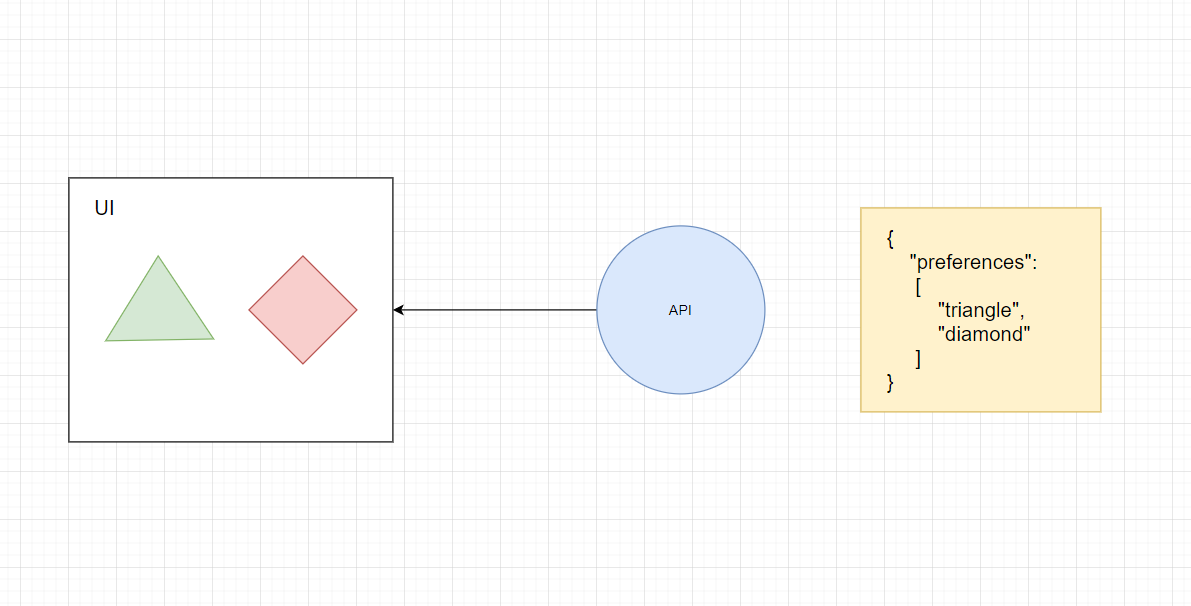
The idea of contextual experiences goes hand in hand with data-driven design where your backend services providing your frontend with data are agnostically the ones in control of what kind of capabilities your user interface is going to have based on the data provided. This pattern has proven itself to be quite effective when building dynamic applications that adjust themselves based on a particular user profile or preferences.

Image DDUI

For instance, users with accessibility needs may require a different set of components to perform a certain task that may differ from other users. Similarly, users with particular preferences may choose to adjust their user experience to fit their needs by adding or removing particular components from their dashboards. But more commonly, dynamic data-driven UI components can become very handy with enterprise applications that require adjustment in the type of data it tries to collect from it’s users.

A good example for that is when providing a form to request information about a certain topic. Depending on user’s selection for an answer, a new set of questions may appear. The contextual experience in this case let’s each user choose their own adventure. This pattern can be seen in most of questionnaires, request forms and all other types of applications that adjust themselves based on the current user choices.

In the next few sections, I’m going to walk you through the entire process of architecting, designing and developing contextual user experiences using Blazor’s DynamicComponent capability.

High Level Design

In order to implement context-aware Blazor applications, we need to understand how to architect our API/UI components to go hand-in-hand to provide the best possible experience. Here’s some rules for a context-aware system design:

Pure Data (API Side)

When designing your models for an API system – your models on the API side should not have anything related to the UI experience from a terminology or styling standpoints. For instance, your data living in your backend systems should not have a preference called TextBox or DropDownList. That oversteps into the boundaries of the rendering not the supplying of data. Your API data may, however, learn about the raw data type of the information its providing. For instance, the primitive data types could play a role in describing the type of data needs to be rendered. But that’s not always the case, since multi-line text and single-line text may render differently based on the component provided. In that case a custom, raw and generic type needs to be put in place for the UI client to know how to map it and eventually render the data dynamically.

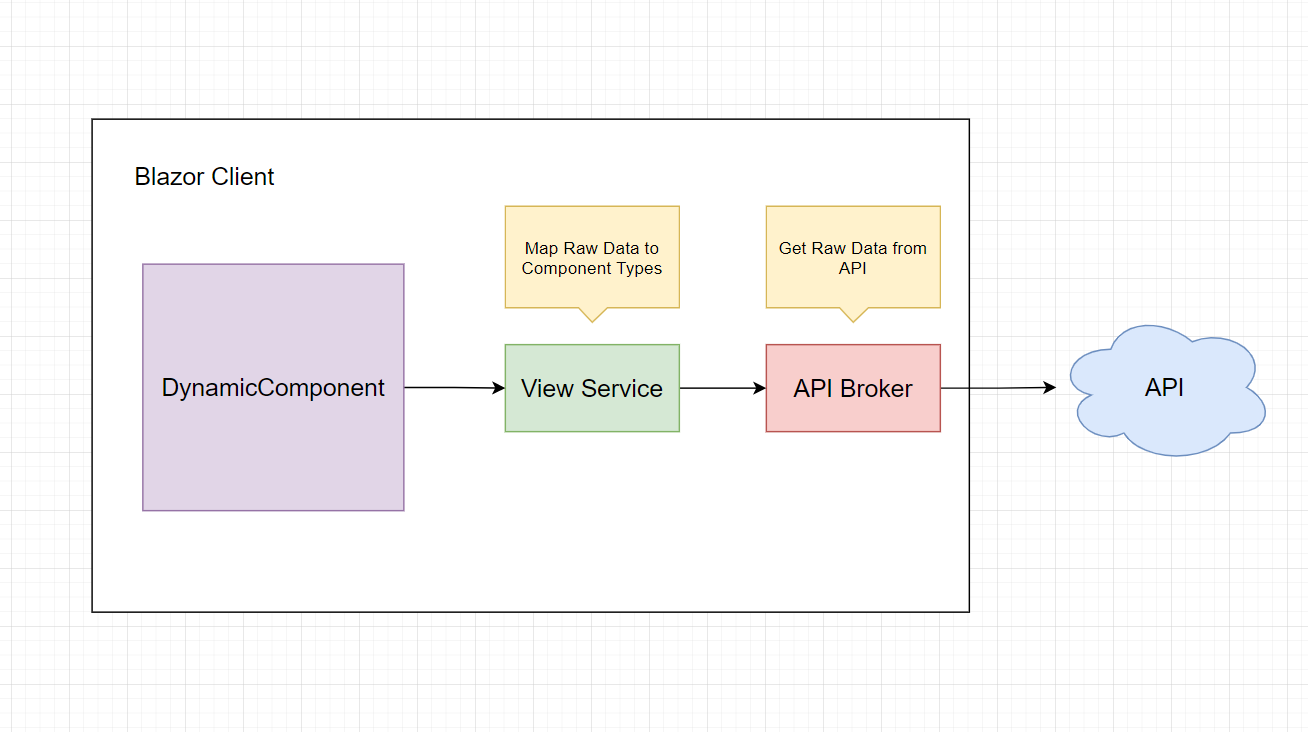
Mapping (UI Side)

On the UI side, your Blazor application may contain mapping components or services that knows how to map raw data types into their designated UI components. For instance, your Blazor application will be responsible for receiving raw data of type Text and map that type to a UI component TextBoxComponent. This way, you have created a level of abstraction by leveraging the generic terminology of your data types to match whichever UI component the current UI client you are building would like to render that to.

This pattern would also allow rendering the same raw data in different ways based on the type of the UI applications. For instance, UI components built for mobile apps may choose to render Text to Entry as is the case in Xamarin apps for instance. And maybe your desktop Windows Forms Application may choose to render Text data type to TextBox and so on.

Image MapComponentTypes

The Implementation

Let’s turn the aforementioned theory into a reality. Let’s assume you have an API that provides the following body of data:

{
    "options":
    [
       "Choice",
       "Choices",
       "Text"
    ]
}

In your Blazor client, your API broker hands over the above model to a view service that does the following:

public IEnumerable<OptionView> RetrieveAllOptionViews()
{
    List<string> options = this.optionService.RetrieveAllOptions();

    return options.Select(option => new OptionView
    {
        Text = option,
        Value = $"{option}Base"
    });
}

The above function will call it’s foundation dependency to retrieve all options in their raw API format. Then map each and every result into a text value as a representative for an option in a drop down list and the value as the name of the UI component.

For instance, if one of the values in that list is Choice the dropdown option text would be Choice and the value would be the stringified value of the UI component that corresponds to the text value, which would be ChoiceBase.

Now, let’s take this further to the Page level where everything will be tied up together as follows:

In an Index page we are going to define our dependency as the aforementioned view service, along with a couple of functions:

public partial class Index : ComponentBase
{
    [Inject]
    public IOptionViewService OptionViewService { get; set; }

    public IEnumerable<OptionView> OptionViews { get; set; }
    public Type SelectedComponent { get; set; }

    protected override void OnInitialized()
    {
        SelectedComponent = typeof(ChoiceBase);
        this.OptionViews = this.OptionViewService.RetrieveAllOptionViews();
    }

    public void SetComponent(ChangeEventArgs changeEventArgs)
    {
        string fullComponentName = changeEventArgs.Value;
        SelectedComponent = Type.GetType(typeName: fullComponentName);
    }
}

The properties of the backend side of the Index Page provides a list of all the OptionViews that come from the OptionViewService ready to be consumed as is. Additionally, a property for the default selection which is SelectedComponent – this particular property is important to be initialized with some value in order for the DynamicComponent to be able to render it.

Now, based on the selection, the SetComponent function will trigger to reset the value of the SelectedComponent and re-render through the DynamicComponent as follows:

<select @onchange="SetComponent">
    <Iterations Items="OptionViews" T="OptionView" Context="optionView">
        <option value="@optionView.Value">@optionView.Text</option>
    </Iterations>
</select>

<DynamicComponent Type="SelectedComponent" />

For every OptionView an option will be made, and when the selection changes the SelectedComponent will also change accordingly triggering a new value that corresponds to the dropdown list option.

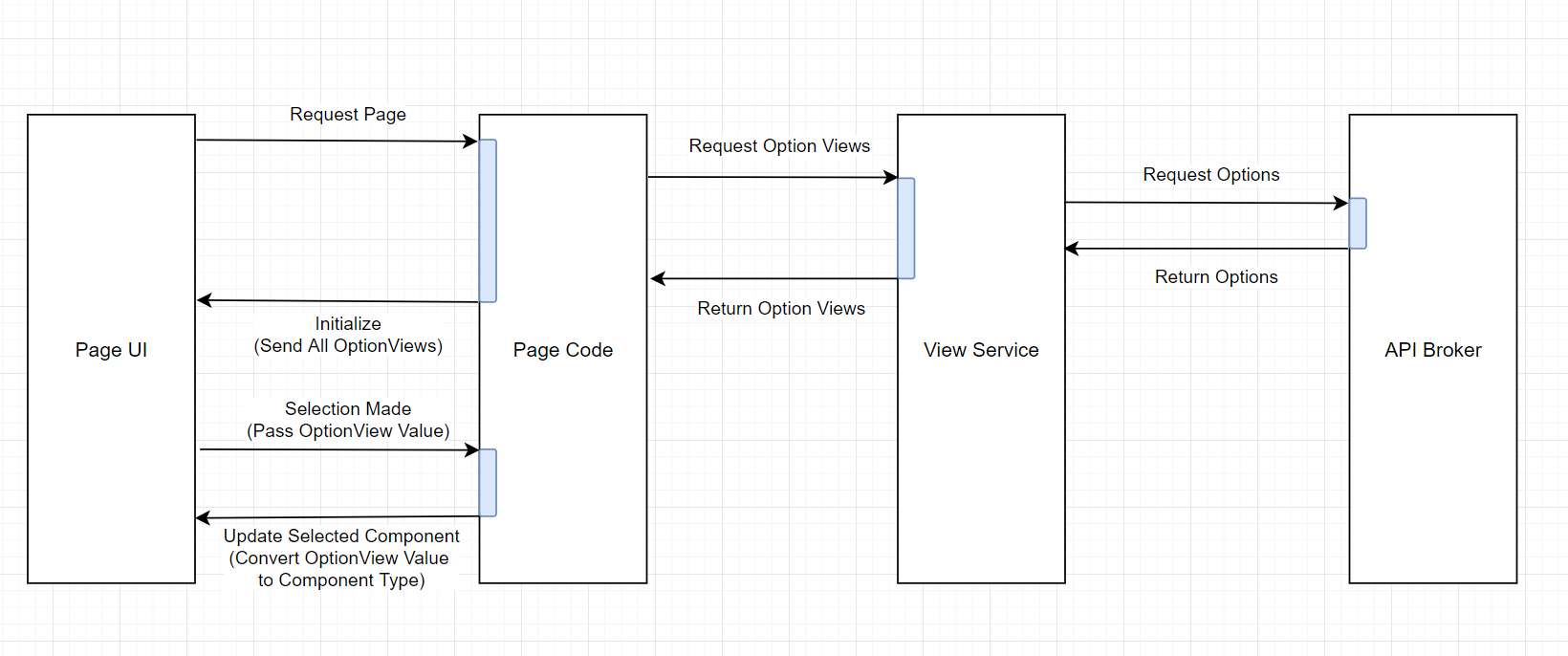
Here’s a sequence diagram to visualize the event flow of the events in the above code:

Image SequentialContextual

Now, let’s take a look at how DynamicComponent handles rendering components based on the user’s choice:

Image DynamicComponentDemo

Now, the above examples is just a small manifestation of the original pattern. Providing truly contextual experiences is a two-way street. Offering dynamic components alone can only be fruitful in read-only mode. But what happens when you need to send your APIs the selection back as a stored value? How do we render these stored values back onto a dynamic component as a pre-set parameter? Can DynamicComponent support nested components?

All of these questions, and more will be addressed in the next part of this article, so stay tuned!

Here’s some final notes:

  • The source code of above demo can be found here.
  • Here’s a full end-to-end demo video for the same pattern.

The post Building Contextual Experiences w/ Blazor appeared first on ASP.NET Blog.


F# and F# tools update for Visual Studio 16.10

We’re excited to announce updates to the F# tools for Visual Studio 16.10. For this release, we’re continuing our trend of improving the F# experience in Visual Studio to build upon what was released in the VS 16.9 update last February.

  • Support for Go to Definition on external symbols
  • Better support for mixing C# and F# projects in a solution
  • More quick fixes and refactorings
  • More tooling performance and responsiveness improvements
  • More core compiler improvements

Let’s dive in!

Go to Definition on external symbols

This one’s been a long time coming. We’ve had a feature request since 2016 and several trial implementations throughout the years. Now it’s here!

As shown in the video, you can either use the f12 key or ctrl+click to navigate to a declaration, just like in source code in your own solution.

When you navigate, Visual Studio generates a complete F# Signature File that represents the module or namespace that the symbol lives under, with XML documentation if it is present. This allows colorization, tooltips, and further navigation to work exactly as if they had been declared as signature files in your own codebase.

Better mixing of C# and F# projects in your solution

One of the biggest annoyances when working with C# and F# projects that interoperate in the same codebase is that you need to rebuild projects to see updates in other projects if they cross the C# <-> F# boundary.

Starting with the VS 16.10 release, if you make a change to a C# project, you don’t need to rebuild it to see changes in an F# project!

As shown in the video, I can make any modification and immediately see changes in the F# project.

The inverse is still not true today, and there remains more work to be done to make the C# <-> F# interop boundaries clean from a tooling standpoint. To summarize the current state of things, here’s a checklist:

  • ✔ F# projects can “see” changes in C# projects without rebuilding
  • ✔ You can Go to Definition on any C# symbol from F# and navigate to that spot in a C# codebase
  • ❌ C# projects cannot “see” changes in an F# project without rebuilding
  • ❌ You cannot Go to Definition on any F# symbol from C# and navigate to that spot in the F# codebase

We’re doing more work to turn the remaining red crosses into green check marks. The work is quite low-level and starts with some changes to the F# compiler and will likely also involve changes in the C# tooling as well.

XML documentation scaffolding

At the start of Visual Studio 2019, we disabled a feature that allowed you to scaffold XML documentation in source due to performance concerns. The implementation was found to be a significant source of UI delays, which could be detrimental to an overall Visual Studio experience, especially if combined with large memory consumption.

Over the span of Visual Studio 2019, we’ve made big strides in performance for the F# tools, including changing the implementation of the XML documentation scaffolding feature so it doesn’t impact UI delays anymore. So it’s now re-enabled!

More quick fixes and refactorings

Like the last release, we’re bringing in some more quick fixes and refactorings for the VS 16.10 release!

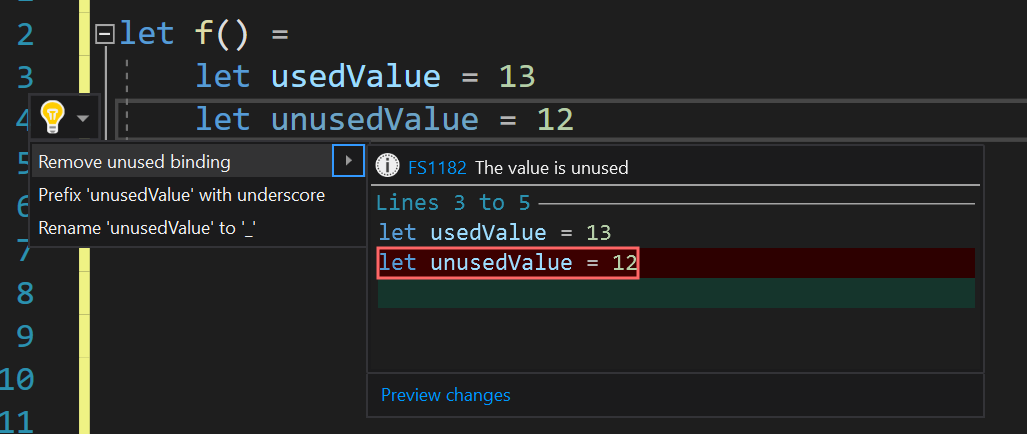
Remove unused binding quick fix

If you have an unused binding in any scope, we’ll offer to remove it for you if it’s considered removable:

Remove unused binding code fix

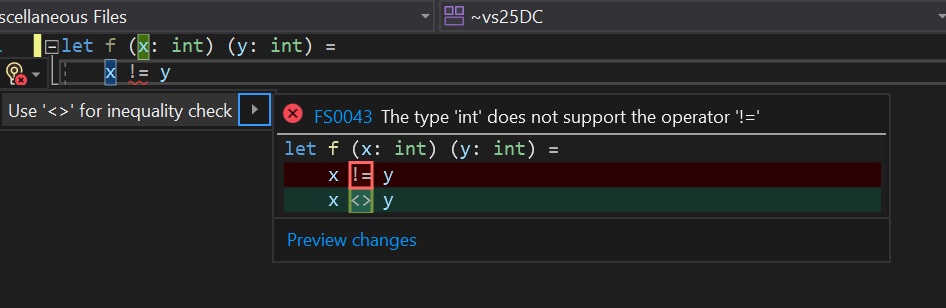
Use proper inequality operator quick fix

Some beginners from other languages might use != and get confused by the error it produces. This quick fix will correct their operator usage to use <>:

Use proper inequality operator code fix

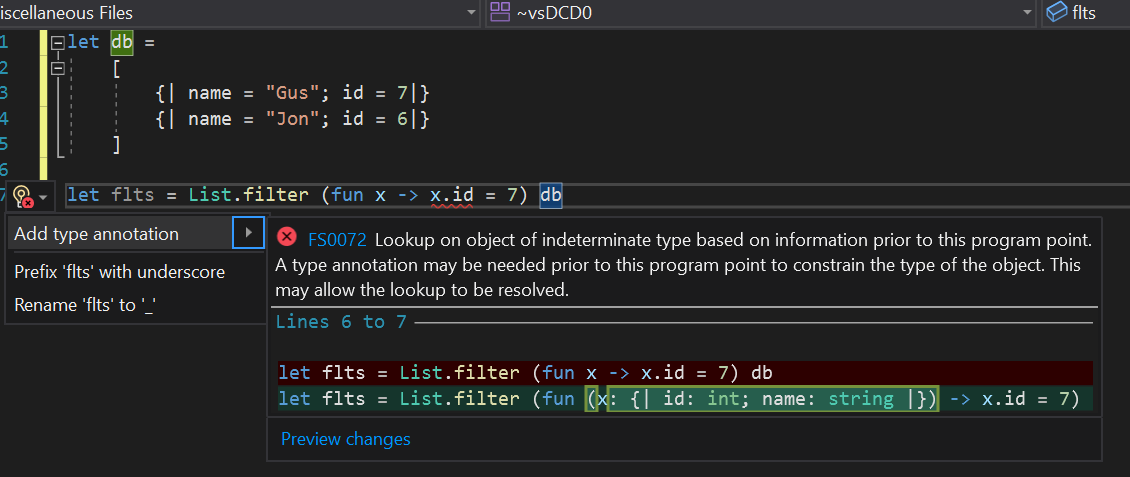
Add type annotation to object of indeterminate type quick fix

The F# compiler can give a confusing error, where code technically doesn’t compile, but the F# tools can actually infer a type that the compiler can’t. This quick fix will bring that known type into a suggestion:

Add type annotation to object of indeterminate type quick fix, F# and F# tools update for Visual Studio 16.10

Add type annotation refactoring

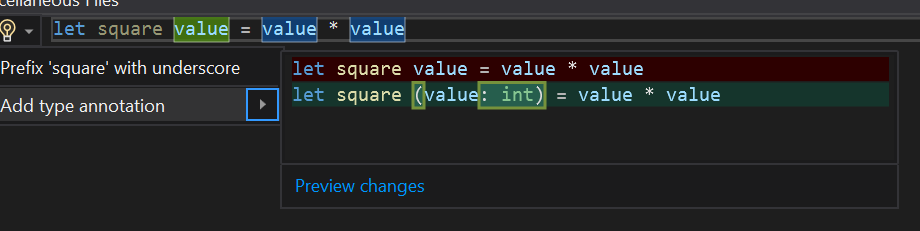
Finally, we’ve added the first refactoring in the F# tools for Visual Studio. Refactorings are different from quick fixes in that they aren’t triggered by warnings or errors. Instead, lightbulbs (with no error icon next to them) indicate that a code refactoring is available at your cursor position.

Add type annotation refactoring

Even more tooling performance and responsiveness

Just like the past several Visual Studio releases, we’re continuing to chip away at tooling performance and responsiveness for larger codebases.

Reduced memory usage

We identified another “win” for memory usage for large solutions. When Visual Studio colors constructs in an open document, this is actually the result of a process known as “classification”. Classification runs in two passes:

  1. Syntactical classification
  2. Semantic classification

Syntactical classification can do things like identify keywords from non-keyworks. It’s very lightweight because it doesn’t require typechecking anything. You may notice for a very, very large file that keywords are colored before types are colored.

Semantic classification is an expensive operation. It does things like distinguish classes, structs, enums, methods, properties, etc. The end result is more nuanced colorization in a document. However, since it is typically the first semantic operation kicked off by a language service, it also fills caches.

One of the caches used by semantic classification is the actual classification information itself. This information used to be stored in one big array. This could consume significant RAM over time (especially if you have a lot of large documents open). To address this, we backed the data with a memory-mapped file, an approach we’ve taken for several other large stores of data in the F# tools for Visual Studio. This has lead to savings of up to 200MB in the F# codebase, depending on how many files are open in a Visual Studio session.

This change was contributed by Saurav Tiwary. Thanks, Saurav!

More IDE features respond immediately

Last release, we started some work in the F# language service to make requests for semantic information no longer serial. As a refresher, the machinery involved serializes requests that require semantic information because there may be a circumstance where a typechecking operation can have downstream effects. It uses a queue to process requests in order. In practice, however, this approach is rarely necessary. In this release, we’ve pulled even more operations off of this queue.

With these changes, you should notice that tooling features in larger codebases react to your inputs faster than before, especially in larger codebases.

Core compiler improvements

Finally, we’ve got some more compiler improvements to share!

Support for WarnOn in project files

Prior to this release, if you wanted to introduce warnings for specific compiler codes, you’d have to use --warnon:number in an OtherFlags property in your project file.

You can now just use WarnOn and pass the numbers directly in, just like in C#.

This was implemented by Chet Husk. Thanks, Chet!

Support for ApplicationIcon in project files

Prior to this release, setting ApplicationIcon in F# project files would do nothing.

Now, you can set this property in a project file just like in C#. A compiler flag, --win32icon, was also added.

This was implemented by albert-du. Thanks!

More span optimizations

Jérémie Chassaing implemented a lovely optimization for looping over a Span/ReadOnlySpan.

The following F# code:

let sumArray (vs: int ReadOnlySpan) =
    let mutable sum = 0
    for i in 0 .. vs.Length-1 do
        sum <- sum + vs.[i]
    sum

Now emits cleaner IL that removes a bounds check, allowing the runtime to more aggressively optimize the loop. This optimization also applies to for x in xs do loops.

Looking forward

With this release, we’re officially shifting gears to support three initiatives:

  1. Great support for F# in .NET 6
  2. Great support for F# in .NET Interactive
  3. Great support for F# in Visual Studio 2022

For the first initiative, we’re going to lock down on the language features we intend on releasing with soon. We’re not intending on adding many language features this time. We feel that there is more value in core compiler improvements and core tooling improvements (F# interactive, Visual Studio) right now. .NET 6 is an LTS release, we’re prioritizing existing feature-completeness, performance, and reliability. That doesn’t necessarily mean a feature freeze. In fact, we may also end up releasing a “compiler feature” or two, especially when related to improving build times. But it does mean that the set of new language features will be smaller when compared to F# 5. When we have a finalized set of language changes going into .NET 6, we’ll announce it and the version number that we’ll assign the release.

For the second initiative, we’re focused mainly on making sure that F# code gives great output (plaintext, charting), has great tooling (intellisense, tooltips), and gives a good experience using a broad set of libraries, especially those tailored towards data science and machine learning. To that end, we’ve already accomplished much of what we intend to do, especially in supporting some exotic package layouts for bringing in different packages with native dependencies. But there is still work to be done, such as ensuring tooling experiences (completion, tooltips, etc.) all work well. We’re committed to delivering an incredible F# experience when .NET Interactive releases in GA.

Lastly, we’re heavily focused on making sure we deliver a great F# experience in Visual Studio 2022. Since Visual Studio 2022 is going to be 64-bit, that means that there will be higher memory usage when compared to today. We have a lot of performance analysis work ahead of us. Our preliminary builds indicate that memory usage is ~2x when loading the F# codebase and running an expensive operation like Find All References. We are committed to bringing this factor down as much as possible. On top of that, we want to continue to iterate on Visual Studio productivity features and bring features like Inline Hints, better C# interop, faster build times, and more.

Stay tuned, and happy F# coding!

The post F# and F# tools update for Visual Studio 16.10 appeared first on .NET Blog.


source https://devblogs.microsoft.com/dotnet/f-and-f-tools-update-for-visual-studio-16-10/

🎮 Easy JavaScript Game Development with Kaboom.js (Mario, Zelda, and Space Invaders) - Full Course


Curriculum for the course 🎮 Easy JavaScript Game Development with Kaboom.js (Mario, Zelda, and Space Invaders) - Full Course

Learn how use JavaScript and Kaboom.js to create three classic video games. You will create games similar to Space Invaders, Super Mario Bros. and Legend of Zelda. Kaboom.js makes makes it easier and quicker to create games. ✏️ This course was developed by Ania Kubów. Check out her channel: https://www.youtube.com/c/AniaKubów ⭐️ Code ⭐️ 🔗 Space Invaders: https://replit.com/@AniaKubow/Kaboomjs-Space-Invaders 🔗 Mario: https://replit.com/@AniaKubow/Kaboomjs-Mario 🔗 Zelda: https://replit.com/@AniaKubow/Kaboomjs-Zelda ⭐️ Course Contents ⭐️ ⌨️ (0:00:00) Introduction ⌨️ (0:04:12) The basics ⌨️ (0:16:47) Space Invaders ⌨️ (0:47:32) Mario ⌨️ (1:45:15) Zelda ⌨️ (2:46:39) Sharing to the Replit App Store ⌨️ (2:48:03) Using any Code Editor 🎉 Thanks to Replit for providing a grant that made this course possible. -- Learn to code for free and get a developer job: https://www.freecodecamp.org Read hundreds of articles on programming: https://freecodecamp.org/news And subscribe for new videos on technology every day: https://youtube.com/subscription_center?add_user=freecodecamp

Watch Online Full Course: 🎮 Easy JavaScript Game Development with Kaboom.js (Mario, Zelda, and Space Invaders) - Full Course


Click Here to watch on Youtube: 🎮 Easy JavaScript Game Development with Kaboom.js (Mario, Zelda, and Space Invaders) - Full Course


This video is first published on youtube via freecodecamp. If Video does not appear here, you can watch this on Youtube always.


Udemy 🎮 Easy JavaScript Game Development with Kaboom.js (Mario, Zelda, and Space Invaders) - Full Course courses free download, Plurasight 🎮 Easy JavaScript Game Development with Kaboom.js (Mario, Zelda, and Space Invaders) - Full Course courses free download, Linda 🎮 Easy JavaScript Game Development with Kaboom.js (Mario, Zelda, and Space Invaders) - Full Course courses free download, Coursera 🎮 Easy JavaScript Game Development with Kaboom.js (Mario, Zelda, and Space Invaders) - Full Course course download free, Brad Hussey udemy course free, free programming full course download, full course with project files, Download full project free, College major project download, CS major project idea, EC major project idea, clone projects download free

.NET Framework May 2021 Cumulative Update Preview for Windows 10, versions 2004, 20H2, 21H1

Today, we are releasing the May 2021 Cumulative Update Preview for .NET Framework.

Quality and Reliability

This release contains the following quality and reliability improvements.

CLR1
  • Addresses a performance issue caused by incorrect configuration in the GC.
  • Addresses an issue where a background GC could pause the runtime for a long period of time if a large managed heap is filled with long lived objects with a deep chain of references.
  • Addresses an issue where crashes could occur if security stackwalks were generated during ThreadAbortException handling.
NCL2
  • .NET Framework 4.8 will now allow to negotiate TLS 1.3 if underlying OS supports it.
WPF3
  • Addresses an issue when rapid typing using an IME can crash via FailFast.
  • Addresses an issue where Thaana characters displayed in left-to-right order.
  • Addresses a crash when WebBrowser receives a completion event for a navigation it tried to cancel.

1 Common Language Runtime (CLR) 2 Network Class Library (NCL) 3 Windows Presentation Foundation (WPF)

Getting the Update

The Cumulative Update Preview is available via Windows Update and Microsoft Update Catalog.

Microsoft Update Catalog

You can get the update via the Microsoft Update Catalog. Customers that rely on Windows Update will automatically receive the .NET Framework version-specific updates. Advanced system administrators can also take use of the below direct Microsoft Update Catalog download links to .NET Framework-specific updates. Before applying these updates, please ensure that you carefully review the .NET Framework version applicability, to ensure that you only install updates on systems where they apply.

The following table is for Windows 10 and Windows Server 2019+ versions.

Product Version Cumulative Update
Windows 10 Version 21H1
.NET Framework 3.5, 4.8 Catalog 5003254
Windows 10, version 20H2 and Windows Server, version 20H2
.NET Framework 3.5, 4.8 Catalog 5003254
Windows 10 2004 and Windows Server, version 2004
.NET Framework 3.5, 4.8 Catalog 5003254


Previous Monthly Rollups

The last few .NET Framework Monthly updates are listed below for your convenience:

The post .NET Framework May 2021 Cumulative Update Preview for Windows 10, versions 2004, 20H2, 21H1 appeared first on .NET Blog.


source https://devblogs.microsoft.com/dotnet/net-framework-may-2021-cumulative-update-preview-for-windows-10-versions-2004-20h2-21h1/

ASP.NET Core updates in .NET 6 Preview 4

.NET 6 Preview 4 is now available and includes many great new improvements to ASP.NET Core.

Here’s what’s new in this preview release:

  • Introducing minimal APIs
  • Async streaming
  • HTTP logging middleware
  • Use Kestrel for the default launch profile in new projects
  • IConnectionSocketFeature
  • Improved single-page app (SPA) templates
  • .NET Hot Reload updates
  • Generic type constraints in Razor components
  • Blazor error boundaries
  • Blazor WebAssembly ahead-of-time (AOT) compilation
  • .NET MAUI Blazor apps
  • Other performance improvements

Get started

To get started with ASP.NET Core in .NET 6 Preview 4, install the .NET 6 SDK.

If you’re on Windows using Visual Studio, we recommend installing the latest preview of Visual Studio 2019 16.11. If you’re on macOS, we recommend installing the latest preview of Visual Studio 2019 for Mac 8.10.

Upgrade an existing project

To upgrade an existing ASP.NET Core app from .NET 6 Preview 3 to .NET 6 Preview 4:

  • Update all Microsoft.AspNetCore.* package references to 6.0.0-preview.4.*.
  • Update all Microsoft.Extensions.* package references to 6.0.0-preview.4.*.

See the full list of breaking changes in ASP.NET Core for .NET 6.

Introducing minimal APIs

In .NET 6, we are introducing minimal APIs for hosting and routing in web applications. This opens the doors for new developers building their first web application with .NET and to our existing customers who want to build small microservices and HTTP APIs. These streamlined APIs provide the benefits of ASP.NET MVC with less ceremony.

To try out creating a minimal API, create a new ASP.NET Core empty web app.

dotnet new web -o MinApi

With just a single file and a few lines of code, you now have a fully functioning HTTP API:
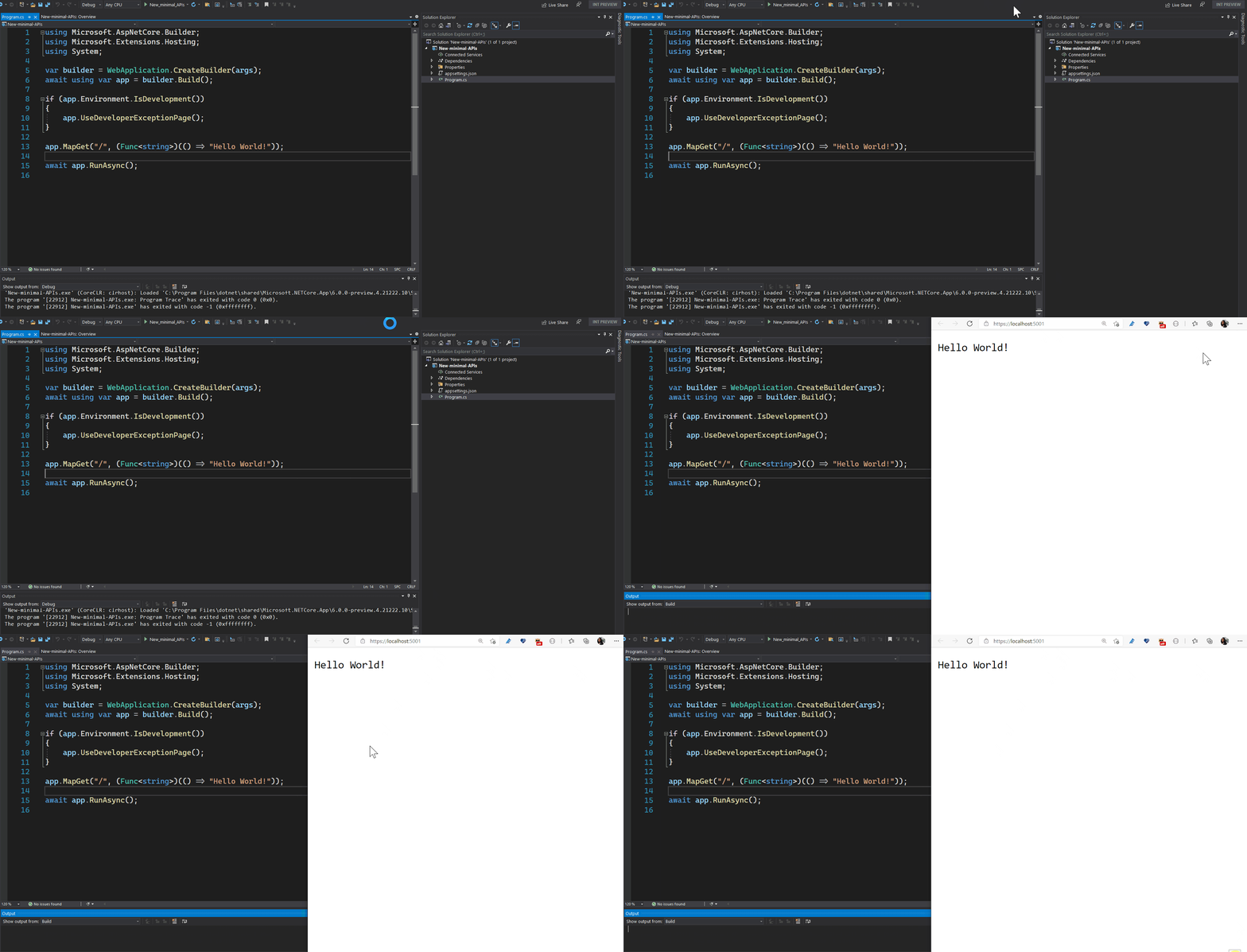
miniapi-preview

New routing APIs

The new routing APIs allow users to route to any type of method. These methods can use controller-like parameter binding, JSON formatting, and action result execution.

Before (using the existing Map APIs):

app.MapGet("/", async httpContext =>
{
    await httpContext.Response.WriteAsync("Hello World!");
});

After (using the new Map overloads):

app.MapGet("/", (Func<string>)(() => "Hello World!"));

C# 10 improvements

These APIs already take advantage of newer C# features, like top-level statements. With C# 10, which ships with .NET 6 later this year, the experience will get even better. For example, the explicit cast to (Func<string>) will no longer be necessary. The image below demonstrates what it will look like once all of the C# 10 features are implemented.
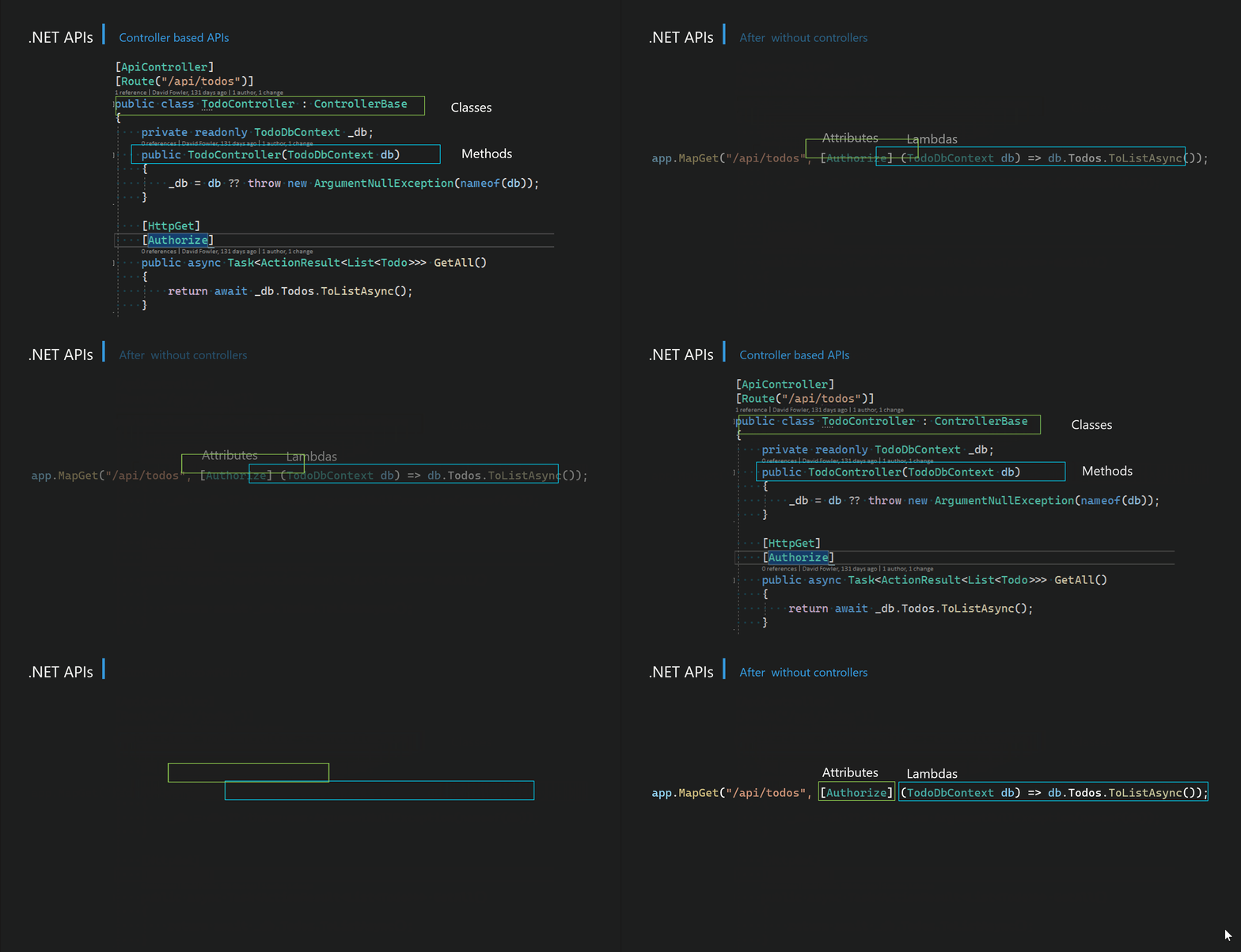
miniapi-functions

The developer goes from using classes and methods to using lambdas without giving up the ability to use attributes and other features available to MVC Controller actions.

New hosting APIs

The new empty web template is using the new hosting model introduced in .NET 6 Preview 4.

var app = WebApplication.Create(args);

app.MapGet("/", (Func<string>)(() => "Hello World!"));

app.Run();

You aren’t limited to just use the new routing APIs. Below is an example of an existing web app updated to use the new hosting model that configures services and adds middleware.

using Microsoft.AspNetCore.Builder;
using Microsoft.Extensions.DependencyInjection;
using Microsoft.Extensions.Hosting;
using Microsoft.OpenApi.Models;

var builder = WebApplication.CreateBuilder(args);
builder.Services.AddControllers();
builder.Services.AddSwaggerGen(c =>
{
    c.SwaggerDoc("v1", new OpenApiInfo { Title = "Api", Version = "v1" });
});

var app = builder.Build();

if (app.Environment.IsDevelopment())
{
    app.UseDeveloperExceptionPage();
    app.UseSwagger();
    app.UseSwaggerUI(c => c.SwaggerEndpoint("/swagger/v1/swagger.json", "Api v1"));
}

app.UseHttpsRedirection();
app.UseAuthorization();
app.MapControllers();

app.Run();

The new hosting API reduces the amount of boilerplate required to the configure and start any ASP.NET app.

Performance

These new routing APIs have far less overhead than controller-based APIs. Using the new routing APIs, ASP.NET Core is able to achieve ~800k RPS in the TechEmpower JSON benchmark vs ~500k RPS for MVC.

Tech-Empower-Benchmark

Async streaming

ASP.NET Core now supports async streaming from controller actions all the way down to the response JSON formatter. Returning an IAsyncEnumerable from an action no longer buffers the response content in memory before it gets sent. This helps reduce memory usage when returning large datasets that can be asynchronously enumerated.

Note that Entity Framework Core provides implementations of IAsyncEnumerable for querying the database. The improved support for IAsyncEnumerable in ASP.NET Core in .NET 6 can make using EF Core with ASP.NET Core more efficient. For example, the following code will no longer buffer the product data into memory before sending the response:

public IActionResult GetProducts()
{
    return Ok(dbContext.Products);
}

However, if you have setup EF Core to use lazy loading, this new behavior may result in errors due to concurrent query execution while the data is being enumerated. You can revert back to the previous behavior by buffering the data yourself:

public async Task<IActionResult> Products()
{
    return Ok(await dbContext.Products.ToListAsync());
}

See the related announcement for additional details about this change in behavior.

HTTP logging middleware

HTTP logging is a new built-in middleware that logs information about HTTP requests and HTTP response including the headers and entire body.

public void Configure(IApplicationBuilder app, IWebHostEnvironment env)
{
    app.UseHttpLogging();
}

HTTP logging provides logs of:

  • HTTP Request information
  • Common properties
  • Headers
  • Body
  • HTTP Response information

To configure the HTTP logging middleware, you can specify HttpLoggingOptions in your call to ConfigureServices():

public void ConfigureServices(IServiceCollection services)
{
    services.AppHttpLogging(logging =>
    {
        // Customize HTTP logging here.
        logging.LoggingFields = HttpLoggingFields.All;
        logging.RequestHeaders.Add("My-Request-Header");
        logging.ResponseHeaders.Add("My-Response-Header");
        logging.MediaTypeOptions.AddText("application/javascript");
        logging.RequestBodyLogLimit = 4096;
        logging.ResponseBodyLogLimit = 4096;
    });
}

This results in a new log with the HTTP request information in the Microsoft.AspNetCore.HttpLogging.HttpLoggingMiddleware category.

info: Microsoft.AspNetCore.HttpLogging.HttpLoggingMiddleware[1]
      Request:
      Protocol: HTTP/1.1
      Method: GET
      Scheme: https
      PathBase:
      Path: /
      QueryString:
      Connection: keep-alive
      Accept: */*
      Accept-Encoding: gzip, deflate, br
      Host: localhost:5001
      User-Agent: PostmanRuntime/7.26.5
      My-Request-Header: blogpost-sample
      Postman-Token: [Redacted]

For more information on how to use HTTP logging, take a look at the HTTP logging docs.

Use Kestrel for the default launch profile in new projects

Kestrel is default launch profile

We’ve changed the default launch profile from IIS Express to Kestrel for all new projects created in .NET 6 Preview 4. Starting Kestrel is significantly faster and results in a more responsive experience while developing your apps.

  IIS Express (ms) Kestrel (ms) % change
Debugging 4359 2772 36%
No debugging 1999 727 64%

IIS Express is still available as a launch profile for scenarios such as Windows Authentication or port sharing.

IConnectionSocketFeature

The IConnectionSocketFeature request feature gives you access to the underlying accept socket associated with the current request. It can be accessed via the FeatureCollection on HttpContext.

For example, the application below sets the LingerState property on the accepted socket:

var builder = WebApplication.CreateBuilder(args);
builder.WebHost.ConfigureKestrel(serverOptions =>
{
    serverOptions.ConfigureEndpointDefaults(listenOptions => listenOptions.Use((connection, next) =>
    {
        var socketFeature = connection.Features.Get<IConnectionSocketFeature>();
        socketFeature.Socket.LingerState = new LingerOption(true, seconds: 10);
        return next();
    }));
});
var app = builder.Build();
app.MapGet("/", (Func<string>)(() => "Hello world"));
await app.RunAsync();

Improved single-page app (SPA) templates

We’ve updated the ASP.NET Core project templates for Angular and React to use a improved pattern for single-page apps that is more flexible and more closely aligns with common patterns for modern front-end web development.

Previously, the ASP.NET Core template for Angular and React used specialized middleware during development to launch the development server for the front-end framework and then proxy requests from ASP.NET Core to the development server. The logic for launching the front-end development server was specific to the command-line interface for the corresponding front-end framework. Supporting additional front-end frameworks using this pattern meant adding additional logic to ASP.NET Core.

The updated ASP.NET Core templates for Angular and React in .NET 6 flips this arrangement around and take advantage of the built-in proxying support in the development servers of most modern front-end frameworks. When the ASP.NET Core app is launched, the front-end development server is launched just as before, but the development server is configured to proxy requests to the backend ASP.NET Core process. All of the front-end specific configuration to setup proxying is part of the app, not ASP.NET Core. Setting up ASP.NET Core projects to work with other front-end frameworks is now straight-forward: simply setup the front-end development server for your framework of choice to proxy to the ASP.NET Core backend using the pattern established in the Angular and React templates.

The startup code for the ASP.NET Core app no longer needs any single-page app specific logic. The logic for starting the front-end development server during development is injecting into the app at runtime by the new Microsoft.AspNetCore.SpaProxy package. Fallback routing is handled using endpoint routing instead of SPA specific middleware.

Templates that follow this pattern can still be run as a single project in Visual Studio or using dotnet run from the command-line. When the app is published, the front-end code in the ClientApp folder is built and collected as before into the web root of the host ASP.NET Core app and served as static files. Scripts included in the template configure the front-end development server to use HTTPS using the ASP.NET Core development certificate.

.NET Hot Reload updates

The latest preview of Visual Studio has some initial support for .NET Hot Reload. You may have noticed the new Apply Code Changes button and debug option when debugging your app:

Apply Code Changes button

The Apply Code Changes button will update the running app with any code changes you’ve made in the editor even without having to save the file. Here’s an example of updating the Counter component to increment by two instead of one. Notice that the current count is not lost once the change has been applied.
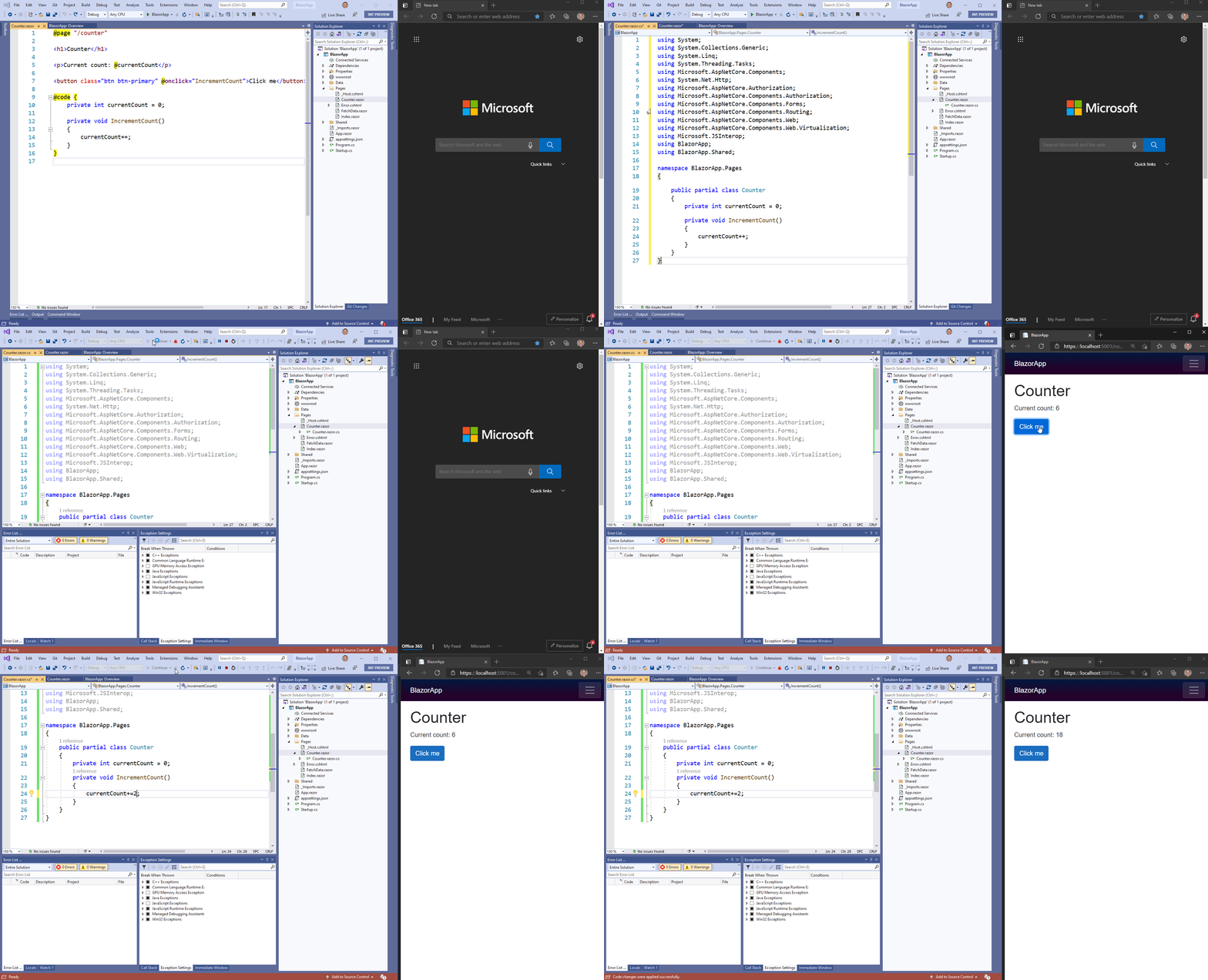
.NET Hot Reload in Visual Studio with Blazor

.NET Hot Reload support in Visual Studio is still a work in progress, so there are a number of limitations when using it with ASP.NET Core apps:

  • You must run with the debugger attached to apply changes
  • Code changes can only be applied to C# files – changes to Razor files (.razor, .cshtml) don’t work yet
  • Applied changes don’t force the UI to update yet, so UI updates will need to be triggered manually
  • Changes can’t be applied to Blazor WebAssembly apps yet

All of these limitations are being worked and will be addressed in future Visual Studio updates. Stay tuned!

If you’re using .NET Hot Reload via dotnet watch, changes will now be applied to ASP.NET Core hosted Blazor WebAssembly apps. Changes will also be reapplied to your Blazor WebAssembly app if you refresh the browser.

To learn more about .NET Hot Reload you can get all the details in our blog post: Introducing .NET Hot Reload

Generic type constraints in Razor

When defining generic type parameters in Razor using the @typeparam directive, you can now specify generic type constraints using the standard C# syntax:

@typeparam TEntity where TEntity : IEntity

Blazor error boundaries

Blazor error boundaries provide a convenient way to handle exceptions within the component hierarchy. To define an error boundary, use the new ErrorBoundary component to wrap some existing content. The ErrorBoundary component will render its child content as long as everything is running smoothly. If an unhandled exception is thrown, the ErrorBoundary renders some error UI.

For example, we can add an error boundary around the body content of the layout of the default Blazor app like this:

<div class="main">
    <div class="top-row px-4">
        <a href="https://docs.microsoft.com/aspnet/" target="_blank" rel="noopener">About</a>
    </div>

    <div class="content px-4">
        <ErrorBoundary>
            @Body
        </ErrorBoundary>
    </div>
</div>

The app continues to function as before but now our error boundary will handle unhandled exceptions. For example, we can update the Counter component to throw an exception if the count gets too big.

private void IncrementCount()
{
    currentCount++;
    if (currentCount > 10)
    {
        throw new InvalidOperationException("Current count is too big!");
    }
}

Now if we click the counter too much, an unhandled exception is thrown, which gets handled by our error boundary by rendering some default error UI:

Blazor error boundary default UI

By default, the ErrorBoundary component renders an empty div with a blazor-error-boundary CSS class for its error content. The colors, text, and icon for this default UI all defined using CSS in the app, so you are free to customize them. You can also change the default error content by setting the ErrorContent property.

<ErrorBoundary>
    <ChildContent>
        @Body
    </ChildContent>
    <ErrorContent>
        <p class="my-error">Nothing to see here right now. Sorry!</p>
    </ErrorContent>
</ErrorBoundary>

Because we defined the error boundary in the layout, once an exception is thrown we now only see the error content regardless of which page we navigate to. It’s generally best to scope error boundaries more narrowly than this, but we can choose to reset the error boundary to a non-error state on subsequent page navigations by calling the Recover method on the error boundary.

...
<ErrorBoundary @ref="errorBoundary">
    @Body
</ErrorBoundary>
...

@code {
    ErrorBoundary errorBoundary;

    protected override void OnParametersSet()
    {
        // On each page navigation, reset any error state
        errorBoundary?.Recover();
    }
}

Blazor WebAssembly ahead-of-time (AOT) compilation

Blazor WebAssembly now supports ahead-of-time (AOT) compilation, where you can compile your .NET code directly to WebAssembly for a significant runtime performance improvement. Blazor WebAssemby apps today run using a .NET IL interpreter implemented in WebAssembly. Because the .NET code is interpreted, typically this means that .NET code running on WebAssembly runs much slower than it would on a normal .NET runtime. .NET WebAssembly AOT compilation addresses this performance issue by compiling your .NET code directly to WebAssembly.

The performance improvement from AOT compiling your Blazor WebAssembly app can be quite dramatic for CPU intensive tasks. For example, the clip below shows a comparison of doing some basic image editing using the same Blazor WebAssembly app, first using the interpreter and then AOT compiled. The AOT compiled version runs over five times faster!
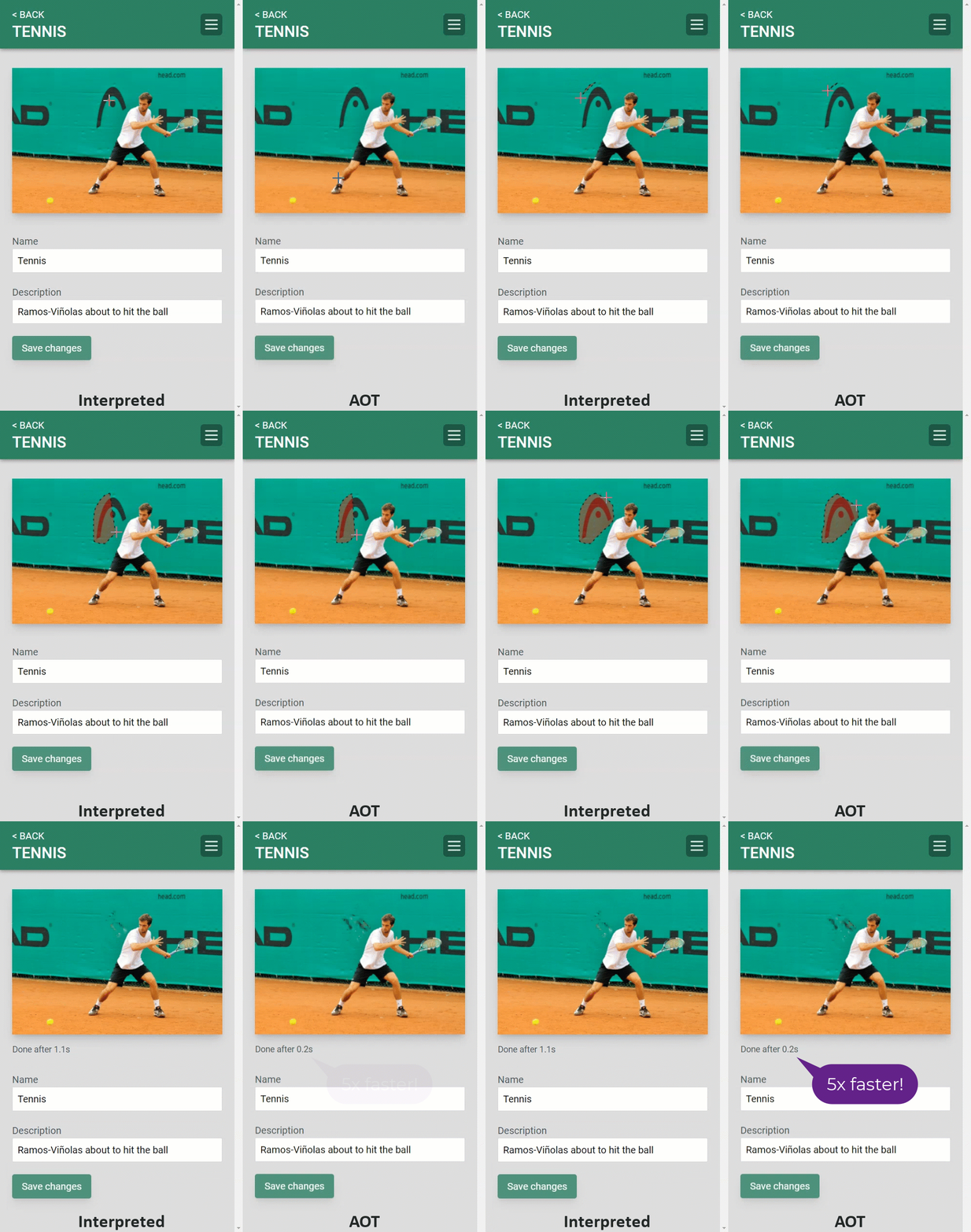
Picture Fixer AOT

You can check out the code for this PictureFixer on GitHub.

.NET WebAssembly AOT compilation requires an additional build tools that must be installed as an optional .NET SDK workload in order to use. To install the .NET WebAssembly build tools, run the following command from an elevated command prompt:

dotnet workload install microsoft-net-sdk-blazorwebassembly-aot

To enable WebAssembly AOT compilation in your Blazor WebAssembly project, add the following property to your project file:

<RunAOTCompilation>true</RunAOTCompilation>

To then AOT compile your app to WebAssembly, publish the app. Publishing using the Release configuration will ensure the .NET IL linking is also run to reduce the size of the published app:

dotnet publish -c Release

WebAssembly AOT compilation is only performed when the the project is published. It isn’t used when the project is run during development. This is because WebAssembly AOT compilation can take a while: several minutes on small projects and potentially much longer for larger projects. Speeding up the build time for WebAssembly AOT compilation is something that we are working on.

The size of an AOT compiled Blazor WebAssembly app is generally larger than the if the app was left as .NET IL. In our testing, most AOT compiled Blazor WebAssembly apps are about 2x larger, although it depends on the specific app. This means that using WebAssembly AOT compilation trades off load time performance for runtime performance. Whether this tradeoff is worth it will depend on your app. Blazor WebAssembly apps that are particularly CPU intensive will benefit the most from AOT compilation.

.NET MAUI Blazor apps

Blazor enables building client-side web UI with .NET, but sometimes you need more than what the web platform offers. Sometimes you need full access to the native capabilities of the device. You can now host Blazor components in .NET MAUI apps to build cross-platform native apps using web UI. The components run natively in the .NET process and render web UI to an embedded web view control using a local interop channel. This hybrid approach gives you the best of native and the web. Your components can access native functionality through the .NET platform, and they render standard web UI. .NET MAUI Blazor apps can run anywhere .NET MAUI can (Windows, Mac, iOS, and Android) although our primary focus for .NET 6 is on desktop scenarios.

To create a .NET MAUI Blazor app, you first need to setup .NET MAUI on your development machine. The easiest way to do that is using the maui-check tool.

To install the maui-check tool, run:

dotnet tool install -g Redth.Net.Maui.Check

Then run maui-check to acquire the .NET MAUI tooling and dependencies. For additional information about getting started with .NET MAUI, refer to the wiki documentation on GitHub.

Once everything is installed, create a .NET MAUI Blazor app using the new project template:

dotnet new maui-blazor -o MauiBlazorApp

You can also create a .NET MAUI Blazor app using Visual Studio:

New .NET MAUI Blazor app

.NET MAUI Blazor apps are .NET MAUI apps that use a BlazorWebView control to render Blazor components to an embedded web view. The app code and logic lives in the MauiApp project, which is setup to multi-target Android, iOS, and Mac Catalyst. The MauiApp.WinUI3 project is used to build for Windows, and the MauiApp.WinUI3 (Package) project is used to generate an MSIX package for Windows. Eventually we expect to merge the Windows support into the main app project, but for now these separate projects are necessary.

The BlazorWebView control is setup for you in MainPage.xaml in the MauiApp project:

<b:BlazorWebView HostPage="wwwroot/index.html">
    <b:BlazorWebView.RootComponents>
        <b:RootComponent Selector="#app" ComponentType="{x:Type local:Main}" />
    </b:BlazorWebView.RootComponents>
</b:BlazorWebView>

The root Blazor component for the app is in Main.razor. The rest of the Blazor components are in the Pages and Shared directories. Notice that these components are the same ones used in the default Blazor template. You can use existing Blazor components in your app unchanged. Static web assets for the app are in the wwwroot folder.

Windows

To run the app for Windows, you’ll need to build and run using Visual Studio.

Select the MauiBlazorApp.WinUI3 (Package) project as your startup project

Select WinUI startup project

Also select x64 for the target platform.

Select x64 target platform

You can then hit F5 or Ctrl+F5 to run the app as a native Windows desktop app using WinUI.

.NET MAUI Blazor app running on Windows

Android

To run the app on Android, first start the Android emulator using the Android SDK or the Android Device Manager.

Then run the app from the CLI using the following command:

dotnet build HelloMaui -t:Run -f net6.0-android

To run on Android from Visual Studio, select the MauiBlazorApp project as the startup project

Select startup project

Then select net6.0-android as the target framework in the Run button drop-down menu.

Select Android target framework

You can then hit F5 or Ctrl+F5 to run the app using the Android emulator.

Android

iOS and Mac Catalyst

To run the app for iOS or Mac Catalyst, you’ll need to use a macOS development environment running Big Sur. You can’t currently run the app for iOS or Mac Catalyst from a Windows development environment, although we do expect that .NET MAUI will support running iOS apps using a connected BUILD agent or on a connected device using Hot Restart.

To run the app for iOS and Mac Catalyst, use the following commands:

dotnet build HelloMaui -t:Run -f net6.0-ios
dotnet build HelloMaui -t:Run -f net6.0-maccatalyst

iOS and Mac Catalyst

There are some known limitations with .NET MAUI Blazor apps in this release:

  • Component scoped CSS files (.razor.css) are not working yet in the main .NET MAUI project. This will get fixed in a future update.

Learn more about what’s new in .NET MAUI in .NET 6 Preview 4.

Other performance improvements

As part of continually improving the performance of ASP.NET Core, we made a whole host changes to reduce allocations and improve performance across the stack:

Give feedback

We hope you enjoy this preview release of ASP.NET Core in .NET 6. We’re eager to hear about your experiences with this release. Let us know what you think by filing issues on GitHub.

Thanks for trying out ASP.NET Core!

The post ASP.NET Core updates in .NET 6 Preview 4 appeared first on ASP.NET Blog.


Announcing Entity Framework Core 6.0 Preview 4: Performance Edition

Today, the Entity Framework Core team announces the fourth preview release of EF Core 6.0. The main theme of this release is performance – and we’ll concentrate on that below – details on getting EF Core 6.0 preview 4 are at the end of this blog post.

The short and sweet summary:

  • EF Core 6.0 performance is now 70% faster on the industry-standard TechEmpower Fortunes benchmark, compared to 5.0.
  • This is the full-stack perf improvement, including improvements in the benchmark code, the .NET runtime, etc. EF Core 6.0 itself is 31% faster executing queries.
  • Heap allocations have been reduced by 43%.

The runtime perf push

When the EF Core team started the planning process for version 6.0, we knew it was finally time to address an important area. After several years spent delivering new EF Core features, stabilizing the product and progressively narrowing the feature gap with previous versions of Entity Framework, we wanted to put an emphasis on performance and to see exactly where we could go. In previous work iterations, a lot of attention was given to the lower layers of the stack: on the industry-standard TechEmpower Fortunes benchmark, .NET already scored very high, reaching 12th place overall (running on Linux against the PostgreSQL database). But while performance was always in our minds while working on EF Core, we hadn’t done a proper optimization push at that level of the stack.

When working on perf, it’s usually a good idea to have a target you can work to, even if it’s a somewhat arbitrary one. For 6.0, the goal we set ourselves was to get as close as possible to the performance of Dapper on the Fortunes benchmark. For those unfamiliar with it, Dapper is a popular, lightweight, performance-oriented .NET object mapper maintained (and used) by the folks over at Stack Overflow; it requires you to write your own SQL and doesn’t have many of the features of EF Core – it is sometimes referred to as a “micro-ORM” – but is an extremely useful data access tool. The EF Core team loves it, and we don’t think EF Core should be the answer to every .NET data need out there. So being lightweight and performance-oriented as it is, Dapper provided us with inspiration and a number to strive to reach.

At the end of this iteration, the gap between Dapper and EF Core in the TechEmpower Fortunes benchmark narrowed from 55% to around a little under 5%. We hope this shows that EF Core can be a good option for performance-aware applications, and that ORMs and data layers aren’t necessarily “inefficient beasts” which should be avoided. It’s worth mentioning that the benchmark executes a LINQ query – not raw SQL – so many of the benefits of EF Core are being preserved (e.g. statically-typed queries!) while sacrificing very little perf.

A final, general note on performance. The numbers and improvements reported in this article are for a very specific scenario (TechEmpower Fortunes), using non-tracking queries only (no change tracking, no updates); the benchmarks were executed on a high-performance, low-latency setup. Real-world application scenarios will most probably show very different results, as the runtime overhead of executing queries would be dominated by network or database I/O times. In fact, we believe that for many real-world applications, the runtime overhead added by something like EF Core is likely to play a very minor role next to other, more important factors influencing perf. Keep this in mind when thinking about your data access

With that out of the way, let’s dive into some of the optimizations done for EF Core 6.0. For those interested, the full list of improvements done in this optimization round is available, along with detailed measurements.

Pooling and recycling, DbContext and beyond

Recycling and pooling are central to good performance: they reduce the work needed to create and dispose resources, and typically lower heap allocations as well, which reduces pressure on the garbage collector. All EF Core users are familiar with the DbContext class – this is the main entry point for performing most operations; you can instantiate one (or get one from dependency injection), use it to perform a few database operations (“unit of work”), and then dispose it. While instantiating new DbContexts is fine in a typical application, the overhead of doing so in high-performance scenarios can be significant: DbContext works with a whole set of internal services – via an internal dependency injection mechanism – which coordinate together to make everything work; setting all that up takes time.

For this reason, EF Core has supported DbContext pooling for quite a while. The idea is simple: when you’re done with a DbContext, rather than disposing it (and all its dependent services), EF Core resets its state and then allows it to be reused later. And of course, our benchmark implementation for TechEmpower Fortunes already had this feature turned on; so… why was my profiler showing me considerable time spent creating and wiring together new DbContext instances?

In almost all cases, you want to place an upper bound on the number of instances you pool. An unbounded pool can suddenly fill up with a huge number of objects, which can take up considerably resources (memory or otherwise) and which may stick around indefinitely, depending on your pruning strategy. In the EF Core case, the default upper bound for pooled DbContext instances was 128 – going beyond that number meant falling back to instantiation and disposal. Now, while 128 should be fine for most applications – it’s not common to have 128 contexts active simultaneously – it definitely wasn’t enough for TechEmpower Fortunes; and hiking that number up to 1024 yielded a 23% improvement in benchmarkthroughput. This, of course, isn’t an improvement in EF Core itself, but it did lead us to increase the default, and we will probably start emitting a warning if the upper bound is surpassed. Finally, since DbContext pooling proved to be so important in this case, we made the feature accessible to applications not using dependency injection as well. I think this is a nice example of where even a minor benchmark misconfiguration can feed into useful product improvements.

But DbContext isn’t everything. When executing a query, EF Core makes use of various objects, including ADO.NET objects such as DbConnection, DbCommand and DbDatareader, and various internal objects for these. When all these instances showed high up in memory profiling, more recycling was clearly in order! As a result, each DbContext now has its own, dedicated set of instances of all these, which it reuses every time. This reusable graph of objects – rooted at the DbContext pool – extends all the way down into the PostgreSQL database provider (Npgsql), a good demonstration of an optimization that reaches across the layers of the stack. This change alone reduces the total bytes allocated for query execution by 22%.

Logging suppression

EF Core includes a lot of extension points, which allows users to get information about – and hook into – various stages of query execution. For example, to execute the SQL query against a relational database, EF Core calls DbCommand.ExecuteReaderAsync; it can log an event both before and after this call (allows users to see SQL statements before they get executed, and with their running times afterwards), write a DiagnosticSource event, and call into a user-configured command interceptor which allows the user to manipulate the command before it gets executed. While this provides a powerful and flexible set of extension points, this doesn’t come cheap: a single query execution has 7 events, each with 2 extension points (one before, one after). The cost of continuously checking whether logging is enabled or whether a DiagnosticListener is registered started showing up in profiling sessions!

One initial idea we considered was a global flag to disable all logging; this would be the simplest solution and would also provide the best performance possible. However, this approach had two drawbacks:

  1. It would be a sort of high-perf opt-in: it needs to be discovered and turned on. Wherever possible, we prefer to improve EF Core for everyone – out of the box.
  2. It would be all or nothing. If you, say, just want to get SQL statements logged, you can’t do that without paying the price for all the other extension points as well.

The solution we ended up implementing was to check whether any sort of logging or interception is enabled, and if not, suppress logging for that event for 1 second by default. This improved benchmark throughput by around 7% – very close to the global flag solution – while at the same time bringing the perf benefit to all EF Core users, without an opt-in. If, say, a DiagnosticListener is registered at some point during program execution, it may take up to a second for events to start appearing there; that seemed like a very reasonable trade-off for the speed-up.

Opting out of thread-safety checks

While logging suppression offered an internal optimization that’s transparent to users, our third case was different.

As hopefully everyone knows, EF Core’s DbContext isn’t thread-safe; for one thing, it encapsulates a database connection, which itself almost never allows concurrent usage. Now, although concurrent access of a DbContext instance is a programmer bug, EF Core includes an internal thread safety mechanism, which tries to detect when this happens, and throws an informative exception. This goes a long way to help EF Core users find accidental bugs, and also to make new users aware that DbContext isn’t thread-safe. This mechanism works on a best-effort basis – we made no attempt to make it detect all possible concurrency violations, since that would probably hurt performance in a significant way.

Now, the thread safety check mechanism itself didn’t show up as significant when profiling – something else did. To support some query scenarios, this check needs to be reentrant: it’s OK to start a 2nd query, as long as it’s part of the 1st query. And since EF Core supports asynchronous query execution, an AsyncLocal is used to flow the locking state across the threads that participate in the query. It turned out that using this AsyncLocal caused quite a few heap allocations to occur, and reduced benchmark throughput in a considerable way.

After some discussion, we decided to introduce an opt-out flag from thread-safety checks. Unlike with logging, there is no way for EF Core to know when the checks are needed, and when they aren’t; and we definitely want to prioritize reliability and easier debugging, so turning the check off by default was out of the question. Once users have tested that their application works well in production and they are confident that no concurrency bugs exist, they can choose to disable this particular protection; for our TechEmpower Fortunes benchmark, doing so yielded a 6.7% throughput improvement.

Closing words

None of the above is a dramatic change, or a fundamental re-designing of EF Core’s internal architecture. Fortunately, the EF Core query pipeline was already conceived with perf in mind: after a first expensive “compilation” when a query is first seen, EF Core caches both the query’s SQL and a code-generated materializer, which is the piece of code responsible for reading results from the database and instantiating your objects from them. This means that once an application reaches steady state, the heavy lifting has already been done, and EF Core has very little work left to do; and that’s how EF Core is able to perform well.

I hope the above has been an interesting read into the optimizations that have gone into EF Core 6.0, and has provided a glimpse into the internals; the full list of optimizations is available for those who want to dive deeper. To make your EF Core application perform better, please take a look at our performance docs, including this new guidance for high-perf scenarios based on this optimization effort.

What’s next? Well, performance work is never done. In addition to the above, EF Core 6.0 will also deliver other types of performance improvements, including various SQL generation improvements and optimized models, which should improve startup times for applications with lots of entities. We also have plans for continued future improvements, especially in areas of EF Core which weren’t covered in this optimization cycle (e.g. the update pipeline, change tracking).

Finally, I’d like to thank Sébastien Ros and the Crank performance infrastructure, without which this optimization work wouldn’t have been possible, and the EF Core team for their patience with me making their code more convoluted.

How to get EF Core 6.0 previews

EF Core is distributed exclusively as a set of NuGet packages. For example, to add the SQL Server provider to your project, you can use the following command using the dotnet tool:

dotnet add package Microsoft.EntityFrameworkCore.SqlServer --version 6.0.0-preview.4.21253.1

This following table links to the preview 4 versions of the EF Core packages and describes what they are used for.

Package Purpose
Microsoft.EntityFrameworkCore The main EF Core package that is independent of specific database providers
Microsoft.EntityFrameworkCore.SqlServer Database provider for Microsoft SQL Server and SQL Azure
Microsoft.EntityFrameworkCore.SqlServer.NetTopologySuite SQL Server support for spatial types
Microsoft.EntityFrameworkCore.Sqlite Database provider for SQLite that includes the native binary for the database engine
Microsoft.EntityFrameworkCore.Sqlite.Core Database provider for SQLite without a packaged native binary
Microsoft.EntityFrameworkCore.Sqlite.NetTopologySuite SQLite support for spatial types
Microsoft.EntityFrameworkCore.Cosmos Database provider for Azure Cosmos DB
Microsoft.EntityFrameworkCore.InMemory The in-memory database provider
Microsoft.EntityFrameworkCore.Tools EF Core PowerShell commands for the Visual Studio Package Manager Console; use this to integrate tools like scaffolding and migrations with Visual Studio
Microsoft.EntityFrameworkCore.Design Shared design-time components for EF Core tools
Microsoft.EntityFrameworkCore.Proxies Lazy-loading and change-tracking proxies
Microsoft.EntityFrameworkCore.Abstractions Decoupled EF Core abstractions; use this for features like extended data annotations defined by EF Core
Microsoft.EntityFrameworkCore.Relational Shared EF Core components for relational database providers
Microsoft.EntityFrameworkCore.Analyzers C# analyzers for EF Core

We also published the 6.0 preview 4 release of the Microsoft.Data.Sqlite.Core provider for ADO.NET.

Thank you from the team

A big thank you from the EF team to everyone who has used EF over the years!

ajcvickers Arthur Vickers AndriySvyryd Andriy Svyryd Brice Lambson JeremyLikness Jeremy Likness
maumar Maurycy Markowski roji Shay Rojansky smitpatel Smit Patel

Thank you to our contributors!

We are grateful to our amazing community of contributors. Our success is founded upon the shoulders of your efforts and feedback. If you are interested in contributing but not sure how or would like help, please reach out to us! We want to help you succeed. We would like to publicly acknowledge and thank these contributors for investing in the success of EF Core 6.0.

AkinSabriCam alexernest alexpotter10 Ali-YousefiTelori
#1 #1 #1 #1, #2
alireza-rezaee andrejs86 AndrewKitu ardalis
#1 #1 #1 #1
CaringDev carlreid carlreinke cgrevil
#1, #2 #1, #2 #1, #2 #1
cgrimes01 cincuranet dan-giddins dennisseders
#1 #1, #2, #3, #4 #1 #1, #2, #3, #4, #5, #6
DickBaker ErikEJ fagnercarvalho FarshanAhamed
#1 #1, #2, #3, #4, #5, #6, #7, #8, #9, #10, #11 #1, #2 #1
filipnavara garyng Geoff1900 gfoidl
#1, #2 #1, #2, #3 #1 #1, #2
Giorgi GitHubPang gurustron hez2010
#1, #2, #3, #4 #1 #1 #1, #2
HSchwichtenberg jaliyaudagedara jantlee jeremycook
#1 #1, #2 #1 #1
jing8956 joakimriedel joaopgrassi josemiltonsampaio
#1 #1, #2 #1, #2 #1
KaloyanIT khalidabuhakmeh khellang koenbeuk
#1, #2, #3, #4 #1, #2 #1 #1
kotpal larsholm lauxjpn leonardoporro
#1 #1, #2 #1, #2 #1
lexkazakov mariuz MartinWestminster Marusyk
#1 #1 #1 #1, #2, #3, #4, #5, #6, #7, #8, #9, #10, #11, #12, #13, #14, #15, #16
MattKomorcec MaxG117 mefateah meggima
#1, #2 #1 #1 #1, #2
mguinness michalczerwinski mrlife msawczyn
#1 #1, #2, #3, #4 #1, #2, #3, #4 #1
MSDN-WhiteKnight natashanikolic nmichels nschonni
#1 #1 #1, #2 #1, #2, #3, #4
OKTAYKIR OOberoi Oxyrus pkellner
#1 #1 #1 #1
ptupitsyn ralmsdeveloper RaymondHuy riscie
#1 #1, #2 #1, #2, #3, #4, #5, #6, #7, #8 #1, #2
SergerGood Shirasho SimonCropp stevendarby
#1, #2, #3, #4, #5, #6, #7, #8, #9, #10 #1 #1, #2 #1, #2
Strepto teo-tsirpanis the-wazz tkp1n
#1, #2 #1 #1, #2 #1, #2
Tomkaa umitkavala uncheckederror Varorbc
#1, #2 #1, #2, #3, #4 #1 #1
vincent1405 vonzshik vytotas wdesgardin
#1, #2 #1, #2, #3, #4 #1 #1, #2
wmeints yesmey
#1, #2 #1, #2, #3, #4, #5, #6

The post Announcing Entity Framework Core 6.0 Preview 4: Performance Edition appeared first on .NET Blog.


source https://devblogs.microsoft.com/dotnet/announcing-entity-framework-core-6-0-preview-4-performance-edition/

Share this post

Search This Blog

What's New

The "AI is going to replace devs" hype is over – 22-year dev veteran Jason Lengstorf [Podcast #201]

Image
Curriculum for the course The "AI is going to replace devs" hype is over – 22-year dev veteran Jason Lengstorf [Podcast #201] Today Quincy Larson interviews Jason Lengstorf. He's a college dropout who taught himself programming while building websites for his emo band. 22 years later he's worked as a developer at IBM, Netlify, run his own dev consultancy, and he now runs CodeTV making reality TV shows for developers. We talk about: - How many CEOs over-estimated the impact of AI coding tools and laid off too many devs, whom they're now trying to rehire - Why the developer job market has already rebounded a bit, but will never be the same - Tips for how to land roles in the post-LLM résumé spam job search era - How devs are working to rebuild the fabric of the community through in-person community events Support for this podcast is provided by a grant from AlgoMonster. AlgoMonster is a platform that teaches data structure and algorithm patterns in a structure...

Labels

Programming Video Tutorials Coursera Video Tutorials Plurasight Programming Tutorials Udemy Tutorial C# Microsoft .Net Dot Net Udemy Tutorial, Plurasight Programming Tutorials, Coursera Video Tutorials, Programming Video Tutorials Asp.Net Core Asp.Net Programming AWS Azure GCP How To WordPress Migration C sharp AWS Project Git Commands FREE AWS Tutorial OldNewThings Git Tutorial Azure vs AWS vs GCP New in .Net javascript AI Google I/O 2025 Wordpress jquery Generative Video Git Git Squash Google Flow AI PHP SQL Veo 3 squash commit CSS Cloud Services React Tutorial With Live Project Source Code git rebase CPR Nummer Dropdown Reset Javascript Figma Figma Beginner Tutorial Geolocation Non-Programmer Content Python Free Course Think Simply Awesome Tutorial UI UX Live Project UI/UX Full Course Wireframing dotnet core runtime error html API Gateway AWS EKS vs Azure AKS All in one WP stuck C++ C++ Coroutines CPR Denmark ChatGPT Cloud Database Cloud DevOps Cloud Security Cloud Storage Contact Form 7 Dropdown Unselect Javascript E commerce Free AWS Terraform Project Training Git Commit Google Drive Files Google Drive Tips Http Error 500.30 Http Error 500.31 Interview Questions Learn Courutines C++ Microservices for Live Streaming PII Denmark Pub Sub SQL Server SSIS Terraform Course Free Terraform Tutorial Free USA E commerce strategies UpdraftPlus UpdraftPlus Manual Restore Website Optimization Strategies dropdown javascript select drop down javascript smarttube apk error 403 smarttube next 403 Error 413 Error 503 504 524 AI & ML AI Assistants AI Course CS50 AI in daily life AWS API Gateway AWS EBS AWS EC2 vs Azure VMs vs GCP Compute Engine AWS EFS AWS IAM AWS Lamda AWS RDS vs Azure SQL AWS Redshift AWS S3 AZ-104 AZ-104 Free Course AZ-104 Full Course AZ-104 Pass the exam Abstract Class C# Abstract Method Ajax Calender Control Ajax Control Toolkit All In One Extension Compatibility All In One WP Freeze All In One WP Migration All in one WP All-in-One WP Migration Android 15 Android TV Applying Theme html Asp.net core runtime Error Audio Auto Complete Azure AD Azure APIM Azure Administrator Certification Azure Blob Storage Azure Data Lake Azure Files Azure Function Azure Managed Disk Azure Synapse Base Class Child Class Best Grocery Price Big Data BigBasket vs Grofers Bing Homepage Quiz Blogger Import Blogger Post Import Blogger XML Import Bluetooth Connectivity Browser Detail Building Real-Time Web Applications Bulk Insert CI/CD CPR Address Update CPR Generator CPR Generator Denmark CS50 AI Course CS50 AI Python Course CS50 Artificial Intelligence Full Course CVR Centrale Virksomhedsregister Change Workspace TFS ChatGPT Essay Guide ChatGPT Usage ChatGPT vs Humans Cloud API Management Cloud CDN Cloud Computing Cloud Data Warehouse Cloud Event Streaming Cloud IAM Cloud Messaging Queue Cloud Monitoring and Logging Cloud Networking CloudFront Cloudflare Cloudwatch Compute Services Connect a Bluetooth Device to my PC site:microsoft.com Containers ControlService FAILED 1062 Corona Lockdown MP CosmosDB Covid19 Covid19 Bhopal Covid19 Home Delivery MP Covid19 Indore Covid19 Susner Covid19 Ujjain Cypress Javascript Cypress Javascript framework Cypress Javascript testing Cypress Javascript tutorial Cypress Javascript vs typescript DNS Danish CVR Data Analytics Data Analytics Course Free Data Engineering Data Structure Full Course Data Visualization Database Database Diagram Visualizer Davek Na Dodano Vrednost Dbdiagram export seeder Deep Learning Course Denmark Numbers Det Centrale Personregister Det Centrale Virksomhedsregister DevOps Device Compatibility Dictionary Dictionary in C# Digital Economy Disaster Recovery for Web Applications Disaster-Proof Infrastructure Dmart Frenchise Dmart Home Delibery Dmart Mumbai Address Dmart Pickup Points Doodle Jump Drive Images On Blog Drive Images On Website Driver Problems DropDown Dropbox Dropdown jquery DynamoDB ETL ETL Package Ecommerce Store using AWS & React Embed Drive Images Escape Sequences in c#.Net Event Hub Explicit Join Extract Facebook App Fake CVR Denmark Fake DDV Slovenia Fake VAT Number Fake Virk Number Faker Feature Toggle Find CPR Information Find a Word on Website Firestore Flappy Bird Game Form Selectors using jQuery Free React Portfolio Template FreeCodeCamp Frontend Best Practices for Millions of Users Full Text Index View G Drive Hosting GAN certification course GCP Cloud Data Lake GCP Filestore GCP Functions GCP IAM GCP Persistent Disk Gemini Git Checkout Google Adsense Setting Google Beam Google BigQuery Google Conversion Tracking Google Docs Advanced Tutorial Google Drive Clone Google Drive Clone Bot Google Drive Clone HTML CSS Google Drive Clone PHP Google Drive Clone React Google Drive Clone Tutorial Google Drive Clone VueJS Google Drive File Sharing Google Drive Images Google Drive Sharing Permissions Grocery Price Compare Online Grocery in Corona Grocery in Covid19 Grofers vs DMart vs Big basket HAXM installation HTML Storage HTML to PDF Javascript HTML2Canvas HTML5 HTML5 Append Data HTML5 Audio HTML5 Data Storage HTML5 Storage HTML5 Video Harvard University AI Course Header Sent Height Jquery High Availability in Live Streaming Platforms High-Concurrency Frontend Design High-Concurrency Web Applications How to Search for a Word on Mac Html2Canvas Black Background issue Http Error 413 Http Error 500.35 IIS INNER Join Image Gallery Blogger Image Gallery Blogger Picasa Image Gallery Blogger Template Image Gallery Blogger Template Free Implicit Join Indexing in SQL Instagram Clone React Instagram Clone Script Install NodeJS Ubuntu Internet Infrastructure Interview IoT IoT Core IoT Hub JS Game Tutorial Java Feature Toggle Javascript game tutorial JioCinema Case Study Keep Me Login Key Management Kinesis Learn Scrappy with a live project List Live Streaming Data Delivery Live Streaming Performance Optimization Load Load Balancer Looping Dictionary MTech First Semester Syllabus MTech Syllabus MVC Mac Mac Finder Shortcut Media Controller Media Group Attribute Microservices Architecture for Scalability Missing MySQL Extension Mobile Optimization Multiple Audio Sync Multiple Video Sync Mumbai Dmart List MySQL MySQL ERD Generator Next.js Beginner Tutorial Ngnix NodeJS NodeJS Ubuntu Commands Numpy OOPS Concepts OOPS in C# Object Oriented Programming Object Storage Outer Join PHP Installation Error PHP WordPress Installation Error Pandas Personligt identifikations nummer Pipedrive Pipedrive Quickbooks Integration Portfolio Website using React Project Astra PyTorch Quickbooks Quote Generator RGPV Syllabus Download Random SSN Generator ReCaptcha Dumbass React Feature Toggle Real-Time Video Processing Architecture Real-Time Video Processing Backend RegExp Regular Expression Reinstall Bluetooth Drivers Remember Me Remove NodeJS Ubuntu Renew DHCP Lease Reset IP Address Linux Reset IP Address Mac Reset IP Address Windows Reset Remote Connection Reset Remote Connection Failure Resize Textarea Restore Errors Restore Failed UpdraftPlus Route 53 SOS Phone SQL Indexed Tables SQL Joins SQL Seed generator SQS SSIS Package SSIS Tutorial SSN Generator for Paypal SSN Number SSN Number Generator SSN Validator Safari 8 Safari Video Delay SageMaker Scalable Backend for High Concurrency Scalable Cloud Infrastructure for Live Streaming Scalable Frontend Architectures Scalable Live Streaming Architecture Scrapy course for beginners Search A word Search for a Word in Google Docs Secret Management Serverless Service Bus Slovenian VAT Generator SmartTube Software Architect Interview Questions Software Architect Mock Interview Sparse Checkout Spotlight Mac Shortcut Stored Procedure Subtree Merge T-Mobile IMEI Check TFS TMobile IMEI check unlock Team Foundation Server Terraform Associate Certification Training Free Text Search Text color Textarea Resize Jquery Theme Top WordPress Plugins Transform Trim javascript Troubleshooting TypeScript Beginner Tutorial Ubuntu Unleash Feature Toggle Update Computer Name UpdraftPlus 500 UpdraftPlus Backup Restore UpdraftPlus Error 500 UpdraftPlus Error 504 UpdraftPlus Error 524 UpdraftPlus HTTP Error UpdraftPlus New Domain UpdraftPlus Restore Not Working UpdraftPlus Troubleshooting Upstream Reset Error Use Google Drive Images VAT Number Generator Verizon imei check Verizon imei check paid off Verizon imei check unlock Verizon imei check\ Version Control Vertex AI Video View Indexing SQL Views in SQL Virksomhedsregister Virtual friends Visual Studio 2013 WHERE Clause WHPX expo Web Security Web scraping full course with project Web3 What is Feature Toggle WordPress Backup Troubleshooting WordPress Backup UpdraftPlus WordPress Database Backup WordPress Error 503 WordPress Installation Error WordPress Migration UpdraftPlus Wordpress Restore Workspaces Commands Your ip has been banned Zero Click angle between two points bing homepage quiz answers bing homepage quiz answers today bing homepage quiz not working bing homepage quiz reddit bing homepage quiz today byod Verizon imei check chatgpt essay example chatgpt essay writer chatgpt essay writing check tmobile imei contact form 7 captcha contact form 7 captcha plugin contact form 7 recaptcha v3 cpr-nummer engelsk cpr-nummer liste cpr-nummer register cpr-nummer tjek dbdiagram dom load in javascript dotnet core hosting bundle dotnet failed to load dotnet runtime error get url in php how to search for a word on a page how to search for a word on a page windows ipconfig release is cypress javascript istio transport failure jQuery AutoComplete jQuery Input Selector jQuery Menu jQuery Options joins in mySql jquery selector jquery selectors jsPDF jsPDF images missing key key-value keypress event in jQuery kubernetes upstream error localStorage metro by t-mobile imei check nemid cpr-nummer react native expo setup react native on Windows react native setup recaptcha v3 contact form 7 recaptcha wordpress contact form 7 reset connection failure resize control jQuery response code 403 smarttube round number in javascript select sessionStorage smarttube 403 エラー smarttube apk smarttube beta smarttube download smarttube reddit smarttube unknown source error 403 smartube sos iphone top right sos on iphone 13 sos only iphone substr substr in javascript tmobile imei tmobile imei check paid off tmobile imei number total by Verizon imei check trim trim jquery turn off sos iphone turn off sos on iphone 11 unknown source error 403 unknown source error response code 403 smarttube upstream connect error url in php view hidden files mac finder zuegQmMdy8M ошибка 403 smarttube
  • ()
  • ()
Show more
an "open and free" initiative. Powered by Blogger.